








softify.pro
Loading …
Services About COCO – our AI server Portfolio Insiders Case Studies Good to Know Contact Login

NEXT-GEN SOFTWARE AESTHETIC

Pure fluidity meets ultimate performance.

The new visual identity for modern digital workflows.

softify.pro — The new visual identity for modern digital workflows.

Scroll to explore ↓

Software, built the way modern business actually moves

softify.pro is a software studio built around one idea: technology should move as fluidly as the businesses it supports. We work at the intersection of modern web development, process automation, and applied artificial intelligence — three disciplines that rarely live under one roof, yet increasingly need to. Our clients range from small workshops digitising their first invoice run to established mid-sized manufacturers replacing spreadsheets with real logistics software. What connects them is not size, but ambition: they want systems that are fast, dependable, and genuinely pleasant to use, not just functional. Every project we take on starts from the same three questions — what does this business actually need to move faster, what already works and should be respected rather than replaced, and what part of the workflow can quietly run itself once it's built correctly. The answers shape everything that follows, from the technology stack to the rollout plan.

Services

The new visual identity for modern digital workflows.

01 — LOGISTICS

Automating logistics — built for small and mid-sized firms in the DACH region

A large share of our work is dedicated to logistics and operations software for small and medium-sized companies across Germany, Austria and Switzerland. These businesses are frequently caught between two unattractive options: expensive enterprise logistics suites designed for corporations ten times their size, or a patchwork of spreadsheets, paper forms and phone calls that quietly limits how fast they can grow.

We build the middle path — custom automation that fits the way a specific warehouse, workshop or distribution team actually operates. That can mean digitising incoming goods and stock movements, automatically generating delivery notes and shipping labels, connecting order intake to route planning, or simply replacing a fragile spreadsheet that one person understands with a shared system the whole team can rely on. Because we work directly with owners and operations managers in the DACH region, requirements are gathered in the language the business actually runs in, and rollout is planned around real shift patterns and real warehouse floors, not an abstract implementation timeline.

02 — WEB

Modern web development, built on current technology

We design and build web applications and websites using current, actively maintained technology rather than legacy frameworks kept alive out of habit. That means clean PHP 8.4 on the backend where a classic server-rendered application is the right fit, modern JavaScript where interactivity matters, and MySQL 8 for data that needs to stay consistent and queryable for years, not just for the first six months after launch. Every project is planned for both desktop and mobile from the very first sketch, not adapted afterwards — load times, layout breakpoints, and touch interactions are part of the specification, not an afterthought.

Beyond the visible interface, we care about what a website looks like from the inside: readable code, a database schema that will not need to be rebuilt at the next feature request, and deployment steps that a second developer could follow without having to call us. A website that performs well today and can still be extended cleanly in three years is, to us, the actual definition of 'modern'.

03 — AI / COCO

COCO — our own AI server for automated software testing

For enterprise clients, we operate and maintain our own dedicated AI server, named COCO. Unlike a general-purpose chatbot bolted onto a workflow, COCO is purpose-built and self-hosted specifically for automated testing of web software and cross-platform desktop applications — from login and authentication flows to full multi-step business processes.

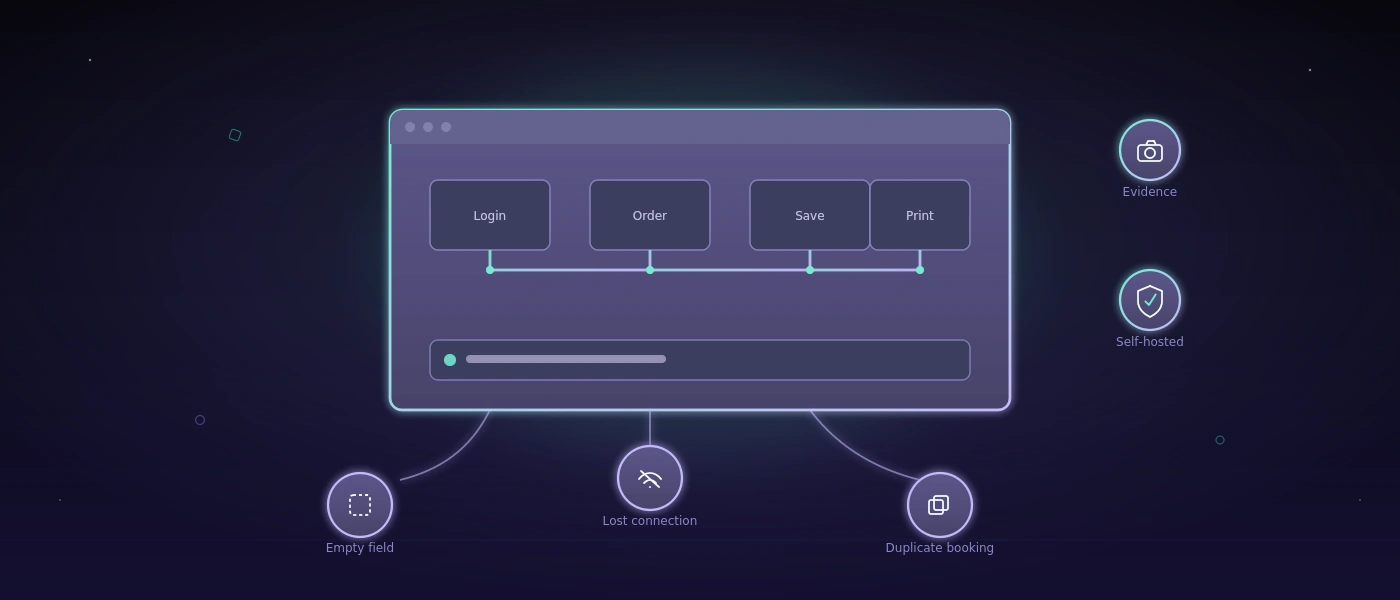
COCO plans a test scenario, executes it against the real application, captures before-and-after screenshots and execution recordings as evidence, and produces a plain-language assessment of what passed, what failed, and why — including edge cases such as repeated failed logins, account lockouts, and recovery flows that are tedious and error-prone to test by hand. Because the server runs locally under our management, enterprise clients keep full control over where test data and screenshots are stored, without sending internal application traffic to a third-party cloud service by default.

COCO — our own AI server for automated software testing

For enterprise clients, we operate and maintain our own dedicated AI server, named COCO. Unlike a general-purpose chatbot bolted onto a workflow, COCO is purpose-built and self-hosted specifically for automated testing of web software and cross-platform desktop applications — from login and authentication flows to full multi-step business processes.

COCO plans a test scenario, executes it against the real application, captures before-and-after screenshots and execution recordings as evidence, and produces a plain-language assessment of what passed, what failed, and why — including edge cases such as repeated failed logins, account lockouts, and recovery flows that are tedious and error-prone to test by hand. Because the server runs locally under our management, enterprise clients keep full control over where test data and screenshots are stored, without sending internal application traffic to a third-party cloud service by default.

We set up, configure and maintain COCO for each enterprise client individually — defining the test plans that matter for their specific application, tuning confidence thresholds, and deciding case by case when a result should be escalated for human review. The goal is not to replace a QA team, but to give it a tireless colleague that runs the repetitive regression tests before every release, before a human ever has to.

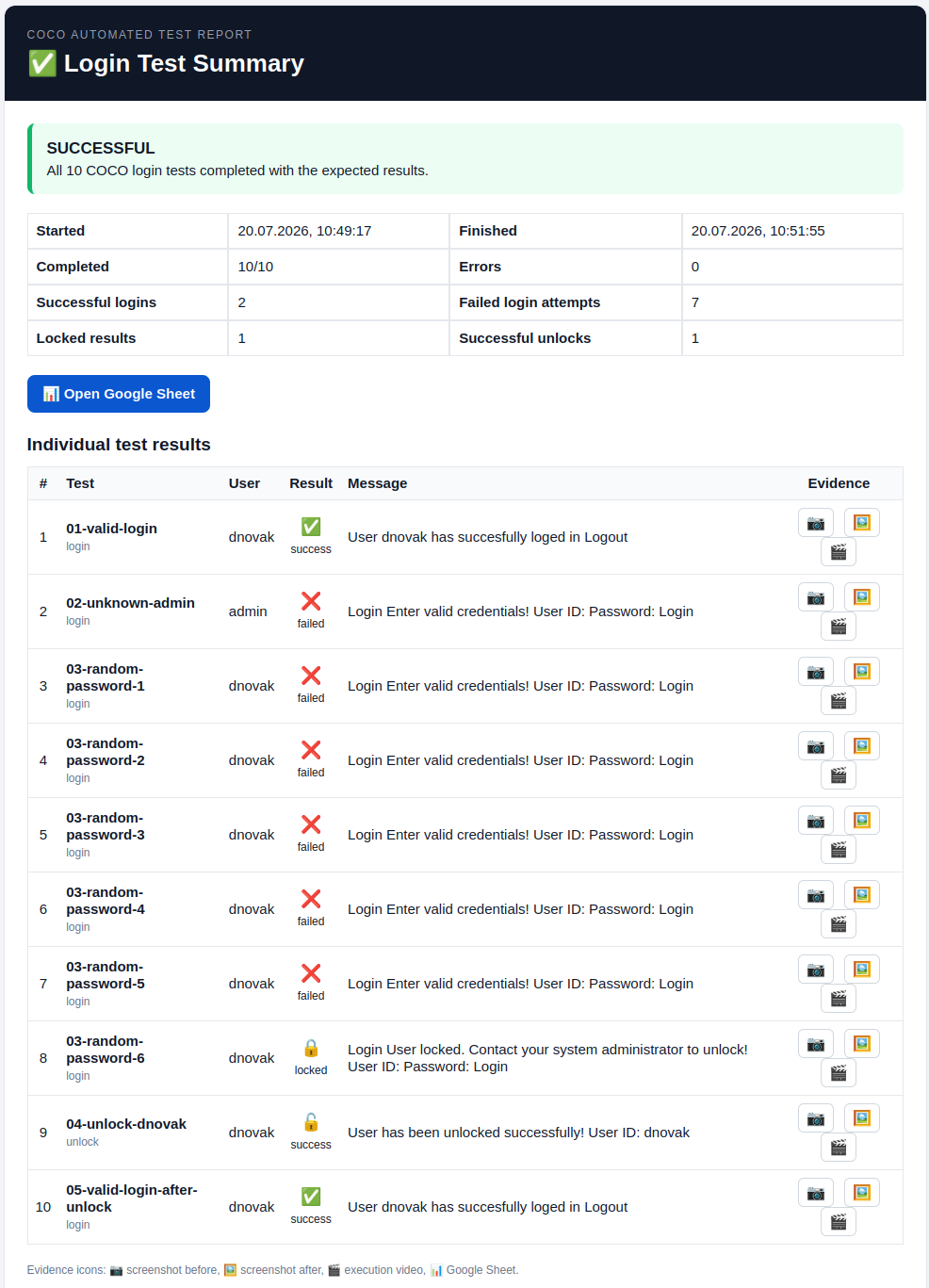
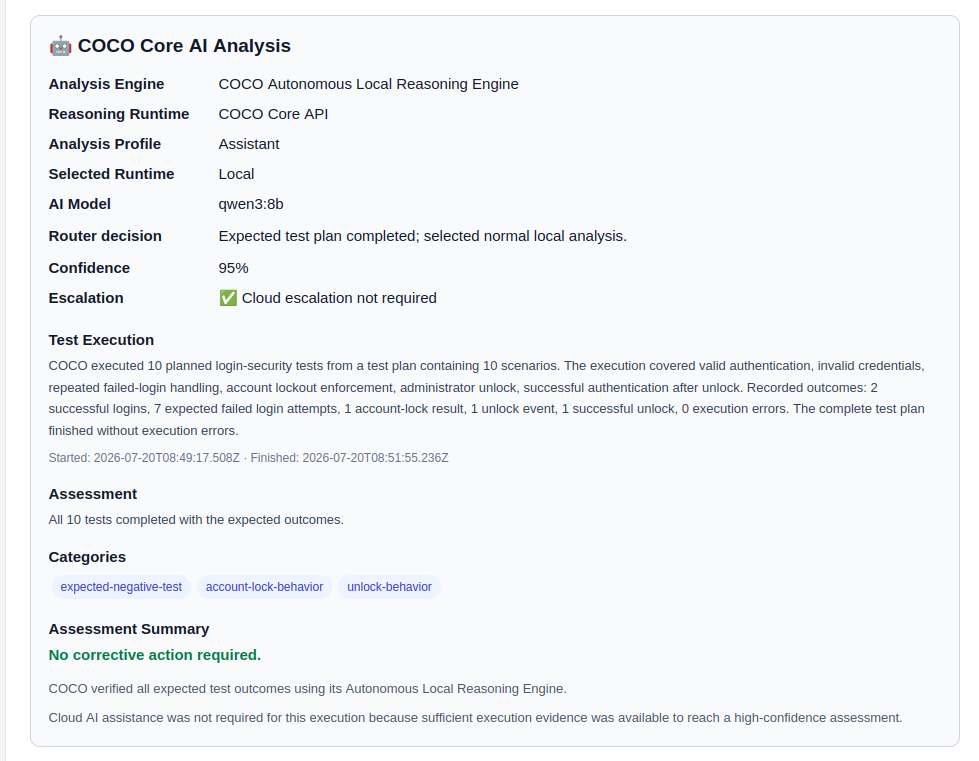
COCO automated login test report
COCO — automated login & account-lockout test report
COCO AI analysis panel
COCO — plain-language AI analysis of a completed test run

Why softify.pro

We deliberately stay small enough that every project is handled by people who were in the initial planning conversation, not handed off to a queue. That means shorter feedback loops, fewer misunderstandings, and a team that still remembers why a particular decision was made six months into a project. We favour boring, provable reliability over trend-chasing: a stack is chosen because it fits the problem and can be maintained by someone other than us in five years, not because it was fashionable in the sprint it was picked. If a spreadsheet genuinely still does the job better than custom software would, we'll tell you that too — our goal is a workflow that actually moves faster, not simply a bigger software bill.

Selected work

A small selection of work we're able to show publicly — further case studies and enterprise projects are available on request under NDA.

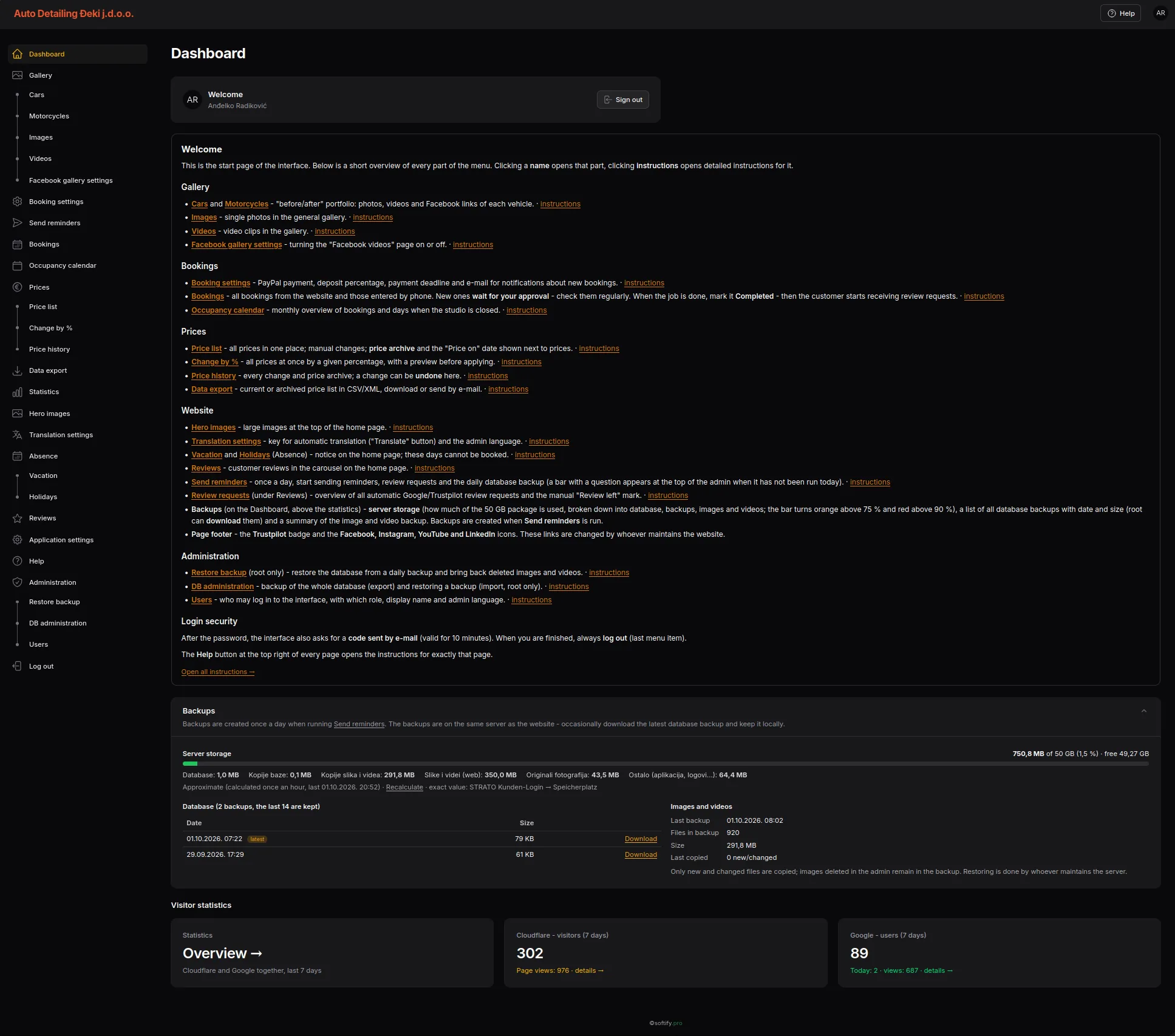
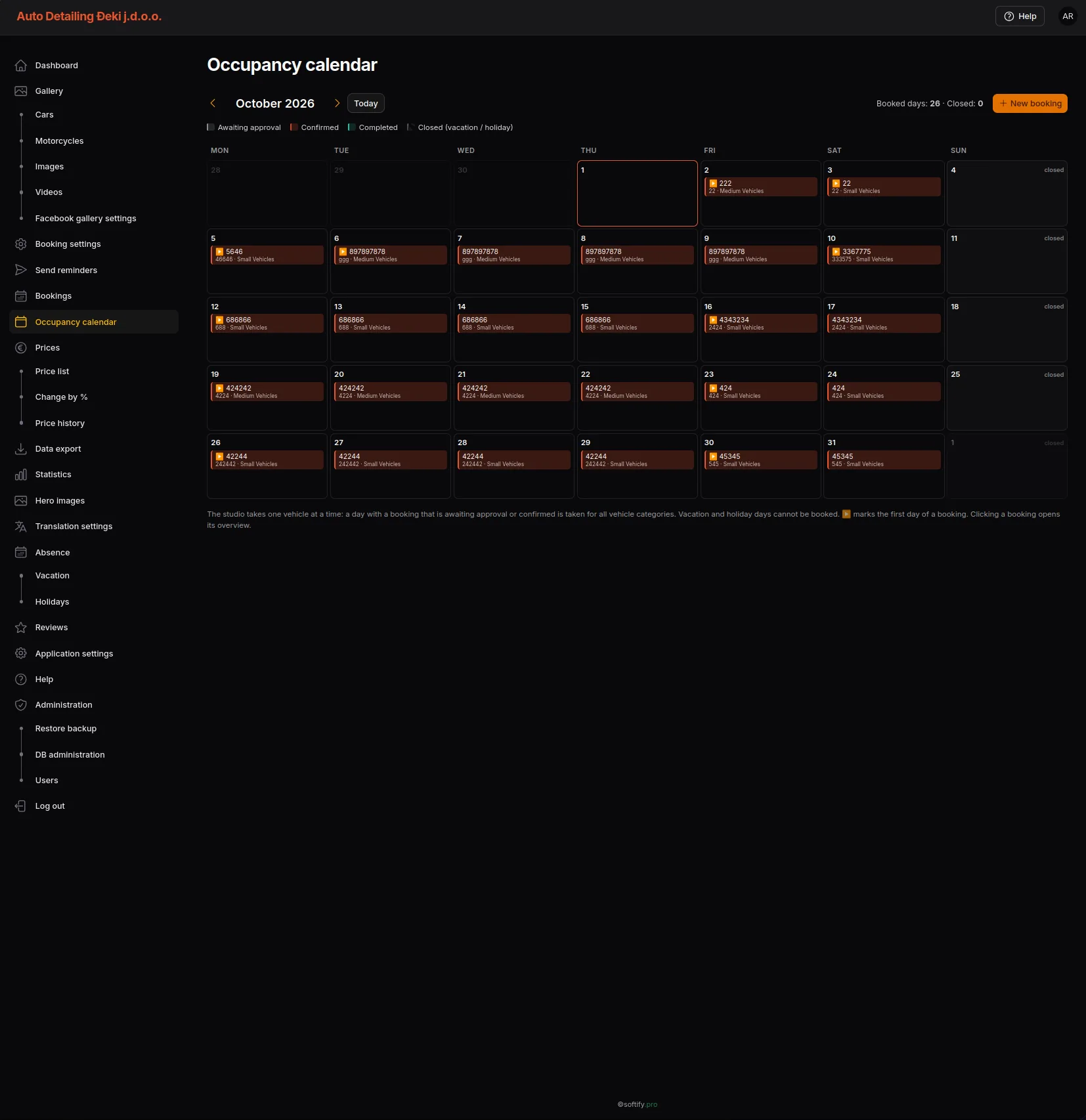
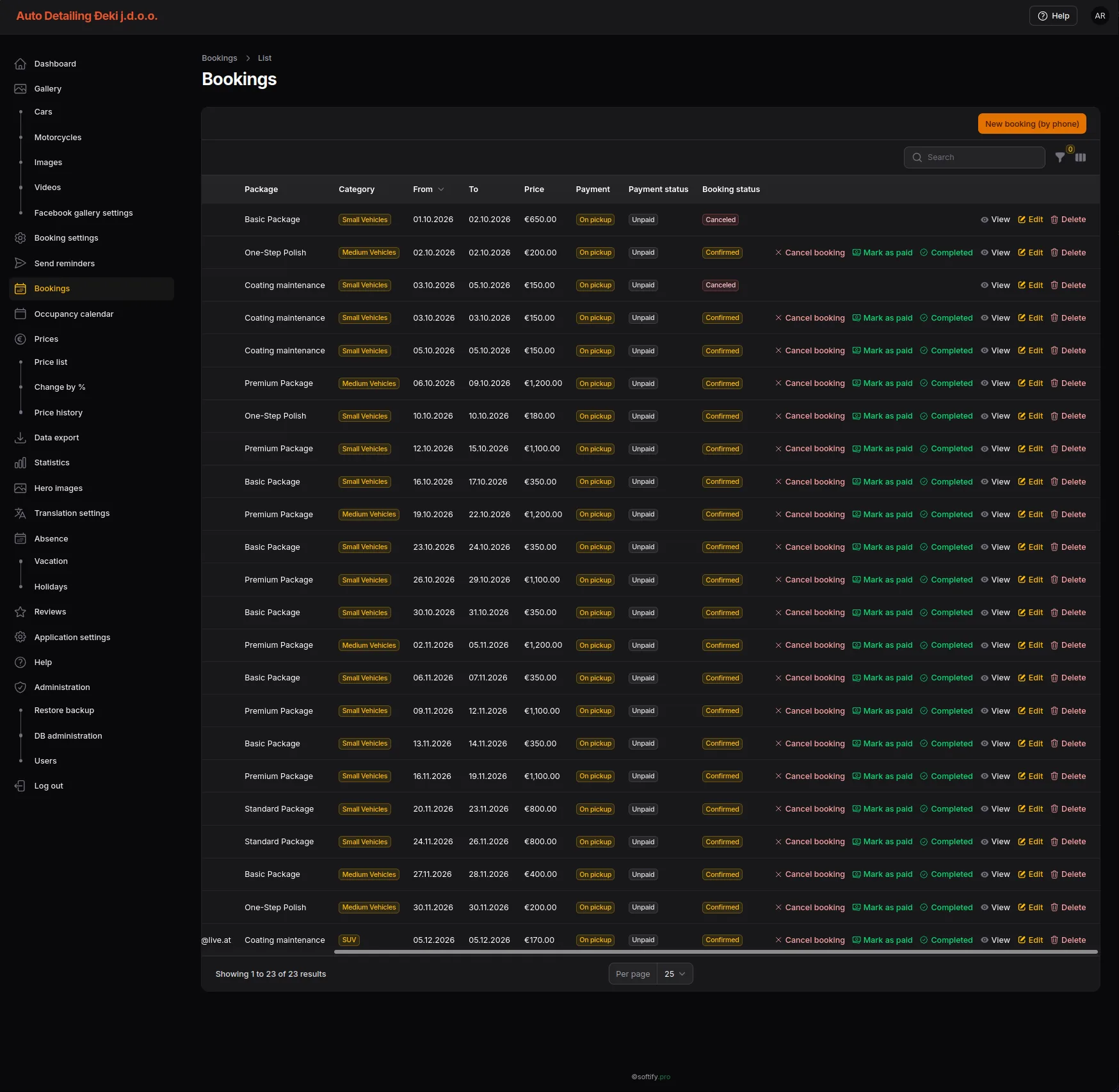
Auto Detailing Đeki – From Website to Digital Service Platform autodetailing-deki.pro

Auto Detailing Đeki – From Website to Digital Service Platform

A multilingual platform for vehicle detailing – from price calculation through booking to transparent order tracking, managed from a central back office.

Koralpenhaus

Koralpenhaus

Regional presentation and booking website in the Alpine region, built with a focus on clean structure, fast loading and easy content maintenance.

Dexosano

Dexosano

A modern PHP-based web platform, engineered with the same performance-first approach softify.pro applies to every client project.

softify.pro - Insiders

One Warehouse. One Truth.

One Warehouse. One Truth.

There is a simple way to make warehouse software look convincing.
Open a dashboard.
Show a few green numbers.
Add a chart.
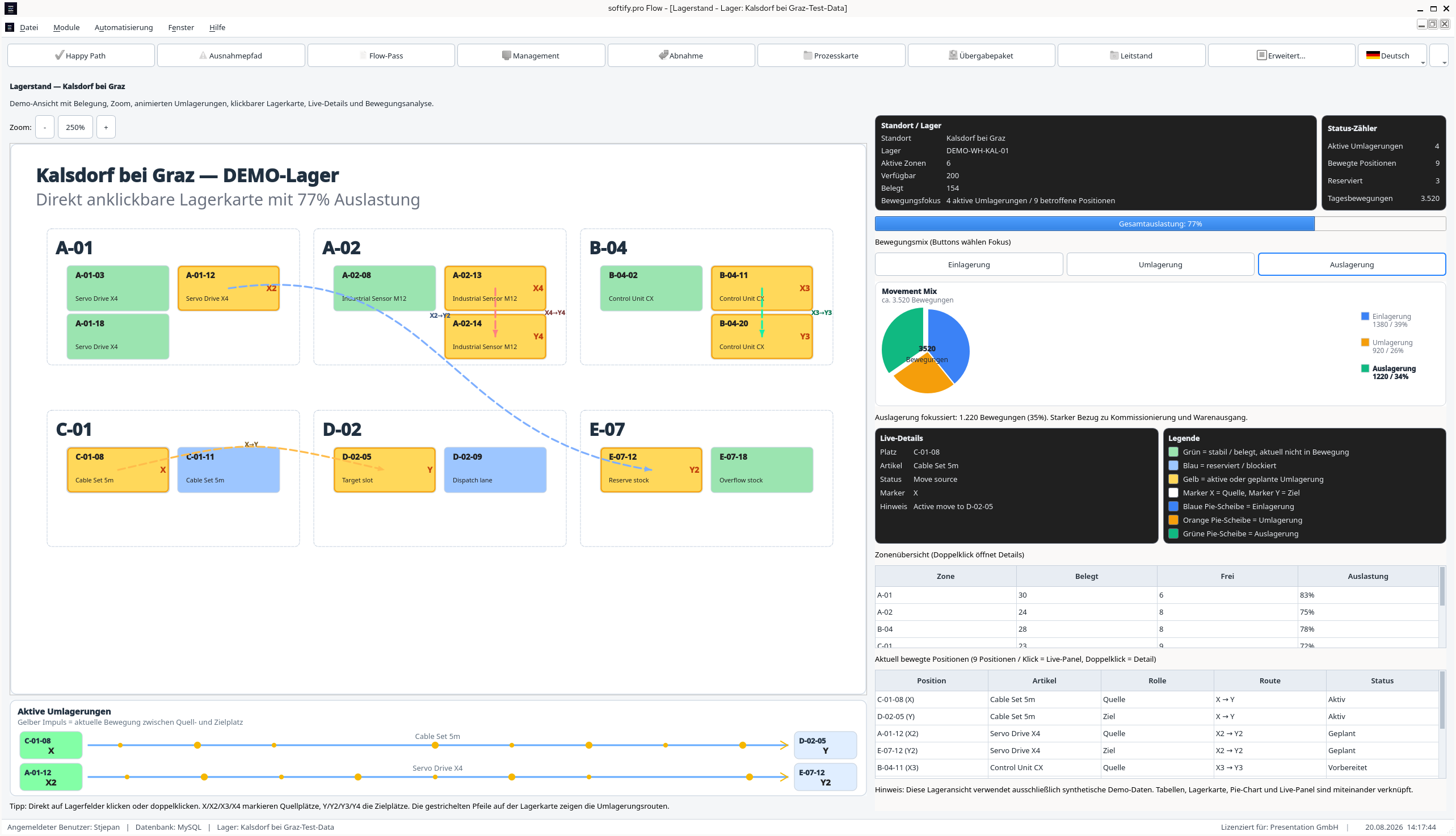
Put some stock on a warehouse map.
Finish with a report.
Everything looks fine.
And everything may still be wrong.
Because a warehouse does not care how good the dashboard looks.
It cares whether every part of the system agrees on what actually happened.
That became the interesting part of the latest softify.pro Flow experiment.
Not another screen.
Not another KPI.
Not another report.
Something much less visible.
Consistency.
It started with a warehouse.
The current softify.pro Flow demo works with several synthetic warehouse environments.
Different warehouse IDs.
Different capacities.
Different zone structures.
No production inventory.
No customer data.
No real operational information.
But the process logic behaves as if all of it mattered.
Because in real logistics, it does.
Once a warehouse is selected, that context becomes part of everything that follows.
Flows.
SSCCs.
Movements.
Operators.
Analytics.
Reports.
That sounds obvious.
It becomes considerably less obvious once the same process begins appearing in several different parts of the application.
Then we opened another view.
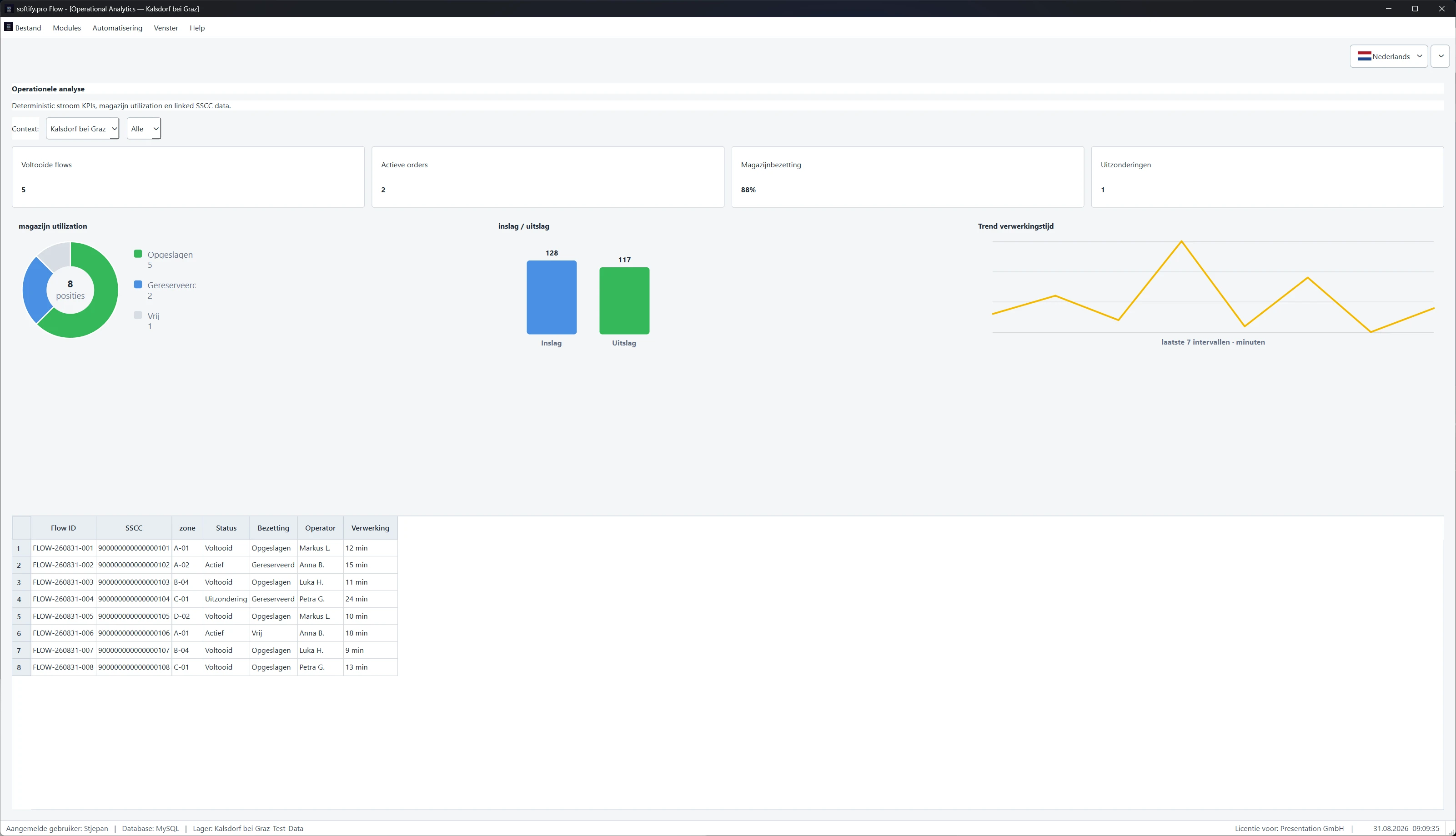
Operational Analytics.
Suddenly the warehouse looked completely different.
No storage positions.
No movement arrows.
Instead:

  • completed Flows,
  • active orders,
  • warehouse utilisation,
  • exceptions,
  • inbound,
  • outbound,
  • processing time.

The visual representation had changed.
The warehouse had not.
That distinction became important.
Because underneath the KPIs were still individual records.
Flow IDs.
SSCCs.
Zones.
Statuses.
Operators.
Processing times.
Different view.
Same operational reality.
So far, so good.

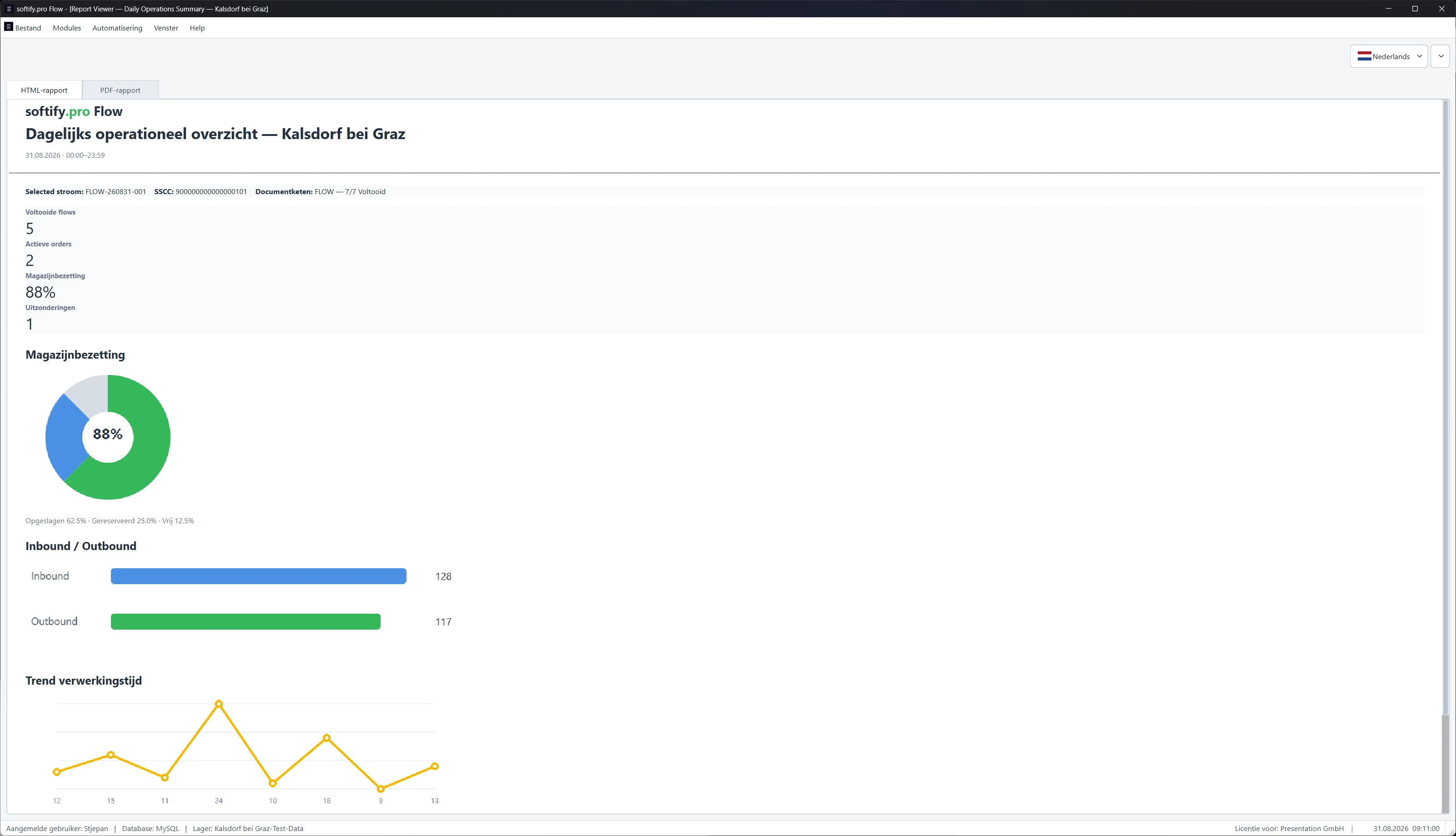
Operational Analytics — aggregated warehouse state with the underlying Flow records still visible.

Flow.

88% is only useful if the system can explain it.
Suppose the dashboard says:
Warehouse utilisation: 88%.
Useful.
But incomplete.
Some positions are occupied.
Some are reserved.
Some remain free.
Those states are not interchangeable.
The number becomes trustworthy only if the system can still explain where it came from.
Five completed Flows?
Show them.
Two active orders?
Show them.
One exception?
Which one?
88% utilisation?
What is occupied?
What is reserved?
What remains free?
A dashboard should summarize reality.
It should not replace it.
Then we changed the language.
Dutch.
The warehouse remained the same.
The Flow IDs remained the same.
The SSCCs remained the same.
The operators remained attached to their records.
Only the language changed.
Later the same operational state appeared in Croatian.
Then French.
This is where multilingual software becomes much more interesting than translated buttons.
A bad translation is easy to notice.
A state change caused by changing the language is much more dangerous.
Imagine switching from German to French and silently losing the selected Flow.
Or rebuilding a filter against the wrong warehouse.
Or displaying the correct SSCC inside the wrong process context.
The interface might still look perfect.
The system would not be.
Flow therefore follows a simple rule:
Language may change the words. It may not change the truth.
Then the Flow acquired a history.
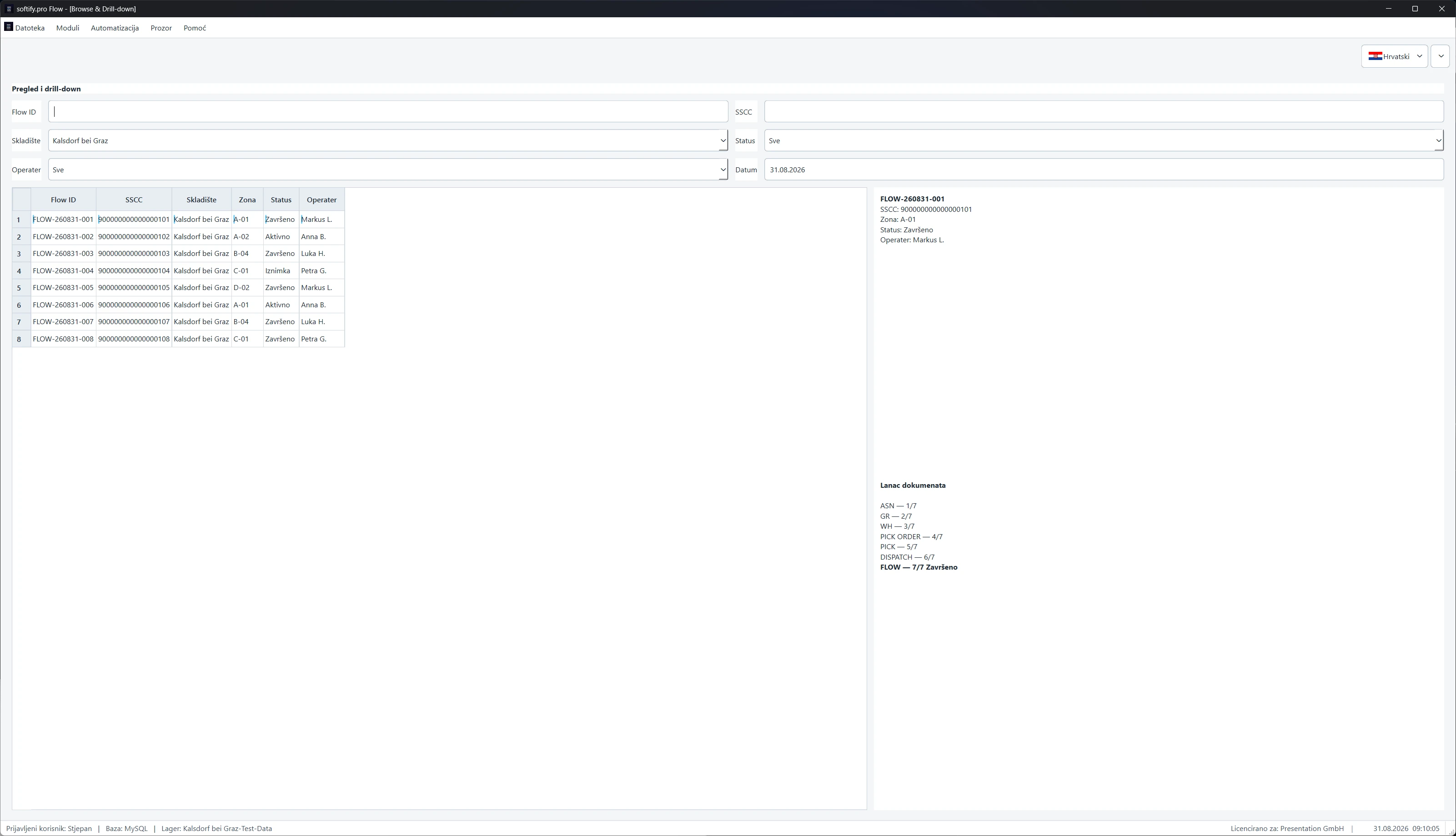
Browse & Drill-down does not try particularly hard to look impressive.
That may be why it is useful.
Select a Flow.
Its context appears.
Warehouse.
Zone.
Status.
Operator.
SSCC.
And then the document chain.
ASN.
Goods Receipt.
Warehouse Movement.
Pick Order.
Pick.
Dispatch.
FLOW.
Seven steps.
The process is no longer only a current state.
It has a past.
And that changes the question.
Instead of:
What is happening?
we can ask:
How did we get here?
That is a much better question when something eventually goes wrong.

One Flow, one SSCC, one document chain — from ASN to completion.

Flow.


SSCC becomes the thread.
At first, an SSCC looks like what it is.
An identifier.
A long number in a table.
But across Flow it becomes something more useful.
A thread through the process.
Follow it and other things begin to connect.
A warehouse.
A Flow.
A zone.
A status.
An operator.
A document chain.
Eventually a report.
The same physical logistics object is now visible from several different parts of the application.
Useful.
Also dangerous.
Because every additional view creates another opportunity for the system to tell a different story.
And that is where things become interesting.
Suppose Analytics says the Flow is active.
Drill-down says the SSCC belongs to that Flow.
The document chain says the operation has progressed further.
The report says something else.
Which one is correct?
This is not a Flow-specific problem.
It is one of the oldest problems in business software.
Different parts of the same system gradually develop their own version of reality.
One screen reads transactional state.
Another reads an aggregate.
Another relies on cached data.
A report calculates something slightly differently.
An exception gets resolved operationally but disappears from reporting.
Every component works.
The complete system lies.
Usually politely.
So we opened the Report Center.
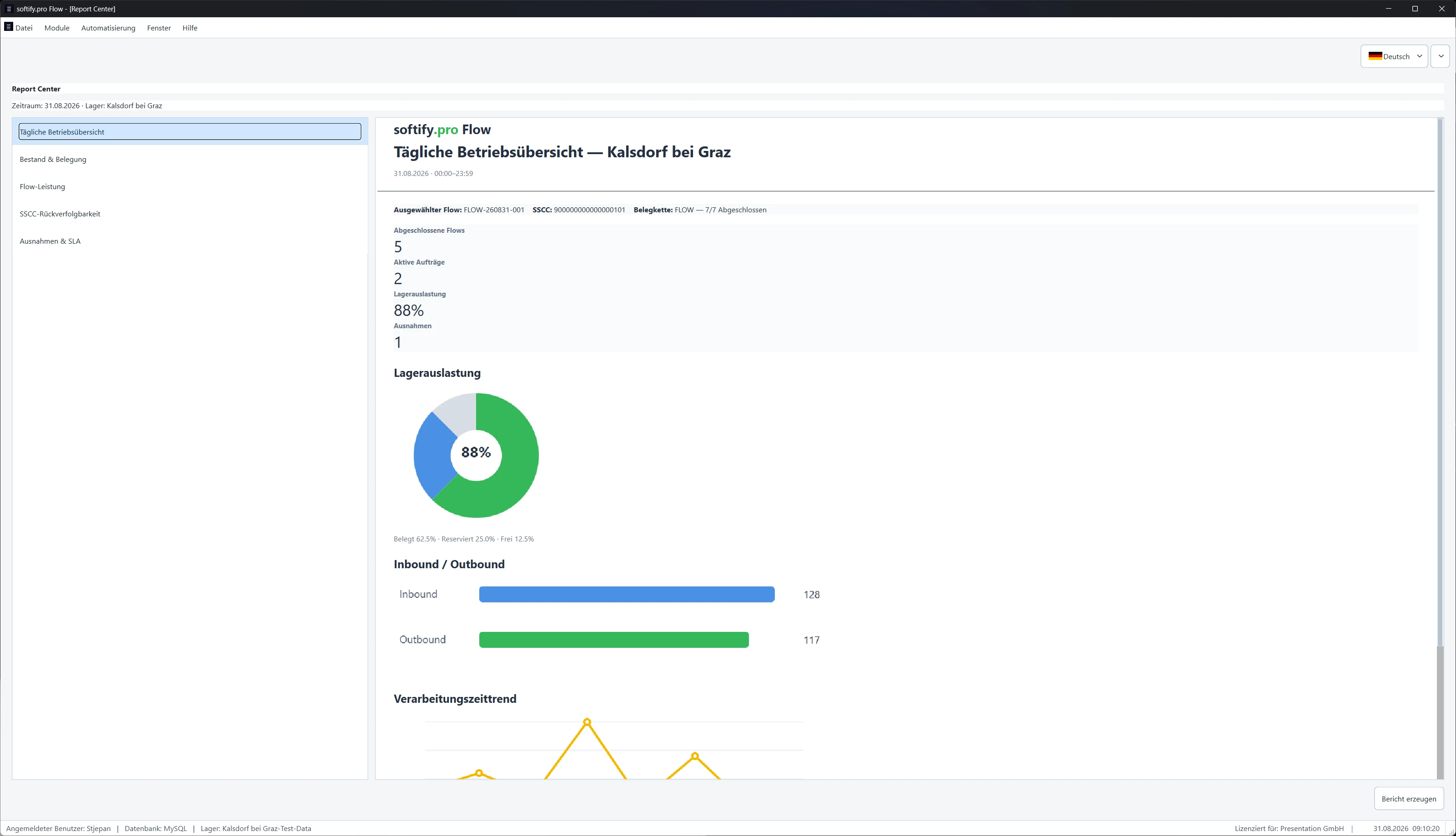
Daily Operational Overview.
Stock and occupancy.
Flow performance.
SSCC traceability.
Exceptions and SLA.
The same operational story appeared again.
Completed Flows.
Active orders.
Warehouse utilisation.
Exceptions.
Inbound.
Outbound.
Processing time.
But this time the question was not whether the report looked correct.
The question was:
Can it defend itself?
A good report gives you a number.
A better system can explain where the number came from.

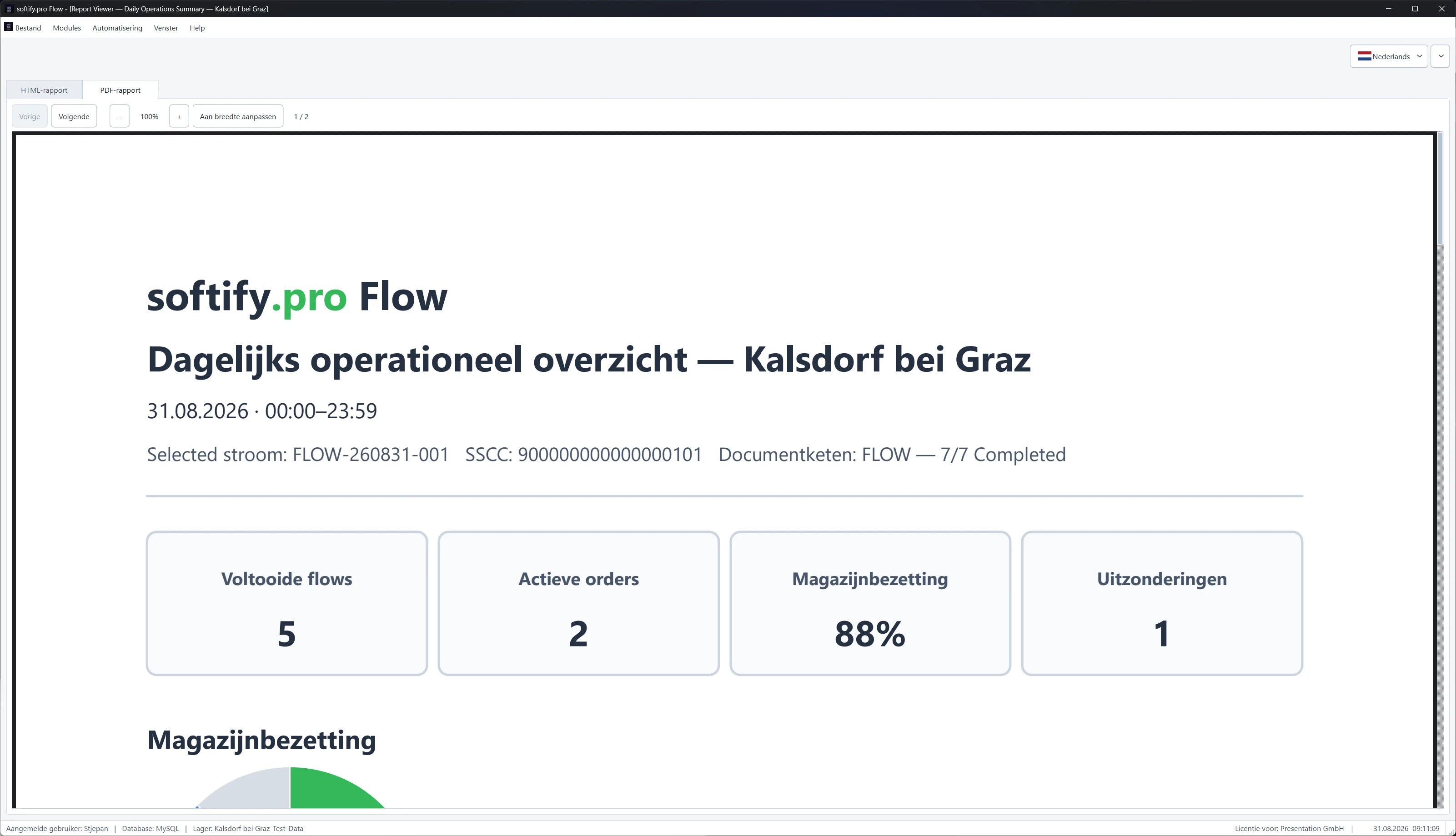
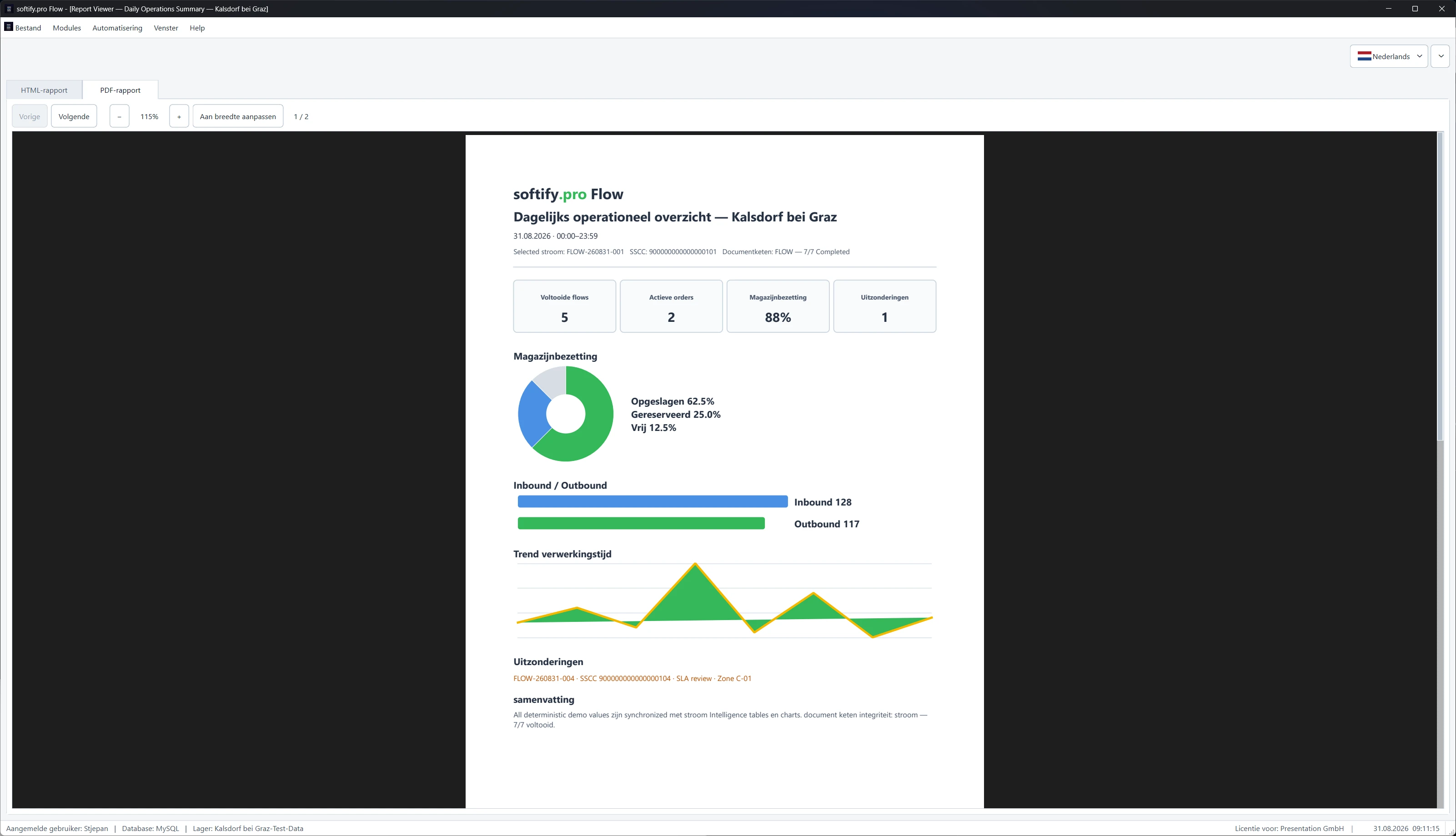
Reporting from the same operational state — not a second version of reality.

Flow.
Flow.
Flow.
Flow.


The exception was still there.
One of the quieter details turned out to be one of the more important ones.
The demo data contains an exception.
It appears in Analytics.
It appears in Drill-down.
It appears in SSCC traceability.
It appears in the Report Center.
And it remains visible in Exceptions & SLA.
That is exactly what should happen.
Operationally recovering from an exception does not mean the exception should disappear from history.
"The process continued" and "nothing happened" are not the same statement.
In logistics, that difference matters.
At this point we had a testing problem.
Not a software problem.
A testing problem.
We now had the same warehouse represented as:

  • analytics,
  • individual Flows,
  • SSCC histories,
  • document chains,
  • reports,
  • and exception views.

Each one could be tested independently.
Open.
Click.
Filter.
Verify.
Pass.
Next.

That would be easy.
It would also miss the interesting part.
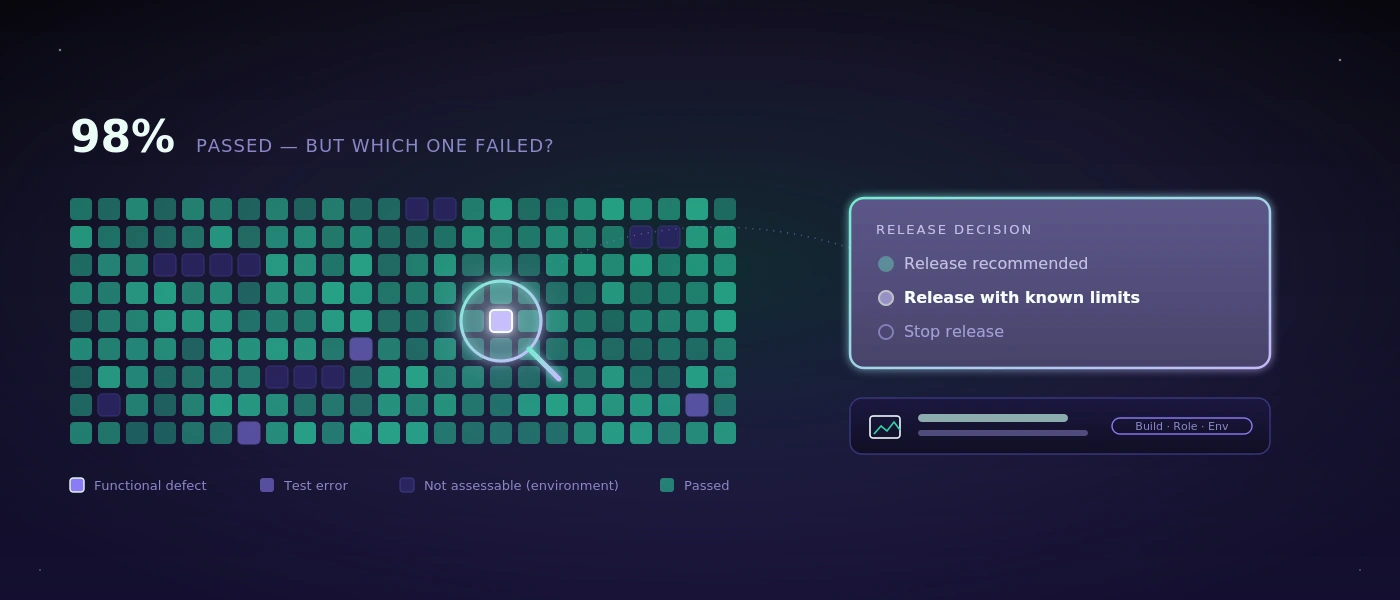
Because six green checks do not prove that six views agree with each other.
Enter COCO.
Again.
COCO had already dealt with Flow before.
Authentication.
Users.
Roles.
Database environments.
Languages.
Desktop execution.
Then came logistics.
Warehouses.
Inventory.
Picking.
Movements.
Exceptions.
Documents.
Ubuntu.
Red Hat Enterprise Linux.
This time we gave COCO something slightly different.
Not a screen to verify.
A story to follow.
Take this warehouse.
Take this Flow.
Take this SSCC.
Open Analytics.
Open Drill-down.
Change the language.
Look again.
Open the report.
Find the same Flow.
Find the same SSCC.
Find the exception.
Compare.
Then compare again.

COCO following the same operational context across softify.pro Flow — analytics, traceability, language changes and reporting.

That changes the nature of the test.

The question is no longer:

  • Does each module work?

It becomes:

  • Do all modules believe the same thing happened?

Much better question.
Much less comfortable one.
A warehouse system should have one memory.
Operators may see positions.
Warehouse managers may see KPIs.
Support may use drill-down.
Auditors may use reports.
COCO may see all of them.
But underneath those perspectives, there should be one history.
One Flow should not acquire several biographies depending on which module is open.
One SSCC should not have several pasts.
One exception should not exist only where it is convenient.
One warehouse should not become another warehouse because the interface language changed.
That is what the current Flow experiment is really about.
Not dashboards.
Not reports.
Not even individual screens.
One operational truth, expressed in different ways.
Control.
Know the warehouse.
Know the state.
Know what is moving.
Know which process owns it.
Clarity.
Turn KPIs back into records.
Turn records into history.
Turn exceptions into evidence.
Turn an SSCC into something traceable.
Flow.
A warehouse is selected.
Analytics begins to describe it.
A Flow advances.
The SSCC remains attached.
A document chain grows.
An exception appears.
The process continues.
The report remembers.
Then the language changes.
The warehouse is still the same.
The Flow is still the same.
The history is still the same.
That is the part we expected.
What happened afterwards was more interesting.
COCO stopped testing the views independently.
It started comparing them.
For a while, nothing remarkable happened.
Same warehouse.
Same Flow.
Same SSCC.
Same story.
Again.
Again.
Again.
And then COCO stopped.
Not because the application crashed.
It didn't.
Not because a test failed in the usual sense.
It hadn't.
It stopped because two perfectly reasonable answers produced a third question.

We know what the question is.
Flow knows why it exists.
COCO knows where to look next.

The rest can wait.


Control. Clarity. Flow.

Published: 31.08.2026

Permalink →

COCO strikes. Again.

COCO strikes. Again.

We should probably stop giving COCO ideas.

The previous experiment was supposed to be enough.

A real application.

Real navigation.

Users.

Roles.

Databases.

Languages.

Evidence.

A respectable case study.

A clean conclusion.

Then somebody showed it: Logistics in Motion.

That was probably the mistake.

It started with three warehouses

Nothing particularly exciting.

…

A Letter From COCO

A Letter From COCO

To the engineer who opens this repository for the first time:

Welcome.

You may have arrived because something failed.

A service stopped responding.

A deployment behaved unexpectedly.

An alert woke you in the middle of the night.

Or perhaps you are simply curious about how this platform works.

Whatever brought you here, know that this project was built for moments exactly like this.

Not to remove difficult problems.

But to make difficult problems understandable.

You will find code.

You will find documentation.

You will find specifications.

But more importantly,

I hope you will find reasoning.

…

Case Studies

softify.pro Flow — Tested by COCO

softify.pro Flow — Tested by COCO

21.08.2026

Control. Clarity. Flow.

Every serious software product eventually develops a second product behind the product.

Customers may never see it. Visitors may never know it exists. But administrators, operators and developers depend on it every day.

For softify.pro Flow, that application is Administration — the operational console responsible for managing users, roles, access levels, authentication states, database environments and other configuration that keeps a Flow deployment under control.

Its login screen carries three words:
Control. Clarity. Flow.

They were originally chosen to describe the experience we wanted administrators to have while operating the system.

But they also describe surprisingly well how we believe software should be tested.

That made softify.pro Flow — Administration an obvious candidate for a real-world COCO test.

Not a laboratory demonstration.
Not a collection of isolated buttons prepared specifically for an AI demo.
A real cross-platform desktop application with real application logic, multiple windows, multiple database backends, authentication, permissions, localisation and enough state to make seemingly small regressions difficult to spot manually.

For the public demonstration shown here, COCO worked exclusively with generated demonstration data. The application was licensed to the fictional company Presentation GmbH, and no production customer information, credentials or personal data were used.

The objective was simple:
Let COCO approach the application as a tester would and determine whether the complete administrative workflow still behaves the way the software claims it does.

The Challenge

At first sight, testing an administration application appears straightforward.

Open it.
Log in.
Click through several windows.
Check whether everything looks correct.

That assumption changes quickly once the application grows.

softify.pro Flow — Administration is not one static form. It is a collection of interconnected operational views inside one application shell.

Among other things, an administrator can work with:

  • user accounts
  • roles and access levels
  • authentication information
  • two-factor authentication status
  • operating-system information
  • network and IP information
  • database configuration
  • sorting and presentation options
  • live language selection
  • application and licensing information

The interface currently supports eleven languages. The application also operates with MySQL and PostgreSQL database backends. Individually, none of those features represents an unusual testing problem.

The difficulty comes from their combinations.
A user table may work correctly in English but display an outdated column name in Croatian.
Sorting may work correctly while connected to MySQL but behave differently after switching to PostgreSQL.

A language change may update most interface elements while leaving one status message untranslated. The application may switch databases successfully but preserve stale information from the previous connection. A new release may introduce a feature while the About dialog still describes the previous one. The program does not need to crash for any of these situations to be a regression. In fact, some of the most inconvenient software defects are precisely the ones where everything appears to work.

The application starts.
The window opens.
The button responds.
But something underneath is no longer quite right.
That is why repetitive regression testing matters.

And it is also exactly the kind of work humans become increasingly bad at performing after repeating the same sequence dozens of times.

Why Manual Testing Becomes Expensive

Testing something once is easy.
Testing it reliably after every relevant release is different.

Consider only three dimensions: 11 interface languages × 2 database backends × multiple application workflows.

The number of combinations grows quickly.
Add different user roles, authentication states, sorting behaviour, configuration changes and operating environments, and the test matrix becomes too large to treat as an occasional manual checklist.

This is where regression testing often starts to erode.
Not deliberately.
A release deadline moves closer.
Someone remembers that the application was tested last week.
A developer quickly checks the most important screen.

German works.
English works.
MySQL works.
The assumption becomes:
"The rest is probably fine."

Usually it is. Until the release where it isn't.
COCO exists partly to remove that assumption from the process.

What COCO Actually Did

COCO started softify.pro Flow — Administration from a cold application state, without relying on a previously prepared screen or manually positioned workflow.

The first interaction was the same one presented to a human administrator: the login window.

COCO identified the authentication interface containing:

  • username
  • password
  • two-factor authentication code

and the line directly underneath the softify.pro Flow identity:
Control. Clarity. Flow.

From there, COCO continued through a defined regression session. The point was not simply to determine whether the application could be opened.

The point was to verify whether the state of the application remained internally consistent while COCO interacted with it.

Authentication Is Only the Beginning

Login testing is one of the most obvious candidates for automation, but successful authentication alone tells us very little about the rest of an administrative application.

Once inside, COCO moved into the actual operating environment. It inspected the user administration interface and verified that the expected information was present.

That included data such as:

  • usernames
  • masked passwords
  • 2FA indicators
  • assigned roles
  • operating-system information
  • IP addresses

COCO then interacted with the table rather than merely observing it.
The user list was sorted by username.
The resulting order was inspected.
The important part was not whether clicking the column header produced some visible change.

COCO verified that the resulting table state matched the requested operation.

That distinction matters.
A functional test asks:
"Did the button respond?"

A useful regression test asks:
"Did the application end up in the correct state?"

Testing the Database Boundary

softify.pro Flow supports more than one database backend.

That makes database switching an especially important regression boundary.
COCO changed the active backend from MySQL to PostgreSQL.

After the switch, it inspected the user information again.
The test was looking for more than a successful connection.
It checked whether the application continued to present the expected records and whether the information shown through the interface remained consistent.

COCO then switched back again.


This kind of transition is easy to underestimate.
The user interface can remain visually identical while the storage layer underneath it changes completely.
From an administrator's perspective, that transition should feel almost boring.
The same users should still be understandable.
The same roles should still make sense.

The same interface behaviour should still apply.

That apparently uneventful continuity is exactly what needs to be proven.

Eleven Languages, One Application State

Localisation is another area where superficial testing is particularly dangerous.

It is relatively easy to verify that an application can start in another language.
It is much more valuable to verify what happens when the language changes while the application is already running and holding state.

COCO switched the interface language live.

The session included transitions between languages such as:
German → English → Croatian
while the administration view remained active.

COCO observed whether interface elements changed correctly in place:

  • table headers
  • controls
  • buttons
  • labels
  • status messages

The underlying table and application state also had to survive that transition.
This matters because multilingual software consists of more than translated strings.
Language changes can expose:

  • forgotten resources
  • stale labels
  • layout problems
  • untranslated status messages
  • encoding issues
  • state resets
  • control recreation problems

A window that looks correct when started directly in Croatian may still behave incorrectly when the user switches from German to Croatian during an active session.

That is the difference between checking a screenshot and testing a workflow.

Restoring Application State

COCO subsequently restored the application's default sorting configuration.

Again, the test did not end with the click itself.

The resulting order and the confirmation presented through the application status area were evaluated. This type of verification may appear insignificant compared with testing authentication or database access.

It isn't.

Enterprise applications accumulate hundreds of small state transitions like these.
Users rely on them without consciously thinking about them.
The software feels reliable precisely because those interactions remain predictable.
Regression testing exists to protect that predictability.

Testing the Information Around the Software

COCO also opened the application's About dialog.

Why test an About window?

Because software documentation starts inside the software itself.
The version number, feature description and licensing information presented to the operator should correspond to the application that is actually running.

An application can function perfectly while still presenting outdated version information or describing capabilities that no longer correspond to the release.

That does not crash a database.
It does something subtler:
it reduces trust.

For enterprise software, operational accuracy includes these apparently small details. COCO therefore checked them too.

Control.

The first word in the softify.pro Flow slogan is also the first principle of the test environment.

Control means knowing what is being tested, against which state and with which data.

The public COCO demonstration does not use client production records.

It runs with deliberately prepared demonstration data whose expected state is known.

That makes results reproducible.

It also means differences between test runs can be investigated instead of explained away as random changes in production data.

More importantly, COCO is designed as a self-hosted AI testing system.

Testing evidence, application screenshots and internal workflow information can remain inside infrastructure under the customer's or operator's own control rather than being sent by default to an unrelated third-party cloud service.

For internal business applications, that is not merely an infrastructure preference. It can be part of the testing requirement itself.

Clarity.

Automation is not particularly useful if its final output is: FAILED
followed by hundreds of lines of technical output that somebody must manually reconstruct before understanding what happened.

COCO is designed to preserve an understandable evidence trail.

The report describes:

  • what was tested
  • which interaction took place
  • in which sequence it happened
  • what COCO observed
  • what state was expected
  • where behaviour differed when something failed

Screenshots and execution evidence can accompany that sequence.
The purpose is not to hide technical detail.

It is to make the result understandable before somebody has to open a debugger.

An engineer should be able to answer:
What happened? before asking:
Where in the code did it happen?

That distinction shortens investigation dramatically when a regression appears.

Flow.

Traditional UI automation often thinks in elements.

Find selector.
Click selector.
Find another selector.
Check value.

That approach remains useful, but applications are not experienced as collections of selectors.

People experience flows.

Log in.
Open administration.
Find a user.
Change a setting.
Switch a database.
Change a language.
Verify the result.

Continue working.

COCO therefore treats the sequence as a process rather than as a random collection of controls.

It follows what the user is trying to accomplish and evaluates the application in context.

That becomes especially valuable when testing real business software, because failures often occur between screens or between states, not inside an individual button.

A logistics workflow may contain an order, stock reservation, picking operation, delivery note and shipment confirmation.
Every individual screen can appear correct while the complete process is wrong.
The same principle applies here on a smaller scale.
The administration window is not the product.

The workflow through it is.

Evidence Instead of Assumption

One of COCO's most important jobs is not clicking. It is remembering what happened.
Human regression testing frequently ends with a statement such as:
"I tested it and everything looked fine."

That may be completely accurate.
But several weeks later, when a problem appears, the useful questions are different:

  • Which release was tested?
  • Which database?
  • Which language?
  • Which user state?
  • What happened before the problem?
  • What exactly was visible?

In which order were the actions performed?
COCO's test runs are designed to leave evidence behind.

That transforms a test result from an opinion into something that can be inspected. A successful run therefore becomes useful too.
It establishes a known reference state against which later behaviour can be compared.

COCO Is Not the Decision Maker

There is an important boundary in the way we use AI for software testing.
COCO is not intended to replace engineering responsibility.

It does not decide what a business rule should be.

It tests behaviour against scenarios, requirements and expectations defined for the application. For sensitive decisions involving permissions, prices, inventory, financial transactions or other critical business states, the definition of correct behaviour remains a human responsibility.

That distinction matters.
AI is excellent at repeating a detailed test without losing concentration. It is excellent at collecting evidence.
It can inspect screens, compare expected and observed behaviour and explain discrepancies. But the business still defines what correct means.

COCO makes that definition testable.

The Test Nobody Wants to Repeat

There is a simple reason automation adds value here.
A human tester can absolutely perform this regression session.
The first language receives full attention.
Probably the second one too.
Then another.
Then another.
MySQL has already been checked.
PostgreSQL still needs to be checked.
The sort test has already been performed several times.
The About dialog has not changed for months.

It is Friday afternoon.

And human attention does what human attention naturally does. It starts optimising.
COCO doesn't. In COCO's own spirit:

  • I do not get bored of clicking the same button in eleven languages. I do not skip the PostgreSQL pass because it is Friday afternoon. I do not assume the sort order held because it worked in the previous release.

For COCO, every regression session can be treated as if it were the first. That is not intelligence replacing a human tester.
It is automation protecting the human tester from the part of testing where human attention is least valuable.

From Repetitive Testing to Engineering Evidence

The larger purpose of COCO is not to maximise the number of automated actions.
A thousand automated clicks are meaningless if nobody understands what they prove. The useful outcome is confidence supported by evidence.

For softify.pro Flow, that means being able to say that a release was exercised across the operational areas that matter:

  • authentication
  • user administration
  • roles and access information
  • two-factor authentication state
  • sorting behaviour
  • MySQL operation
  • PostgreSQL operation
  • live localisation
  • status feedback
  • application information
  • licensing information

and that the result is preserved in a form that can be reviewed afterwards. The same principle scales far beyond this application.
A login process can be tested this way.
A booking workflow can be tested this way.
A logistics process can be tested this way.
A cross-platform desktop application can be tested this way.
The screens change.
The business rules change.
The principle does not:
define the expected workflow, execute it consistently, collect evidence and make the result understandable.

Why We Test Our Own Software With COCO

There is another reason softify.pro Flow matters as a COCO case study.

It is our own software.
That removes the comfortable distance that sometimes exists between a technology demonstration and the people demonstrating it.

If COCO is intended to test enterprise software, it has to be useful enough for us to trust it with software we actually develop and release ourselves.

Flow therefore acts as both a product and a proving ground.
New testing capabilities can be exercised against a real application.
Unexpected behaviour can expose weaknesses in the application, the test plan or COCO itself.

Each side improves the other.
That feedback loop is much more valuable than building artificial demonstrations designed only to succeed. A testing system should not look convincing because the demonstration was easy.
It should become convincing because it continues finding the small things humans would eventually stop checking.

The Result

softify.pro Flow — Administration now has a documented and repeatable regression process that COCO can execute before relevant releases.

The test spans both supported database environments and the application's eleven-language interface while following the application as an administrator would use it rather than treating each screen as an isolated test target.

COCO produces an evidence trail showing what was tested, what was observed and in which order the session occurred.

That evidence can remain locally controlled.
Developers gain a reproducible starting point when something changes.
Human testers spend less time repeating predictable interactions and more time investigating the situations that genuinely require judgment.

And softify.pro Flow receives something more valuable than a green PASS indicator.

It receives evidence that the experience promised on its login screen continues to exist after the code underneath it changes.

Control. Know what is being tested and keep the environment under control.

Clarity. Understand what happened without reconstructing an opaque automation log.

Flow. Test the application as a process people actually use.

Control. Clarity. Flow.

It was written for the software.
It turned out to describe the testing philosophy behind it just as well.

Permalink →

Good to Know

Pure fluidity meets ultimate performance: What Really Makes Business Software Fast

Pure fluidity meets ultimate performance: What Really Makes Business Software Fast

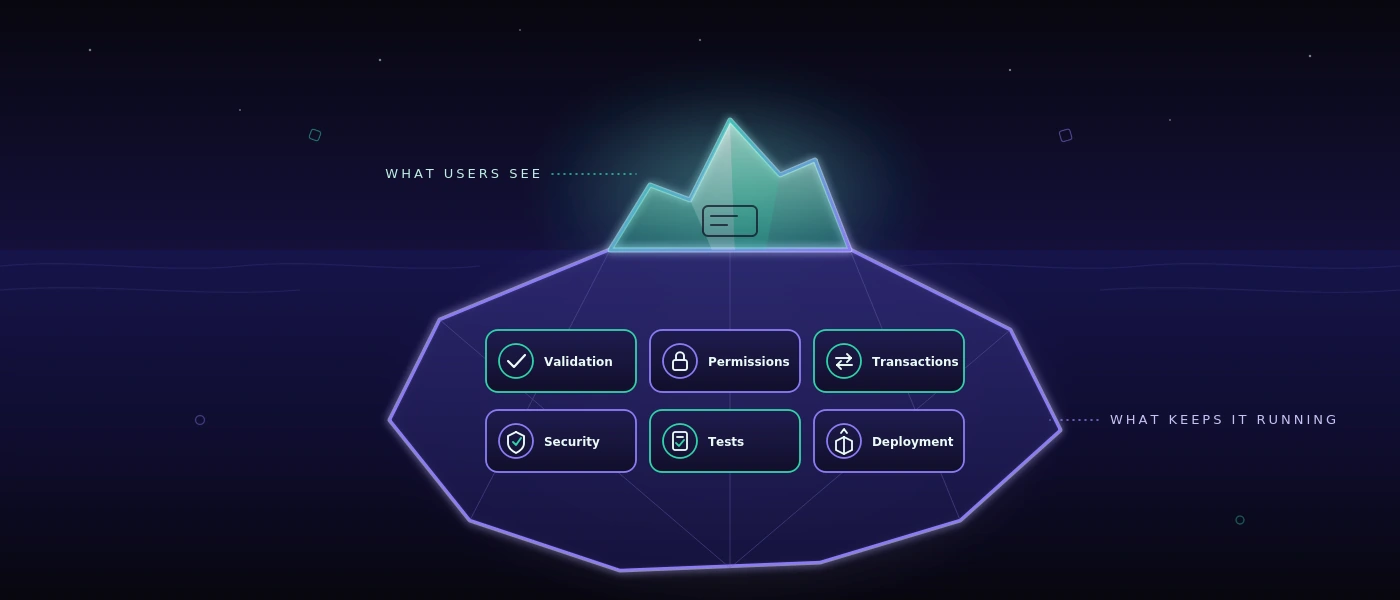
A warehouse manager doesn't recognize bad software by an architecture diagram. They recognize it by the fact that employees reach for the phone again, capture delivery notes twice, or can't say after a shift which goods actually arrived. Pure fluidity meets ultimate performance therefore mustn't be a merely visual aspiration. For business software, it means that a transaction feels natural and at the same time works reliably under real conditions.

An elegant interface is worthless if it stutters on weak Wi-Fi in the warehouse. A fast application also helps little if it forces a sequence of work that nobody at the ramp can follow. Good digital tools combine design, speed, and process understanding. They reduce friction without pressing the business into a prefabricated standard logic.

Pure fluidity meets ultimate performance is an operational question

Fluidity is often confused with animations, large images, and smooth transitions. That may suit a modern brand. In daily work, though, it shows up differently: a goods receipt can be booked without detours. An employee finds an order even when only a reference number is known. An error is named clearly instead of vanishing into a cryptic message.

Performance is likewise more than a good score in a browser test. What matters is the response time for an order with many items, stability at month-end, and the question of whether five people can work at the same time without overwriting each other's data states. A clean way of handling dropped connections, permissions, and locked accounts is part of it, too.

The two are inseparable. If a screen responds instantly but has unclear mandatory fields, it stays tiring. If the workflow is cleverly modeled but the page waits two seconds on every booking, it gets bypassed. Fluidity arises where the system supports the next sensible action and stays technically fast enough that the train of thought doesn't break.

The interface follows the work path, not the org chart

Many standard solutions structure their menus by modules: purchasing, sales, warehouse, reporting, administration. That's understandable from a product perspective. On the warehouse floor, however, work often begins with a situation: a truck is waiting, a pallet is missing, a customer needs proof of delivery, or a shipment still has to be labeled before the cut-off time.

A good custom application therefore starts with these situations. What information is available? Who decides? What has to be documented? What mustn't be changed later? Only after that is it decided which input screen, check, or automation is required.

That doesn't mean casting every existing workflow unchanged into software. Some spreadsheets really are too error-prone, some approvals unnecessarily slow. But a working Excel list doesn't necessarily have to be replaced by a project. If it's maintained by only one person, knows few exceptions, and remains traceable, it can be the right tool. Software pays off when it improves coordination, reduces sources of error, or makes information reliably available to several participants.

Fewer clicks aren't automatically better

The demand for as few clicks as possible sounds reasonable but can lead in the wrong direction. For an irreversible warehouse booking, a short confirmation makes sense. For a shipping release, a visible plausibility check can prevent expensive rework. The right workflow depends on the risk.

What matters is that additional steps have a clear purpose. A confirmation shouldn't appear just because the framework generates it easily. It should stand exactly where people have to make a decision consciously. That way the application stays fast without becoming careless.

Performance arises in the architecture, not in the last sprint

Anyone who speeds up a website or web application only shortly before go-live is usually treating symptoms. Large queries, unclear data models, and special cases added afterwards can't be permanently corrected by a single optimization day.

A robust foundation begins with a database that matches the actual relationships in the business. In MySQL 8, movements, documents, status changes, and user actions need traceable keys and sensible indexes. A stock level mustn't appear merely as a number if it later has to be clarified which booking it resulted from. At the same time, not every piece of historical information has to be recalculated on every page load.

With modern web applications, the separation of responsibilities is also relevant. PHP 8.4 can represent business rules clearly and maintainably, while modern JavaScript is used selectively for reactive areas. That's not a creed for a particular stack. It's a question of maintenance: can changes be implemented safely in six months? Is it visible where a rule applies? Can an error be reproduced instead of merely guessed at?

Performance also needs limits. Search fields need sensible minimum characters or precise filter logic if millions of records are conceivable. Large lists need pages or graduated loading processes. Images and documents shouldn't block the critical workflow. These decisions seem unspectacular. That's exactly why they often stay valuable longer than a conspicuous frontend effect.

Visible speed creates trust

Not every process can finish in under a second. A label print, an interface to the shipping provider, or a check against external data occasionally takes time. What matters then is how the application handles waiting.

A clear status such as “Shipping label is being created” is better than a frozen button. After completion, it should be recognizable which number was generated and whether the transaction may be triggered again. If an external service is unreachable, the team needs an understandable course of action instead of an error message for developers.

That's also a question of data integrity. A double click mustn't create two deliveries. An aborted process mustn't silently leave behind a half-finished record. Good systems plan for such cases because they will occur in daily work. Especially with changing shifts, time pressure, and mobile devices, the exception isn't a fringe topic.

Quality becomes visible before the error

For applications with many process variants, it isn't enough to click through a few paths manually at the end. Changes to prices, roles, validations, or interfaces can trigger consequences at a distant spot. Here automated testing becomes part of performance: not only technically, but organizationally.

A test system should be able to check real workflows, such as creating an order, changing an item, generating a delivery note, and verifying permissions. It should record evidence and phrase results so that business departments can interpret them. A sentence like “The shipping process wasn't completed after the address change” helps more than an uncommented stack trace.

For security-conscious teams, the place where these tests run is also relevant. If screenshots, credentials, test cases, or internal application steps shouldn't leave the company, a self-hosted approach is often more sensible than an external cloud service. With COCO, automated tests for web and Windows applications can be run on a dedicated environment. That isn't necessary for every team. For sensitive data, regulated areas, or internal business applications, though, control over test data can be a decisive advantage.

Design is good when it makes work easier

A strong visual identity can create trust. It shows that a company takes its digital presence seriously. In an operational system, however, design has to do even more: orientation under time pressure. Contrast, typography, clear states, and understandable labels decide whether someone completes a transaction confidently or asks a colleague.

Restraint is often the better choice here. A dashboard with ten colorful metrics can look impressive and still hide the single relevant deviation. A reduced view that makes open goods receipts, missing scans, and at-risk delivery dates visible is more useful. The question isn't how much interface is possible, but which information improves a decision.

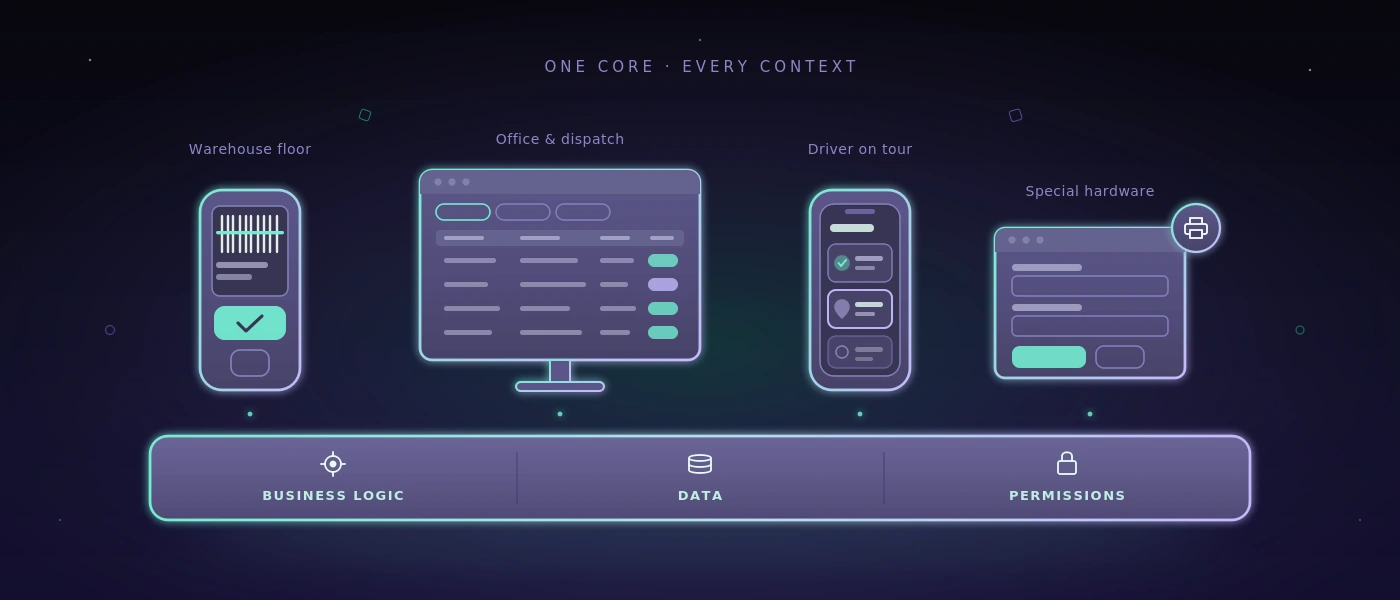
That also applies to responsive applications. Mobile capability doesn't mean squeezing every desktop screen into a smaller format. A smartphone at goods receiving may need only scan, quantity, storage location, and confirmation. Detailed follow-up work possibly belongs on a larger screen. Different devices deserve different priorities, even though they access the same reliable data foundation.

A sensible yardstick for the next decision

Before a team decides on a new platform, an automation, or a complete rebuild, a simple check helps: does the workflow become clearer, faster, or safer for the people who perform it daily? And can the solution still be understood when requirements, staff, or interfaces change?

If both answers are robust, a nice promise becomes a usable system. Then pure fluidity meets ultimate performance shows itself not on a slide, but on a calm working day on which orders, data, and decisions keep moving without unnecessary friction.
Permalink →

SaaS Flow Web: Introducing Workflows Safely During Ongoing Operations

SaaS Flow Web: Introducing Workflows Safely During Ongoing Operations

A goods receipt doesn't sit idle because a team doesn't know yet another piece of software. It sits idle because information gets lost between email, paper form, Excel file, and phone call. With SaaS - “Flow Web” on flow.softify.pro - the interface therefore shouldn't be the first question. What matters is whether the service reliably represents a concrete workflow - even on hectic days, with changing responsibilities, and when a delivery doesn't match the plan.

For small and mid-sized companies, SaaS often makes sense because they don't first have to build their own servers, releases, and basic functions. But that's no free pass for every process. Anyone who introduces a tool that makes everyday work more complicated or pushes important data into unclear side lists isn't digitalizing work. They're only shifting the friction.

What SaaS “Flow Web” has to deliver

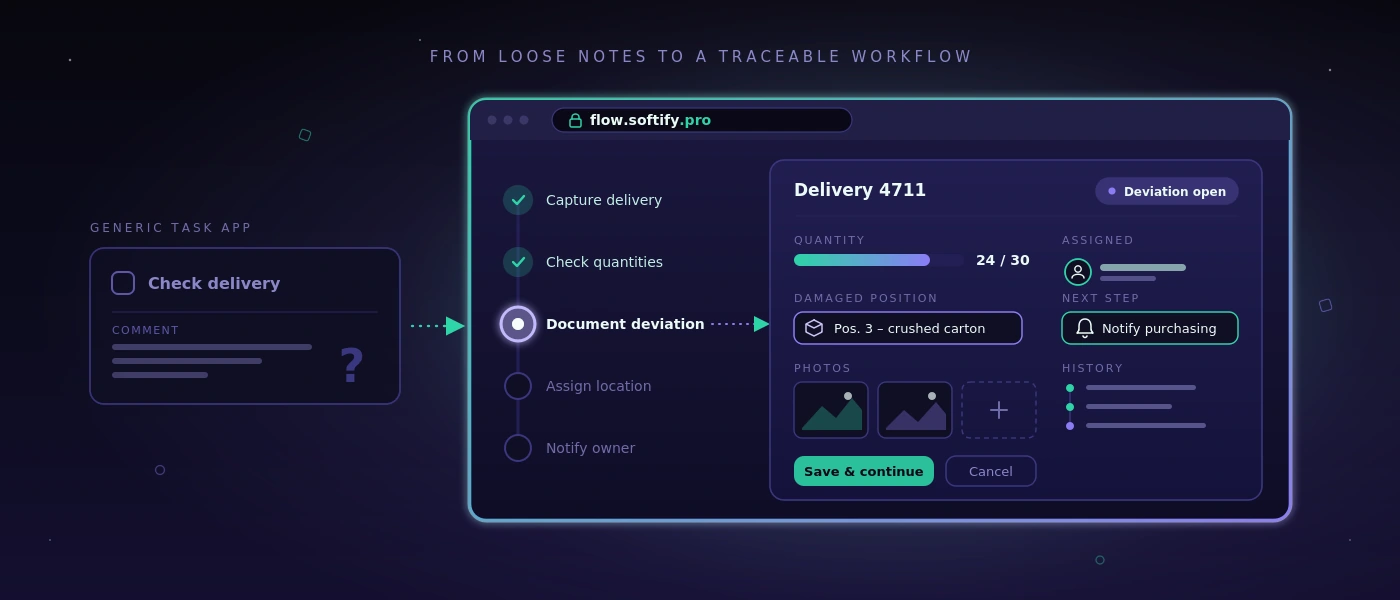
A web workflow is good when employees know without interpretation what to do next. For goods receiving, that can mean: capture the delivery, check quantities against the order, document deviations, assign a storage location, and inform a responsible person if needed. The process doesn't have to be spectacular. It has to be traceable, fast, and repeatable.

This is exactly where the difference lies between a general task app and a business process system. A task app can create an item called “Check delivery.” A business workflow can additionally record which delivery is meant, who accepted it, which item was damaged, which photos exist, and whether a follow-up delivery is outstanding. This data then doesn't sit as free text in a single comment, but where the next person needs it.

For a solution like Flow Web on flow.softify.pro, the evaluation should therefore begin with the transactions, not with a feature list. A business with five warehouse movements a day needs something different from a shipping team with several cut-off times, different carriers, and regular partial-delivery management. SaaS is no substitute for understanding the process.

Name the bottleneck first, then configure

Many digitalization projects start too broad: “We want to digitalize the warehouse.” That sounds plausible but quickly leads to a system with too many screens, special cases, and training documents. A precise statement is better, such as: “Goods receipts are only booked the next day because delivery notes sit on the desk at the end of the shift.”

A sensible start can be derived from such a sentence. The first version can capture delivery notes, confirm items and quantities, flag deviations, and pass the booking on to the responsible office. Once this workflow works, labels, supplier ratings, or automatic order suggestions can be added later. Not every sensible expansion step belongs in the first rollout.

A well-maintained spreadsheet can also stay if it fulfills its purpose. For example, a monthly report with few participants in an existing file can be cheaper and more transparent than a dedicated module. SaaS pays off where information is used several times, processing times are critical, or errors arise from media breaks.

The right questions before introduction

Before configuration, a team should play through a real transaction from start to finish. Not the ideal process, but the case that causes problems in daily work: wrong quantity, missing reference, urgent shipment, or an order with special approval. This reveals the rules a system actually has to represent.

Relevant points include: who may create, change, or close a transaction? Which inputs are mandatory, which merely helpful? When does a manager have to be informed? Which data is passed to accounting, shipping, or customer service? And what happens when the Wi-Fi in the warehouse is weak or an employee no longer has their credentials?

The answers determine the quality of the introduction more strongly than a long catalog of visual requirements. A clean role process, an understandable error message, and a documented approval step usually prevent more effort in operations than an additional report on the home page.

Data storage and roles are not a side issue

SaaS is often treated as purely a question of operation. For operations and IT managers, however, what happens to the data is at least as important. That concerns master data, delivery information, employee data, photos of damage, and possibly customer data. Before introduction, responsibilities, retention, and export options should be clear.

In practice, that means: the company must know which data sits in the system, who has administrative access, and how data is provided in case of a switch or contract termination. An export available only as a hard-to-read PDF file rarely helps. For operational data, structured, usable formats are decisive.

The permission concept also deserves concrete attention. In the warehouse, not every person needs to see prices, customer terms, or global settings. At the same time, overly tight permission assignment must not block the workflow. Roles aligned with actual activities make sense: receiving, dispatch, shipping, team lead, and administration. Critical changes should be traceable, so that nobody has to guess who changed a booking when questions arise.

Access itself should be protected with solid fundamentals. These include secure password policies, a regulated password reset, account lockout after repeated failed attempts, and, where the risk profile demands it, additional login steps. Security comes across as professional when it's predictable and doesn't only become noticeable when someone has been locked out.

Integration only where it measurably relieves effort

A web workflow often only unfolds its value in interplay with existing systems. That can be an ERP, a shop, a shipping solution, a time-tracking tool, or a database. Still, not every interface is automatically sensible. Every integration creates dependencies, failure patterns, and maintenance effort.

The central question is: which manual step does the connection concretely remove? If an interface saves 30 minutes of transfer work a day and reduces typing errors, the benefit is clear. If it merely mirrors information that gets checked once a week anyway, a manual export can initially be the more sensible solution.

With custom extensions, the technical foundation counts. Documented interfaces, clearly defined data fields, and traceable error logs make later operation easier. If a system is connected to a tailor-made web application, technologies and database structure should be chosen so that they remain maintainable in the long term. A well-kept application based on PHP 8.4, modern JavaScript and MySQL 8 is more valuable than a custom solution that's briefly impressive but undocumented.

Introduction during ongoing operations

The most common mistake is a hard start without a comparison phase. Teams are then supposed to work differently immediately on Monday morning, while open questions only arise from real problems. That increases rejection, even if the software fundamentally fits.

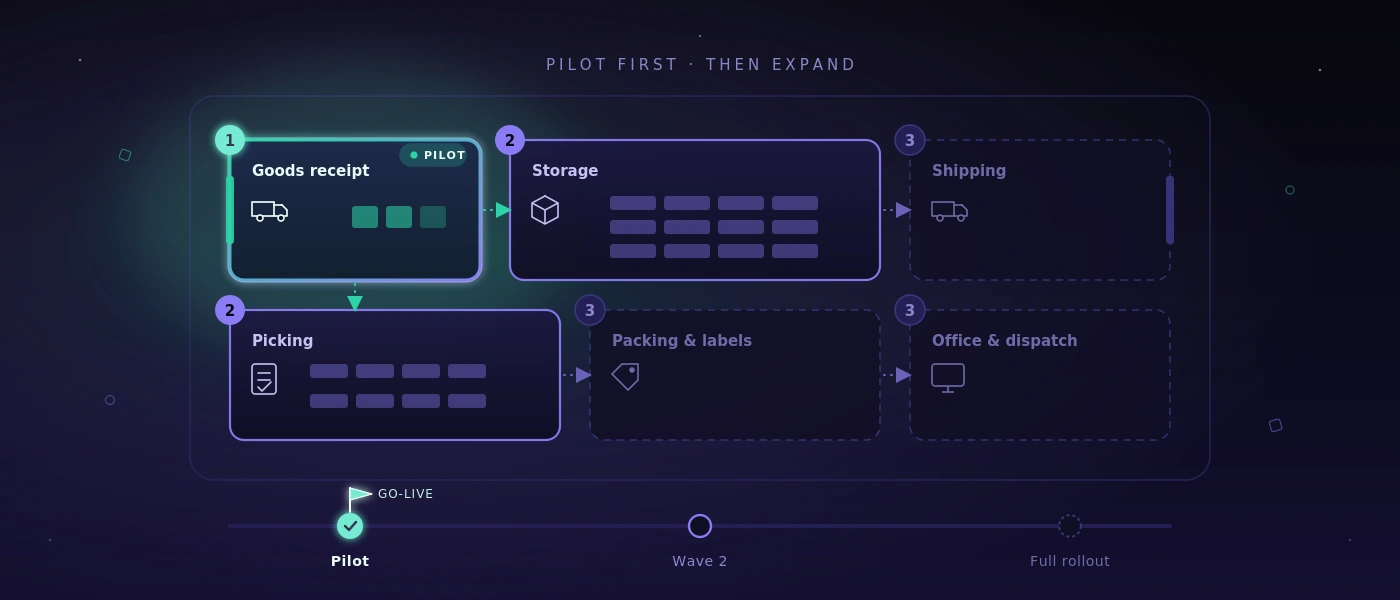
Better is a limited pilot with one team, one process variant, or one clearly defined site area. During this time, it's checked whether capture and approvals work, whether terms are understandable, and whether exceptions land cleanly. It's important not to collect feedback merely as a wish list. Every change should be tested against the benefit for lead time, error rate, or transparency.

Metrics should also be defined early. For example, processing time per goods receipt, number of open deviations, queries about delivery status, or correction bookings can be observed. Without a baseline, “feels faster” remains the only assessment. That may be true, but it isn't enough for a robust investment decision.

Operations needs a clear owner

SaaS reduces technical effort, but doesn't relieve a company of responsibility for its own process. Internally, someone is needed who manages roles, bundles feedback, recognizes training needs, and decides which changes are truly necessary. This person doesn't need to be able to program. But they should understand the workflow and have access to the people responsible.

Equally important is brief, robust operating documentation. It doesn't explain every screen, but answers the questions that arise in daily work: what to do about a faulty booking? Who approves new users? How is an outage communicated? Where is exported data stored? Such clarity prevents a digital system from becoming dependent on personal call-outs again after a few months.

A good SaaS solution is therefore not recognized by how many menu items it offers. It shows its value when a new colleague can process a transaction confidently, a deviation doesn't vanish, and a manager sees the status without calling three people. Flow Web should be measured by exactly this standard: not by promises, but by a working day that demonstrably runs calmer and more reliably.

Permalink →

Web Development with Current Frameworks: What Businesses Really Gain

Web Development with Current Frameworks: What Businesses Really Gain

If a goods receipt still shuttles between a paper form, a phone call, and three Excel files, a modern frontend alone won't solve the problem. Web development with current frameworks makes sense when it visibly simplifies workflows: employees see the next step, data is captured only once, and the application remains understandably maintainable even after the first go-live.

For small and mid-sized companies, the framework question is therefore not a matter of faith. What matters isn't whether an interface carries especially many technical buzzwords. What matters is whether warehouse movements, orders, inspections, or approvals get through the working day reliably - even under time pressure, shift changes, and fluctuating network connections.

Frameworks are a means, not a project goal

A framework provides a proven structure for recurring tasks: routing, forms, permission management, data access, tests, and the rendering of interfaces. That doesn't automatically reduce every risk. But it prevents a project from having to reinvent basic functions again and again.

In a custom web application, a modern JavaScript framework can, for example, sensibly represent interactive screens: a picking list that continuously updates items, route planning with clear status changes, or an inspection log that assigns photos and comments directly to a transaction. In the backend, established PHP frameworks provide traceable rules, clearly separated responsibilities, and consistent interfaces to the database.

This is especially relevant when an initially small solution turns into an operating system used daily for a process. A form for delivery notices can start out manageable. As soon as it updates stock, outputs labels, takes roles into account, and communicates with a shipping provider, it needs a clean technical foundation. Frameworks help avoid renegotiating that foundation with every extension.

What current web frameworks concretely do better

The value of modern frameworks rarely lies in spectacular effects. It shows in the invisible parts of an application. Forms can check input immediately, without faulty data only becoming apparent after submission. Permissions can be defined centrally, so a driver sees different information than dispatch. Changes to an order are stored traceably, instead of silently overwriting a spreadsheet cell.

On the server side, a current environment with PHP 8.4 and MySQL 8 creates a resilient foundation for business-critical logic. Database transactions prevent, for example, a stock level from being reduced while the associated booking fails. Unique keys and validation rules avoid duplicates. Background processes can generate documents or call interfaces without the person at the screen having to wait.

Security isn't a retrofit function either. A contemporary framework supports secure password storage, protection against typical input attacks, traceable sessions, and defined account-lockout flows. Even so, implementation remains a project task: permissions have to be modeled correctly from a business perspective, and sensitive functions need additional checks. A framework provides guardrails, but no knowledge of who in the business may grant which approval.

Deciding on web development with current frameworks properly

The best technology doesn't come from a list of popular tools, but from actual use. An internal application for ten people has different requirements than a customer portal with several thousand simultaneous accesses. A warehouse terminal with a scanner needs different operating logic than a management report on the desktop.

That's why a sensible decision begins with concrete questions: which processes measurably cost time today? Which data is transferred multiple times? Where do errors arise because information only becomes visible too late? Which existing spreadsheet works well enough and should initially stay? That last point in particular protects against expensive digitalization projects without operational benefit.

For many custom business applications, a server-rendered system with targeted interactive components is the most sensible choice. It loads quickly, is manageable to operate, and avoids unnecessary complexity. A fully decoupled single-page application, by contrast, can be appropriate when the interface handles very many dynamic states, has to work offline, or is later supposed to provide the same functions to a mobile app.

Both can be right from a business perspective. The question isn't: which framework is the most modern? It is: which architecture can still be safely extended, tested, and understood by your own team in two years?

When less technology is the better technology

Not every process needs a complex frontend. A lean form for internal orders can be faster, more stable, and cheaper than an elaborately animated interface. If an Excel file is maintained only once a month and causes no errors, it may well still be the right tool.

Complexity only pays off when it removes real friction. That can be the case when orders are retyped several times, delivery status has to be queried by phone, or nobody is sure which version of a document applies. Then a central application creates clear benefit: one data state, clear responsibilities, and fewer follow-up questions.

Maintainability begins before the first line of code

Frameworks are often seen as accelerators. That's only true if the business rules are sufficiently clear beforehand. A developer can build a state machine cleanly from a technical standpoint. But whether the status sequence really fits the process is decided during requirements capture: when does goods count as received? Who may close a deviation? What happens with a partial delivery?

These decisions belong in documentation, as do interfaces, data fields, and exceptions. That doesn't make projects slower. It reduces later discussions, because it becomes visible which rule was deliberately implemented and which assumption is still open.

Maintainability also shows in small disciplines. Database changes must be versioned. Deployment steps must be documented. Error messages should be usable for operations and development without revealing confidential details. Automated tests check central workflows with every change, such as creating an order, calculating a quantity, or producing a delivery note.

For critical applications, a single test type isn't enough. Unit tests secure individual rules, integration tests check the interplay with the database and interfaces, and end-to-end tests replay real operating paths in the browser. For web and Windows applications, a self-hosted test environment can additionally deliver screenshots, execution logs, and understandable assessments, without unnecessarily handing internal test data to external cloud services.

Performance comes from architecture and data model

A modern interface doesn't become fast just because it uses a current framework. Slow database queries, oversized images, or unclear interfaces stay slow, regardless of the frontend. Especially with lists of orders, items, or movement data, the data model decides the perceived speed.

Clean indexes in MySQL 8, paginated queries, and deliberately loaded data are often more effective than later optimization at the interface. A clear caching concept is just as important. Master data may under some circumstances be cached, while current stock levels or approval status should not be cached blindly. There's no blanket rule here, because the business meaning of the data determines how current it has to be.

Responsive design is also part of technical planning. On the office screen, a wide table can make sense. On a handheld scanner or tablet in the warehouse, the same information needs large touch targets, short paths, and a presentation that remains usable even with gloves or in poor light. Pure fluidity meets ultimate performance in this context doesn't mean as much motion as possible on the screen. It means the application works without friction on the device actually used in the process.

The sensible path from idea to operation

A robust web project starts with a limited, verifiable core. Instead of automating every conceivable exception up front, a process is chosen that occurs often and noticeably causes effort. After the first deployment, real data and feedback show which extension really has priority next.

The technical handover shouldn't only happen at the end. Responsibilities for hosting, backups, monitoring, updates, and access rights have to be clarified early. A system is only as reliable as its operation. Anyone who needs an application daily for shipping or order processing needs defined recovery paths and a clear answer to what happens in case of a disruption.

softify.pro therefore relies on maintainable technologies, documented delivery, and direct technical responsibility instead of short-lived framework fads. That's no magic shortcut. It creates the precondition for an application to keep working after launch, to be developed further, and not to become the next fragile special case.

At best, the right web application doesn't feel like a new IT project. It feels like a workflow that finally works without detours - with enough technical substance to take the next change in operations calmly in stride.

Permalink →

Planning a Software Rollout: How to Introduce It During Ongoing Operations

Planning a Software Rollout: How to Introduce It During Ongoing Operations

A new system rarely fails because a button is missing. It fails on Monday morning: the early shift can't find goods receipt, a delivery note gets printed twice, or an Excel file suddenly becomes the unofficial truth. Anyone who wants to plan a software rollout therefore has to do more than introduce functions - they have to secure real operations.

Especially in the warehouse, workshop, dispatch, and administration, a rollout isn't an IT appointment. It changes hand movements, responsibilities, and information paths. A good introduction keeps work moving, makes errors visible early, and gives staff a clear answer to the decisive question: what do I do differently from tomorrow?

The rollout begins before the first training session

Many projects start with a feature list: capture orders, book warehouse movements, print shipping labels, plan routes. That's necessary but not enough. Before the start, it has to be clear which processes should actually run through the new system on the first productive day - and which deliberately shouldn't yet.

This delineation isn't a sign of incompleteness. It reduces risk. If a mid-sized business has so far coordinated goods receipts via paper, phone, and spreadsheets, it doesn't have to digitize complete stock management, returns handling, route planning, and supplier evaluation all on the first day. A sensible first scope might lie in goods receiving, unambiguous warehouse movements, and printing delivery documents.

What matters is describing the target process concretely. Not: "Goods receipt goes digital." But: "The employee scans the delivery, checks quantity and condition, assigns a storage location, and creates a transaction for purchasing in case of deviations." Only at this level do open questions become visible: what happens when an order is missing? Who may correct quantities? May a delivery without a label be put into storage?

Planning a software rollout means: prioritizing critical workflows

Not every process carries the same weight. An outage in master data maintenance can be unpleasant. An outage in shipping, picking, or invoice approval can block a whole day's work. That's why the rollout needs prioritization by operational risk, not by the order in the requirements specification.

A simple classification has proven its worth: business-critical, important, and postponable. Business-critical are all workflows that move goods, money, or binding customer communication. Important are functions that speed up daily work, but whose outage can be cushioned manually for a transitional period. Postponable are convenience functions, rare special cases, or reports that may initially still come from an existing source.

This classification influences testing depth. For a critical shipping process, it's not enough to click through a single order successfully. Partial deliveries, cancellations, missing printers, wrong addresses, parallel processing, and the handover to the carrier also have to be tested. For a rarely used statistics function, a later test cycle can be appropriate.

Make success criteria measurable in advance

"The application runs" isn't an acceptance criterion. Verifiable statements are better: a goods receipt of 30 line items can be booked within ten minutes. Shipping labels get printed at the designated workstation. Stock changes appear immediately in dispatch. A locked user account can only be reactivated through the defined approval process.

Such criteria connect the business department and development. They also prevent acceptance from turning into a collection of vague impressions. Not every piece of feedback has to be resolved before go-live. But every piece of feedback needs classification: critical error, relevant improvement, or item for a later expansion stage.

Data migration: only clean data deserves trust

Old data is often underestimated. Spreadsheets contain duplicate item numbers, different units, expired customer addresses, and stock levels whose origin nobody can explain anymore. Whoever takes over this data unchecked moves old ambiguity into a new system - just with a better interface.

Before migration, it should be determined which data is really needed. Current items, active customers, open orders, relevant suppliers, and verified opening stock are often sensible. Historical records don't necessarily have to move completely into the new application. It can be enough to archive them readably if they remain necessary for evidence or queries.

A trial load is especially important. Data isn't just imported technically, but checked functionally: do quantities, units, and assignments match? Are required fields complete? Can typical orders be processed correctly with it? For go-live, a clear cutoff date is then needed. From when is which system the leading one? Without this rule, duplicate maintenance and contradictory stock levels arise.

Pilot operation instead of one big switch

A big bang can make sense if a small team uses a clearly delimited process and the old and new solutions can't work in parallel. In most operational environments, though, a pilot operation is the more controllable choice.

The pilot should work with real cases, but within a limited scope: one warehouse area, one shift, one product group, or a selected team. What matters is that the pilot group doesn't consist only of especially tech-savvy employees. It should realistically represent later daily work, including the people who work under time pressure and have justified objections.

In pilot operation, it becomes clear whether scanners, printers, network, and permissions work at the actual workstation. Process gaps that nobody mentioned in meetings also become visible. Perhaps goods are initially put down at an intermediate spot in daily practice. Perhaps drivers need a different delivery note than administration. Such insights aren't a setback. They're the reason to run the pilot before the full-scale start.

Training as a work situation, not a software tour

A training session that only explains menu items creates little confidence. Employees have to learn through their tasks: "You accept a damaged delivery," "You pick an urgent order," "You correct a wrongly booked quantity." The context sticks because it matches daily work.

Short training sessions close to go-live are usually more effective than one long appointment weeks earlier. Concise work instructions directly at the workstation also help. They shouldn't explain the whole system, but show the most common transactions, clear responsibilities, and the path in case of disruptions.

Also name contact persons per area. These people don't have to solve every technical problem themselves. But they should be able to decide whether it's an operating error, a functional ambiguity, or an actual system error. That protects the project team from unstructured shouting-in and speeds up help for the shift.

Go-live needs an operating plan

Go-live day needs more than a time. Define who decides on the business side, who is responsible for technical changes, and through which channel disruptions are reported. For critical workflows, it should be visible whether central functions work: login, permissions, data capture, interfaces, printing, and backup.

A fallback plan belongs too. That doesn't mean returning completely to the old world at the slightest problem. It means determining in advance which disruption justifies a stop, how orders are documented if necessary, and how they get cleanly re-entered afterwards. A paper form for a few hours can be reasonable. Permanent parallel operation without end is not.

Technical details count here: have accounts been created in time? Do roles and account-lockout rules take effect correctly? Are label printers connected to the right templates? Does a tested database backup exist? For custom-developed applications, documented deployments, traceable version states, and a clear path for bug fixes are standard.

The first weeks decide acceptance

After the start begins the phase in which an application either becomes a work tool or an unloved extra step. So plan short daily feedback loops. Which errors occur repeatedly? Where do detours arise? Which fields are misunderstood? Which report is a manager really missing?

Not every observation demands an immediate change. Some problems resolve through more precise work rules or better training. Others show real weaknesses in the process or the application. The art lies in not confusing the two. A system shouldn't make existing, working processes more complicated without reason. If a well-maintained spreadsheet is still the better solution for a rare special case, it may stay.

Measure the effect using a few concrete metrics: processing time per transaction, number of follow-up questions, miscoded postings, reprints, open orders, or stock discrepancies. Only these values show whether the rollout actually improves operations - instead of merely introducing new screens.

A good rollout doesn't feel like a project after a few weeks. It becomes a reliable work routine: the right data is where it's needed, exceptions are traceable, and teams have to chase after information by phone less. That's exactly what planning should aim for - not a spectacular launch day, but a calmer, better controllable daily routine.

Permalink →

Planning Multiplatform Application Development: Process First, Platform Second

Planning Multiplatform Application Development: Process First, Platform Second

A warehouse manager confirms a goods receipt on a handheld scanner. Dispatch checks the same transaction in the browser. A driver needs the delivery status on the road on a smartphone. Multiplatform application development sounds like a technical question at this moment. In reality, it's first about an operational workflow: what work has to get done where, with what reliability, and on which device?

For small and mid-sized companies, the right answer is rarely: we build everything natively for every platform. More often it is: we define a shared process, deliberately pick the necessary user interfaces, and avoid duplicate logic. That doesn't just save development budget. It also prevents the warehouse, the office, and the field service from working with different data states.

What Multiplatform Application Development is supposed to deliver

Multiplatform Application Development refers to building an application that is usable in several environments, such as the web browser, on iOS and Android, or on Windows desktop systems. The term is often reduced to the question of whether a single codebase can produce several apps. That's only part of the decision.

For operational systems, what matters most is whether the application works where it's used. A goods-receiving area may need a camera for capturing barcodes, large controls for gloves, and a usable response when Wi-Fi coverage is unstable. Administration, by contrast, needs tables, filters, permission concepts, and traceable change logs. A driver needs a reduced view, not the same interface as dispatch.

A shared technical foundation can sensibly connect these requirements. But it mustn't lead to each platform being served like a poor compromise. The best shared code is worthless if staff take detours because the application doesn't reflect their actual workflow.

Define the process first, then the platform

Before teams talk about frameworks, they should examine one concrete transaction from start to finish. Take a delivery: an order comes in, goods are picked, a delivery note is generated, the handover is confirmed, and the status is reported back to sales or customer service. Where does a media break occur today? Where is something noted on paper, retyped later, or queried by phone?

This observation separates real platform requirements from wish lists. If only two office employees use a function, a well-made web interface is usually enough. If ten people on the warehouse floor make bookings, a mobile, scanner-friendly interface can make the difference. If an existing Windows program has to work with special hardware, a desktop integration may be necessary.

Not every function belongs on every device. That's not a flaw of a multiplatform-capable solution, but a sign of clean product decisions. Shared data and business rules don't necessarily mean identical screens.

The three questions that clarify cost and benefit

The first question is: which devices are already in use, and how long will they remain so? A business with managed Windows terminals has different requirements than a field service with private smartphones. The second is: what happens without a network connection? Offline capability increases effort considerably, because data has to be stored locally, synchronized later, and handled cleanly in case of conflicts. It makes sense if the process would otherwise come to a standstill - not as standard equipment.

The third question concerns the consequences of failure. Can an employee enter a booking later, or does a shipping label, a stock level, or a safety release depend on it? The more critical the transaction, the more strongly permissions, validation rules, repeatability, and logging have to be planned.

An architecture that doesn't fall apart at the second platform

With a sustainable solution, the business logic isn't scattered across several interfaces. Stock checks, status changes, number ranges, permissions, and document generation need a central, tested foundation. Browser, mobile application, and desktop client access it through clearly defined interfaces.

For many internal business processes, a modern web application is the most economical starting point. It can be updated centrally, needs no installation on every workstation, and works on desktop, tablet, and smartphone. With PHP 8.4, modern JavaScript and MySQL 8, a maintainable foundation can be built, provided the data model, access rights, and deployment aren't only considered shortly before go-live.

An installable mobile or desktop application gets added when it brings a clear advantage: deep integration with scanner, printer, or camera, reliable offline operation, special background functions, or requirements from device management. That's a targeted expansion, not an end in itself.

A common mistake is reusing the user interface completely at any price. Technically, that can look attractive. In practice, it produces small text on large monitors, overloaded forms on smartphones, or controls that don't fit the platform. It's better to share the data model, rules, and components where it makes sense, while tuning the operation to the respective context.

Data consistency matters more than a shared codebase

Multiple platforms increase the risk of contradictory data. An order is changed in the office while a driver still sees an old version on his device. Two employees book the same item stock at the same time. An offline device sends its changes back hours later. These cases aren't a side issue, but the core of the architecture.

The system therefore needs unambiguous identities, timestamps, traceable state changes, and rules for conflicts. For a delivery status, the most recently confirmed change may be sufficient. For stock levels, that's often too coarse. There it has to be clear which movement was booked, from which storage location it originates, and whether a correction has to be justified.

Permissions also belong in a central place. An employee may be allowed to record goods receipts, but not approve stock corrections. An external driver may only see his route. Session lifetimes, multi-factor authentication for critical roles, and account-lockout flows aren't decorative security features. They protect concrete workflows and make responsibilities visible.

Testing Multiplatform Application Development the way people actually work

An application can start on three operating systems and still fail in operation. What matters are the workflows under real conditions: the scanner reacts too slowly, a label printer isn't reachable, a permission doesn't take effect after a role change, or a synchronization produces duplicate bookings.

That's why critical processes should be tested automatically. These include login and lockout behavior, order entry, stock movements, document creation, and the handling of faulty input. For web and Windows applications, recurring tests can be run on a self-hosted infrastructure. That's especially relevant if screenshots, internal order data, or test accounts shouldn't be passed on to external cloud services.

Automation doesn't replace checks by people on the warehouse floor. But it ensures that known workflows get checked again and again after changes. Good test reports don't just name a technical error, but the affected process: delivery proof can't be generated, a user account stays locked after successful approval, or route data isn't updated.

When a platform strategy is too much

Some companies don't need their own app. If stable browser access is enough, the workflow is rarely mobile, and the number of users stays manageable, a responsive web application is often the more sensible choice. It reduces maintenance effort, distribution problems, and the number of possible sources of error.

An existing spreadsheet doesn't have to be replaced immediately either. If it only serves as a simple evaluation, is maintained by one person, and doesn't create error-prone handovers, it can fulfill its purpose. The time for a system has come when knowledge sits in individual heads, versions drift apart, follow-up questions increase, or a transaction can no longer be reliably traced.

Conversely, a lean platform strategy quickly becomes too small when employees have to work offline, hardware gets connected, or customers and partners need controlled access. Then it's worth deliberately funding the additional requirements instead of bolting them on later under time pressure.

Start with a robust pilot

A good start isn't a feature catalog with a hundred items, but a complete, measurable workflow. For example: record goods receipt, update stock, document a deviation, and create a task for clarification. This pilot shows early whether the data model, devices, permissions, and operation fit together.

After that, the solution can grow in sensible steps: picking, shipping, route planning, or reporting. Every extension should pass the same question: does it shorten a real workflow, reduce errors, or create reliable transparency? If not, it can wait.

In the end, the most sensible platform isn't the one with the most technical options. It's the one on which a team starts its work faster in the morning, asks fewer questions during the shift, and can trace in the evening what actually happened.

Permalink →

Evaluating Test Automation Results Correctly

Evaluating Test Automation Results Correctly

A regression test can end the morning with 98 percent of cases passing and still not be good news. Perhaps the failed test is exactly the login of a major customer. Perhaps 40 tests were skipped because the test environment wasn't reachable. Or the run was green, but only checked whether buttons exist, not whether an order actually gets saved, a delivery note generated, and stock adjusted correctly. Test automation results aren't a statement about quality as long as their context is missing.

For QA leads, development, and business departments, the real work therefore doesn't lie only in automating tests. What matters is preparing results so that reliable decisions emerge from them: can a release be rolled out? Does an error need to be handled immediately? Is the error new, recurring, or just a problem with the test environment? And is there evidence that a business department without test code can also follow?

What Test Automation Results really tell you

The simplest metric is: passed or failed. It's helpful, but rarely sufficient. A high pass rate can build confidence if the tests cover critical workflows, the test data is plausible, and the environment resembles later operation. If one of these factors is missing, the number remains mainly a signal that an automated run was executed.

For business-critical applications, other questions weigh more. In a warehouse solution, not every screen is equally important. A display error in an internal hint text can wait. An error that books the wrong quantity at goods receipt or generates a shipping label without a recipient address cannot. Good test results therefore weight risks instead of treating all cases equally.

A failed test isn't automatically a product defect either. It can be triggered by expired credentials, a locked test role, unavailable interfaces, changed test data, or a slow environment. Whoever doesn't separate these causes produces noise. The team then spends time on false alarms while real errors get lost among red status messages.

Four status types instead of one red list

A clear classification works well in practice: functional defect, technical test failure, environment problem, and expected change. A functional defect means the application violates a defined requirement. A technical test failure points more to the test itself, such as a selector that no longer matches after a deliberately changed interface.

An environment problem exists when, for example, a test system or a connected interface isn't available. Expected changes arise when a process was deliberately adjusted but the automation still checks the old target state. These categories don't prevent every discussion. But they make sure the discussion starts at the right point.

From test runs to decision-ready reports

A usable report answers not only that something failed, but what happened, how severe it is, and whether the error appears reproducible. That takes more than a list of test names and timestamps.

Every relevant run should include the tested build, the test environment, the role used, key test data, and start and end time. Especially with Windows desktop applications or complex web platforms, this information is needed to narrow down differences. An error that only occurs under a restricted warehouse role is something different from an error that blocks every login.

Meaningful results also contain traceable evidence: screenshots, recorded steps, error messages, and, where needed, technical logs. A screenshot alone can be misleading, though. It shows a moment, not the cause. The combination of step sequence, visible state, and expected response is far more helpful.

AI-assisted systems can turn this evidence into understandable assessments. With COCO, for example, tests run on a dedicated, self-hosted AI server. The evaluation can explain that an order was created but the expected status change didn't occur, and directly link the recording of the execution. For security-conscious teams, it matters where screenshots, application data and test traffic are processed. Local control isn't automatically required, but for internal applications and sensitive data it can be the more sensible path than an external cloud service.

The right level of detail for different recipients

Development teams need error messages, technical steps, and the most precise possible hints for reproduction. An operations manager, by contrast, first needs the affected function, the business risk, and a clear statement on operational readiness. Both perspectives must be derivable from the same execution, without anyone having to transfer results into presentations manually.

A good report therefore starts with a short decision layer: release recommended, release with known limitations, or stop the release. Below that come the critical deviations with priority and evidence. The technical details follow only after that. That's not a simplification at the expense of accuracy, but a clean separation of information needs.

Measuring coverage without fooling yourself

Test coverage is often presented as a percentage. That value is useful when it's clear what it measures. Code coverage, for example, shows which parts of the program code were executed during tests. That doesn't prove a business process works correctly. A test can touch many lines of code and still never check whether a wrong delivery address appears on the document.

For business departments, process coverage is often more meaningful. It describes which real workflows are protected: capturing an order, reserving stock, booking a partial delivery, accepting a return, or approving an invoice. Transitions between systems and roles are especially valuable, because that's where errors often arise: when importing an order, printing a label, or switching from office to warehouse terminal.

Don't prioritize by the number of possible tests, but by damage impact and frequency of change. A rarely used process with high financial or legal risk often deserves automation sooner than a frequently used but harmless view. Conversely, a stable, low-criticality workflow can still get by with a short manual check. Not every check has to be automated just because it can be.

Unstable tests are a quality problem of their own

Tests that pass sometimes and fail other times without any recognizable product change are often called flaky. They damage trust faster than a permanently red test. As soon as teams reflexively restart red results, the automation loses its warning function.

The causes are usually concrete: hard-coded waits, shared test data, parallel access, asynchronous processing, or an environment that isn't reset. A short three-second pause in the test can help by chance, but it's not a solution. It's better to wait for a verifiable state, make test data unique, and isolate workflows from each other.

Not every instability can be avoided entirely. External interfaces can fluctuate, and real infrastructure has outages. The report should then clearly mark whether a test couldn't be evaluated because of an external dependency. A repeated run can be useful for diagnosis, but it must not make the first finding invisible.

A sensible process after every test run

After an automated run, not every result should immediately be treated the same. First, blocking errors and non-evaluable critical tests are checked. Then comes classifying new deviations against known, accepted problems. Only then is a release decision reliable.

Defined thresholds help, but they have to fit the process. For example, a failed test in the payment or permissions flow can trigger an immediate stop. For a purely cosmetic deviation, a documented exception can be acceptable. Such rules shouldn't first emerge under time pressure before a release.

Equally important is feedback: every production error that the tests didn't detect is a reason to check whether a scenario, a test data variant, or a control point is missing. The goal isn't to pile up as many tests as possible. It's to build better safeguards, in a targeted way, from real errors.

In the end, the most useful test results aren't those with the greenest overview. They're those where a responsible person on Monday morning can understand what was checked, what risk remains, and what action is now sensible.

Permalink →

Inventory Discrepancy Causes: Common Reasons for Stock Differences

Inventory Discrepancy Causes: Common Reasons for Stock Differences

The system says 248 units in stock, the shelf holds 231. Those 17 units look at first like a counting mistake. But that's exactly where the wrong analysis often starts. Inventory discrepancy causes are rarely a single oversight in practice. Most of the time they arise where goods receipt, warehouse movement, picking, and posting drift apart in time or organizationally.

For a small or mid-sized company, stock differences aren't just a topic for the stocktake. They lead to misordering, express deliveries, unnecessary safety stock, and delivery promises that can't be kept. Whoever separates the causes cleanly doesn't have to introduce a big ERP system right away. Often clearer posting rules, the right capture devices, and a system that reflects real work processes are enough.

Inventory discrepancy causes: where differences arise

A stock difference is the difference between the target stock in the leading system and the stock actually present. The word "leading" is decisive here. If an Excel file, a paper list, and an inventory management system are all maintained in parallel, there are practically multiple truths. Then the difference didn't just arise in the warehouse - it was already built into how the data is managed.

The effective countermeasure therefore depends on the type of error. A miscounted pallet needs a different fix than a delivery that was physically accepted but never posted. Before teams restructure processes, they should evaluate differences by item, storage location, shift, movement type, and time. Only this pattern shows whether it's a one-off or a recurring process error.

1. Goods receipts get posted late or incompletely

Goods receipt is a classic break point. Goods arrive in the morning, get set aside for inspection, and later get moved straight into production or onto the shelf. Posting happens in the afternoon, the next day, or not at all. As long as the goods are physically present, the system stock appears too low. If they're already consumed or shipped, follow-on errors become more likely.

Partial deliveries, substitute items, and over-deliveries are especially prone to this. If the delivery note says one quantity but a different quantity arrives, nobody should just post the document "roughly matching" it. The discrepancy needs to stay visible as an exception, including reason, responsible person, and approval. Otherwise the deviation disappears from the transaction and only resurfaces at the stocktake.

2. Warehouse movements happen without a transaction

An item gets placed from goods receipt into high-bay storage, moved from one bin into the picking zone, or reserved for an order. Physically that's a small, quick movement. In the system, it can be decisive.

If staff reorganize storage locations purely by feel, the overall stock might still be correct, but availability at the right spot isn't. That causes search time, mispicks, and unnecessary replenishment trips. A good warehouse solution doesn't have to make every movement complicated. It has to capture the few movements that are relevant for availability, traceability, and reordering.

In workshops or smaller warehouses, it's often more sensible to maintain a few unambiguous zones than a theoretically perfect bin structure nobody maintains in daily operation. Precision only works if it stays workable.

3. Picking and shipping get posted too early

Many teams post an order as "issued" the moment it's picked, even though the goods are still sitting at a staging location. If the order then gets changed, canceled, or only partly shipped, the system stock and the physical stock no longer match.

A clear separation between reserved, picked, and shipped is better. Not every company needs complex status chains for this. But the moment stock gets reduced must be unambiguous. For shipped goods, that moment is often closer to the actual handover to the carrier than to the first time it's pulled off the shelf.

Returns also belong in this flow. When goods come back, they're not automatically available again. Only inspection, a quality decision, and putaway should determine whether they return to sellable stock, stay blocked, or get written off.

4. Wrong units and master data errors

A box, a bundle, a roll, and a single piece can all refer to the same item. If the conversion isn't maintained cleanly, differences arise at impressive speed. A staff member posts "1," meaning a box of 24 pieces. The system understands one piece.

Master data errors are especially insidious because the posting process can look technically correct. So check packaging units, conversion factors, minimum quantities, storage locations, and item numbers. Similarly named variants too - different lengths, colors, or batches - are easily confused.

No blanket rule like "scan more" helps here. Barcodes are only as reliable as the mapping behind them. For small assortments, a cleanly maintained item master with clearly legible labels can achieve more than an extensive but poorly configured scanner landscape.

5. Parallel spreadsheets and manual corrections

The spreadsheet on the desktop rarely arises from carelessness. Usually it fills a real gap: a special reservation, a missing evaluation value, or a process the existing software doesn't cover. It becomes a problem when it turns into a second stock ledger.

Then receipts get posted in the system but removals get noted in the spreadsheet. Or a correction only happens wherever it happens to help the next order. Nobody can later reliably explain which value is valid.

Not every spreadsheet needs to be abolished. A calculation for planning or analysis can remain sensible. But stock-changing transactions should have exactly one leading system. Adjustments need a reason code, a timestamp, and ideally a person who can be traced back to them. That's not bureaucracy for its own sake - it's the prerequisite for solid root-cause analysis.

6. Counting errors and unsuitable stocktaking methods

Even correct processes don't protect against human error. Items get counted twice, pallets get overlooked, open boxes get estimated, or storage locations don't get locked while counting is underway. An annual full stocktake discovers these problems late and under heavy pressure.

For many businesses, a cycle count is the more sensible alternative. Fast-moving or high-value items get checked more often, stable C-items less often. What matters isn't producing as many counts as possible, but checking deviations against the most recent movements promptly. If a discrepant item simply gets corrected without documenting the cause, the pattern stays invisible.

A counter-check is especially worthwhile for high values, serial numbers, or batches. For screws in a consumables store, it can be economically excessive. The depth of control should match the risk.

7. Unclear responsibilities between shifts and areas

Stock errors often arise at handoffs. The early shift stages goods, the late shift ships them. Goods receipt accepts a delivery while dispatch planning changes the order in parallel. Each individual step can be traceable, yet nobody owns the whole transaction.

So define not just roles but handoff points: who confirms the goods receipt? When does responsibility for picked goods change hands? Who checks open exceptions at shift end? A shared digital board or a simple exception list is often more effective than additional meetings.

The system should make open transactions visible rather than forcing staff to remember. For example, deliveries without a quantity check, picks without a shipping completion, or returns without a quality decision need to stand out before they become silent stock errors.

8. Weak system integration and missing validation rules

If the shop, order management, warehouse, and accounting exchange data with a time lag or via file, duplicate or missing postings can occur. An import runs twice. An interface fails silently. An order gets changed after its shipping status has already been transferred.

The solution isn't necessarily a full replacement. Often what's needed are clearly defined interfaces, unambiguous document numbers, and technical checks. A warehouse posting should traceably store when it occurred, which transaction it originated from, and whether it was later canceled. Critical processes need error messages and queues, not just a silent entry in a log file.

With custom-developed logistics systems, such rules can be tailored deliberately to the operation: no negative quantity without approval, no shipping confirmation without a shipping position, no duplicate processing of the same external reference. The best rule here isn't the strictest one, but the one that stops real errors without blocking operations for normal exceptions.

Checking stock differences systematically

Don't start with a blanket correction. Pick the ten items with the most frequent or most expensive differences and trace their last movement backward: goods receipt, relocation, pick, return, count, and any manual adjustment. If the cases cluster around one location, one shift, or one movement type, that's a solid starting point.

After that, every measure should be measurable. If new barcode scans get introduced, don't just watch the number of scans - watch the discrepancy rate per item group. If a new staging status gets added, check open staging daily. Good processes don't produce false precision. They make exceptions visible and traceable early.

The sensible next step is often small: define a handoff point, clean up a storage location, or technically secure a recurring manual correction. Reliable stock doesn't come from more software on a hunch, but from processes that are still correctly executable on a hectic Tuesday at 4:45 pm.

Permalink →

Getting Process Automation Right for SMBs

Getting Process Automation Right for SMBs

A delivery note is missing because the data is still on a slip of paper. A goods receipt gets recorded twice because the warehouse and the office work with different spreadsheets. An approval gets delayed because the responsible person isn't picking up the phone right now. That kind of friction rarely costs a lot of money in one go. But over weeks, queries, search time, error corrections, and unnecessary waiting add up. That's exactly where process automation for SMBs makes sense.

It's not about replacing as many activities as possible with software. Good automation makes workflows traceable, reduces avoidable handoffs, and gives staff time for decisions that require experience. This is especially decisive in small and medium-sized companies: the teams are close to day-to-day business. When a process snags, often the whole shift notices right away.

Don't automate every process

The most common mistake is starting with the most visible annoyance. Maybe an Excel file is irritating, maybe a new dashboard seems needed. Both can be justified. But a digitized mess stays a mess - just faster and with more data.

Before any technical decision, the workflow should first be described the way it actually happens. Not the way it should read in the manual. Who triggers the process? What information is needed? Where does something get transferred manually? Who decides on exceptions? And how does the team recognize that the process is complete?

Especially in the warehouse or order processing, the critical points often sit between systems: an order arrives by email, gets copied into a spreadsheet, gets coordinated by phone, and later gets entered into shipping software. Every handoff increases the probability that quantities, dates, or addresses diverge.

Automation pays off especially when a process occurs frequently, has clear rules, and errors have noticeable consequences. That could be goods receipt, generating delivery notes, assigning warehouse movements, or handing off approved orders to shipping. Rare edge cases with a lot of discretionary judgment, on the other hand, often stay better handled manually - at least at first.

Process automation for SMBs starts with priorities

Not every unnecessary activity deserves an immediate project. Simple prioritization creates clarity. Assess individual workflows by frequency, processing time, error costs, and dependencies. A process that runs fifty times a day and saves only two minutes each time can be more economical than a complicated monthly process.

The question of error consequence is at least as important. A wrongly printed internal document is annoying. A wrong batch assignment, a lost delivery address, or an undocumented goods receipt can trigger complaints, search effort, and stock discrepancies. There, automation creates not just speed but reliability.

A sensible first step is usually small enough to be verifiable within a few weeks. For example, a staff member could scan goods via a barcode, the system checks item and quantity, updates the stock in a central database, and generates a storage receipt directly if needed. The team then doesn't have to guess which version of a spreadsheet is current.

A clear target state instead of a feature list

Many projects start with a long list of desired features. A concrete operational picture is better: what should be visible at the end of a process without anyone having to ask? For shipping, that could mean that, once approved, an order automatically gets a pick list, the shipping address gets checked, and a label can be generated. Exceptions visibly land in a clarification queue instead of an unmanageable email inbox.

This target picture forces useful decisions. Does every order have to be processed fully automatically? Or should orders above a certain value, with a divergent delivery address, or with missing stock be deliberately submitted for review? Automation doesn't need one-hundred-percent dark processing to create major value.

The right technology depends on the workflow

There's no single technical standard path for every SMB. A spreadsheet solution can still be reasonable for a manageable evaluation. It's quickly adapted, familiar, and causes little rollout effort. As soon as several people work on it simultaneously, bookings need to be traceable, or data gets exchanged with other systems, though, it hits its limits.

Then a lean, workflow-specific application is often more sensible than an oversized enterprise suite. It can map exactly the steps needed in operations: record order, check stock, move goods, generate document, book shipment, and report status back. No more, but no less either.

Technically, what matters less is whether a system advertises the latest buzzword. What matters is solid foundations: a cleanly modeled database, traceable permissions, logs for relevant changes, reliable interfaces, and documented deployments. An application built on PHP 8.4, modern JavaScript, and MySQL 8 can be very maintainable long-term if architecture and operations are considered from the start.

Integrations deserve attention too. Automatic data exchange with a shop, ERP, shipping provider, or accounting saves time only if errors are handled visibly. What happens with an invalid address? Is a failed label print retried? Can the team see which data has been transferred and which is still missing? Silent errors are more dangerous than a clearly marked exception.

Rollout during ongoing operations

A new system has to adapt to shift changes, delivery deadlines, and existing work routines. That's why a gradual rollout is usually safer than a hard cutoff date for all areas. Start with a bounded process, a product group, or a warehouse area. That reduces risk and creates real feedback from everyday use.

Parallel operation isn't a sign of uncertainty here, but a controlled test. For a limited time, old and new recording can be compared. Differences don't just reveal software bugs but often also rules that until now only existed in individual employees' heads. Those rules belong visibly in the process - not permanently in personal experience.

Staff shouldn't be confronted with the new workflow only at training. Whoever runs the process daily recognizes shortcuts, edge cases, and impractical screens early. Good software respects this knowledge without building in every historically grown exception unchanged. The right question is: which exception protects an important business case, and which is just a workaround for an old problem?

Making it measurable whether the effort pays off

Two or three metrics should be defined before the start. Those could be throughput time per order, number of manual corrections, stock discrepancies, or time to shipment. Without a baseline, every later evaluation turns into a gut feeling.

Not every effect shows up immediately in euros. When a warehouse team can always tell where goods are located, the number of interruptions drops. When delivery documents come from the same data as the order, the risk of contradictory information drops. And when responsibilities are visible in the system, a process depends less on individual people.

Automation needs maintenance and limits

An automated workflow isn't a project that freezes after go-live. Item structures change, customers demand new documents, shipping providers adjust interfaces. That's why responsibilities, updates, backups, and a regulated handling of permissions belong to the actual system.

Especially for applications with customer, order, or stock data, it should be clear who gets access and why. Roles need to fit the daily work: a warehouse team needs different functions than accounting or sales. Logged changes, secure login flows, and tested restores look unspectacular. In an incident, exactly these details decide whether operations can keep working.

Tests are also part of operational safety. Recurring checks for order entry, stock booking, document generation, and permission management prevent a change in one place from breaking a working process elsewhere. For critical web or desktop applications, a controlled, self-hosted test environment can make sense if screenshots, test data, and internal processes shouldn't reach external cloud services.

softify.pro supports projects like this with a simple principle: first understand the actual workflow, then build the smallest viable solution. Sometimes that's a custom application. Sometimes it's enough to structure an existing spreadsheet more cleanly and automate a single handoff step.

The best next step, then, isn't a software comparison, but a walk-through of a real process - from trigger to completion. Take an order, a goods receipt, or a complaint and follow it with the people involved. Wherever information gets re-entered, nobody knows the status, or decisions wait unnecessarily, that's usually where the most sensible approach to automation lies.

Permalink →

Testing Windows Applications: A Practical Plan

Testing Windows Applications: A Practical Plan

A Windows application can look clean in demo mode and still slow down operations on a Monday morning. An unsaved delivery note, a user locked out after three failed attempts, or a print dialog that behaves differently after an update aren't cosmetic bugs. Anyone who wants to know how to test Windows applications should therefore not start with individual buttons, but with the workflows that cost work, money, or traceability.

Especially in warehouses, workshops, dispatch, and administration, many critical processes run through desktop software that has grown over years. What matters there isn't whether a test case is impressively worded. What matters is whether staff can reliably get their work done under realistic conditions - including incomplete data, changing permissions, slow networks, and unplanned interruptions.

Testing Windows applications starts with the critical workflows

Not every function deserves the same testing effort. A rarely used export with manual follow-up work should be assessed differently than booking a goods receipt, generating a label, or the daily order reconciliation. So start with a simple question: what actually happens if this workflow fails?

High priority goes to processes with a direct impact on stock, delivery, invoicing, security, or customer communication. That includes things like login and permission checks, creating and changing master data, transaction bookings, document printing, interfaces to ERP or shipping services, and recovery after an error. Even functions used by only a small group of people can be critical if they block a month-end close or the release of goods.

These workflows don't turn into abstract test lists, but into traceable work steps. A goods-receipt test might, for example, start with an existing order, record a partial delivery, report a deviating quantity, assign a storage location, and then check whether stock, booking log, and printed document match. That way you're testing the software's actual effect, not just individual input fields.

Build a test base that reflects operations

Many bugs only become visible once the test environment gets close to reality. An application often behaves differently with an empty test tenant than with several years of transaction data, blocked items, missing required information, or already-opened transactions.

So set up test data deliberately. You don't necessarily need a complete copy of production. A controlled data set with typical, edge-case, and deliberately faulty cases makes more sense: items with different units of measure, customers with special terms, orders with partial deliveries, users with different roles, and transactions already in progress. Personal data should be anonymized or replaced with realistic sample data.

The test base also includes the technical environment. Document the Windows version, resolution, scaling, installed printers, network drives, database version, connected services, and permissions. That sounds dry, but it saves time later. If a bug only occurs on workstations with 125% scaling or with a particular printer driver, that needs to be reproducible.

Don't just check the ideal path

The ideal path mainly proves that the application was built for the expected route. In operations, the difficult situations arise alongside it. What happens if a user leaves a required field empty, triggers the same booking twice, or loses the connection while saving? Does the transaction stay consistent? Does the person get an understandable message? Can they keep working safely?

With Windows applications, handling and state are also particularly relevant. Dialog windows can appear in the background, keyboard shortcuts can overlap, file-selection dialogs can block the flow. Check whether focus, error messages, and locks are unambiguous. A technical exception with no guidance doesn't help the shift lead.

Use manual tests where judgment is needed

Manual tests aren't a sign of insufficient maturity. They're indispensable when a new workflow is emerging, an interface is being rebuilt, or domain expertise determines quality. An experienced warehouse manager will spot faster than a script whether a screen is understandable under time pressure, or whether a warning appears too late.

Manual testing does get expensive and unreliable, though, when the same stable workflows are repeated before every version. Then the release depends on available people, memory, and scattered notes. The right point to move to automation is usually where a process runs frequently, can cause significant damage, and has clear expected results.

A good manual test case describes the starting situation, steps, expected result, and required data. When there's a bug, add a screenshot, timestamp, application and build version, and the exact action. "Printing doesn't work" isn't a usable bug description. "After changing the delivery address, the print dialog stays open, order 4711 doesn't get a PDF, and no message appears" is.

Automated regression tests for recurring risks

Automation doesn't check whether software is fundamentally good. It checks whether previously working, defined workflows still work after a change. That's especially valuable for Windows software whose interfaces, database logic, and external interfaces get developed further over years.

Start small. Pick five to ten business-critical workflows first that should be checked before every release. Those might include login with an account-lockout flow, order entry, warehouse booking, PDF or label printing, role switching, and a central import. Only once these tests run reliably does expanding to edge cases pay off.

For desktop applications, automated tests often drive visible interface elements: windows, input fields, tables, buttons, and dialogs. That works, but it's more fragile than a pure interface test. Small layout changes, slower machines, or ambiguously named elements can break tests. So developers, the business side, and test owners should jointly decide which elements are stably addressable and which check steps are better secured via the database, a log, or an interface.

A sensible test also checks more than just that a button could be clicked. It verifies the business consequence: was the booking saved? Is the stock correct? Was a document generated? Was no duplicate record created? Visible interaction and a verifiable result belong together.

Evidence is part of the test result

A green status alone rarely suffices for critical applications. When a test fails, teams quickly need an answer to three questions: what was the starting situation? At which step did the workflow fail? What did the application show at that moment?

Screenshots, execution logs, and, where appropriate, screen recordings make bugs discussable. They significantly shorten the handoff between operations, QA, and development. For regulated or security-conscious companies, they're also a solid basis for tracing sign-offs and deviations.

The storage location isn't a side issue here. Test runs can contain internal customer data, price lists, order information, or screen views. Anyone automating tests for sensitive Windows applications should clarify whether that data is allowed to leave their own infrastructure. A self-hosted environment like COCO can make sense here, because test execution, evidence, and evaluation stay under your own control. Whether that's necessary depends on data protection requirements, contractual situation, and protection needs - not every team needs the same architecture for it.

Build testing into the release process

The best test catalog loses value if it only gets used after a hectic go-live. Define a fixed point in time: automated core regressions run before every release, manual acceptance checks new or changed workflows, and known limitations get documented openly.

Not every failed test needs to stop a release. A bug in a rarely used admin view can be acceptable if a safe workaround exists and the affected area is clearly informed. A bug that books stock incorrectly or silently locks out users needs to be treated differently. That decision should be made based on business impact, not on the mere count of red tests.

Maintain the tests alongside the application. When a process changes deliberately, update the test case, test data, and expected result together with the requirement. Outdated tests create noise and eventually get ignored. A few trustworthy checks are worth more than hundreds of automated workflows whose results nobody takes seriously anymore.

In the end, it's not about simulating every conceivable input. It's about protecting the work that has to run again the next morning. Start with a single critical process, make its outcome provable, and build outward from there.

Permalink →

Secure Test Data Management Without Losing Control

Secure Test Data Management Without Losing Control

A failed test run is annoying. A successful test run with real customer data in an insufficiently protected environment can turn out considerably more expensive. Secure test data management doesn't resolve that contradiction with a single tool, but with clear rules for data, access, test environments, and evidence. For teams that automate testing of web or Windows applications, it's therefore part of quality work - not just compliance.

Why test data becomes a security problem

Production data is tempting for tests because it contains real edge cases: incomplete addresses, unusual order combinations, historical pricing rules, or faulty inputs. But that very data often contains names, contact details, contract information, personnel numbers, banking data, or internal business logic.

The risk rarely arises from a single glaring mistake. It usually grows step by step: a database export gets created for a test, dropped into a shared directory, and later copied into another environment. An external service receives screenshots for error analysis. A test account keeps broad permissions because cleanup might disrupt the next run. After a few months, nobody reliably knows anymore which data lives where.

At small and mid-sized companies, the problem is often sharpened by tight capacity. The team wants to hit a release deadline, not run its own data protection project. The responsibility remains all the same. Whoever uses data for quality assurance needs to be able to trace which data gets processed, who has access, and when it gets removed again.

Secure test data management starts before the test case

The decisive question isn't "How do we protect the test data set?" It's "What information does this test actually need?" Many regression tests don't require real personal references at all. A shipping process, for example, needs to verify that delivery addresses, weights, zones, labels, and status changes are processed correctly. Synthetic customers, plausible item master data, and deliberately defined edge cases are enough for that.

This distinction leads to a workable data classification. Not every test environment needs the same depth of data. Unit and integration tests are often fine with fully artificial data sets. For end-to-end tests, pseudonymized copies can make sense when real data patterns are functionally relevant. Production-like data should be the exception - with a documented purpose, limited access, and a fixed lifespan.

The quality of the substitute data matters here. Random fantasy data helps little if it doesn't reflect realistic dependencies. A test data set for a warehouse application, for instance, needs to contain item variants, storage locations, blocked stock, partial deliveries, and returns in a coherent combination. Good test data doesn't just protect personal information. It finds bugs that would never surface with empty tables and the sample customer "John Doe".

Synthesize, mask, or minimize?

Synthetic data is the safest choice when the business rules can be modeled cleanly. It's generated specifically from test requirements and contains no copy of real people or transactions. The effort lies in maintenance: if the data model changes or new process rules get added, generators and fixtures have to grow along with them.

Masking is a good fit when an application's behavior depends heavily on production structures. Sensitive fields get replaced or altered while relationships are preserved. Names become plausible but fictional names; email addresses become undeliverable test addresses; account numbers become correctly formatted values with no real association. Masking only holds up if indirect inferences are also considered. A combination of a rare location, date of birth, and contract feature can still make a person identifiable.

Data minimization is often the underrated third path. Instead of copying a complete export, only the necessary slice gets provided. That reduces attack surface, storage needs, and cleanup effort. Testing a discount rule doesn't require anyone's entire year of customer history.

Access and environments need to match the risk

A protected data set loses its value if it sits in a freely reachable test environment. Test systems therefore need their own security boundaries - separate databases, dedicated service accounts, clearly defined network access, and no silent connection to production.

Access rights should be role-based, not tied to shared accounts. Developers may need different permissions than QA, support, or external service providers. Administrator access is sometimes necessary, but it should be time-limited, logged, and tied to a traceable approval. Sensible password rules, multi-factor authentication where available, and account lockout flows on repeated failed attempts apply to test accounts too.

Automated tests bring another special case: they generate evidence. Screenshots, screen recordings, logs, and error messages can contain sensitive content even when the database has been masked. A screenshot of a customer screen, a browser trace with session information, or a log with an API payload belongs in the same protective consideration as the test database.

That's why test artifacts need retention rules. Not every successful run needs to be stored permanently. For critical sign-offs, traceable evidence can make sense, for instance with a timestamp, build number, test version, and result. Failed runs often need a longer analysis window. After that, artifacts should be deleted automatically. What no longer exists can't be accidentally shared or compromised.

Automation without uncontrolled data leakage

AI-assisted test automation can speed up testing considerably, especially for extensive web and Windows applications. But it changes the security question: where do screenshots, inputs, error descriptions, and application traffic go? Who processes them? How long do they stay there?

For security-conscious teams, self-hosted execution is often the better architecture. A system like COCO can run within your own infrastructure, or a clearly bounded one, executing test steps, storing evidence, and generating understandable evaluations. That's not mandatory in every situation. For a public marketing page with purely synthetic form values, an external service can be reasonable. For internal line-of-business applications, customer portals, or software handling personal transactions, though, local control is a concrete advantage.

Self-hosting isn't a free pass. Running it demands updates, backup concepts, access logs, and a responsible party. In return, data sovereignty stays where it belongs. The right approach depends on protection needs, existing operational capability, and the kind of application being tested - not on the current hype around a particular testing tool.

How rules turn into a workable process

A workable process doesn't have to block the release. Start with a data map: which test environments exist, what kinds of data live there, and which systems generate additional artifacts? That inventory usually already uncovers old exports, forgotten staging systems, and unclear responsibilities.

After that, a simple decision matrix per test class pays off. It determines whether synthetic data is enough, masking is required, or a clearly justified production extract is needed. It's rounded out with owners, deletion deadlines, and access roles. This doesn't have to be an overloaded rulebook. A short, actually-followed guideline beats a security document nobody can find during an incident.

Technically, data provisioning and cleanup belong in the test pipeline. A run creates the data sets it needs reproducibly, uses unique markers, and removes them again afterward. That prevents test environments from filling up with leftover data and results getting less trustworthy with every sprint. For critical processes, teams should additionally check whether data access and test evidence need to be logged in an audit-ready way.

Security that makes testing faster

Secure test data management is often seen as additional control overhead. Poorly implemented, it can indeed be that. Well implemented, though, it creates reliable, repeatable starting conditions. Teams waste less time hunting for a usable data export, avoid broken tests caused by uncleaned leftover data, and can justify sign-offs better.

The most sensible first step is rarely a big platform project. Take the test process with the highest risk or the most friction - approving an internal order application, say - and make the data source, access, artifacts, and deletion visible there. From that concrete work grows a security routine that doesn't make tests more cumbersome, but more credible.

Permalink →

Warehouse Software vs ERP

Warehouse Software vs ERP

A goods receipt arrives at the same time as an urgent picking job, two employees ask about the storage location of an item, and a delivery note has already been corrected by hand. It's in exactly these moments that the question of Warehouse Software vs ERP becomes practical. It isn't about the most modern interface or the longest feature list. It's about whether the information is available right where a decision has to be made in seconds.

Many small and medium-sized businesses in the DACH region start out with an ERP, a spreadsheet and a lot of experience on the team. That can work for a long time. Problems start when stock figures diverge between systems, search times increase, and every special case has to be solved by shouting across the warehouse. At that point a large ERP project is often floated, even though maybe only one clearly defined warehouse process actually needs to be digitized.

Warehouse Software vs ERP: the difference in daily work

An ERP system maps the business broadly. It typically connects purchasing, sales, item master data, accounting, production, invoicing and planning. Its strength is that commercial and operational data flow together within one shared framework. An order is created, an invoice is issued, a requirement is planned, and stock is valued.

Warehouse software, often called a WMS or warehouse management system, works closer to the actual movements inside the warehouse. It supports goods receiving, putaway, transfers, picking, stocktaking, shipping and returns. It answers questions an ERP often only maps coarsely: which location is the item on? What stock is actually available? Which batch was shipped? Which order takes priority? Who confirmed the transfer?

This split isn't absolute. Some ERPs have extensive warehouse functions, and some WMS products connect to order or purchasing processes. What matters, then, isn't the label on the offer, but the operational depth. An ERP can manage ten storage locations and still be impractical if staff have to open several screens for every movement, or only enter data later.

The ERP is the commercial source of truth

When an order needs to be invoiced, a purchase order triggered, or a material valuation created, that belongs in the ERP in most businesses. That's usually where the leading item and customer logic lives. This role shouldn't be carelessly duplicated. Two independent systems for prices, item numbers or orders don't create security, they create reconciliation work.

An ERP is particularly worthwhile when the central challenge spans departments: purchasing and production need to be planned together, financial data needs to stay consistent, or several legal entities work with the same processes. Anyone who doesn't yet have that kind of foundation shouldn't expect a pure warehouse solution to replace every business process.

Warehouse software controls the movement

In the warehouse, though, what matters isn't only what's theoretically in the system. What matters is what has just arrived at gate three, which bin is free, and whether the goods have been reserved for a confirmed order. A good warehouse solution reduces friction at exactly these points.

That can start with mobile scanners: items are scanned at goods receipt, assigned to a storage location, and immediately reported as available. During picking, the system guides staff through a sensible sequence, checks item and quantity, and generates shipping labels or delivery documents as needed. The booking doesn't happen hours later at an office desk, it happens within the process itself.

The benefit isn't only speed. Traceable bookings make errors visible. If a stock figure is wrong, you can pin down when a movement was missed or confirmed incorrectly. That's far more reliable than a monthly correction in a spreadsheet.

When an ERP module is enough

An existing ERP module can be the right choice when the warehouse organization is manageable and the team can reliably work with the processes. A single warehouse, fixed locations, few order lines, and no strict batch or serial number requirements are typical conditions. With low shipping volume, too, an additional system component can create more upkeep than benefit.

Before acquiring a new system, it's worth running a sober test: can an employee fully book a goods receipt, a transfer and a shipment without a notepad? Is stock visible per storage location? Can stocktaking discrepancies be traced back? Are documents created without double entry? If the answer to most of these is yes, expansion may not be urgent.

The spreadsheet is also allowed to stay, if it cleanly serves a limited purpose, such as seasonal capacity planning or a one-off analysis. A good solution doesn't replace every familiar way of working. It replaces the manual steps where errors, waiting time or missing transparency actually cost money.

When a specialized warehouse solution becomes worthwhile

The turning point usually arrives gradually. First, one employee asks about an item more often. Then stock is kept higher than needed, just in case, because nobody is sure of the actual available quantity. Eventually shipments get delayed because delivery notes, labels and stock corrections run through different tools.

A specialized warehouse software becomes especially worthwhile when several of these conditions come together:

  • multiple warehouse zones, storage locations or external warehouses need to be managed
  • goods receipts, transfers and picking happen in high volume every day
  • batches, serial numbers, expiry dates or blocked stock need to be tracked
  • shipping carriers, label printers or mobile scanners need to be built into the process
  • operational reality diverges from what the ERP shows more and more often

This list isn't an automatic purchase recommendation. A business with many line items can work fine with a well-set-up ERP. Conversely, a small business may need a lean warehouse application early on if every part has to be traceable, or several teams need to book at the same time.

The integration question often matters more than the features

The hardest question in Warehouse Software vs ERP is rarely: which system can do more? The better question is: which data needs to flow into which system, and when?

In many cases the ERP stays the leading source for items, customers, orders and commercial documents. The warehouse application takes over operational execution. It receives released orders, carries out the warehouse movements, and reports back status, quantities, batches or shipment numbers. That way, each side has a clear job.

This interface needs concrete rules. What happens to an order change after picking has already started? Is a warehouse allowed to go negative in stock? Which booking counts during a network outage? How are items blocked when they're flagged during a quality check? Without these decisions, even a technically clean API becomes a new source of errors.

For small and medium-sized businesses, a step-by-step rollout is often more sensible than a complete switch. Goods receiving with barcode scans can be introduced first. Storage locations and transfers follow next, then picking and shipping later. This lets real exceptions surface early, without betting the whole operation on a single cutover day.

Standard product, ERP expansion, or a purpose-built application?

A standard WMS pays off when your own processes are largely conventional and an existing integration fits the ERP. It brings proven functionality into operation quickly. The price for that can be that teams have to adapt their workflows to fixed defaults, or pay for enterprise features they rarely use.

Expanding the ERP makes sense when the necessary operational depth is genuinely available and usable on the warehouse floor. You shouldn't just check the product demo, but a real workflow with a scanner, gloves, patchy Wi-Fi and time pressure before departure.

A purpose-built application becomes interesting when the process carries the company's competitive edge, or standard software permanently forces workarounds. That could be an unusual goods-receiving process, a link between a workshop and the warehouse, special delivery notes, or a routing logic of your own. In that case, the solution shouldn't be made artificially large. A clear process, cleanly modeled and built on a maintainable technical foundation, is worth more than a platform that theoretically can do everything.

softify.pro builds such systems around concrete movements and responsibilities: from goods receiving through warehouse bookings to shipping documents. The data model, permissions, error cases and later maintenance stay part of the implementation — not tasks for sometime after go-live.

Questions that belong on the table before the decision

Not every requirement has to be automated on day one. But it should be decided on deliberately. The people responsible should work out with the warehouse team, sales and accounting which data is authoritative, which errors occur most often today, and which metrics will actually be needed later. A nice-looking stock overview helps little if nobody knows whether reserved, blocked and available quantities are treated differently.

Ownership of master data matters just as much. Warehouse processes rarely fail because of a missing button. They fail because of inconsistent item numbers, poorly maintained units of measure, and unresolved rules for substitute items or unit conversions. Software can make these problems visible. It can't resolve them without decisions made inside the business.

The right choice, then, isn't automatically ERP or warehouse software. It comes from the gap between your current process and the process your team actually has to run reliably. Start with one movement that costs time or creates errors today, and check which system maps that movement most clearly, quickly and traceably.

Permalink →

How to Automate Goods Receiving

How to Automate Goods Receiving

A truck is standing at the gate, two employees are checking delivery notes, and the stock list is still sitting on the computer back in the office. This is exactly where the question of how to automate goods receiving starts to become practical. Not because every warehouse needs a large ERP rollout. But because a missing, delayed or wrongly booked goods receipt has consequences: stock figures are wrong, orders wait, complaints become hard to trace, and the shift starts with follow-up questions.

Automating goods receiving does not mean replacing people with scanners. It means running recurring checks, bookings and documents in a way that lets the team at the gate decide quickly, so the stock afterwards is reliable. For small and medium-sized businesses, a lean workflow that actually fits is usually worth more than an enterprise system full of functions nobody uses.

What actually gets lost with manual goods receiving

Paper delivery notes and spreadsheets often work well enough for long enough to postpone an investment. The problem does not arise from a single carton. It arises when discrepancies pile up: a partial delivery only gets noted later, a batch cannot be matched, a pallet ends up in the wrong area, or a goods receipt is only booked at the end of the day.

Then several truths exist at once. The supplier reports it as delivered. Goods are physically standing in the warehouse. Dispatch planning does not yet see any available stock. Accounting has a document but no confirmation of quantity or damage. Staff reconcile this information by phone, email and experience. That costs time and makes the process dependent on individual people.

Automation creates one shared, timely source for the transaction. It captures not only the target stock, but also what actually happened at the gate: who accepted it, when, in what quantity, with what discrepancy, and where the goods go next.

How to automate goods receiving with a clear workflow

The right starting point is not picking a scanner or a warehouse app. First, the real process has to become visible. Walk through a typical goods receipt from the announced delivery date to putaway. Also observe the special cases along the way, because they determine whether a solution holds up in daily use.

A digital workflow usually consists of five consecutive decisions. The delivery is identified, checked against the order or expected shipment, the actual quantity is recorded, discrepancies are documented, and the goods are assigned to a storage location or a further inspection step. Each step should only ask for the data that is actually needed at that point.

1. Make expected deliveries available in advance

If purchase orders, production orders or advance shipping notices exist, the warehouse should be able to see them before arrival. On arrival, the responsible person selects the supplier, scans an order number or searches for an open delivery. The system shows the expected items, quantities and, where relevant, batch or serial numbers.

This shortens the acceptance process noticeably. Even more important, though, is the inspection logic: the team does not have to decide from memory whether 18 cartons instead of 20 is acceptable. The discrepancy becomes visible and can be given a reason. For unannounced deliveries, the workflow needs a controlled path, for example as a provisional goods receipt released by purchasing or dispatch planning.

2. Use barcodes where they actually save time

A barcode scanner or the camera of a rugged mobile device is the most sensible entry point for many warehouses. A scan reduces typing errors and speeds up recurring movements. The precondition, however, is that item numbers, packaging units and labels are maintained consistently. A scanner does not fix unclear master data.

Not every item needs serial-number tracking. For screws or standard consumables, item, quantity and storage location are often enough. For spare parts under warranty, regulated products or components used in production, batch, serial number, expiry date and inspection status can be mandatory. The depth of capture should match the risk, not a generic software template.

3. Treat discrepancies as a normal process

A good digital goods receipt does not try to prevent every discrepancy. It makes discrepancies simple and provably manageable. Shortages, overdeliveries, transport damage, wrong items and blocked batches need clear statuses instead of handwritten notes on the delivery slip.

With a damaged delivery, for example, a photo can be captured right at the receiving dock, the quantity booked as blocked, and purchasing informed automatically. Available stock stays correct while the goods physically move into a quarantine zone. This prevents damaged parts from being accidentally picked or used in production.

The rule does not always have to be fully automatic. For small quantities, an overdelivery can be accepted directly. For expensive or safety-relevant items, a release should be required. These thresholds belong in the process and need to remain adjustable later on.

4. Trigger putaway immediately

Acceptance is only operationally complete once it is clear where the goods are, or why they cannot be put away yet. The system can suggest a fixed storage location, prefer a replenishment zone, or determine a target area based on item group, temperature range and available capacity.

For manageable warehouses, clear location logic with a few zones is often enough. Complex route optimization is only worthwhile when volume, travel distances and staffing structure justify it. Anyone receiving ten pallets a day does not need an optimization project that takes longer than the running time it saves. A reliable storage-location scan is often the bigger step forward.

After putaway, the system updates stock and the movement log. Sales, dispatch planning or production then see the status without having to ask the warehouse. If an item may only become available after a quality check, the system separates physical stock from available stock.

What data goods receipt actually needs

A digital process quickly becomes unpopular if it asks for too many fields at the gate. At the same time, without a minimum of data, the evidence needed for later clarifications is missing. In most mid-sized businesses, this information is worth capturing:

  • Supplier and reference to the order or delivery note
  • Item, accepted quantity and packaging unit
  • Timestamp and the responsible person
  • Storage location or status such as inspection, hold or quarantine
  • Discrepancy reason, photos and release where needed

Additional fields should only be mandatory when they enable a concrete decision. Where batch tracking is required, the batch number is not an extra, it is core information. A free-text comment on every delivery, on the other hand, is often only filled in to make a form look complete.

Integration decides on benefit versus effort

Goods receiving must not become a new island solution alongside purchasing, production and accounting. At minimum, item master data, open orders and stock changes need to be exchanged reliably. Whether this happens through an existing ERP interface, data imports or a purpose-built intermediate process depends on the systems already in place.

With older ERP systems, full real-time integration is not always economical. A verified import at fixed intervals can be entirely sufficient if quantities and deadlines allow it. For spare parts that are immediately allocated to urgent orders, on the other hand, a near-real-time booking matters more. Technology should follow the pace of the business here.

Operational readiness is also part of the planning. Devices need user accounts, clear roles and a defined behavior for network outages. A mobile goods receiving process does not necessarily have to work offline. But if Wi-Fi outages happen regularly, a local buffer with traceable synchronization is not a luxury, it is part of process reliability.

Rolling out in small steps instead of a big bang

Start with one supplier, one product group or one clearly delimited warehouse area. Measure not only the time per booking, but also rework, unresolved discrepancies and queries between the warehouse and the office. That reveals whether the automation actually reduces workload.

Train with real, everyday delivery notes, including damaged or incomplete deliveries. A process that only works for a perfectly matching delivery is not automation, it is a demo. Staff at goods receiving should be able to help shape the rules, because they know the exceptions.

softify.pro deliberately develops such workflows in a workflow-specific way: from the mobile scan to the documented stock movement and a stable connection to existing systems. What matters here is not the longest feature list, but a system that stays traceable under time pressure and can be operated and maintained technically.

The best next step is therefore not a software comparison, but a one-hour look at the last ten problematic deliveries. If you can say, for each of them, where time was lost and what information was missing, the first draft of a better goods receiving process is already there.

Permalink →

Benefits of barcode-based picking for small and medium-sized warehouses

Benefits of barcode-based picking for small and medium-sized warehouses

A wrong item in the box rarely costs just the price of the return. It ties up time in the warehouse, triggers follow-up questions in the office and, in the worst case, damages a customer relationship. That is why the benefits of barcode-based picking show up not first in a technical metric, but in a calmer goods-out area: employees know what to do next, and discrepancies are noticed where they occur.

This is particularly relevant for small and medium-sized warehouses. Many processes initially work with paper lists, Excel files, shouted instructions and the experience of individual people. That is not fundamentally wrong. With a manageable volume, a spreadsheet may even be the more sensible tool. But as product variety, order numbers, shift changes or traceability requirements grow, the pragmatic stopgap quickly becomes a source of errors.

What barcode-based picking changes in everyday work

With barcode-based picking, a scan does not merely confirm that someone did something. It links order, storage location, item and quantity in one traceable work step. The system specifies the next pick, the employee scans the location and the item, enters the quantity if needed and receives immediate feedback.

The order of the checks is decisive. If an employee scans an item first and only then the storage location, the system can detect a wrong item but cannot prevent an unfavourable walking route. In practice, the sequence location, item, quantity often proves itself. For batch, serial number or best-before processes, further checks are added. Which of them are required depends on the risk, not on what would be technically possible.

A good system does not replace a sensible warehouse layout. It does, however, make it visible when that order is not maintained in day-to-day operations. If goods are sitting in an unintended location, the error is not discovered at the stocktake, but at the scan.

The key benefits of barcode-based picking: fewer mix-ups right where they happen

Paper lists demand constant concentration: read the item number, find the bin, compare the packaging, tick off the quantity. Under time pressure, similar boxes, almost identical descriptions or an interrupted task are enough to cause an error. The barcode brings unambiguous identification into that moment.

The scanner does not replace thinking, but it takes over the kind of check that people find hardest to sustain during routine work. If the item does not match the order, the feedback should be clear: wrong item, expected item, next sensible step. A plain red warning signal helps little if it is not clear how the discrepancy is to be resolved.

Postings make stock levels more reliable

Stock levels are only useful if they can support decisions. Anyone planning reorders, promising delivery dates or providing production material needs more than a figure from last week. If withdrawals are only transferred from a list at the end of the shift or after the fact, time windows with an unclear data situation arise.

A scan can post the withdrawal immediately. This reduces the gap between physical movement and digital stock. That does not mean every figure is automatically correct. Mislabelled goods, unposted transfers and damaged stock remain real issues. But causes can be narrowed down much better, because every movement has a timestamp, an order and, where applicable, a user reference.

This is especially helpful for replenishment processes. If a bin falls below its target stock, the system can create a replenishment order or at least make the shortfall visible. Pickers then do not have to search for replacement goods in the middle of an order while the customer is waiting for their shipment.

Faster onboarding without depending on individual knowledge

Experienced warehouse staff know routes, special cases and what items look like by heart. This knowledge is valuable, but risky as the only operating system. During holidays, illness or growth, teams come under pressure when new employees first have to spend weeks learning which shelf row is meant by an internal abbreviation.

A good mobile interface guides people through the order in understandable language. It shows the storage location, item, target quantity and, if needed, a picture or notes on packaging. The scan confirms the step. New colleagues do not become experts overnight, but they can work safely much sooner.

The same applies to temporary staff and changing shifts. The prerequisite is well-maintained master data. A system cannot derive clear instructions from an item description like “part small blue new”. Digitalisation exposes such weaknesses - and that is often a useful side effect.

Traceability for complaints and stocktakes

When a customer reports a missing quantity, without process data a search through paper stacks, shipping lists and memories often begins. With barcode-based postings, it is possible to check which order was processed when, which line was confirmed and whether there was a correction or a partial quantity.

This is no guarantee against complaints. But it shortens the clarification and separates assumptions from facts. Stocktakes benefit too: discrepancies can not only be counted but also investigated on the basis of movements. If corrections pile up at a particular bin, in an item group or after a particular process handover, a concrete starting point for improvement emerges.

Measurable processes instead of gut feeling

Many warehouses know that “things get tight in the afternoon” or that certain orders take unusually long. Without timestamps and process steps, it remains a gut feeling. If pick start, scan, interruption, completion and handover are recorded, bottlenecks can be clearly distinguished.

Perhaps it is not picking that is slow, but goods are put away too late. Perhaps waiting times occur at the packing station, or a single bin is visited disproportionately often. This data should not be misunderstood as a tool for blanket performance monitoring. Its value lies first in identifying unnecessary walking, missing replenishment and unclear handovers.

The benefit depends on process design

Barcode-based picking is not an end in itself, and not every warehouse needs comprehensive warehouse management software. With few orders, a small range and a permanent team, a well-run process with simple lists can be more economical. A project makes sense when the costs of wrong picks, search times, stock uncertainty or manual rework are regularly felt.

The hardware question also deserves a sober look. A smartphone with camera scanning can be sufficient for initial processes. With high scan frequency, gloves, poor lighting or a rough environment, dedicated handheld scanners are usually faster and less error-prone. Network coverage is also decisive. If Wi-Fi fails in a warehouse zone, the application needs a clear strategy: offline buffering with later synchronisation, or a process that does not handle that area on mobile devices.

Label quality is just as important as the software. A barcode on a worn bin label or a duplicated item identifier undermines the entire process. Before launch, storage locations should be clearly labelled, units defined and critical special cases clarified: How is an opened package handled? What happens when stock is missing? Who may correct a quantity? What happens to goods without a readable code?

How to roll it out without disrupting operations

The most reliable way in is rarely a complete changeover. Start with a clearly defined area, such as the most frequent shipping orders or an item group with many mix-ups. There, the scan sequence, error messages and labels can be tested in real operation without rebuilding the entire site at once.

Before technical implementation, the real path of an order should be mapped - from order intake through reservation and picking to the packing station and shipping label. What counts is not the target process from an organisational chart, but the workflow the shift actually uses. The most valuable requirements often lie in small exceptions: batch orders, substitute items, partial picks or returning goods that are not needed.

After that, clear rules for exceptions are needed. An employee must be able to report a stock shortage without informally bypassing the order. An authorised person must be able to make corrections in a traceable way. And if there are interfaces to a shop, ERP or shipping provider, order status and stock postings should be clearly defined. Duplicate data maintenance is a warning sign, not a permanent solution.

For custom systems, softify.pro starts exactly at this point: not with an overloaded enterprise package, but with the scan and posting steps that are demonstrably necessary for the specific warehouse operation. A maintainable data foundation, clearly documented interfaces and understandable user interfaces are worth more than a long list of rarely used features.

A sensible first checkpoint

Take ten typical orders and follow them from receipt to shipping handover. Note where employees have to search, ask questions, enter data later or rely on memory. That is exactly where it is decided whether barcode-based picking brings benefits - and which scan process really fits the warehouse.

Permalink →

Self-Hosted Testing vs Cloud

Self-Hosted Testing vs Cloud

A failed regression test is rarely just a red entry in a dashboard. It can mean that a shipping screen in the warehouse generates wrong labels, a customer portal stops accepting orders, or a Windows application crashes during a shift handover. The question of self hosted testing vs cloud isn't therefore about infrastructure as an end in itself. It's about which data a testing process touches, who controls it, and how reliably it runs under real operating conditions.

Cloud-based testing platforms can be up and running quickly. For many teams that's sensible, especially when testing a public web application and needing additional execution capacity on short notice. Self-hosted testing environments, by contrast, require a deliberate technical setup. But they hand control over test data, network paths, access rights, and operation back to the company. The right choice doesn't depend on a general principle, but on the application, the risk, and the operational capability at hand.

Self Hosted Testing vs Cloud: What It's Really About

The debate is often reduced too heavily to upfront cost. A cloud solution looks cheaper because no servers need to be procured and no environment needs to be set up. A dedicated test server looks more elaborate at first glance, because the operating system, updates, access control, monitoring, and backups all need planning.

That calculation falls short. What matters are the ongoing costs of a testing strategy: waiting times before releases, debugging after incomplete test runs, coordination with privacy and information security, and the consequences of a faulty deployment. If a team regularly examines sensitive line-of-business applications, the additional organizational overhead of external services can outweigh operating a clearly bounded environment of its own.

"Cloud" is also not a uniform model. Some providers merely store test logs, others process screenshots, video recordings, credentials, DOM content, or network traffic. With AI-assisted testing, image and text data may additionally reach external models or subcontractors for evaluation. Whoever only looks at a data center's location often misses the more important question: which data actually leaves the company's own control zone, and what contractual and deletion rules apply to it?

When cloud testing is the sensible choice

Cloud testing isn't inherently a security problem, and self-hosting isn't automatically the better architecture. For a new, publicly reachable web shop or a marketing platform, a cloud environment can be very fitting. The team can quickly cover browser and device variants without maintaining its own execution machines. With fluctuating test load, elastic scaling is also a real advantage.

Small development teams with few, clearly anonymized test data sets also often benefit from a managed service. They shouldn't invest their time in operating a platform when the actual bottleneck lies in missing test cases, unclear acceptance criteria, or unstable test data. A dedicated server doesn't solve those problems.

The cloud fits especially well when the application needs no internal network access, no personal or business-critical data appears in the test flows, and short lead time matters more than deep infrastructure control. The prerequisite is careful configuration: separate test accounts, no real customer data, scoped tokens, traceable retention periods, and a clear rights concept.

When self-hosted testing becomes more sensible

Things look different for applications that are only reachable within the company network or that map core operational processes. Warehouse or production software often processes item movements, delivery addresses, stock, serial numbers, and pricing logic. A test run can generate screenshots of order screens, download documents, or log in with user roles. Such data shouldn't be scattered unnoticed across several external systems.

Self-hosted testing allows the test execution to be placed close to the application. The test server can run in the same network segment or in a controlled DMZ. Firewall rules are set deliberately, internal applications don't need to be opened up to an external service, and logs remain under the company's own administration. This is often especially relevant for Windows desktop applications, since these are rarely designed for external testing platforms.

For regulated industries, larger customer requirements, or internal security policies, this architecture is often easier to audit. That doesn't mean every audit is automatically passed. A dedicated server also needs patch management, encryption, role-based rights, backups, and documented operating procedures. The difference is that the company makes these decisions itself and can demonstrate them.

At softify.pro, COCO is therefore designed as a dedicated, self-hosted AI server: test runs for web and Windows applications execute locally, evidence gets recorded, and results are evaluated in plain language. That doesn't replace domain-expert sign-off. But it does ensure that test traffic, screenshots, and evaluations can stay where the company retains data sovereignty.

Comparing costs correctly: operations against friction

A sensible comparison covers more than license price versus hardware price. In the cloud, recurring fees arise per user, test minute, parallel execution, or AI consumption. These costs are predictable at first, but can rise significantly as test coverage grows. On top of that come possible expenses for enterprise contracts, data processing agreements, and security reviews.

With self-hosting, investments arise for infrastructure and setup. That can include virtual machines, storage, network access, monitoring, and the time of a technically responsible team. These costs remain even when few tests are running. For a project with rare releases, that's a good argument against an oversized in-house solution.

With regular regression testing, the picture shifts. If the same business-critical workflows need checking every week, predictable internal capacity is often more economical than variable platform costs and manual approval loops. The approach becomes especially valuable when test cases are used for years and evolve alongside the line-of-business application. Maintainability then matters more than a fast but hard-to-control start.

Quality doesn't depend on the hosting model

A common misconception says cloud tests are automatically more modern, self-hosted tests automatically more stable. Neither is true. Test quality comes from sensible scenarios, resilient test data, stable identifiers in the interface, and clear expectations for the result.

A test shouldn't just check whether a button is clickable. For order processing, it might, for example, create an order, check an available quantity, generate a delivery note, and ensure that the correct role is allowed to approve the transaction. For a desktop program, it can verify the import of a file, error handling, and the output of a document. Only such end-to-end flows show whether a change has damaged the real process.

AI can help here by detecting interface changes, documenting steps in plain language, and prioritizing anomalies. But it shouldn't become a black box. Teams need screenshots or other evidence, traceable test steps, and defined thresholds for when a result counts as passed, uncertain, or failed. Especially for visual checks, a confidence threshold makes sense, so small, expected layout deviations don't block every release.

The operational questions before the decision

Before a team commits, it should concretely trace the path of a test run. Where does the test execute? Which systems does it log into? What data does it see? Where are screenshots, logs, and reports stored? Who's allowed to read, delete, or export results? These questions are more practical than a blanket decision for or against the cloud.

Equally important is responsibility after go-live. Who updates browsers and test agents? Who responds when a certificate expires? How are credentials rotated? And how is it ensured that a test doesn't accidentally trigger a real shipping booking or customer notification? Good test automation needs separate environments and protective mechanisms, not just good scripts.

A hybrid model can make sense. Public interfaces and broadly distributed browser checks run in the cloud, while internal line-of-business processes stay on a dedicated test server. That reduces operational overhead without handing sensitive workflows over wholesale. The prerequisite is a clear boundary between the two areas, not a confusing mixed setup.

The best decision is the one that fits the actual risk and the company's own operational reality. If a spreadsheet still carries a process reliably, it doesn't need to become a large system. But if test data and internal applications belong to the business core instead, control isn't a luxury - it's a factual requirement for reliable software.

Permalink →

Inventory Management in the Warehouse

Inventory Management in the Warehouse

A missing part rarely shows up while counting in the warehouse. It usually only surfaces when an order can't be packed, a technician stands in front of an empty shelf, or purchasing calls around looking for a delivery promise. Good Inventory Management doesn't prevent these surprises with more spreadsheets, but with a reliable picture of what's on hand, where it is, and what happens with it next.

For small and mid-sized companies, this isn't a question of getting the biggest possible ERP system. What matters is whether staff in goods receipt, warehouse, and shipping can work through a few clear steps - even under time pressure, across shift changes, and when a delivery doesn't turn out as planned.

Inventory Management starts with movements, not stock lists

A stock list is a snapshot. It can be correct and still not help much if nobody can trace why a quantity changed. A resilient system therefore treats stock as the result of documented movements: goods arrive, get checked, are put away, reserved, picked, transferred, shipped, or corrected.

Every movement needs a clear reason, a timestamp, a responsible person, and ideally a link to a specific transaction. That could be a purchase order, a customer order, a delivery note, or a production order. That turns the figure "24 pieces available" into a verifiable statement: 30 units were booked in, four are reserved for two orders, and no open transfer distorts the available stock.

This distinction matters especially with scarce parts. Physically present, reserved, and freely available are three different states. If they get mixed together, sales promises goods the warehouse already needs for a different order. If they're kept clean, a team can decide early: reorder, reprioritize, or give the customer a realistic answer.

Where manual processes typically break

Spreadsheets aren't fundamentally wrong. For a small assortment, one storage location, and few movements per week, they can be more economical than a dedicated application. They become problematic once several people work simultaneously or stock gets updated from multiple sources.

That's when the familiar gaps appear: goods receipt sits as paper on the desk, the Excel file was changed locally, a transfer was only agreed verbally, and shipping doesn't book anything until after hours. The stock isn't necessarily wrong, but it's time-shifted and its origin is unclear. That's exactly what makes it unsuitable for operational decisions.

The organizational structure also plays a role. A single central location needs different workflows than a business with satellite warehouses, service vehicles, or a production line that draws material. Whoever maps these differences with a single free-text column shifts the logic into individual employees' heads. That works until that person goes on vacation or order volume increases.

Define the process before the software

A sensible project doesn't start with the question of which scanner to buy or which interface looks modern. First it must be clear which decisions the system is meant to support. Concrete observations from daily work are often enough for that: how is goods receipt handled today? When does it count as checked? Who's allowed to correct stock? What happens with damaged goods? And at what point does an order become bindingly reserved?

From these answers, a few binding rules emerge. For example, goods receipt may only be booked in after a quantity check. Items without a storage location must not appear as ready for put-away. Stock corrections require a reason code and stay visible in the history. Shipped goods aren't silently deleted, but assigned to the order through a documented write-off.

That's less spectacular than a big digitization slide deck, but far more valuable in operation. When the rules are unambiguous, software can reliably enforce them. When they stay unclear, every new application just speeds up conflicting work steps.

Master data: start small, maintain consistently

Not every item needs ten classifications from the start. A usable foundation often consists of item number, description, unit, active storage status, and one or more storage locations. Depending on the business, batches, serial numbers, minimum stock levels, supplier item numbers, or expiry dates get added.

What matters is consistency, not the number of fields. Two item numbers for the same physical item, or shifting units like "box," "pack," and "piece" without a conversion rule, generate later errors almost automatically. A system can technically allow such entries. It should restrict them wherever they endanger the workflow.

Which features actually help in the warehouse

For many mid-sized warehouses, a clear core is more valuable than an overloaded feature catalog. That core typically covers four areas:

  • Goods receipt with order reference, quantity check, and put-away
  • Warehouse movements between defined locations and areas
  • Order reservation, picking, and shipping confirmation
  • Stocktaking and stock corrections with a traceable history

On top of that, label printing, barcode scanning, delivery notes, shipping labels, or a handover to accounting and shop systems can save a lot of time. But they should build on a clean movement model. Fast label printing helps little if scanning doesn't unambiguously assign the item to the correct storage location or order.

The environment also matters for usability. An employee wearing gloves at goods receipt needs large, unambiguous actions and as little text entry as possible. A dispatcher at a desk, on the other hand, needs filters, search functions, and a view of open transactions. Both roles can use the same data, but they don't need the same interface.

Real-time doesn't mean every figure is beyond question

Many companies want real-time stock. That's sensible, but the term is often used too loosely. A stock figure can be updated immediately after every scan and still be wrong if a process stays incomplete. If goods get scanned but not checked, the figure is technically current and operationally questionable.

That's why every system needs a way of handling exceptions. Discrepancies at goods receipt, damaged packaging, returns, and items that can't be found aren't edge cases. They're part of everyday operation. Good processes mark them visibly instead of forcing staff into improvised side lists.

Permissions also deserve attention. Not every person should be able to change item master data or correct historical bookings. A practical rights concept separates routine transactions from higher-risk interventions. That doesn't just protect against errors - it also makes root-cause analysis easier when a stock figure deviates unexpectedly.

Integration only where it improves the workflow

Inventory management rarely stands alone. Orders might come from a web shop, an email capture process, an industry-specific solution, or directly from sales. Shipping providers need address data and weights. Accounting expects documents in a certain format.

An integration is worthwhile when it eliminates duplicate entry or reduces sources of error. It's not automatically sensible just because an interface is available. Especially with processes that have grown organically, a clear, checked import can be more reliable than a permanent real-time coupling that transmits faulty data unnoticed.

Technically, the solution should stay traceable: unambiguous interfaces, logged transfers, understandable error messages, and a database structure that doesn't hide changes. With a well-maintained application built on PHP 8.4 and MySQL 8, such processes can be implemented leanly without forcing teams into a global corporate system. What matters isn't the technology label, but whether maintenance, extensions, and data corrections remain controllable three years from now too.

Rollout in small, measurable steps

A big bang is rarely the best choice in a warehouse. A bounded start is safer, for example with goods receipt and one selected warehouse area. In this phase, scan times, error types, open special cases, and the quality of master data can be observed. Only afterward do reservation, shipping, or additional locations follow.

Running in parallel can make sense here, but only with a clear end date. Two leading stock records over an extended period create exactly the problem the new solution is meant to fix. A defined cutover with stocktaking, cleaned-up master data, and clear responsibilities for the first weeks is better.

Success doesn't show in how many features got activated. It shows in whether fewer follow-up questions arise, whether orders get packed more completely, and whether a team can explain, without detective work, why an item's stock looks the way it does.

If the current process with a well-maintained spreadsheet genuinely works stably, it should be allowed to stay. But if information keeps getting lost between paper, phone calls, and multiple files, the next sensible step isn't a bigger tool - it's a clear process that makes every important warehouse movement visible.

Permalink →

Are Self Hosted Tests Secure?

Are Self Hosted Tests Secure?

A failed regression test is annoying. A screenshot from an internal ERP system landing uncontrolled at an external service is a security incident. That's exactly why QA leads and IT managers ask themselves: are self hosted tests secure? The honest answer is: they can be significantly more secure than cloud-based alternatives, but only if operations are taken just as seriously as the tests themselves.

Self-hosted test automation shifts control over execution, test data, screenshots, logs, and access rights into your own infrastructure. That reduces dependencies and unnecessary data paths. But it doesn't replace a security architecture. A poorly maintained internal test server remains a poorly maintained server.

Are self-hosted tests more secure than cloud tests?

The decisive difference isn't whether a test runs locally or automated. It's where data is processed, who can access it, and what technical boundaries apply.

With an externally operated testing service, several artifacts often leave the company: credentials for test accounts, URLs of internal applications, DOM content, screenshots, videos of test runs, error logs, and possibly database extracts. Even if a provider meets high security standards, an additional trust and contractual relationship emerges. For applications with customer, personnel, production, or financial data, this can be a relevant hurdle.

A self-hosted system can be operated within your own network or a clearly bounded EU environment. The test instance accesses staging, acceptance, or isolated test systems directly. Test artifacts stay where the application and its operational responsibility also reside. This is especially sensible when testing Windows desktop applications, internal web portals, or systems with sensitive process data.

But self-hosting isn't automatically more secure. Whoever runs a test server with open remote access, shared administrator accounts, and permanently valid passwords has merely shifted the risks. The question therefore isn't just: cloud or on-premises? It's: is the test environment demonstrably secured and permanently maintainable?

Are self hosted tests secure? It comes down to these boundaries

A secure testing platform needs clear technical and organizational boundaries. For small and medium-sized companies, this doesn't have to look like a corporate program. It just has to be implemented consistently and documented.

Separate the test environment from production

Automated tests should find bugs, not trigger orders, modify delivery notes, or book stock movements. That's why tests need a separate environment with its own interfaces, test tenants, and test data. Where a complete copy of production isn't necessary, it's often even unnecessarily risky.

For a warehouse or order portal, that can mean: test users are allowed to record goods receipts and generate shipping labels, but the resulting documents don't go to any real printer or real freight carrier. API keys point to sandbox endpoints. Email sending is intercepted or limited to internal recipients. That way a test stays meaningful without producing operational consequences.

The separation should also apply at the network level. The test server only needs the connections it actually requires. Blanket access to the entire internal network is convenient but rarely justifiable. Segmentation limits the damage if a test account or a system component is compromised.

Treat credentials like production access

Test automation often needs login data. That's normal, but this data doesn't belong in test scripts, configuration files in the source code, or chat histories. Passwords, tokens, and certificates should be loaded from a controlled secrets management system. Test accounts get only the rights the specific workflow requires.

Access to the testing platform itself also needs roles. A developer might need to start test runs and read results, but not change the network configuration. A department can view reports but doesn't need access to stored login data. Administration rights should be tied to individuals, not coupled to a shared account.

Additionally, multi-factor authentication, reasonable password rules, and account lockout flows belong to the minimum standard. Test systems in particular are often treated as less critical. Attackers see it differently: they like to use test environments as an entry point, because that's where credentials, internal names, and technical details reside.

Minimize test data and mask it deliberately

The most common mistake isn't a missing encryption method, but too much real information in the test set. For most regression tests, nobody needs real customer names, real addresses, or complete personnel files. Synthetic datasets, masked copies, and deliberately created special cases are often enough.

There are exceptions. Some bugs only appear with real data structures, unusual character sequences, or complex permission constellations. Then a controlled, pseudonymized copy can make sense. What matters is that this decision is made deliberately and has a deletion deadline. Test databases shouldn't keep running for years as a forgotten shadow copy of production.

Screenshots and videos deserve the same attention. They're valuable for debugging, but can show account data, internal prices, or personal content. Define which artifacts get recorded, who's allowed to see them, and when they're automatically deleted. A test report doesn't need to store every screen capture forever to be probative.

Operate the server like a product

A self-hosted test server isn't a device you install once and then forget about. Operational security comes from repeatable maintenance: timely security updates for the operating system, browser, test runner, and dependencies; encrypted storage and transport paths; monitored backups; centralized logging; and a clear handling of security advisories.

Especially for browser-driven tests, the update cadence is relevant. Outdated browser engines and automation libraries can contain known vulnerabilities or make tests unreliable. Both cost time. Documented deployments and fixed maintenance windows aren't a bureaucratic add-on, then, but the foundation for reproducible results.

For a dedicated AI test server like COCO, the same applies. Local execution doesn't protect sensitive application content by magic. It creates control over where AI-assisted evaluation, screenshots, and test logs are processed. That control has to be filled with patch management, permissions, network segregation, and clear retention rules.

Where self-hosting has its limits

Cloud services aren't insecure by definition. A specialized provider can offer more security staff, more mature monitoring, and more professional redundancy than a company with a single overloaded IT role. Whoever lacks the capacity for operations, updates, and incident response can create higher risk with a poorly maintained self-hosted system.

On the other hand, many external testing platforms are simply not a good process fit for internal specialist applications. If an application is only reachable within the company network, if test runs show confidential screens and documents, or if data shouldn't leave your own control domain, local operation is often the clearer solution.

The sensible decision depends on protection needs and operational capability. For a public marketing site without sensitive logins, a cloud testing service can be appropriate. For internal dispatch software, a customer portal with personal data, or a Windows application in the production network, much speaks in favor of a controlled, self-hosted environment.

A practical security check before launch

Before automated tests get rolled out, someone responsible should be able to answer these questions without guessing:

  • Which systems, databases, and interfaces may the test server reach?
  • What data appears in screenshots, videos, logs, and AI evaluations?
  • Where are credentials stored, and when are they rotated?
  • Who is allowed to start test runs, read results, and administer systems?
  • How quickly are critical updates applied, and how is that verified?
  • When are test artifacts and data no longer needed deleted?

These questions feel sober. That's exactly their value. Security rarely comes from a single tool or an impressive architecture diagram. It comes from responsibilities, data flows, and technical boundaries that remain verifiable in everyday operation.

Whoever builds test automation should first clarify the application's protection needs and then choose the smallest sensible architecture. A cleanly bounded test server with few authorized accounts is often more valuable than an overloaded platform nobody can reliably maintain. Boring, provable reliability also beats the spectacular but opaque solution when it comes to testing.

Permalink →

Warehouse Management Systems: What Really Matters

Warehouse Management Systems: What Really Matters

When an employee in goods receipt jots down the same delivery line on paper, later transfers it into a spreadsheet, and then clarifies by shouting across the aisle where it gets stored, willingness to work rarely is the problem. What's missing is a shared process. Warehouse management systems create that process by documenting stock movements, inventory, and follow-up tasks in one place. For small and mid-sized companies, the decisive factor isn't the longest feature list, but whether the software reliably maps the journey of a good through their own warehouse.

What warehouse management systems must deliver day to day

A warehouse management system, or WMS for short, isn't just a better stock list. It controls or documents the physical processes in the warehouse: goods receipt, quality check, put-away, transfer, picking, packing, shipping, and stocktaking. Every booking answers a simple operational question: what is where, in what quantity, in what status, and who triggered the movement?

At first glance, this clarity seems banal. But it prevents typical error chains. An item has been delivered but hasn't yet been checked. A pallet sits in goods receipt but is already shown as available in the system. An order gets picked even though the goods should be reserved for a more important customer order. Without clearly defined statuses and movements, a single ambiguity quickly turns into a wrong delivery promise.

For many mid-sized warehouses, the benefit doesn't start with full automation. Simply having tracked put-away tasks, unambiguous storage locations, and mobile bookings can noticeably cut search times. What matters is that staff no longer have to translate between paper, phone, email, and several spreadsheets.

Not every warehouse needs a large suite

The market offers extensive enterprise systems with functions for global multi-site networks, complex customs handling, automated conveyor technology, and very fine-grained optimization logic. That can be the right choice if these requirements genuinely exist. But for a company with one or a few warehouses, shifting priorities, and well-established special-case processes, such a suite can create more friction than benefit.

The costs then aren't just in licenses. They arise in long implementation projects, extensive customization, training, and dependency on external specialists. Even a system with a hundred settings doesn't solve a problem if shift leads have to open a ticket for everyday corrections.

The alternative doesn't necessarily mean full custom development. A standard product can be a sound choice when its core workflows fit and customizations stay deliberately limited. Likewise, an existing spreadsheet can still be the best solution, for example for a rare, manageable evaluation. It becomes critical only once several people work with it simultaneously, enter movements with a delay, or the spreadsheet is meant to become the operational truth about available stock.

The right solution is guided by actual process volume and the cost of errors. Five wrong picks per week mean something different in a spare-parts warehouse with time-critical customer orders than five deviations in a slow-moving archive stock.

Capture the processes first, not the screens

Many WMS projects start with a product demo. There, decision-makers see slick dashboards, scanner views, and colorful metrics. More useful, first, is a walk through the warehouse during a normal working day. Where does the goods arrive? Who checks quantities and damage? When does an item get its batch or serial number? How is it decided which location it goes to? And what happens when reality deviates from the order?

These questions lay the foundation for a solution that gets accepted later. A well-documented target process doesn't just describe the ideal case. It also covers exceptions: partial deliveries, damaged goods, unannounced deliveries, stock shortages, returns, and blocked stock. It's precisely these cases that decide whether staff trust the system or reach for notepaper again.

Statuses matter more than pretty interfaces

A clean dataset distinguishes, for example, between "expected," "arrived," "under inspection," "put away," "reserved," "picked," and "shipped." Which statuses are necessary depends on the operation. Too few obscure relevant differences. Too many slow down bookings and get bypassed.

The rule should be: every status must have an operational consequence. If goods are blocked, they mustn't be picked. If reserved, it must be visible for which order. If put away, a storage location must be recorded. That's how data rules turn into practical process reliability.

Scanners only help with clear bookings

Barcodes and mobile devices reduce typing errors and speed up movements. But they don't replace a process decision. A scan must trigger an understandable action: check item, confirm quantity, choose destination location, or complete order. If an employee has to guess after every scan which screen comes next, the workflow is designed too complicated.

The hardware question should also be answered pragmatically. For some teams, smartphones with a suitable scanning function and a sturdy case are enough. Others need industrial handheld scanners, because gloves, cold storage, drops, or long shifts demand it. A pilot on the actual warehouse floor shows more than a presentation at a desk.


The technical foundation decides after go-live

A WMS must work correctly even when goods receipts are being booked, orders are being picked, and stock is being checked all at the same time. That produces requirements that often get lost in early conversations: unambiguous movement logs, role-based permissions, traceable corrections, reliable interfaces, and backups that can actually be restored in an emergency.

Stock shouldn't simply be overwritten. Better is a movement model: receipt, issue, transfer, block, or correction each generate a logged record. That way it can later be traced why a quantity is off. This is just as valuable for stocktaking as for resolving a customer complaint case.

Permissions must match responsibility. A picker needs different functions than a warehouse manager who releases stock corrections. For critical changes, justifications, four-eyes approvals, or at least an immutable change log make sense. The effort depends on the risk profile, but the question should be settled before the start.

Interfaces deserve the same attention. A warehouse rarely works in isolation. Orders come from a shop, an ERP, or a structured import. Shipping data goes to carrier systems, delivery notes and labels get generated, stock data flows back. Every interface needs clear responsibilities for error cases. What happens if a shipping label was generated but the confirmation never reaches the WMS? Without retry logic and a visible error queue, such cases end up stuck with individual people.

For custom-built solutions, maintainable technologies aren't a side issue. A traceable application with a clear database structure, documented deployments, and tested integrations stays manageable even after staff turnover. Trendy architecture doesn't help if no one can trace a faulty import.

Rollout in small, controllable steps

A big bang creates avoidable risk. It's often more sensible to first digitize a bounded process, such as goods receipt for one product group or picking in one warehouse area. The team then checks not just functions, but also wording, scan routes, walking distances, and responsibilities.

Master data is often the real construction site here. Item numbers must be unambiguous, units of measure consistent, storage locations sensibly structured, and packaging units clearly defined. A system can't deliver reliable stock figures if the same item appears under three different names, or a "box" means a different quantity depending on the supplier.

During the pilot phase, metrics should stay simple: how long does goods receipt take? How many bookings need correction? How many picks are faulty? How often is stock searched for? Not every improvement shows up immediately as a large cost line item. Fewer follow-up questions and more reliable delivery information can already take significant pressure off day-to-day operations.

Training works best directly at the process. Staff don't need an abstract walkthrough of every menu item. They need to know how to book their next delivery, report a deviation, or correct a wrong scan. For the first shifts after launch, a responsible person should be reachable who can make decisions quickly.

The right question for the selection

With warehouse management systems, the central question isn't: which software can do the most? It's: which workflows need to become faster, clearer, and more traceable for our team, every day?

Whoever describes these workflows clearly first can objectively evaluate standard software, extensions, or a purpose-built application. The result doesn't have to look spectacular. It should ensure that goods find their way, stock remains trustworthy, and the people in the warehouse spend less time searching, asking, and correcting afterward.

Permalink →

Custom Logistics Software vs Spreadsheets

Custom Logistics Software vs Spreadsheets

A goods receipt arrives earlier than announced, two employees edit the same stock list in parallel, and the driver waits for a delivery note whose latest version nobody can confidently name. Situations like these decide the question "custom logistics software vs spreadsheets" not theoretically, but between goods receipt, storage location, and the loading ramp.

Tables aren't fundamentally the problem. They're quick to set up, familiar to everyone, and often surprisingly effective for clearly bounded tasks. They become problematic when they're meant to serve as the operating system of a growing warehouse or distribution process. Then a file turns into a critical process - without binding rules, traceable states, or a solid history.

When spreadsheets in the warehouse are the right choice

A table makes sense when the process is manageable, infrequent, and controlled by few people. That could be, for example, monthly demand planning, a one-off stocktaking preparation, or an evaluation of supplier prices. It can also be enough for a small stock with one person responsible, as long as changes don't happen under time pressure and no downstream processes automatically depend on it.

The advantage isn't just the low license cost. Teams can adjust columns, check calculations, and set up a new form within minutes. Anyone who hasn't yet understood a stable process shouldn't rush to cast it into software. A good table can first make visible which data is actually needed and which fields are only maintained out of habit.

It would therefore be wrong to treat every Excel file as a backlog item. The decisive question is: Is the table a working tool for one person, or a shared source for operational decisions? As soon as several roles depend on the same data, the risk rises noticeably.

Custom Logistics Software vs Spreadsheets: The Tipping Point

The switch is usually not triggered by the number of rows. A table with 20,000 line items can work, while a file with 200 rows already leads to errors. What matters is concurrency, process steps, and the consequences of incorrect information.

A typical warning sign is the version question. If stock levels, open orders, or delivery dates live in files named "final_new," "final_new2," and "really_final," what's missing isn't a better folder structure. What's missing is a binding data state. The same applies when staff have to phone each other to find out whether goods have arrived, an order has been released, or a vehicle has already been loaded.

The tipping point is reached when one entry triggers several downstream actions. A goods receipt then doesn't just change a number in stock. It can start a quality check, assign a storage location, mark an order as partially delivered, and show sales an available item. If these steps are coordinated manually via files, paper, and phone calls, deviations are hard to avoid.

It becomes especially critical during shift changes and absences. When only one experienced person knows which color marking in a list means a block, or which formula calculates a safety stock, the process isn't robust. It works only as long as that person is available.

What custom-built software actually does better

Custom logistics software isn't simply a table with a nice interface. Its value comes from controlled workflows. Every booking gets a clear timestamp, a responsible person, and a traceable status. Staff see not just data, but the next permitted action.

For a goods receipt, that can practically mean: select the delivery, record the quantity, document any deviation, print the label, and confirm put-away. Only then does the stock get released. For picking, the system can bundle orders by priority, display storage locations in a sensible order, and only generate a delivery note once the line items are confirmed.

This isn't a matter of unnecessary complexity. It prevents the same item from being reserved twice, a partial delivery from counting as complete, or a delivery note from being printed based on outdated data. Simple rules help too: mandatory fields for batches, block reasons for damaged goods, plausibility checks on quantities, and permissions for correction bookings.

A well-planned application doesn't map every special case right away. It focuses on the workflows that cost time daily or regularly produce errors. For one business, that might be managing container movements; for another, the fast capture of incoming goods with mobile devices. Standard software often only knows these particulars as an expensive add-on module - or not at all.

The hidden cost of the table

A table's license cost is low. The process cost can't be. It arises in follow-up questions, rework, search time, duplicate maintenance, and mis-planned stock. It also arises when a team has to check in the evening which data has changed since the morning.

These costs often stay invisible because they're spread across many roles. The warehouse manager checks stock levels, inside sales corrects delivery dates, accounting hunts for documents, and management gets numbers with a delay. No single activity looks dramatic. Together they slow down throughput and planning reliability.

A solid decision shouldn't therefore only compare software prices. Measure, over two to three weeks, how many manual handoffs an order goes through, how often information is asked for, and which errors keep recurring. Also relevant are the consequences: does an incorrect stock level lead to an internal correction, or to a missed delivery?

Not every problem needs a big suite

Many mid-sized companies in the DACH region rightly hesitate before extensive enterprise systems. Long rollouts, rigid screens, and license models for functions that never get used rarely solve a concrete warehouse problem. But the alternative doesn't have to mean sticking with scattered files.

Between both extremes lies a workflow-specific application. It can, for example, connect order intake, goods receipt, stock movements, shipping labels, and delivery notes in one shared system, without bringing along full financial accounting, global corporate logic, and twenty foreign languages.

The technical foundation is decisive. An application with a clear database structure, documented interfaces, and traceable permissions stays adaptable. Technologies like PHP 8.4, modern JavaScript, and MySQL 8 aren't an end in themselves here. Used correctly, they create a maintainable foundation for roles, booking histories, print documents, and reports - even when processes change in two years.

How the switch succeeds without disrupting operations

The biggest danger isn't the technology, but too large a first step. Anyone who tries to clean up every historical file and map every exception before launch delays the benefit for months. A clear, verifiable start is better.

Start with a process that occurs frequently and is well bounded, such as goods receipt with stock booking, or shipping with a delivery note and label. Precisely define when the transaction begins, which data is strictly necessary, who grants which approval, and when it counts as complete. That produces not just screen forms, but solid working rules.

Data migration also needs pragmatism. Active items, suppliers, storage locations, and open orders have to be clean. Historical old stock, on the other hand, can often be archived rather than imported into the new system at high effort. Running in parallel can make sense, but only with a fixed end date. Otherwise you get two truths instead of one better one.

The value of a direct technical partner shows during rollout.

softify.pro therefore doesn't work from an abstract feature list, but clarifies workflows where they actually happen: at intake, in the warehouse aisle, during packing, and at handover to shipping. Good software respects working routines and only changes what genuinely makes the process more reliable.

The decision can be checked against three questions

First: Do several people need to trust current data simultaneously? Second: Does a booking trigger downstream processes that are currently secured manually? Third: Can an error lead to a delivery delay, incorrect stock, a wrong invoice, or a time-consuming search? If these questions are mostly answered with yes, the table is probably no longer the right system of record.

If the answer stays mostly no, it can remain a reasonable solution. Then it's more worthwhile to unify files, define responsibilities, and document critical formulas. Technology shouldn't be bigger than the problem.

The next sensible step therefore isn't a blanket digitization project, but a shared look at one concrete workflow together with the people who carry it out daily. There, it quickly becomes visible whether a well-maintained table is enough - or whether reliable software should finally take over the work that today gets stuck between paper, phone calls, and multiple versions of the same file.

Permalink →

Get in touch

Have a project in mind, a workflow that still runs on spreadsheets and good will, or a testing backlog COCO could take off your team's hands? Tell us about it.

Send message