
What Does Custom Software Cost? Cost Drivers and Budget Ranges
When goods receipt still bounces between a paper form, a phone call and three Excel files, the price question is fair: what does custom software cost, and does it pay off against the effort you have today? A reliable answer does not start with a flat number. It starts with the specific process the system is meant to handle reliably.
Custom software is not a product with a price tag. It emerges from processes, data, roles, interfaces and quality requirements. A lean tool for one clearly defined work step therefore costs something fundamentally different from a platform that connects stock movements, delivery notes, labels, orders and external systems.
What does custom software cost in practice?
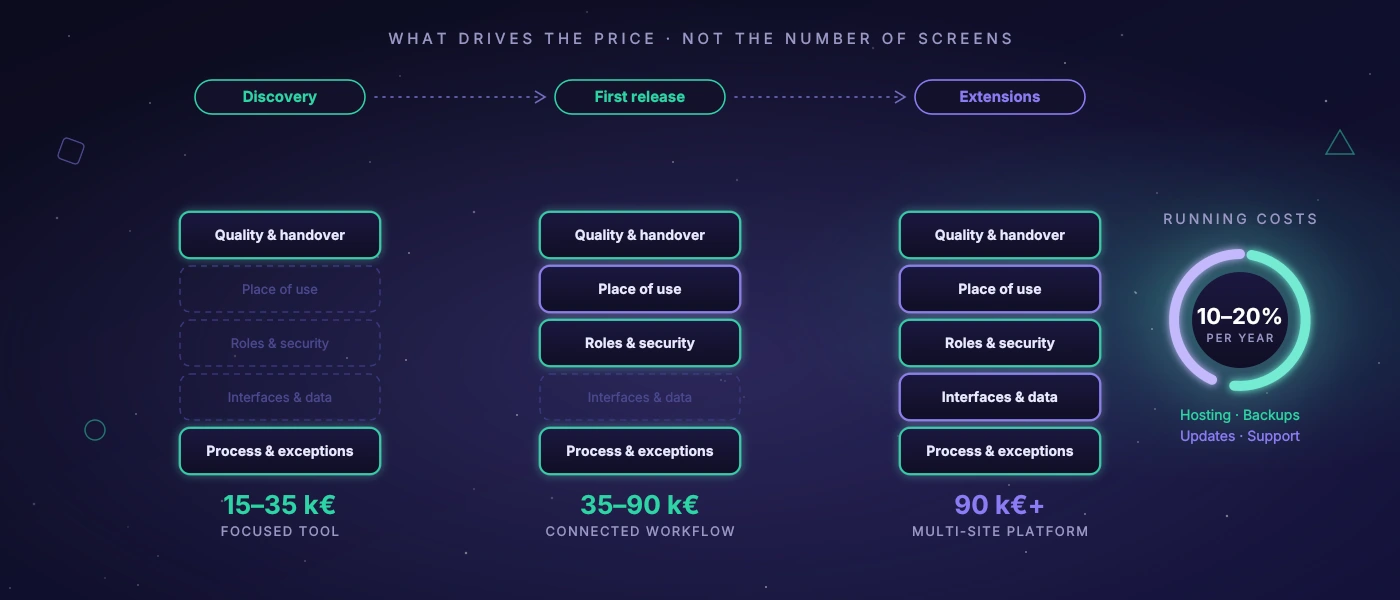
For small, clearly scoped applications, realistic project budgets are often between 15,000 and 35,000 euros. That could be an internal web application that captures orders in a structured way, makes status changes traceable and generates documents.
As soon as several roles, mobile use in the warehouse, document printing, permission concepts or interfaces come into play, projects often land between 35,000 and 90,000 euros. Systems with several sites, complex integrations, historised data, demanding planning or high availability requirements start closer to 90,000 euros and can go well beyond.
These ranges are not fixed prices. They serve as orientation for companies weighing an extended spreadsheet, off-the-shelf software and a custom application. What matters is not whether an application has ten or fifty screens. What matters is which errors it prevents, which work steps it shortens and how reliably it has to work under real conditions.
An example: a simple input form for delivery data is quickly built. A solution that processes barcodes at goods receipt, updates stock, knows partial quantities, documents blocking reasons, prints labels, generates delivery notes and reports discrepancies to an existing ERP is a different project. The visible screen is only part of the work. The rules behind it determine effort and price.
The biggest cost drivers of a custom system
Process clarity and exceptions
A cleanly described process saves development time. That does not mean a company has to write a hundred-page specification before the project starts. But it should be clear who triggers what, which data is needed and when a case counts as done.
The real costs often arise in the exceptions: what happens with a wrong delivery? May a shift lead change bookings afterwards? How is a partial delivery handled? Must an order be blocked when data is missing? Such questions are not a side issue. They define whether the software holds up in daily work or is bypassed at the first deviation.
Interfaces and data quality
An application without connections to other systems is easier to estimate. As soon as data is exchanged with an ERP, shop, shipping provider, time tracking, machines, scanner hardware or customer systems, effort rises. Not only because of the technical connection, but because of the responsibility for correct data.
An interface needs clear rules: which system is the leading one? What happens when a transfer fails? Are duplicates detected? How are changes logged? An API that exists on paper does not answer these questions automatically. Especially in grown system landscapes, clarifying the data is often more valuable than a quick integration.
Roles, security and traceability
In many businesses not everyone should see or change everything. Warehouse staff need different functions than dispatch, administration or management. Add password policies, account lockouts after failed attempts, approvals and the question of which changes must be traceable later.
A robust permission concept takes time but prevents expensive consequential damage. When stock, delivery addresses, price information or inspection records live in the system, access control is part of the functional solution - not just a technical extra.
Usability at the actual place of use
Software for the desk can be planned differently from software for the warehouse floor, workshop or loading ramp. There, large controls, few inputs, scanner support, understandable feedback and a view that also works on smaller devices count.
If labels, delivery notes or inspection records are needed, printers, paper formats and output rules must be considered early. A process that looks clean in the office can fail on the handheld scanner or at the label printer. Good planning reduces such rework.
Quality, operation and documented handover
A working prototype is not automatically production-ready software. A productive application needs automated tests, error handling, backups, monitoring, deployment and technical documentation in the calculation. For a modern web application, for example, PHP 8.4, modern JavaScript and MySQL 8 can form a solid, maintainable foundation. The technology is not an end in itself. It has to make operation easier over the years.
Testing effort also depends on risk. If an incorrect display can be corrected internally, different standards apply than for an application that generates shipping documents every day or processes sensitive inspection data. Boring, provable reliability is more valuable in such cases than a fashionable technology experiment.
A concrete budget example from logistics
Take a mid-sized company that so far coordinates goods receipts via paper lists and Excel. It is looking for an application for three to five user groups: goods receipt, warehouse, dispatch and administration. It should capture deliveries, check line items, document discrepancies, print labels and make the status visible to others involved.
If the process is clear and no deep ERP integration is needed at first, a first productive stage could cost roughly 40,000 to 65,000 euros. That would typically include process analysis, UX concept, development, testing, setup and rollout. If bidirectional interfaces, complex stock logic, several clients or offline capability are added, the budget may be closer to 70,000 to 120,000 euros.
The better question is therefore not: can we build everything at once? But: which section removes friction demonstrably first? It is often worth taking goods receipt as the first expansion stage live, gathering experience and then adding shipping, inventory or route planning. A sensible project scope protects budget and acceptance.
Why cheap offers can become expensive later
A low offer is not bad per se. It can fit if scope, data model and operating requirements really are small. It becomes problematic when an offer only prices the visible screens but allows no time for coordination, exceptions, tests, permissions, data migration or rollout.
Then the open points show up later as change requests. Or they are not solved at all, and staff start keeping shadow lists again. That causes double maintenance, uncertainty about the data state and dependence on individuals. The cheapest implementation is not always the one with the lowest entry price, but the one with an honest, traceable scope.
A serious offer therefore often separates discovery, first release and possible extensions. In a short preliminary phase, processes, risks, data sources and priorities are clarified. That costs money but lowers the likelihood that the team spends months on features nobody uses at the workplace.
Running costs are part of the decision
After rollout, running costs arise for hosting, backups, monitoring, security updates, support and further development. As a rough guide, many companies budget around 10 to 20 percent of the initial development cost per year. For very stable, small applications it can be less. For systems with many integrations, heavy use or ongoing regulatory requirements it can be more.
These costs are not a sign of a bad system. Software remains part of operations: browsers change, interfaces evolve, staff have new requirements. What matters is whether the system is built so that changes stay plannable. Documented deployments, understandable data structures and automated tests contribute exactly to that.
When custom software is not the right choice
Not every process needs its own application. If a spreadsheet is maintained by two people, errors are rare and the process stays stable, it can be the most sensible solution. Off-the-shelf software also makes sense if your own process largely follows an established industry standard and adjustments would only be cosmetic.
Custom software pays off where the workflow is a direct competitive advantage, standard solutions permanently force awkward detours, or media breaks regularly cost time and cause errors. It also pays off when sensitive data and specific processes demand more control, for example with internally operated test systems for web or Windows applications.
Before commissioning, a provider should be able to answer three things clearly: which process is solved in the first release, which assumptions are in the budget and which ongoing tasks remain after go-live? Whoever gets these answers in concrete form can assess an investment objectively. The best next step is usually not the biggest platform but the smallest solution that demonstrably works better on the warehouse floor, in the office and in later operation.