
Warehouse Management Systems: What Really Matters
When an employee in goods receipt jots down the same delivery line on paper, later transfers it into a spreadsheet, and then clarifies by shouting across the aisle where it gets stored, willingness to work rarely is the problem. What's missing is a shared process. Warehouse management systems create that process by documenting stock movements, inventory, and follow-up tasks in one place. For small and mid-sized companies, the decisive factor isn't the longest feature list, but whether the software reliably maps the journey of a good through their own warehouse.
What warehouse management systems must deliver day to day
A warehouse management system, or WMS for short, isn't just a better stock list. It controls or documents the physical processes in the warehouse: goods receipt, quality check, put-away, transfer, picking, packing, shipping, and stocktaking. Every booking answers a simple operational question: what is where, in what quantity, in what status, and who triggered the movement?
At first glance, this clarity seems banal. But it prevents typical error chains. An item has been delivered but hasn't yet been checked. A pallet sits in goods receipt but is already shown as available in the system. An order gets picked even though the goods should be reserved for a more important customer order. Without clearly defined statuses and movements, a single ambiguity quickly turns into a wrong delivery promise.
For many mid-sized warehouses, the benefit doesn't start with full automation. Simply having tracked put-away tasks, unambiguous storage locations, and mobile bookings can noticeably cut search times. What matters is that staff no longer have to translate between paper, phone, email, and several spreadsheets.
Not every warehouse needs a large suite
The market offers extensive enterprise systems with functions for global multi-site networks, complex customs handling, automated conveyor technology, and very fine-grained optimization logic. That can be the right choice if these requirements genuinely exist. But for a company with one or a few warehouses, shifting priorities, and well-established special-case processes, such a suite can create more friction than benefit.
The costs then aren't just in licenses. They arise in long implementation projects, extensive customization, training, and dependency on external specialists. Even a system with a hundred settings doesn't solve a problem if shift leads have to open a ticket for everyday corrections.
The alternative doesn't necessarily mean full custom development. A standard product can be a sound choice when its core workflows fit and customizations stay deliberately limited. Likewise, an existing spreadsheet can still be the best solution, for example for a rare, manageable evaluation. It becomes critical only once several people work with it simultaneously, enter movements with a delay, or the spreadsheet is meant to become the operational truth about available stock.
The right solution is guided by actual process volume and the cost of errors. Five wrong picks per week mean something different in a spare-parts warehouse with time-critical customer orders than five deviations in a slow-moving archive stock.
Capture the processes first, not the screens
Many WMS projects start with a product demo. There, decision-makers see slick dashboards, scanner views, and colorful metrics. More useful, first, is a walk through the warehouse during a normal working day. Where does the goods arrive? Who checks quantities and damage? When does an item get its batch or serial number? How is it decided which location it goes to? And what happens when reality deviates from the order?
These questions lay the foundation for a solution that gets accepted later. A well-documented target process doesn't just describe the ideal case. It also covers exceptions: partial deliveries, damaged goods, unannounced deliveries, stock shortages, returns, and blocked stock. It's precisely these cases that decide whether staff trust the system or reach for notepaper again.
Statuses matter more than pretty interfaces
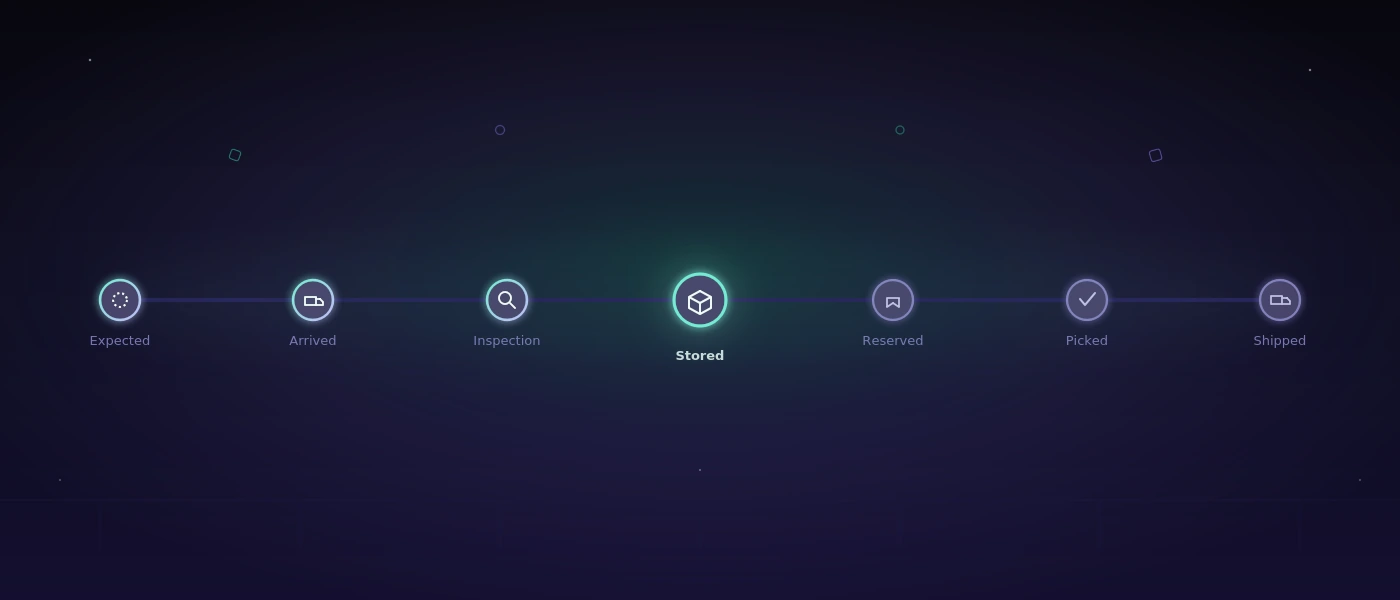
A clean dataset distinguishes, for example, between "expected," "arrived," "under inspection," "put away," "reserved," "picked," and "shipped." Which statuses are necessary depends on the operation. Too few obscure relevant differences. Too many slow down bookings and get bypassed.
The rule should be: every status must have an operational consequence. If goods are blocked, they mustn't be picked. If reserved, it must be visible for which order. If put away, a storage location must be recorded. That's how data rules turn into practical process reliability.
Scanners only help with clear bookings
Barcodes and mobile devices reduce typing errors and speed up movements. But they don't replace a process decision. A scan must trigger an understandable action: check item, confirm quantity, choose destination location, or complete order. If an employee has to guess after every scan which screen comes next, the workflow is designed too complicated.
The hardware question should also be answered pragmatically. For some teams, smartphones with a suitable scanning function and a sturdy case are enough. Others need industrial handheld scanners, because gloves, cold storage, drops, or long shifts demand it. A pilot on the actual warehouse floor shows more than a presentation at a desk.
The technical foundation decides after go-live
A WMS must work correctly even when goods receipts are being booked, orders are being picked, and stock is being checked all at the same time. That produces requirements that often get lost in early conversations: unambiguous movement logs, role-based permissions, traceable corrections, reliable interfaces, and backups that can actually be restored in an emergency.
Stock shouldn't simply be overwritten. Better is a movement model: receipt, issue, transfer, block, or correction each generate a logged record. That way it can later be traced why a quantity is off. This is just as valuable for stocktaking as for resolving a customer complaint case.
Permissions must match responsibility. A picker needs different functions than a warehouse manager who releases stock corrections. For critical changes, justifications, four-eyes approvals, or at least an immutable change log make sense. The effort depends on the risk profile, but the question should be settled before the start.
Interfaces deserve the same attention. A warehouse rarely works in isolation. Orders come from a shop, an ERP, or a structured import. Shipping data goes to carrier systems, delivery notes and labels get generated, stock data flows back. Every interface needs clear responsibilities for error cases. What happens if a shipping label was generated but the confirmation never reaches the WMS? Without retry logic and a visible error queue, such cases end up stuck with individual people.
For custom-built solutions, maintainable technologies aren't a side issue. A traceable application with a clear database structure, documented deployments, and tested integrations stays manageable even after staff turnover. Trendy architecture doesn't help if no one can trace a faulty import.
Rollout in small, controllable steps
A big bang creates avoidable risk. It's often more sensible to first digitize a bounded process, such as goods receipt for one product group or picking in one warehouse area. The team then checks not just functions, but also wording, scan routes, walking distances, and responsibilities.
Master data is often the real construction site here. Item numbers must be unambiguous, units of measure consistent, storage locations sensibly structured, and packaging units clearly defined. A system can't deliver reliable stock figures if the same item appears under three different names, or a "box" means a different quantity depending on the supplier.
During the pilot phase, metrics should stay simple: how long does goods receipt take? How many bookings need correction? How many picks are faulty? How often is stock searched for? Not every improvement shows up immediately as a large cost line item. Fewer follow-up questions and more reliable delivery information can already take significant pressure off day-to-day operations.
Training works best directly at the process. Staff don't need an abstract walkthrough of every menu item. They need to know how to book their next delivery, report a deviation, or correct a wrong scan. For the first shifts after launch, a responsible person should be reachable who can make decisions quickly.
The right question for the selection
With warehouse management systems, the central question isn't: which software can do the most? It's: which workflows need to become faster, clearer, and more traceable for our team, every day?
Whoever describes these workflows clearly first can objectively evaluate standard software, extensions, or a purpose-built application. The result doesn't have to look spectacular. It should ensure that goods find their way, stock remains trustworthy, and the people in the warehouse spend less time searching, asking, and correcting afterward.