
Test Automation Comparison: Which Approach Fits Your Application?
When month-end closing, shipping approval or a new customer portal stalls because of an error, no tool demo with impressive dashboards helps. A test automation comparison must therefore start with the actual application: which workflows must not fail, how often do they change, and what evidence does the team need when a test fails?
For many companies the bottleneck is not the lack of a single test tool. It is manual regression testing, unclear responsibilities, test data in production-like systems and results nobody can reliably explain. The right solution reduces that risk. It does not automate as many clicks as possible at any cost.
Test automation compared: four approaches
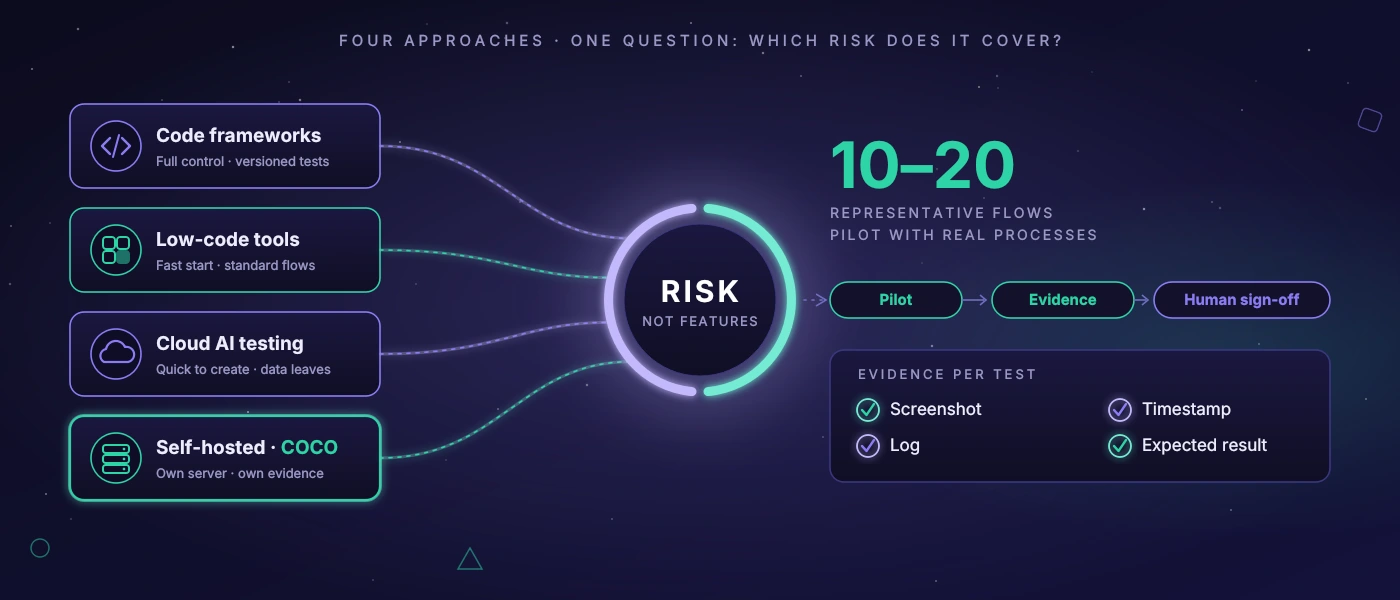
Four approaches usually meet in the market: classic code-based test frameworks, low-code or no-code platforms, cloud-based AI tools and individually operated test infrastructure. None of them is inherently superior. The difference lies in the application types, security requirements and the team's ability to maintain the tests over the long term.
Code-based frameworks give development teams a lot of control. They can be built into existing build and deployment processes, version test logic in the source code and are particularly well suited to web applications with a stable technical architecture. The price is clear: tests are software. They need reviews, clean selectors, sensible test data and developer capacity. A poorly structured test suite becomes just as maintenance-intensive as poorly structured production code.
Low-code tools promise a faster start. Business units or QA teams can assemble test steps through interfaces without programming every check themselves. That can make sense for clearly delimited standard workflows, for example a web application with a few recurring approval processes. As soon as many special cases, dynamic interfaces or complex permissions are added, however, the work often just shifts: away from code, towards maintaining recordings, variables and exception rules.
Cloud-based AI testing offerings complement these approaches with image recognition, self-healing promises or natural-language test descriptions. That can speed up creation. But those responsible should ask precisely which data leaves the company. Screenshots, user interfaces, error messages and test data can contain trade secrets, personal data or insights into internal processes. For a public shop front end this trade-off is different from that for internal dispatch software or a Windows application in manufacturing.
Your own or self-hosted test infrastructure is usually not a quick start by credit card. It requires setup, monitoring and clear operational responsibility. In return, test traffic, screenshots and evidence stay under your own control. That is particularly relevant when web and desktop applications, sensitive data or industry-specific compliance requirements come together. At softify.pro, COCO is designed for exactly this case: a dedicated AI server that runs tests, records evidence and produces understandable assessments without passing internal test data on to an external cloud service by default.
Don't compare features, compare failure risks
A long feature list looks objective but is rarely the right basis for a decision. What matters is which class of failure a system is meant to cover. A login failure after a change to the account lockout is critical if employees cannot start work. A wrongly calculated stock level can lead to picking errors. A shifted button in a rarely used view may have a much lower priority.
A robust selection therefore starts with ten to twenty representative workflows. These include more than ideal cases. Check, for example, what happens with missing required fields, how different roles behave, whether a delivery is printed again after correction or how the system reacts to timeouts. It is precisely at these points that differences show between a convincing demonstration and a usable test operation.
The test frequency should also follow the risk. Starting a complete end-to-end test of all workflows after every commit sounds thorough but may block development. Fast technical checks can run on every change. Business-critical end-to-end scenarios run at a release, overnight or before a production approval. A good setup makes visible why a test runs at which stage.
Maintainability decides after the first quarter
Automated tests have a bad reputation when they turn red after every small interface change. Often this is not due to the chosen product but to the test construction. A test that relies on position, colour or randomly generated content is fragile. Better are unambiguous technical identifiers, stable test data and reusable steps for login, role selection or order creation.
In a test automation comparison it is therefore worth looking at everyday maintenance. Can the team quickly trace failed steps? Are screenshot, timestamp, log and expected result stored together? Can individual tests be repeated selectively? And is it clear who assesses a failed test from a business perspective and who fixes the technical cause?
Especially for long-lived applications, compatibility with your own architecture also counts. Modern JavaScript interfaces behave differently from server-rendered PHP applications. Windows desktop software needs different control and observation options than a browser. Anyone testing both should not choose a solution that handles one area only through workarounds.
AI as a testing aid, not as an approval authority
AI can relieve test teams in a meaningful way. It can prioritise anomalies, detect changes in screenshots, describe test steps in understandable language or derive recurring failure patterns from many logs. That saves time in triage, that is, in deciding which red message really needs to be investigated.
It does not, however, replace business approval. A model can recognise an unusual interface but cannot reliably decide whether a price approval is legally correct or whether a stock deviation remains permissible in the specific process. Such cases need explicit rules, defined expected values and a responsible person.
With AI features, ask about confidence thresholds and escalation logic. If a system only reports a deviation with high certainty, subtle errors can go undetected. If it classifies every slight image difference as an error, alarm fatigue results. The right threshold depends on the process and should be set on the basis of real test runs, not general marketing promises.
Assess data, operation and costs honestly
The licence is only one part of the cost. Also include time for test case selection, test data maintenance, adjustments after releases, infrastructure and evaluation. A cheap tool can become expensive if three people sort false alarms every week. Conversely, an individually set up test server can be economical if it reliably catches critical regressions and shortens manual acceptance days.
With test data, restraint makes sense. Where possible, anonymised or purpose-generated data should be used. Production copies often contain more information than a test requires. If data is stored locally or in your own network, access rights, retention periods and logging must still be regulated. Self-hosted does not automatically mean securely operated.
Also plan for the failure of the test system. If an overnight run fails, it should be clearly recognisable whether the application is faulty, the test environment was unreachable or a dependency such as a mail server was missing. This separation saves a lot of time in the morning and prevents wrong approval decisions.
Start with a limited pilot
The most sensible comparison rarely arises in a presentation but in a pilot with real workflows. Choose a process with tangible business value but manageable complexity. A login with role check, the creation of an order and the output of a delivery note may be more suitable than modelling the entire system landscape straight away.
Define in advance what success means: for example a certain execution time, traceable error evidence, no transfer of sensitive data to the outside and maintenance that the existing team can handle. After a few release cycles it becomes visible whether the chosen method only looks good or actually takes work off your hands.
The best test automation is not the one with the most automations. It is the one whose results a team understands, trusts when it comes to approvals and that can still be operated sensibly after the next process change.