
Planning a Software Rollout: How to Introduce It During Ongoing Operations
A new system rarely fails because a button is missing. It fails on Monday morning: the early shift can't find goods receipt, a delivery note gets printed twice, or an Excel file suddenly becomes the unofficial truth. Anyone who wants to plan a software rollout therefore has to do more than introduce functions - they have to secure real operations.
Especially in the warehouse, workshop, dispatch, and administration, a rollout isn't an IT appointment. It changes hand movements, responsibilities, and information paths. A good introduction keeps work moving, makes errors visible early, and gives staff a clear answer to the decisive question: what do I do differently from tomorrow?
The rollout begins before the first training session
Many projects start with a feature list: capture orders, book warehouse movements, print shipping labels, plan routes. That's necessary but not enough. Before the start, it has to be clear which processes should actually run through the new system on the first productive day - and which deliberately shouldn't yet.
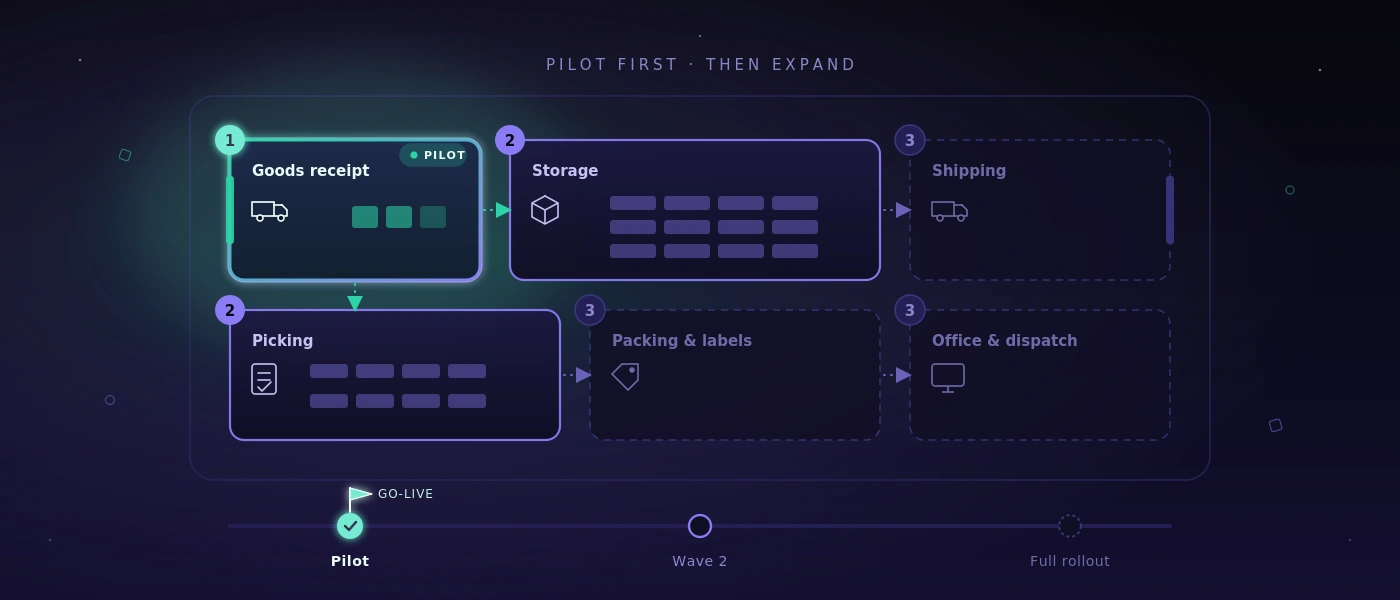
This delineation isn't a sign of incompleteness. It reduces risk. If a mid-sized business has so far coordinated goods receipts via paper, phone, and spreadsheets, it doesn't have to digitize complete stock management, returns handling, route planning, and supplier evaluation all on the first day. A sensible first scope might lie in goods receiving, unambiguous warehouse movements, and printing delivery documents.
What matters is describing the target process concretely. Not: "Goods receipt goes digital." But: "The employee scans the delivery, checks quantity and condition, assigns a storage location, and creates a transaction for purchasing in case of deviations." Only at this level do open questions become visible: what happens when an order is missing? Who may correct quantities? May a delivery without a label be put into storage?
Planning a software rollout means: prioritizing critical workflows
Not every process carries the same weight. An outage in master data maintenance can be unpleasant. An outage in shipping, picking, or invoice approval can block a whole day's work. That's why the rollout needs prioritization by operational risk, not by the order in the requirements specification.
A simple classification has proven its worth: business-critical, important, and postponable. Business-critical are all workflows that move goods, money, or binding customer communication. Important are functions that speed up daily work, but whose outage can be cushioned manually for a transitional period. Postponable are convenience functions, rare special cases, or reports that may initially still come from an existing source.
This classification influences testing depth. For a critical shipping process, it's not enough to click through a single order successfully. Partial deliveries, cancellations, missing printers, wrong addresses, parallel processing, and the handover to the carrier also have to be tested. For a rarely used statistics function, a later test cycle can be appropriate.
Make success criteria measurable in advance
"The application runs" isn't an acceptance criterion. Verifiable statements are better: a goods receipt of 30 line items can be booked within ten minutes. Shipping labels get printed at the designated workstation. Stock changes appear immediately in dispatch. A locked user account can only be reactivated through the defined approval process.
Such criteria connect the business department and development. They also prevent acceptance from turning into a collection of vague impressions. Not every piece of feedback has to be resolved before go-live. But every piece of feedback needs classification: critical error, relevant improvement, or item for a later expansion stage.
Data migration: only clean data deserves trust
Old data is often underestimated. Spreadsheets contain duplicate item numbers, different units, expired customer addresses, and stock levels whose origin nobody can explain anymore. Whoever takes over this data unchecked moves old ambiguity into a new system - just with a better interface.
Before migration, it should be determined which data is really needed. Current items, active customers, open orders, relevant suppliers, and verified opening stock are often sensible. Historical records don't necessarily have to move completely into the new application. It can be enough to archive them readably if they remain necessary for evidence or queries.
A trial load is especially important. Data isn't just imported technically, but checked functionally: do quantities, units, and assignments match? Are required fields complete? Can typical orders be processed correctly with it? For go-live, a clear cutoff date is then needed. From when is which system the leading one? Without this rule, duplicate maintenance and contradictory stock levels arise.
Pilot operation instead of one big switch
A big bang can make sense if a small team uses a clearly delimited process and the old and new solutions can't work in parallel. In most operational environments, though, a pilot operation is the more controllable choice.
The pilot should work with real cases, but within a limited scope: one warehouse area, one shift, one product group, or a selected team. What matters is that the pilot group doesn't consist only of especially tech-savvy employees. It should realistically represent later daily work, including the people who work under time pressure and have justified objections.
In pilot operation, it becomes clear whether scanners, printers, network, and permissions work at the actual workstation. Process gaps that nobody mentioned in meetings also become visible. Perhaps goods are initially put down at an intermediate spot in daily practice. Perhaps drivers need a different delivery note than administration. Such insights aren't a setback. They're the reason to run the pilot before the full-scale start.
Training as a work situation, not a software tour
A training session that only explains menu items creates little confidence. Employees have to learn through their tasks: "You accept a damaged delivery," "You pick an urgent order," "You correct a wrongly booked quantity." The context sticks because it matches daily work.
Short training sessions close to go-live are usually more effective than one long appointment weeks earlier. Concise work instructions directly at the workstation also help. They shouldn't explain the whole system, but show the most common transactions, clear responsibilities, and the path in case of disruptions.
Also name contact persons per area. These people don't have to solve every technical problem themselves. But they should be able to decide whether it's an operating error, a functional ambiguity, or an actual system error. That protects the project team from unstructured shouting-in and speeds up help for the shift.
Go-live needs an operating plan
Go-live day needs more than a time. Define who decides on the business side, who is responsible for technical changes, and through which channel disruptions are reported. For critical workflows, it should be visible whether central functions work: login, permissions, data capture, interfaces, printing, and backup.
A fallback plan belongs too. That doesn't mean returning completely to the old world at the slightest problem. It means determining in advance which disruption justifies a stop, how orders are documented if necessary, and how they get cleanly re-entered afterwards. A paper form for a few hours can be reasonable. Permanent parallel operation without end is not.
Technical details count here: have accounts been created in time? Do roles and account-lockout rules take effect correctly? Are label printers connected to the right templates? Does a tested database backup exist? For custom-developed applications, documented deployments, traceable version states, and a clear path for bug fixes are standard.
The first weeks decide acceptance
After the start begins the phase in which an application either becomes a work tool or an unloved extra step. So plan short daily feedback loops. Which errors occur repeatedly? Where do detours arise? Which fields are misunderstood? Which report is a manager really missing?
Not every observation demands an immediate change. Some problems resolve through more precise work rules or better training. Others show real weaknesses in the process or the application. The art lies in not confusing the two. A system shouldn't make existing, working processes more complicated without reason. If a well-maintained spreadsheet is still the better solution for a rare special case, it may stay.
Measure the effect using a few concrete metrics: processing time per transaction, number of follow-up questions, miscoded postings, reprints, open orders, or stock discrepancies. Only these values show whether the rollout actually improves operations - instead of merely introducing new screens.
A good rollout doesn't feel like a project after a few weeks. It becomes a reliable work routine: the right data is where it's needed, exceptions are traceable, and teams have to chase after information by phone less. That's exactly what planning should aim for - not a spectacular launch day, but a calmer, better controllable daily routine.