
Planning Multiplatform Application Development: Process First, Platform Second
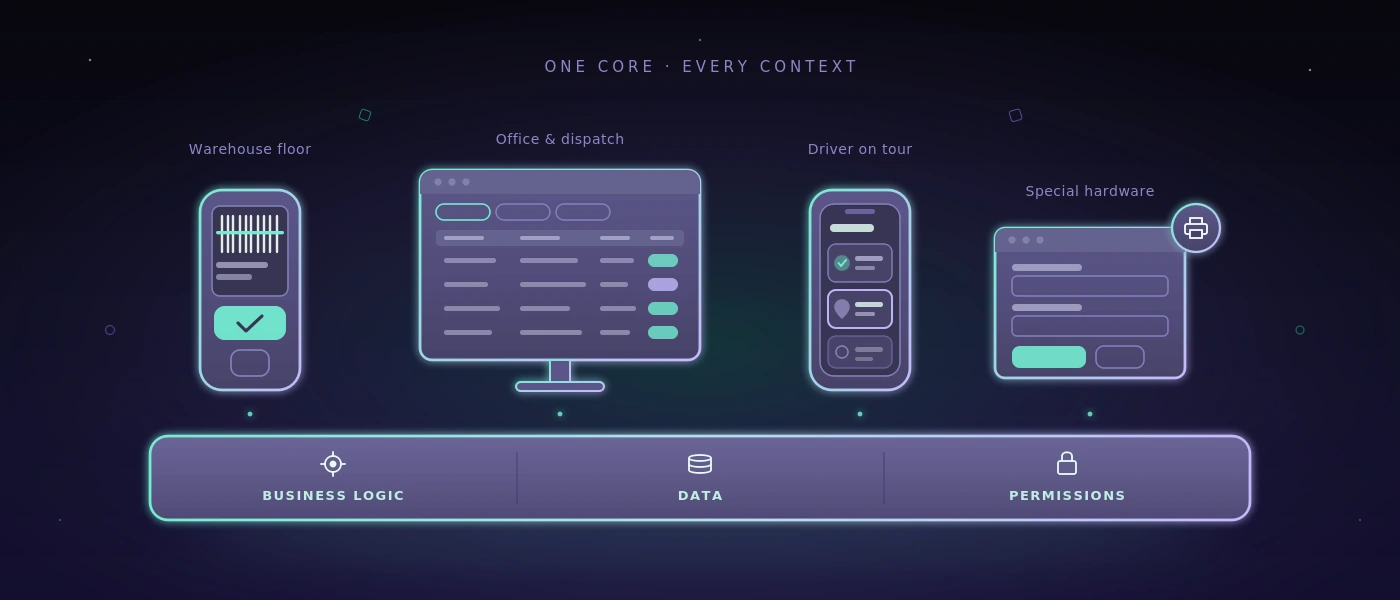
A warehouse manager confirms a goods receipt on a handheld scanner. Dispatch checks the same transaction in the browser. A driver needs the delivery status on the road on a smartphone. Multiplatform application development sounds like a technical question at this moment. In reality, it's first about an operational workflow: what work has to get done where, with what reliability, and on which device?
For small and mid-sized companies, the right answer is rarely: we build everything natively for every platform. More often it is: we define a shared process, deliberately pick the necessary user interfaces, and avoid duplicate logic. That doesn't just save development budget. It also prevents the warehouse, the office, and the field service from working with different data states.
What Multiplatform Application Development is supposed to deliver
Multiplatform Application Development refers to building an application that is usable in several environments, such as the web browser, on iOS and Android, or on Windows desktop systems. The term is often reduced to the question of whether a single codebase can produce several apps. That's only part of the decision.
For operational systems, what matters most is whether the application works where it's used. A goods-receiving area may need a camera for capturing barcodes, large controls for gloves, and a usable response when Wi-Fi coverage is unstable. Administration, by contrast, needs tables, filters, permission concepts, and traceable change logs. A driver needs a reduced view, not the same interface as dispatch.
A shared technical foundation can sensibly connect these requirements. But it mustn't lead to each platform being served like a poor compromise. The best shared code is worthless if staff take detours because the application doesn't reflect their actual workflow.
Define the process first, then the platform
Before teams talk about frameworks, they should examine one concrete transaction from start to finish. Take a delivery: an order comes in, goods are picked, a delivery note is generated, the handover is confirmed, and the status is reported back to sales or customer service. Where does a media break occur today? Where is something noted on paper, retyped later, or queried by phone?
This observation separates real platform requirements from wish lists. If only two office employees use a function, a well-made web interface is usually enough. If ten people on the warehouse floor make bookings, a mobile, scanner-friendly interface can make the difference. If an existing Windows program has to work with special hardware, a desktop integration may be necessary.
Not every function belongs on every device. That's not a flaw of a multiplatform-capable solution, but a sign of clean product decisions. Shared data and business rules don't necessarily mean identical screens.
The three questions that clarify cost and benefit
The first question is: which devices are already in use, and how long will they remain so? A business with managed Windows terminals has different requirements than a field service with private smartphones. The second is: what happens without a network connection? Offline capability increases effort considerably, because data has to be stored locally, synchronized later, and handled cleanly in case of conflicts. It makes sense if the process would otherwise come to a standstill - not as standard equipment.
The third question concerns the consequences of failure. Can an employee enter a booking later, or does a shipping label, a stock level, or a safety release depend on it? The more critical the transaction, the more strongly permissions, validation rules, repeatability, and logging have to be planned.
An architecture that doesn't fall apart at the second platform
With a sustainable solution, the business logic isn't scattered across several interfaces. Stock checks, status changes, number ranges, permissions, and document generation need a central, tested foundation. Browser, mobile application, and desktop client access it through clearly defined interfaces.
For many internal business processes, a modern web application is the most economical starting point. It can be updated centrally, needs no installation on every workstation, and works on desktop, tablet, and smartphone. With PHP 8.4, modern JavaScript and MySQL 8, a maintainable foundation can be built, provided the data model, access rights, and deployment aren't only considered shortly before go-live.
An installable mobile or desktop application gets added when it brings a clear advantage: deep integration with scanner, printer, or camera, reliable offline operation, special background functions, or requirements from device management. That's a targeted expansion, not an end in itself.
A common mistake is reusing the user interface completely at any price. Technically, that can look attractive. In practice, it produces small text on large monitors, overloaded forms on smartphones, or controls that don't fit the platform. It's better to share the data model, rules, and components where it makes sense, while tuning the operation to the respective context.
Data consistency matters more than a shared codebase
Multiple platforms increase the risk of contradictory data. An order is changed in the office while a driver still sees an old version on his device. Two employees book the same item stock at the same time. An offline device sends its changes back hours later. These cases aren't a side issue, but the core of the architecture.
The system therefore needs unambiguous identities, timestamps, traceable state changes, and rules for conflicts. For a delivery status, the most recently confirmed change may be sufficient. For stock levels, that's often too coarse. There it has to be clear which movement was booked, from which storage location it originates, and whether a correction has to be justified.
Permissions also belong in a central place. An employee may be allowed to record goods receipts, but not approve stock corrections. An external driver may only see his route. Session lifetimes, multi-factor authentication for critical roles, and account-lockout flows aren't decorative security features. They protect concrete workflows and make responsibilities visible.
Testing Multiplatform Application Development the way people actually work
An application can start on three operating systems and still fail in operation. What matters are the workflows under real conditions: the scanner reacts too slowly, a label printer isn't reachable, a permission doesn't take effect after a role change, or a synchronization produces duplicate bookings.
That's why critical processes should be tested automatically. These include login and lockout behavior, order entry, stock movements, document creation, and the handling of faulty input. For web and Windows applications, recurring tests can be run on a self-hosted infrastructure. That's especially relevant if screenshots, internal order data, or test accounts shouldn't be passed on to external cloud services.
Automation doesn't replace checks by people on the warehouse floor. But it ensures that known workflows get checked again and again after changes. Good test reports don't just name a technical error, but the affected process: delivery proof can't be generated, a user account stays locked after successful approval, or route data isn't updated.
When a platform strategy is too much
Some companies don't need their own app. If stable browser access is enough, the workflow is rarely mobile, and the number of users stays manageable, a responsive web application is often the more sensible choice. It reduces maintenance effort, distribution problems, and the number of possible sources of error.
An existing spreadsheet doesn't have to be replaced immediately either. If it only serves as a simple evaluation, is maintained by one person, and doesn't create error-prone handovers, it can fulfill its purpose. The time for a system has come when knowledge sits in individual heads, versions drift apart, follow-up questions increase, or a transaction can no longer be reliably traced.
Conversely, a lean platform strategy quickly becomes too small when employees have to work offline, hardware gets connected, or customers and partners need controlled access. Then it's worth deliberately funding the additional requirements instead of bolting them on later under time pressure.
Start with a robust pilot
A good start isn't a feature catalog with a hundred items, but a complete, measurable workflow. For example: record goods receipt, update stock, document a deviation, and create a task for clarification. This pilot shows early whether the data model, devices, permissions, and operation fit together.
After that, the solution can grow in sensible steps: picking, shipping, route planning, or reporting. Every extension should pass the same question: does it shorten a real workflow, reduce errors, or create reliable transparency? If not, it can wait.
In the end, the most sensible platform isn't the one with the most technical options. It's the one on which a team starts its work faster in the morning, asks fewer questions during the shift, and can trace in the evening what actually happened.