
Custom Software or Standard Software? How to Decide for Your Business
A warehouse manager corrects stock levels in a spreadsheet while delivery notes are printed from a second system in the office. An employee phones to clarify the status of a delivery because the information only appears in the system after the end of the shift. In situations like these, the question of custom software or standard software is not a fundamental IT debate. It decides whether work steps become clearer in future - or whether a new tool merely creates more detours.
For small and medium-sized businesses there is no blanket answer. Standard software can be a fast, economical solution. Custom software can simplify processes considerably, but it ties up budget and responsibility. What matters is not which variant sounds more modern. What matters is how well it supports the actual operation.
Custom Software or Standard Software: The Basic Question
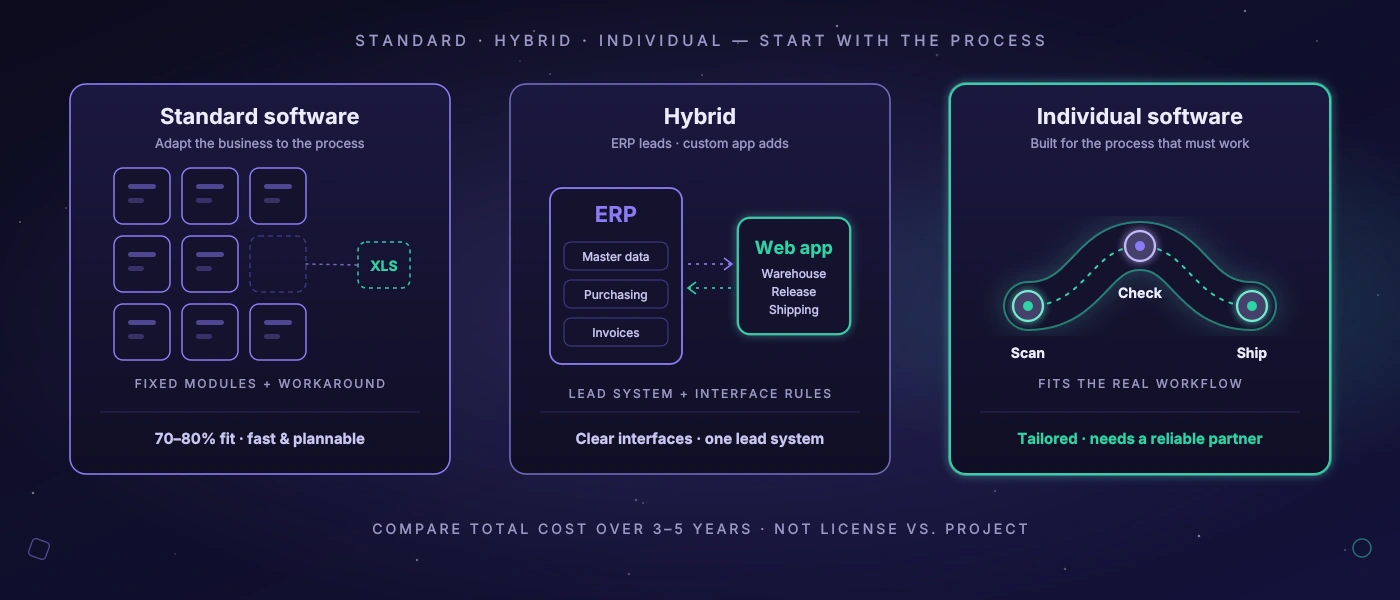
Standard software is developed for a broad market. It comes with predefined workflows, roles, screens and functions - for example for inventory management, CRM, accounting, shipping or project management. The vendor spreads development costs across many customers. That usually makes getting started cheaper and faster.
Custom software is planned and developed for one specific business. It does not necessarily reproduce every existing workflow unchanged. Good custom development first examines which steps are functionally necessary, which have grown historically and where rules are missing. Only then does an application emerge that fits the defined workflows - for example for goods receipt, stock transfers, picking, delivery documents or route planning.
The difference therefore lies not only in the range of functions. Standard software often asks: “How do you adapt your business to the intended process?” Custom software asks: “Which process should work reliably in future?” Both questions can make sense. It becomes problematic when they are not answered deliberately.
When Standard Software Is the Better Choice
If a process is common in the industry, clearly delimited and not critical to your competitive position, there is a lot to be said for a standard solution. Financial accounting is a typical example. Email, video conferencing or simple time tracking also rarely need to be built from scratch. There, the benefit of in-house development is usually out of proportion to the effort, maintenance and liability.
Standard software also makes sense when a company first has to create structure. A business that today keeps stock on paper, in personal notes and in several Excel files does not necessarily need a tailor-made warehouse management system right away. A well-introduced standard product with unambiguous item numbers, storage locations and responsibilities may be enough at first.
The advantage lies in predictability: functions are visible, references and training material exist, updates arrive regularly. Many solutions cover 70 or 80 percent of a typical need well. That share can be entirely sufficient if the remaining requirements rarely occur or can be handled with a simple, stable additional process.
A common mistake, however, is to confuse licence costs with total costs. Monthly fees are easy to compare. Less visible are implementation consulting, data cleansing, interfaces, additional modules, custom adaptations and working time spent on detours. A cheap licence can become expensive if employees transfer the same data several times or have to handle exceptions manually every day.
When Custom Software Pays Off
Custom software is not the right answer just because a team would like to have “something of its own”. It becomes economical when a recurring workflow causes considerable effort, errors or delays and standard products can only map that workflow with permanent compromises.
In a warehouse this can look very concrete: goods receipts are photographed today, quantities are entered into a spreadsheet later and discrepancies are clarified by phone. Or a shipping team creates labels in one portal, delivery notes in another and then updates the order status manually. If these breaks occur daily, the effort is no longer small. It shows up in follow-up questions, search times, incorrect postings, late information and a lack of transparency between shifts.
A tailor-made application can bring such steps together. A scan at goods receipt updates the stock, triggers a check when there are discrepancies and makes the information available directly for scheduling and shipping. Delivery documents are generated from the same order data. Permissions ensure that employees only see the functions they need. The goal is not the maximum range of functions, but a reliable workflow with fewer media breaks.
Four signs in particular suggest taking the custom option seriously:
- Employees maintain the same data in several systems or spreadsheets.
- Exceptions are part of everyday business and are organised outside the system.
- The process deliberately differs from common industry workflows and creates real benefit.
- The team can already put a figure on delays or errors in terms of time, money or customer complaints.
Not every special case justifies development. If an exception occurs twice a month, a clearly documented manual process is often the more sensible solution. If it occurs twenty times per shift, it should no longer depend on memory, shouted requests and a fragile spreadsheet.
Comparing the Costs Correctly
The comparison “licence versus development project” falls short. Standard software has ongoing licence, implementation and adaptation costs. Custom software has higher initial costs as well as expenses for operation, further development and support. Both variants need time for data migration, training and business decisions.
A view over three to five years makes more sense. What counts are not only invoices but also operating costs: How many minutes does an order take? How often is data corrected? Which errors reach customers? What does it cost when a shift waits for feedback from another department? What dependency arises when a vendor changes prices, functions or contract terms?
With custom software another question is added: is the solution maintainable? A proper commission involves more than an attractive interface. It includes a comprehensible architecture, documented deployment, regulated backups, roles and permissions, understandable data models and a plan for updates. Technologies such as PHP 8.4, modern JavaScript and MySQL 8 are not an end in themselves. They make sense when they enable an application that can be operated in the long term and the expertise for it remains available.
Equally important is the scope. A first release does not have to digitise the entire organisation. It is often wiser to begin with one workflow that delivers clearly measurable benefit - such as goods receipt and stock movements - and to connect further areas only after practical use. This reduces risk and creates early feedback from operations.
Process Fit Before Feature List
Many software selection projects begin with long wish lists. That is understandable, but rarely sufficient. A list says that a system can “print labels”. It does not say whether the label is created at the right moment, whether the data is checked, whether reprints remain traceable and whether the shipping clerk has to switch between five screens to do it.
It is better to walk through real processes. Not the idealised workflow from an organisation chart, but the Tuesday morning when a delivery arrives late, an item is missing and two employees depend on the same information at the same time. Who works with which data and when? Where are decisions made? Which exception is common? Which information must be available immediately, and which may follow later?
This analysis often also results in a hybrid. A standard ERP remains the leading solution for master data, purchasing or invoices. A custom web application complements it for the warehouse process, a specific approval or the planning of deliveries. Interfaces then have to be planned deliberately: which data source is leading? In which direction is data transferred? How are errors detected and reprocessed? Without these rules the problem merely shifts from the spreadsheet into an unclear system landscape.
Control, Operation and Data Responsibility
With standard software a company also buys dependency. That is not automatically bad. A specialised vendor can look after security updates, legal requirements and infrastructure more efficiently than a single mid-sized company. Even so, those responsible should check contract terms, export options, interface quality and the handling of their own data.
With custom software control is greater, but it requires a reliable technical partner and clear responsibilities. Who operates the application? How are security updates applied? What access exists in the event of support? What happens if the service provider changes? Documentation and clean handovers are not a side issue, but part of investment security.
This also applies to automated tests. As soon as a new function touches stock, shipping or sensitive customer data, critical workflows should be checked reproducibly. Especially for internal applications, a self-hosted test environment can make sense if screenshots, test data and application traffic do not belong in an external cloud. What matters are comprehensible test cases and documented results - not an AI label on the quote.
The Better Decision Starts Small and Concrete
Before you select or commission software, take a process with high friction losses. Measure lead time, errors, follow-up questions and manual transfers over a few weeks. Talk to the people who carry out the workflow every day. They often know not only the problems but also the exceptions on which a theoretically good system fails in everyday use.
If a standard product improves the workflow with a few acceptable adaptations, that is a good decision. If the business would permanently have to work around the system, custom software deserves a robust business case. The best solution is not the one with the largest catalogue of functions, but the one that works reliably on Monday morning and takes work off the team.