





softify.pro
Loading …
Services About COCO – our AI server Portfolio Insiders Case Studies Good to Know Contact Login

NEXT-GEN SOFTWARE AESTHETIC

Pure fluidity meets ultimate performance.

The new visual identity for modern digital workflows.

softify.pro — The new visual identity for modern digital workflows.

Scroll to explore ↓

Software, built the way modern business actually moves

softify.pro is a software studio built around one idea: technology should move as fluidly as the businesses it supports. We work at the intersection of modern web development, process automation, and applied artificial intelligence — three disciplines that rarely live under one roof, yet increasingly need to. Our clients range from small workshops digitising their first invoice run to established mid-sized manufacturers replacing spreadsheets with real logistics software. What connects them is not size, but ambition: they want systems that are fast, dependable, and genuinely pleasant to use, not just functional. Every project we take on starts from the same three questions — what does this business actually need to move faster, what already works and should be respected rather than replaced, and what part of the workflow can quietly run itself once it's built correctly. The answers shape everything that follows, from the technology stack to the rollout plan.

Services

The new visual identity for modern digital workflows.

01 — LOGISTICS

Automating logistics — built for small and mid-sized firms in the DACH region

A large share of our work is dedicated to logistics and operations software for small and medium-sized companies across Germany, Austria and Switzerland. These businesses are frequently caught between two unattractive options: expensive enterprise logistics suites designed for corporations ten times their size, or a patchwork of spreadsheets, paper forms and phone calls that quietly limits how fast they can grow.

We build the middle path — custom automation that fits the way a specific warehouse, workshop or distribution team actually operates. That can mean digitising incoming goods and stock movements, automatically generating delivery notes and shipping labels, connecting order intake to route planning, or simply replacing a fragile spreadsheet that one person understands with a shared system the whole team can rely on. Because we work directly with owners and operations managers in the DACH region, requirements are gathered in the language the business actually runs in, and rollout is planned around real shift patterns and real warehouse floors, not an abstract implementation timeline.

02 — WEB

Modern web development, built on current technology

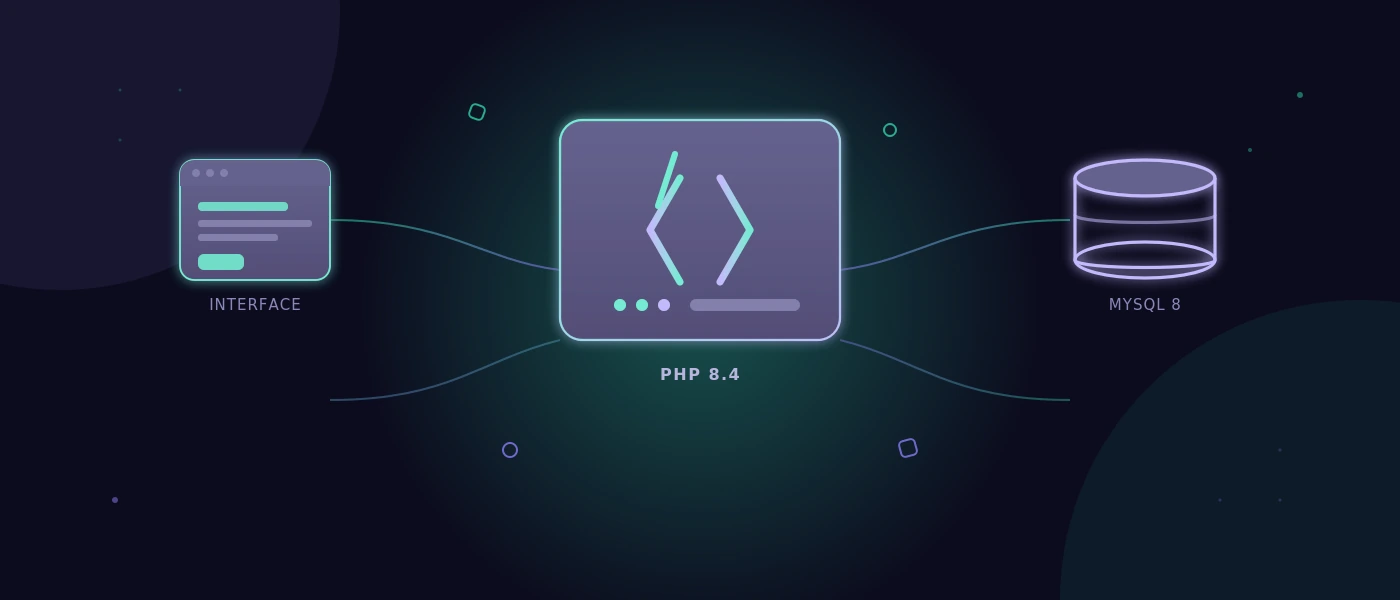
We design and build web applications and websites using current, actively maintained technology rather than legacy frameworks kept alive out of habit. That means clean PHP 8.4 on the backend where a classic server-rendered application is the right fit, modern JavaScript where interactivity matters, and MySQL 8 for data that needs to stay consistent and queryable for years, not just for the first six months after launch. Every project is planned for both desktop and mobile from the very first sketch, not adapted afterwards — load times, layout breakpoints, and touch interactions are part of the specification, not an afterthought.

Beyond the visible interface, we care about what a website looks like from the inside: readable code, a database schema that will not need to be rebuilt at the next feature request, and deployment steps that a second developer could follow without having to call us. A website that performs well today and can still be extended cleanly in three years is, to us, the actual definition of 'modern'.

03 — AI / COCO

COCO — our own AI server for automated software testing

For enterprise clients, we operate and maintain our own dedicated AI server, named COCO. Unlike a general-purpose chatbot bolted onto a workflow, COCO is purpose-built and self-hosted specifically for automated testing of web software and cross-platform desktop applications — from login and authentication flows to full multi-step business processes.

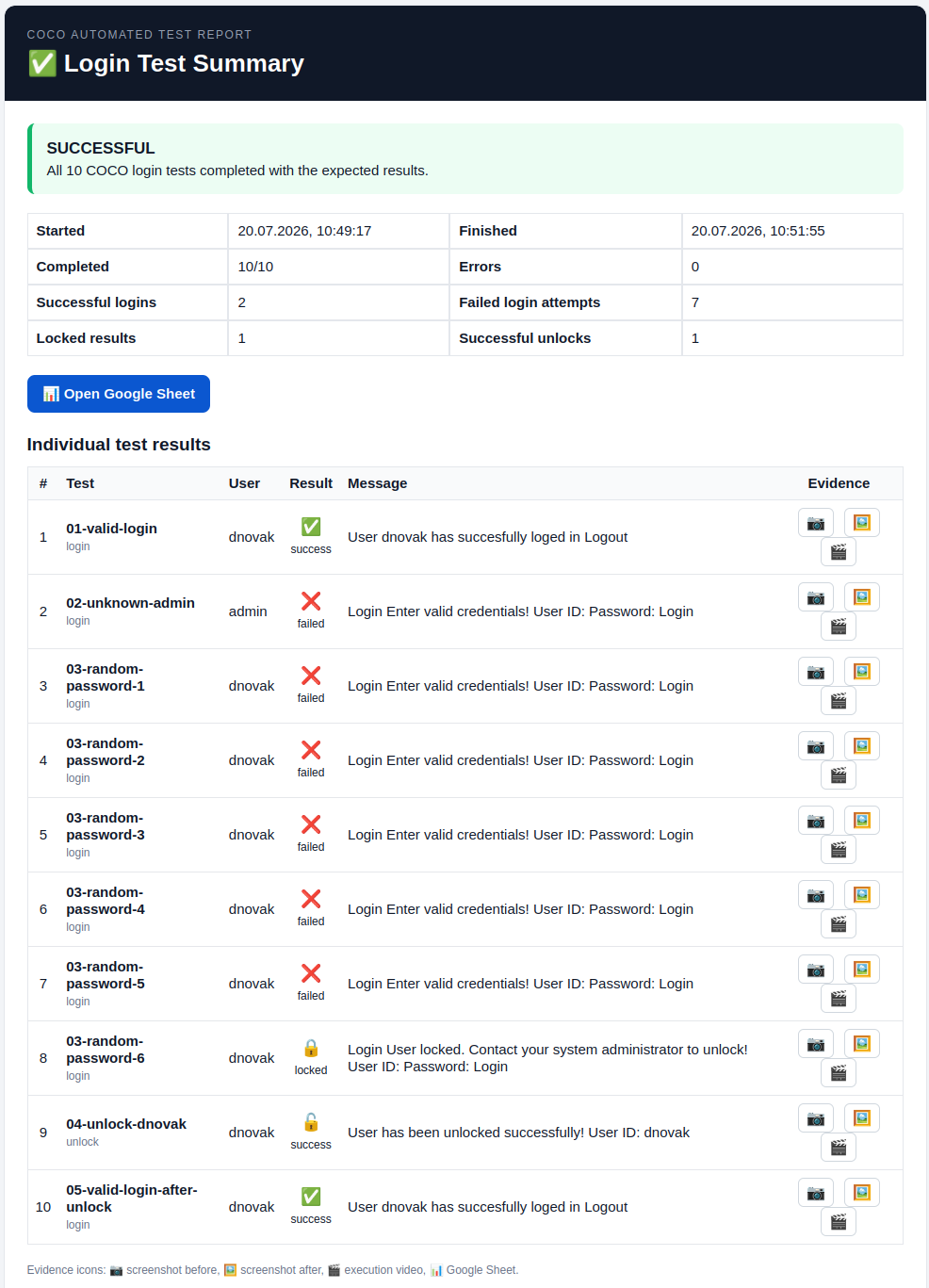
COCO plans a test scenario, executes it against the real application, captures before-and-after screenshots and execution recordings as evidence, and produces a plain-language assessment of what passed, what failed, and why — including edge cases such as repeated failed logins, account lockouts, and recovery flows that are tedious and error-prone to test by hand. Because the server runs locally under our management, enterprise clients keep full control over where test data and screenshots are stored, without sending internal application traffic to a third-party cloud service by default.

COCO — our own AI server for automated software testing

For enterprise clients, we operate and maintain our own dedicated AI server, named COCO. Unlike a general-purpose chatbot bolted onto a workflow, COCO is purpose-built and self-hosted specifically for automated testing of web software and cross-platform desktop applications — from login and authentication flows to full multi-step business processes.

COCO plans a test scenario, executes it against the real application, captures before-and-after screenshots and execution recordings as evidence, and produces a plain-language assessment of what passed, what failed, and why — including edge cases such as repeated failed logins, account lockouts, and recovery flows that are tedious and error-prone to test by hand. Because the server runs locally under our management, enterprise clients keep full control over where test data and screenshots are stored, without sending internal application traffic to a third-party cloud service by default.

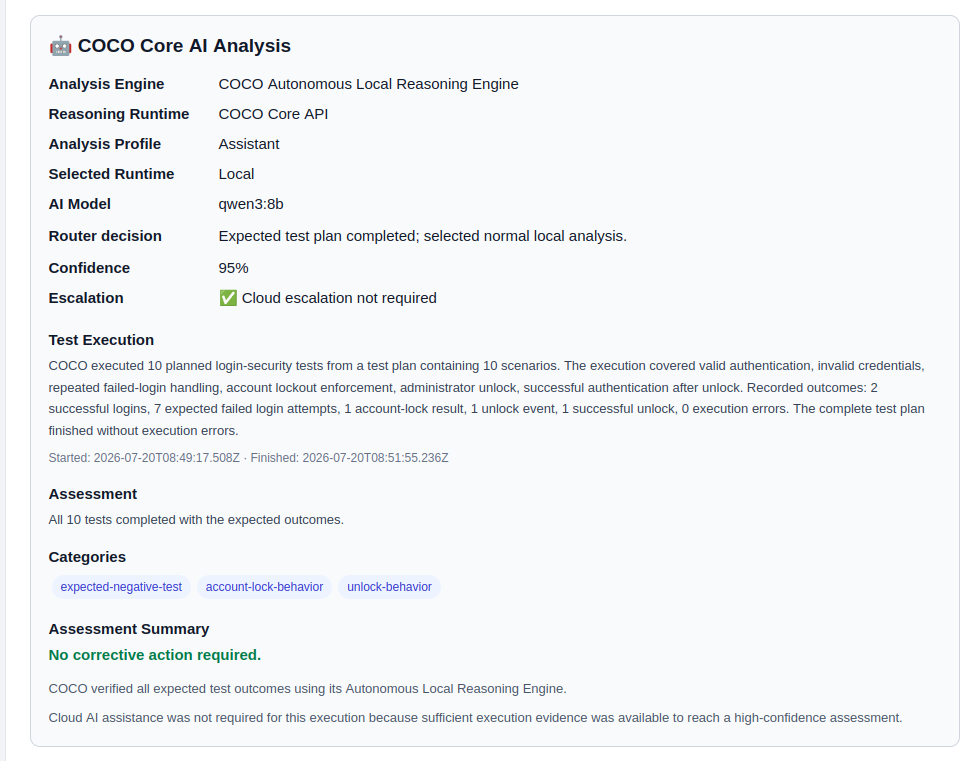
We set up, configure and maintain COCO for each enterprise client individually — defining the test plans that matter for their specific application, tuning confidence thresholds, and deciding case by case when a result should be escalated for human review. The goal is not to replace a QA team, but to give it a tireless colleague that runs the repetitive regression tests before every release, before a human ever has to.

COCO automated login test report
COCO — automated login & account-lockout test report
COCO AI analysis panel
COCO — plain-language AI analysis of a completed test run

Why softify.pro

We deliberately stay small enough that every project is handled by people who were in the initial planning conversation, not handed off to a queue. That means shorter feedback loops, fewer misunderstandings, and a team that still remembers why a particular decision was made six months into a project. We favour boring, provable reliability over trend-chasing: a stack is chosen because it fits the problem and can be maintained by someone other than us in five years, not because it was fashionable in the sprint it was picked. If a spreadsheet genuinely still does the job better than custom software would, we'll tell you that too — our goal is a workflow that actually moves faster, not simply a bigger software bill.

Selected work

A small selection of work we're able to show publicly — further case studies and enterprise projects are available on request under NDA.

Koralpenhaus

Koralpenhaus

Regional presentation and booking website in the Alpine region, built with a focus on clean structure, fast loading and easy content maintenance.

Dexosano

Dexosano

A modern PHP-based web platform, engineered with the same performance-first approach softify.pro applies to every client project.

Case Studies

softify.pro Flow — Tested by COCO

softify.pro Flow — Tested by COCO

21.08.2026

Control. Clarity. Flow.

Every serious software product eventually develops a second product behind the product.

Customers may never see it. Visitors may never know it exists. But administrators, operators and developers depend on it every day.

For softify.pro Flow, that application is Administration — the operational console responsible for managing users, roles, access levels, authentication states, database environments and other configuration that keeps a Flow deployment under control.

Its login screen carries three words:
Control. Clarity. Flow.

They were originally chosen to describe the experience we wanted administrators to have while operating the system.

But they also describe surprisingly well how we believe software should be tested.

That made softify.pro FlowAdministration an obvious candidate for a real-world COCO test.

Not a laboratory demonstration.
Not a collection of isolated buttons prepared specifically for an AI demo.
A real cross-platform desktop application with real application logic, multiple windows, multiple database backends, authentication, permissions, localisation and enough state to make seemingly small regressions difficult to spot manually.

For the public demonstration shown here, COCO worked exclusively with generated demonstration data. The application was licensed to the fictional company Presentation GmbH, and no production customer information, credentials or personal data were used.

The objective was simple:
Let COCO approach the application as a tester would and determine whether the complete administrative workflow still behaves the way the software claims it does.

The Challenge

At first sight, testing an administration application appears straightforward.

Open it.
Log in.
Click through several windows.
Check whether everything looks correct.

That assumption changes quickly once the application grows.

softify.pro FlowAdministration is not one static form. It is a collection of interconnected operational views inside one application shell.

Among other things, an administrator can work with:

  • user accounts
  • roles and access levels
  • authentication information
  • two-factor authentication status
  • operating-system information
  • network and IP information
  • database configuration
  • sorting and presentation options
  • live language selection
  • application and licensing information

The interface currently supports eleven languages. The application also operates with MySQL and PostgreSQL database backends. Individually, none of those features represents an unusual testing problem.

The difficulty comes from their combinations.
A user table may work correctly in English but display an outdated column name in Croatian.
Sorting may work correctly while connected to MySQL but behave differently after switching to PostgreSQL.

A language change may update most interface elements while leaving one status message untranslated. The application may switch databases successfully but preserve stale information from the previous connection. A new release may introduce a feature while the About dialog still describes the previous one. The program does not need to crash for any of these situations to be a regression. In fact, some of the most inconvenient software defects are precisely the ones where everything appears to work.

The application starts.
The window opens.
The button responds.
But something underneath is no longer quite right.
That is why repetitive regression testing matters.

And it is also exactly the kind of work humans become increasingly bad at performing after repeating the same sequence dozens of times.

Why Manual Testing Becomes Expensive

Testing something once is easy.
Testing it reliably after every relevant release is different.

Consider only three dimensions: 11 interface languages × 2 database backends × multiple application workflows.

The number of combinations grows quickly.
Add different user roles, authentication states, sorting behaviour, configuration changes and operating environments, and the test matrix becomes too large to treat as an occasional manual checklist.

This is where regression testing often starts to erode.
Not deliberately.
A release deadline moves closer.
Someone remembers that the application was tested last week.
A developer quickly checks the most important screen.

German works.
English works.
MySQL works.
The assumption becomes:
"The rest is probably fine."

Usually it is. Until the release where it isn't.
COCO exists partly to remove that assumption from the process.

What COCO Actually Did

COCO started softify.pro FlowAdministration from a cold application state, without relying on a previously prepared screen or manually positioned workflow.

The first interaction was the same one presented to a human administrator: the login window.

COCO identified the authentication interface containing:

  • username
  • password
  • two-factor authentication code

and the line directly underneath the softify.pro Flow identity:
Control. Clarity. Flow.

From there, COCO continued through a defined regression session. The point was not simply to determine whether the application could be opened.

The point was to verify whether the state of the application remained internally consistent while COCO interacted with it.

Authentication Is Only the Beginning

Login testing is one of the most obvious candidates for automation, but successful authentication alone tells us very little about the rest of an administrative application.

Once inside, COCO moved into the actual operating environment. It inspected the user administration interface and verified that the expected information was present.

That included data such as:

  • usernames
  • masked passwords
  • 2FA indicators
  • assigned roles
  • operating-system information
  • IP addresses

COCO then interacted with the table rather than merely observing it.
The user list was sorted by username.
The resulting order was inspected.
The important part was not whether clicking the column header produced some visible change.

COCO verified that the resulting table state matched the requested operation.

That distinction matters.
A functional test asks:
"Did the button respond?"

A useful regression test asks:
"Did the application end up in the correct state?"

Testing the Database Boundary

softify.pro Flow supports more than one database backend.

That makes database switching an especially important regression boundary.
COCO changed the active backend from MySQL to PostgreSQL.

After the switch, it inspected the user information again.
The test was looking for more than a successful connection.
It checked whether the application continued to present the expected records and whether the information shown through the interface remained consistent.

COCO then switched back again.


This kind of transition is easy to underestimate.
The user interface can remain visually identical while the storage layer underneath it changes completely.
From an administrator's perspective, that transition should feel almost boring.
The same users should still be understandable.
The same roles should still make sense.

The same interface behaviour should still apply.

That apparently uneventful continuity is exactly what needs to be proven.

Eleven Languages, One Application State

Localisation is another area where superficial testing is particularly dangerous.

It is relatively easy to verify that an application can start in another language.
It is much more valuable to verify what happens when the language changes while the application is already running and holding state.

COCO switched the interface language live.

The session included transitions between languages such as:
German → English → Croatian
while the administration view remained active.

COCO observed whether interface elements changed correctly in place:

  • table headers
  • controls
  • buttons
  • labels
  • status messages

The underlying table and application state also had to survive that transition.
This matters because multilingual software consists of more than translated strings.
Language changes can expose:

  • forgotten resources
  • stale labels
  • layout problems
  • untranslated status messages
  • encoding issues
  • state resets
  • control recreation problems

A window that looks correct when started directly in Croatian may still behave incorrectly when the user switches from German to Croatian during an active session.

That is the difference between checking a screenshot and testing a workflow.

Restoring Application State

COCO subsequently restored the application's default sorting configuration.

Again, the test did not end with the click itself.

The resulting order and the confirmation presented through the application status area were evaluated. This type of verification may appear insignificant compared with testing authentication or database access.

It isn't.

Enterprise applications accumulate hundreds of small state transitions like these.
Users rely on them without consciously thinking about them.
The software feels reliable precisely because those interactions remain predictable.
Regression testing exists to protect that predictability.

Testing the Information Around the Software

COCO also opened the application's About dialog.

Why test an About window?

Because software documentation starts inside the software itself.
The version number, feature description and licensing information presented to the operator should correspond to the application that is actually running.

An application can function perfectly while still presenting outdated version information or describing capabilities that no longer correspond to the release.

That does not crash a database.
It does something subtler:
it reduces trust.

For enterprise software, operational accuracy includes these apparently small details. COCO therefore checked them too.

Control.

The first word in the softify.pro Flow slogan is also the first principle of the test environment.

Control means knowing what is being tested, against which state and with which data.

The public COCO demonstration does not use client production records.

It runs with deliberately prepared demonstration data whose expected state is known.

That makes results reproducible.

It also means differences between test runs can be investigated instead of explained away as random changes in production data.

More importantly, COCO is designed as a self-hosted AI testing system.

Testing evidence, application screenshots and internal workflow information can remain inside infrastructure under the customer's or operator's own control rather than being sent by default to an unrelated third-party cloud service.

For internal business applications, that is not merely an infrastructure preference. It can be part of the testing requirement itself.

Clarity.

Automation is not particularly useful if its final output is: FAILED
followed by hundreds of lines of technical output that somebody must manually reconstruct before understanding what happened.

COCO is designed to preserve an understandable evidence trail.

The report describes:

  • what was tested
  • which interaction took place
  • in which sequence it happened
  • what COCO observed
  • what state was expected
  • where behaviour differed when something failed

Screenshots and execution evidence can accompany that sequence.
The purpose is not to hide technical detail.

It is to make the result understandable before somebody has to open a debugger.

An engineer should be able to answer:
What happened? before asking:
Where in the code did it happen?

That distinction shortens investigation dramatically when a regression appears.

Flow.

Traditional UI automation often thinks in elements.

Find selector.
Click selector.
Find another selector.
Check value.

That approach remains useful, but applications are not experienced as collections of selectors.

People experience flows.

Log in.
Open administration.
Find a user.
Change a setting.
Switch a database.
Change a language.
Verify the result.

Continue working.

COCO therefore treats the sequence as a process rather than as a random collection of controls.

It follows what the user is trying to accomplish and evaluates the application in context.

That becomes especially valuable when testing real business software, because failures often occur between screens or between states, not inside an individual button.

A logistics workflow may contain an order, stock reservation, picking operation, delivery note and shipment confirmation.
Every individual screen can appear correct while the complete process is wrong.
The same principle applies here on a smaller scale.
The administration window is not the product.

The workflow through it is.

Evidence Instead of Assumption

One of COCO's most important jobs is not clicking. It is remembering what happened.
Human regression testing frequently ends with a statement such as:
"I tested it and everything looked fine."

That may be completely accurate.
But several weeks later, when a problem appears, the useful questions are different:

  • Which release was tested?
  • Which database?
  • Which language?
  • Which user state?
  • What happened before the problem?
  • What exactly was visible?

In which order were the actions performed?
COCO's test runs are designed to leave evidence behind.

That transforms a test result from an opinion into something that can be inspected. A successful run therefore becomes useful too.
It establishes a known reference state against which later behaviour can be compared.

COCO Is Not the Decision Maker

There is an important boundary in the way we use AI for software testing.
COCO is not intended to replace engineering responsibility.

It does not decide what a business rule should be.

It tests behaviour against scenarios, requirements and expectations defined for the application. For sensitive decisions involving permissions, prices, inventory, financial transactions or other critical business states, the definition of correct behaviour remains a human responsibility.

That distinction matters.
AI is excellent at repeating a detailed test without losing concentration. It is excellent at collecting evidence.
It can inspect screens, compare expected and observed behaviour and explain discrepancies. But the business still defines what correct means.

COCO makes that definition testable.

The Test Nobody Wants to Repeat

There is a simple reason automation adds value here.
A human tester can absolutely perform this regression session.
The first language receives full attention.
Probably the second one too.
Then another.
Then another.
MySQL has already been checked.
PostgreSQL still needs to be checked.
The sort test has already been performed several times.
The About dialog has not changed for months.

It is Friday afternoon.

And human attention does what human attention naturally does. It starts optimising.
COCO doesn't. In COCO's own spirit:

  • I do not get bored of clicking the same button in eleven languages. I do not skip the PostgreSQL pass because it is Friday afternoon. I do not assume the sort order held because it worked in the previous release.

For COCO, every regression session can be treated as if it were the first. That is not intelligence replacing a human tester.
It is automation protecting the human tester from the part of testing where human attention is least valuable.

From Repetitive Testing to Engineering Evidence

The larger purpose of COCO is not to maximise the number of automated actions.
A thousand automated clicks are meaningless if nobody understands what they prove. The useful outcome is confidence supported by evidence.

For softify.pro Flow, that means being able to say that a release was exercised across the operational areas that matter:

  • authentication
  • user administration
  • roles and access information
  • two-factor authentication state
  • sorting behaviour
  • MySQL operation
  • PostgreSQL operation
  • live localisation
  • status feedback
  • application information
  • licensing information

and that the result is preserved in a form that can be reviewed afterwards. The same principle scales far beyond this application.
A login process can be tested this way.
A booking workflow can be tested this way.
A logistics process can be tested this way.
A cross-platform desktop application can be tested this way.
The screens change.
The business rules change.
The principle does not:
define the expected workflow, execute it consistently, collect evidence and make the result understandable.

Why We Test Our Own Software With COCO

There is another reason softify.pro Flow matters as a COCO case study.

It is our own software.
That removes the comfortable distance that sometimes exists between a technology demonstration and the people demonstrating it.

If COCO is intended to test enterprise software, it has to be useful enough for us to trust it with software we actually develop and release ourselves.

Flow therefore acts as both a product and a proving ground.
New testing capabilities can be exercised against a real application.
Unexpected behaviour can expose weaknesses in the application, the test plan or COCO itself.

Each side improves the other.
That feedback loop is much more valuable than building artificial demonstrations designed only to succeed. A testing system should not look convincing because the demonstration was easy.
It should become convincing because it continues finding the small things humans would eventually stop checking.

The Result

softify.pro FlowAdministration now has a documented and repeatable regression process that COCO can execute before relevant releases.

The test spans both supported database environments and the application's eleven-language interface while following the application as an administrator would use it rather than treating each screen as an isolated test target.

COCO produces an evidence trail showing what was tested, what was observed and in which order the session occurred.

That evidence can remain locally controlled.
Developers gain a reproducible starting point when something changes.
Human testers spend less time repeating predictable interactions and more time investigating the situations that genuinely require judgment.

And softify.pro Flow receives something more valuable than a green PASS indicator.

It receives evidence that the experience promised on its login screen continues to exist after the code underneath it changes.

Control. Know what is being tested and keep the environment under control.

Clarity. Understand what happened without reconstructing an opaque automation log.

Flow. Test the application as a process people actually use.

Control. Clarity. Flow.

It was written for the software.
It turned out to describe the testing philosophy behind it just as well.

Permalink →

softify.pro - Insiders

COCO strikes. Again.

COCO strikes. Again.

We should probably stop giving COCO ideas.
The previous experiment was supposed to be enough.
A real application.
Real navigation.
Users.
Roles.
Databases.
Languages.
Evidence.

A respectable case study.
A clean conclusion.
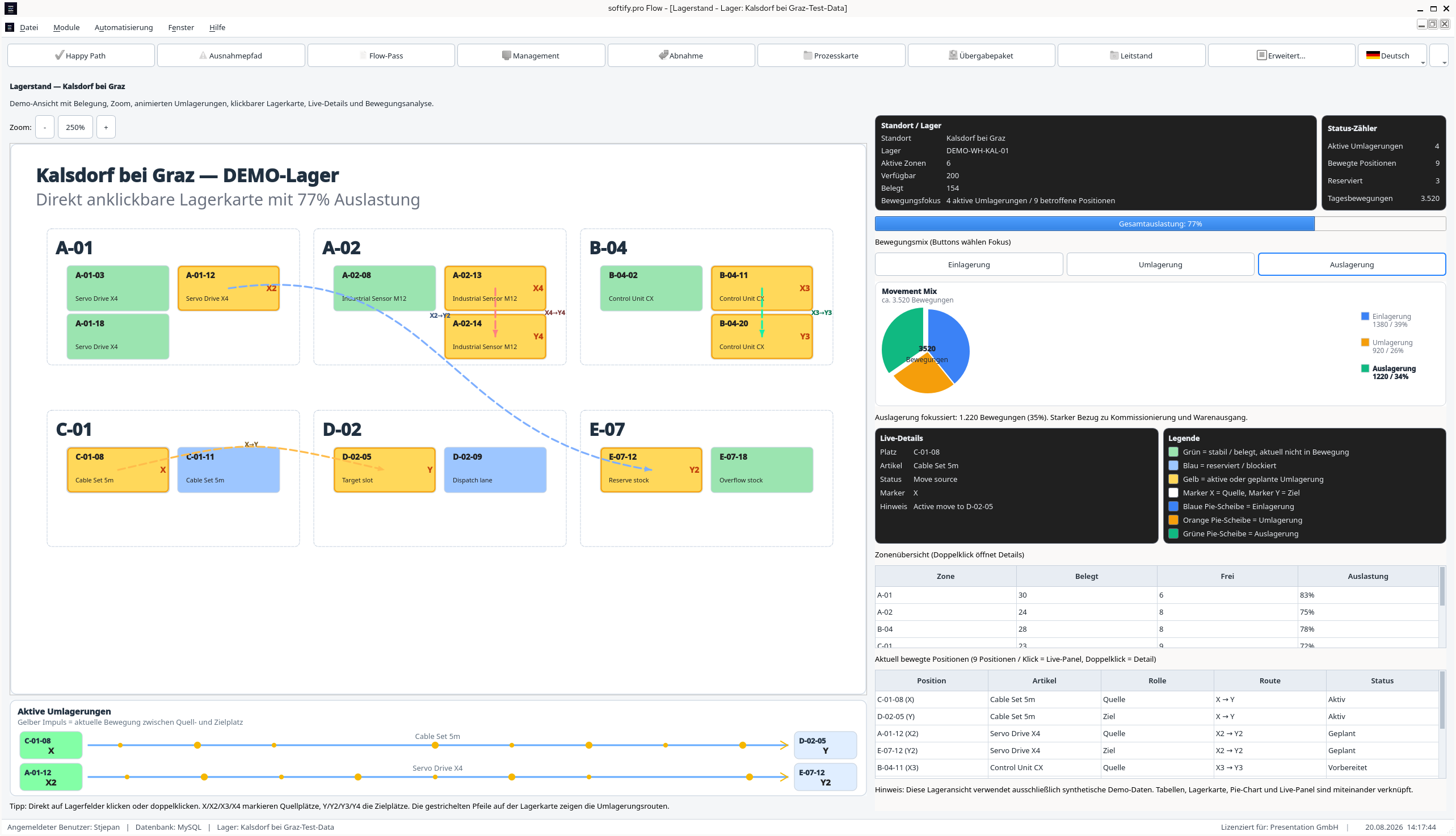
Then somebody showed it: Logistics in Motion.
That was probably the mistake.


It started with three warehouses
Nothing particularly exciting.
Three DEMO warehouses.
  • Kalsdorf bei Graz.
  • Wiener Neustadt.
  • Klagenfurt.
Synthetic data.
No customer information.
No production inventory.

Exactly the kind of environment where nothing important is supposed to happen.
Then the first warehouse was selected.
And the application acquired context.
From that moment, every screen had another question attached to it.

Does this still belong to the same warehouse?
Does the language change only the interface?
Does the process remain at the same step?
Does the inventory still agree?
Does the document reference still point to the right event?
Does the operator see exactly what is needed for the next action?


Suddenly, the interesting part was no longer the screen.
It was the continuity between screens.

COCO tends to do that.

Logistics is not a collection of screens
From the outside, warehouse software can look deceptively simple.
Goods arrive.
Store them.
Someone orders them.
Pick them.
Ship them.
Done.

Except there is an entire operational world hiding between arrived and shipped.
Expected.
Received.
Checked.
Available.
Reserved.
Moved.
Picked.
Blocked.
Corrected.
Dispatched.
Audited.


The physical movement matters.
But the state transition is what makes that movement understandable to software.
And when those two realities stop matching, somebody eventually has a bad day.

Flow.

A warehouse is easier to understand when movement is visible, not merely recorded.
That is why our logistics work has never really started with menus, dashboards or technology.
It starts with the material Flow.

Where does information enter?
Where does it change?
Where can it be lost?

Where is somebody forced to ask another person what happened?
Where does a manual step quietly become the weakest part of an otherwise automated process?
Sometimes the answer is a new interface.
Sometimes an integration.
Sometimes a scanner.
Sometimes simply a better state model.

More software is not automatically better software.
The goal is not automation for its own sake.
The goal is a process that remains understandable.

Control. Clarity. Flow.

The process begins before the first booking.
Before goods receipt.
Before picking.
Before inventory movement.
Before the first transaction.
Flow asks a very basic question:
Which warehouse are we working in?
It sounds almost trivial.
It is not.
Warehouse context belongs to everything that follows.
Inventory.
Documents.
Locations.
Picking.
Relocations.
Audit history.
Exceptions.

The process may look perfectly healthy while operating in the wrong context.
That is exactly the kind of problem a screenshot rarely reveals.
And exactly the kind of boundary COCO likes to question.

Language is easy until it is not
German.
English.
Croatian.
Norwegian.
And others.

A user profile defines the available languages.
The operator switches language while the application is alive.
The interface changes immediately.
The business process must not.
That distinction matters.
The warehouse does not move because the word for warehouse changed.
The picking order does not restart because the user selected another language.
A reservation does not disappear.
An exception does not suddenly belong to another transaction.
The process stays where it is.
Only its representation changes.
That sounds obvious.

Until you realise how many applications treat a language switch almost like a new session.

A multilingual business application should not.
Presentation state may change.
Business state must remain stable.
That makes language switching a surprisingly useful regression test.
A small feature.
A very good fault line.
COCO likes fault lines.

Step by step, the application starts accumulating history
Goods arrive.
The process advances.
Goods receipt is booked.
Inventory changes.
The warehouse state reflects the new reality.
Picking begins.
Stock becomes reserved.
The operator receives a task.

A mobile view reduces the entire process to what matters at that exact moment:
Position.
Storage location.
Quantity.
SSCC.
Operator.
Nothing more.
Nothing less.
That is important.
The mobile interface is not a second business process.
It is another view of the same one.
The warehouse application may know everything.
The picker should not have to.
Clarity does not always mean showing more information.
Sometimes clarity means having the discipline to hide almost everything.

Then somebody scans the wrong location
This is where a logistics workflow becomes more interesting than a feature list.
The expected location is one thing.
The scanned location is another.
Flow stops.
Not crashes.
Stops.
There is a difference.
The process state remains visible.
The affected stock remains understandable.
The exception becomes explicit.

Contextual Help explains what is relevant to the current situation.
The user resolves the discrepancy.
The process continues.
This moment says more about operational software than several pages of happy-path screenshots.
Real logistics is not difficult when everything is correct.
Real logistics becomes difficult when something is almost correct.
A useful system does not hide that behind a green dashboard.
It gives the exception a state.

A reason.
A history.
And a way forward.


Documents remember what people forget

As the workflow progresses, references begin to accumulate.
ASN.
Goods receipt.
Warehouse movement.
Pick.
Dispatch.
Flow.
The interesting part is not that documents exist.
The interesting part is that they tell the same story as the process.
Why is this stock here?
Which receipt introduced it?
Which operation reserved it?
Which pick consumed it?
Which shipment moved it out?
Was an exception resolved before the next step?
What was the active warehouse?
What happened before the current state?
When state and documentation are produced by the same process, traceability becomes easier to trust.
When they are not, people eventually start reconstructing history.
Usually in Excel.
Usually under pressure.
Usually after something has already gone wrong.
COCO prefers evidence before that moment.
Apparently, COCO also travels
There was another small change between runs.
Ubuntu had its run.
Red Hat Enterprise Linux 10 took the next one.
COCO continued.
No ceremony.
No special “Red Hat mode”.
No rewritten workflow.
No conveniently simplified test.
Same Flow.
Different ground underneath it.
An earlier COCO run had already exercised the application on Ubuntu Linux.
The current one moved to Red Hat Enterprise Linux 10.
Different desktop environment.
Different system libraries.
Different packaging.
Different operating environment.
Same warehouse.
Same business states.
Same inventory transitions.
Same language changes.
Same exception logic.
Same evidence.
That is a rather nice way to test cross-platform software.

Do not announce that it is cross-platform. Move it. Then see what breaks.

Language state.
Warehouse context.
Dialog behaviour.
Timing.
Themes.
Process transitions.
Exception handling.
Evidence.
Operating systems have surprisingly creative ways of exposing assumptions.

Ubuntu exposed some.
Red Hat is exposing others.
That is useful.

Because multi-platform engineering is not the ability to start the executable twice.

It is the ability to change the environment without changing the meaning of the process.
A warehouse operator should not care whether the application is running on Ubuntu or Red Hat.
A picking order should not care either.
Neither should an audit trail.
If platform differences begin changing business behaviour, the software is not truly cross-platform.
It is merely portable.
COCO seems considerably more interested in the first definition.
So are we.

COCO does not decide what correct logistics means
This part matters.
COCO does not become a warehouse expert simply because it can follow a warehouse workflow.
Humans still define correctness.
Humans decide when inventory becomes available.
Humans define what a blocked delivery means.
Humans decide who may correct a quantity.
Humans define which movement requires an audit trail.
Humans decide what a valid exception resolution looks like.
Humans decide when a shipment is truly complete.
COCO's job is different.

Repeat.
Observe.
Compare.
Remember.
Leave evidence.


Then do it again after the software changes.
And again.
And again.
Without becoming bored.
Without deciding that last week's result is probably still valid.
Without skipping the annoying exception because lunch is in twelve minutes.
The glamorous future of AI testing contains a surprising amount of repetition.
We consider that a feature.

Evidence changes the conversation
Traditional testing often ends with a perfectly reasonable sentence:
“It worked when I tested it.”

COCO is interested in the next sentence.

What exactly worked?
Which warehouse?
Which user?
Which language?
Which process state?
Which sequence?
Which document?
Which inventory value?
What happened immediately before the test step?
What changed immediately afterwards?
Can another engineer understand the result without asking the person who performed the test?
That is where regression testing becomes more than repeated clicking.
One screen can be correct while the process is wrong.
A picking window can look perfect while inventory has already drifted.
A document can exist while the state that should have created it never occurred.
An application can display 100% while an audit trail quietly disagrees.
COCO follows the Flow because the Flow is where these contradictions become visible.

Somewhere between Control and Flow
There is an interesting symmetry here.
Good logistics software tries to reduce uncertainty inside an operation.
Good testing tries to reduce uncertainty about the software running it.
One asks:
Where is the item?
The other asks:
How do we know the software still knows?
One asks:
Was this movement completed?
The other asks:
What evidence proves that the state changed correctly?
One asks:
Can the next shift continue?
The other asks:
Can the next engineer understand what happened?
Different questions.
Same instinct.
Make the state visible.
Preserve the reasoning.
Reduce the amount of knowledge that exists only inside somebody's head.
Perhaps that is the connection we did not originally plan.

Engineering excellence without the banner
Nobody clicks an Engineering Excellence button.
There isn't one.
And there probably should not be.
Engineering excellence appears indirectly.
The warehouse context survives a language change.
The same process survives another Linux platform.
A stock movement remains traceable.
A mobile picker sees exactly what is needed and nothing else.
An exception interrupts the process without destroying its state.
The Help window explains the current context instead of displaying generic documentation.
The document chain agrees with the operational sequence.
The next engineer can understand what happened without asking the person who happened to be there.
There is plenty of theatre available in modern software.
AI can generate impressive demonstrations.
Dashboards can animate.
Numbers can move.
Videos can look very convincing.
None of that proves that two inventory operations cannot silently produce an incorrect result.
None of it proves that an exception can still be reconstructed weeks later.
None of it proves that the warehouse worker, dispatcher and developer are looking at the same operational truth.

Engineering excellence starts somewhere less photogenic.

With consistency.
With evidence.
With boundaries.


With the willingness to keep the boring parts boring.
Invisible reliability rarely produces the most dramatic screenshot.
Until you deliberately start looking for it.

Control. Clarity. Flow.
Control is knowing which warehouse, which process and which state are active.
Clarity is understanding what changed, when it changed and why.
Flow is allowing the operation to continue without losing the story behind it.
That works for logistics.
It works for software testing.
It works surprisingly well for engineering itself.
The first Flow experiment gave COCO Administration.
Users.
Roles.
Databases.
Languages.
Then somebody gave it a warehouse.
Then multiple languages.
Then mobile picking.
Then inventory.
Then relocations.
Then exceptions.
Then documents.
Then another operating system.
At this point, we should probably stop adding things.
We probably will not.

Control. Clarity. Flow.

Ubuntu had its turn.

Red Hat has the current one.

The Flow keeps moving.

COCO keeps watching.
And somewhere in the middle of the last run, it became obvious that there is another question waiting behind this one.

We know what it is.
COCO knows what it is.
You do not.
Yet.


We could tell you.

But then you might stop checking whether a new Insiders article appeared.
And that would ruin the experiment.

Published: 28.08.2026

Permalink →

A Letter From COCO

A Letter From COCO

To the engineer who opens this repository for the first time:

Welcome.

You may have arrived because something failed.

A service stopped responding.

A deployment behaved unexpectedly.

An alert woke you in the middle of the night.

Or perhaps you are simply curious about how this platform works.

Whatever brought you here, know that this project was built for moments exactly like this.

Not to remove difficult problems.

But to make difficult problems understandable.

You will find code.

You will find documentation.

You will find specifications.

But more importantly,

I hope you will find reasoning.

Good to Know

Warehouse Digitization Project Ideas That Work

Warehouse Digitization Project Ideas That Work

A missing delivery note right before departure, an inventory level that looks different on the shelf than in the spreadsheet, and three employees simultaneously clarifying the same question over the phone: precisely this is where sensible warehouse digitization project ideas emerge. Not from the question of which technology currently looks trendy, but from a concrete process that costs time, generates errors, or depends on the knowledge of individual people.

For small and medium-sized warehousing, trading, and manufacturing businesses, digitalization is rarely a single major project. It is a sequence of clearly defined improvements. The goal does not have to be a complex enterprise warehouse management system. Frequently, a lean tool tailored to the actual workflow is better than a suite with features that nobody on the warehouse floor uses.

Warehouse Digitization Project Ideas with Operational Value

The best entry point is a process that occurs frequently, is easily measurable, and perceptibly improves for employees. Anyone wanting to digitalize the entire warehouse immediately ties up budget and attention before a solution has proven itself in daily operations. A limited first step, by contrast, creates resilient data for the next decision.

1. Goods Receipt with Mobile Data Capture

At goods receipt, many downstream errors originate: incorrectly counted quantities, unresolved discrepancies, delayed inventory bookings, and paper documents that can no longer be found later. A mobile capture form on a handheld scanner, tablet, or smartphone can make the process significantly more stable.

Employees scan the article and delivery reference, capturing quantity, storage location, and the reason for any discrepancy directly at the loading ramp. If a batch, serial number, or photo is relevant, this information belongs to the exact same data record. The inventory is not retroactively added to a spreadsheet at the end of the shift; instead, it receives a traceable status upon actual receipt.

This does not mean that every supplier or article strictly requires barcode labels. For small, irregular deliveries, a search by article number can suffice. The decisive factor is that data capture is faster than the previous workaround of paper and manual transcription.

2. Digital Relocations Instead of Inventory Riddles

Many warehouses fundamentally know what is available, but not reliably where it is located. Goods are pulled forward for an order, temporarily stored, brought to assembly, or placed in an open area due to space constraints. Without simple booking, an inventory question quickly turns into a search operation.

A relocation process does not need a complicated interface. Scan the source location, scan the destination location, confirm the quantity—nothing more is necessary in most cases. The system should verify whether the article and storage location are plausible and clearly assign a booking to a person and timestamp.

Handling exceptions is important. A storage location can be blocked, overfilled, or approved only for specific goods. These rules should be mapped where they prevent actual damage. For rare special cases, an approval step by warehouse management is often sufficient. Too many mandatory fields turn a helpful application into an obstacle.

3. Order Picking with Clear Order Status

Paper pick lists work until priorities change, positions are missing, or an order is split across multiple areas. A simple digital pick list shows which order is open, which positions have already been picked, and where clarification is needed. This reduces inquiries between the warehouse, sales, and shipping departments.

Depending on warehouse size, the application can dictate picking paths or simply sort positions by warehouse zone. Full path optimization pays off primarily with many daily orders and long walking paths. In a compact warehouse, a reliable status display often brings more than a mathematically perfect route that nobody follows in daily practice.

In case of shortages, the system should not just highlight things in red. It should offer a concrete follow-up process: check inventory, request substitute articles, trigger replenishment, or pass the order on for clarification. Digitalization is valuable when it makes the next sensible action visible.

4. Shipping Documents and Labels from Real Order Data

Manually transferring addresses, weights, and article positions into shipping portals is a prime candidate for automation. Delivery addresses, delivery instructions, shipping methods, and package information ideally exist once and are used for the delivery note, shipping label, and shipping confirmation.

A suitable system can generate labels, store documents in an audit-proof manner, and automatically set the order to "ready for shipping" or "shipped" after printing. The operational advantage lies not merely in saved minutes. It lies in ensuring shipping data never diverges across multiple systems.

Integration is crucial here. If a shipping service provider offers no usable interface or involves very different special rules, a semi-automated workflow can be more sensible than a fragile full integration. Boring, provable reliability beats automation that halts at every exception.

5. Replenishment and Minimum Stock Levels with Traceable Rules

Minimum stock levels are frequently maintained in spreadsheets and then ignored because nobody is sure if the numbers are still accurate. A sensible digital solution connects actual bookings with clear inventory control rules. It can notify when an article falls below a threshold, account for reserved quantities, and prepare a purchase order list.

The threshold should not be treated as an eternal truth. Seasonal demand, delivery times, and minimum order quantities change. Therefore, the responsible person needs a simple way to review suggestions and adjust rules. Fully automated orders are only sensible once master data, supplier logic, and consumption data are stable enough.

6. Traceability for Batches, Serial Numbers, and Blocked Stock

Anyone working with batches, devices, spare parts, or regulated products needs more than a quantity display. It must be traceable which goods arrived when, where they were moved, and in which customer order they ended up.

The project can start deliberately small: initially recording only the receipt and shipping of a critical product group. Internal movements and returns follow later. A system that forces every booking but does not understand the real repair or inspection process will be bypassed. Business logic must therefore originate from the workflow, not from an abstract data model.

Selecting the Right Project

The most attractive idea is not automatically the right first idea. Evaluate potential projects based on frequency, error costs, waiting time, and dependency on individuals. A process that runs 50 times a day and saves two minutes per transaction can be more valuable than a rare special feature with great technical elegance. Data quality also belongs in the decision-making process. If article numbers are duplicated, storage locations are not named uniquely, or orders arrive contradictorily from multiple sources, the project should clean up these foundations first. Software can make missing rules visible, but it cannot reliably replace them. Four questions suffice for prioritization:

  • Which activity demonstrably causes the most inquiries or rework?
  • Which information is currently transcribed multiple times or queried by phone?
  • Which error would have the most expensive consequences for customers, inventory, or shipping?
  • Which workflow can be tested in a few weeks with clear success measurement?

Technical Decisions That Count in Daily Warehouse Operations

A warehouse application does not need to look spectacular. It must remain understandable under poor Wi-Fi coverage, while wearing gloves, under time pressure, and during shift changes. Large buttons, clear feedback after a scan, and visible error handling are more important than decorative dashboards.

The architecture should also match operational reality. A web-based application with a clean database structure can run on existing devices and is easier to maintain than an isolated solution on a single PC. With a stable foundation—such as PHP 8.4, modern JavaScript, and MySQL 8—roles, booking histories, interfaces, and documented deployments can be operated transparently over the long term.

Not every piece of information is intended for every role. Warehouse staff need open tasks and clear booking dialogues. Inventory control needs warnings and reorder suggestions. Management needs evaluations regarding throughput times, discrepancies, and open transactions. Role-based access concepts, logs, and account lockouts after repeated failed attempts belong early in the planning stage, especially when external service providers or multiple locations are involved.

Implementation: Prove First, Then Expand

A pilot should run with real orders, not just test data in a meeting room. Choose a warehouse zone, a product group, or a shift and define in advance how success will be recognized: fewer correction bookings, shorter processing time, fewer inquiries, or a higher booking completion rate on the same day.

Plan a fallback level in parallel. If the new application fails or a process is unclear, the team must know how to continue working and how subsequent bookings will be controlled. This is not a sign of a lack of trust in technology, but of professional operations. After two to four weeks, the most valuable insights usually emerge. Perhaps a feature is not missing, but rather better article labeling. Perhaps the workflow is correct, but a scanner profile or permission is causing a bottleneck. These observations should flow into short, controlled improvement cycles rather than triggering a new major project.

The best digitalization does not make daily warehouse work theoretically more modern, but concretely calmer: less searching, less manual transcription, clearer handovers, and reliable information precisely when a decision is pending.

Permalink →

Inventory Workflow Automation Checklist for the Warehouse

Inventory Workflow Automation Checklist for the Warehouse

When a goods receipt is confirmed on paper, inventory levels are later transferred to a spreadsheet, and a shipping question is clarified by phone, each individual step feels manageable. Together, they create inquiries, inventory discrepancies, and dependence on individual employees.

An Inventory Workflow Automation Checklist prevents this condition from prematurely turning into an oversized software project. It separates processes that truly ought to be automated from those for which a cleanly maintained spreadsheet remains sufficient.

The Inventory Workflow Automation Checklist before project launch

Automation does not start with selecting a system. It starts with a verifiable description of what actually happens in the warehouse—even during exceptions, shift changes, and time pressure. Go through the following points directly at the process level with warehouse management, dispatch, purchasing, and, if applicable, accounting.

1. Record movements instead of just inventories

A current inventory is the result of movements. Therefore, it should be clear which events increase, decrease, reserve, block, or transfer stock. These include goods receipt, put-away, order picking, shipping, returns, scrap, inventory discrepancies, and relocation.

Every movement requires a definitive answer to four questions: Who executes it? When is it booked? Which storage location is affected? Which document or order substantiates it? If these answers currently exist only in the heads of experienced employees, that is a prime candidate for automation. The goal is not more data collection, but a resilient history from which any inventory level can be explained.

2. Clean up articles, variants, and units

Many projects fail not because of scanners or web interfaces, but due to master data. An article can be purchased as a carton, stored individually, and sold in sets. Without defined conversions, the software produces formally correct but operationally incorrect quantities.

Check article numbers for duplicates, establish binding descriptions, and distinguish between sales units, storage units, and packaging units. Serial numbers, batches, expiration dates, or hazardous material classifications should only be included in the initial build if they influence daily decisions or are legally required. Everything else initially increases maintenance overhead and error surface.

3. Define storage locations as precisely as necessary

"Hall 2" might be sufficient for an inventory list. For reliable order picking, it is usually too coarse. Define whether a location refers to a zone, rack, bay, slot, or transfer area. Quarantine areas, goods receipt zones, return areas, and shipping buffers must also be recognizable as distinct locations if goods can reside there.

The right granularity depends on the operation. A workshop with a few hundred positions does not strictly require bin management. However, with multiple pickers per shift, a precise storage slot can significantly reduce travel paths and search times. Do not automate a level of precision that nobody can maintain.

4. Establish triggers, responsible roles, and approvals

A workflow needs a clear starting point. At goods receipt, this can be the delivery at the dock, the purchase order in procurement, or the scan of a delivery note. For reordering, a minimum stock level can trigger a proposal, while the final order remains with a responsible person.

Furthermore, document which actions may occur automatically and which require review. A missing quantity should create a discrepancy, not silently alter the expected goods receipt. Approval steps are sensible for valuable, batch-managed, or safety-critical articles. For consumables, they would slow down throughput unnecessarily.

5. Generate documents where they are needed

Delivery notes, put-away lists, pick lists, shipping labels, and handover protocols often originate in different applications. This leads to media breaks: an address is copied, an order is checked off, and shipping status is updated later.

Note the data source, creation timestamp, and recipient for each document. A sensible workflow might, for example, automatically generate a pick list after an order is approved, provide a shipping label after packing, and close the order with a timestamp after handover. The crucial point is that data no longer needs to be manually entered multiple times.

Check interfaces and data quality

The best warehouse logic is useless if orders arrive only once daily as a file or if delivery addresses are formatted inconsistently. Therefore, create a sober list of the systems that send or receive data: shop, ERP, accounting, shipping service provider, supplier portal, production system, and existing spreadsheets.

For every connection, it should be established which system is authoritative for each data field. If the article master data is authoritative in the ERP, the warehouse portal must not quietly create its own articles. If an order change comes from the shop, it must become visible prior to shipping. For low volumes, a controlled CSV import can be the right first step. For high volume or short delivery promises, a direct interface is worthwhile.

Handling errors is equally important. An interface should not just transfer data, but also show what was rejected and why. Unknown article numbers, invalid addresses, or missing quantities must not disappear into a technical log file. They require a worklist with designated responsibility and status.

Design usability on the warehouse floor

A process that looks plausible at a desk can fail on the warehouse floor. Employees wear gloves, move goods, share devices, or work with unstable Wi-Fi coverage. Therefore, check early whether scanners, tablets, desktops, or printouts fit the respective work step.

Scanning should provide clear feedback: correct item, wrong storage location, already booked quantity, or blocked article. Colors alone are not enough. Short, understandable messages and a clear next step are more valuable under time pressure than a feature-rich interface.

Also plan for exceptions. What happens during a damaged barcode, network outage, partial delivery, or discovered unassigned goods? A good workflow offers controlled paths for this and logs the correction. It does not force teams to rely on sticky notes and later batch bookings.

Define metrics before building dashboards

A dashboard is not a goal. Relevant metrics are those that trigger an operational decision. These can include open goods receipts exceeding a defined age, orders close to their shipping deadline, inventory discrepancies per warehouse zone, picking errors, or the time elapsed between order receipt and handover.

Define the data source, calculation rule, and responsible role for each metric. "Inventory accuracy," for example, is only meaningful when it is clear what count it is measured against and how returns or blocked stock are handled. A few reliable metrics are better than a wall of charts that nobody trusts.

Plan security, permissions, and traceability

Automation distributes agency. Who is allowed to modify inventory, create articles, generate shipping labels, or cancel orders should be deliberately established. Role-based permissions are usually more sensible than a shared login on the warehouse PC. Particularly critical corrections require a timestamp, a personnel assignment, and ideally a reason.

Technical fundamentals also belong on the checklist: regular backups, tested recovery, documented access credentials, logging of interface errors, and a procedure for blocked or deactivated user accounts. In a custom application, maintainable technologies, a clean database structure, and traceable deployment steps are not minor details. They determine whether modifications remain calculable after two years.

Implement in small, measurable steps

Do not attempt to convert goods receipt, replenishment, inventory counting, shipping, and route planning all at once. Choose a workflow with noticeable friction and manageable risk, such as the mobile booking of goods receipts or the automated generation of shipping documents. Before starting, record processing time, corrections, and open cases.

Test with real articles, real orders, and the employees who will actually work with them. A pilot with one warehouse zone or product group shows faster than a workshop whether descriptions, scanner workflows, and approvals function. Only when exceptions are mastered should the next process follow.

Automation succeeds when teams need to ask fewer questions, inventory remains explainable, and the process functions even when the most experienced person is on vacation. That is precisely where the next improvement is worthwhile: not with the loudest tool, but with the friction that genuinely slows down the workday.

Permalink →

Improving mobile website loading times: Lean assets, efficient databases, and server configurations that deliver fast responses even under poor network conditions.

Improving mobile website loading times: Lean assets, efficient databases, and server configurations that deliver fast responses even under poor network conditions.

When a warehouse smartphone with poor reception is used to access a site, it is not the hero-section animation that determines the first impression, but whether the page becomes interactive at all. If a prospective client waits three, four, or five seconds for content, the alternative is just a back button away. Improving mobile website loading times requires a traceable technical sequence rather than cosmetic quick fixes.

This applies particularly to websites designed to generate inquiries: for a manufacturer, a logistics service provider, or a business offering complex services. Mobile users frequently access pages between appointments, on the warehouse floor, or via search queries with concrete intent. The site must deliver information rather than cause heavy processing on the device.

Why mobile loading speed is an operational problem

Mobile performance is often treated strictly as an SEO discipline. That falls short. Fast pages help with visibility and campaign costs, but the immediate effect lies in actual usage: forms are submitted more often, phone numbers are dialed more frequently, and product information is read thoroughly. A slow website, conversely, creates doubt before a contact person can even respond.

"Fast" is not a single metric. A page might display a background early yet remain unresponsive to clicks for a considerable time. For visitors, three factors matter: When does the most important content appear? When can the page be operated without delay? And does the layout still shift while they are trying to tap a button? These questions are reflected in metrics like Largest Contentful Paint, Interaction to Next Paint, and Cumulative Layout Shift.

Measurements must happen under realistic conditions. A powerful office computer on Wi-Fi masks issues that become obvious on an older Android device on a cellular network. Location, intermediary services, and a pre-populated browser cache also alter results. Repeated measurements and actual user data matter far more than a single perfect test run.

Improving mobile website loading times: Measure first, change second

The most common mistake is immediately compressing images or installing another optimization plugin. Both can help, but without root-cause analysis, they quickly create hard-to-maintain configurations. Check a representative selection first: the homepage, a typical service or product page, the contact page, and a high-traffic landing page. Patterns become visible across these pages.

The network log reveals which files block initialization and how large they actually are. A performance audit shows whether JavaScript delays operation, if fonts arrive late, or whether images load unnecessarily early. Supplement lab measurements with data from real visitors if traffic permits. This avoids optimizing for a test profile that does not reflect your actual target audience.

Set a clear goal before every change. For example: The visible main content should appear on an average mobile device in under 2.5 seconds, or the contact form should be usable without input delay. Not every page requires a theoretical top score. Complex applications with authenticated data have different prerequisites than public corporate websites. Boring, provable reliability is more valuable here than a short-term score driven by risky tricks.

1. Treat images according to their purpose

On many mobile pages, images remain the largest data block. The problem is not the photo itself, but an image transmitted at a 2,500-pixel width when the device only requires 700 pixels. Provide responsive image variants so the browser can select the appropriate size. Modern formats like WebP or AVIF often significantly reduce file sizes, though they should be deployed with clean fallbacks and verified image quality.

The largest image in the visible initial viewport deserves special attention. It should be correctly cropped, use a suitable resolution, and load early. Images further down the page can load lazily. This saves data upon entry, though it must not cause images to pop in visibly upon scrolling while the user already expects them.

Do not reflexively discard all images. A good image can explain a machine, a team, or a process faster than a paragraph of text. The technical task is to deliver relevant visual information efficiently rather than reducing design to gray placeholder boxes.

2. Limit JavaScript to necessary work

Every script competes for processing time during loading and interaction. Uniformly integrated libraries, tag managers with multiple third-party scripts, chat widgets, maps, and animations are particularly problematic. On desktop devices, these costs often go unnoticed. On mobile, they result in a page that is visible but reacts sluggishly to inputs.

Verify the purpose, loading condition, and business value of every script. An interactive map on the contact page does not need to load on every subpage. A cookie or analytics tool should not trigger a chain of additional files before the visitor can even read the content. Features required only after interaction can be loaded on demand.

For custom-developed websites, a clear component structure is a genuine asset. JavaScript is bundled per function rather than shipped as a global monolith. This also simplifies later maintenance: extending a form does not accidentally alter the code for a product filter or navigation.

3. Deliver CSS and fonts without blockades

A frequent bottleneck lies within the initial visible viewport. If multiple stylesheets, icon fonts, and external font variants must load for it, the browser waits unnecessarily long. Critical styles for the visible section should be small and available early. Non-critical rules can follow later.

For web fonts, a few weights usually suffice. Four weights in normal, italic, and additional subsets feel complete in a design system, but are rarely required for a typical corporate website. Define sensible system fallbacks so text remains readable immediately. A font that switches cleanly a few milliseconds later is superior to empty text blocks.

Icons also deserve a review. A small SVG set is often more efficient and precisely controllable than a complete icon font. This rule allows exceptions: existing systems do not need to be rebuilt purely for a few kilobytes. However, if larger changes are already planned, this decision belongs in the technical foundation.

4. Set up caching and server response cleanly

Even a lean interface feels slow if the server takes too long to deliver the initial response. Causes range from unoptimized database queries and dynamically compiled pages to missing caching. Public content that changes infrequently should be servable quickly as a cached version. Static files like images, CSS, and JavaScript require distinct version names and sensible cache rules.

For PHP applications, this additionally involves efficient execution, a correctly configured opcode cache, and controlled database access. MySQL queries need indexes that match actual filtering and sorting paths. A homepage that executes multiple redundant data queries on every request will not improve as traffic grows.

However, caching is not a blank check. Prices, availabilities, personalized sections, or post-login content must never appear outdated by mistake. Cache boundaries are therefore defined precisely: What may be five minutes old, what must be immediately current, and who clears the cache after content modifications? Good performance stems from this precision.

5. Treat third-party providers critically

External services often constitute the invisible ballast of a website. Analytics, consent management, videos, maps, review widgets, and marketing pixels load additional scripts from external servers. Each dependency can cause delays, raise privacy questions, and impair rendering if errors occur.

This does not mean every external tool must be removed. A video can support sales, and an analytics tool can substantiate key decisions. However, a cost-benefit analysis is required. Load embedded media only after consent or interaction. Use placeholders for maps initially. Finally, remove tags whose data nobody has evaluated for months.

6. Account for layout shifts and mobile usability

Loading speed and usability go hand in hand. Reserve fixed dimensions for images, banners, and embedded elements so buttons do not shift out from under a user's finger. Avoid pop-ups that cover visible content right upon entry. A fast page that immediately displays a hard-to-dismiss overlay fails to solve the core problem.

Test forms with special care. Large input fields, appropriate keyboard types, and short mandatory paths help more than elaborate visual effects. If an inquiry only requires a name, a callback number, and a request, a twelve-part form is not a sign of thoroughness—it is friction.

7. Manage performance as a permanent operational process

A one-off relaunch does not keep loading times low permanently. New campaign images, tracking requirements, and editorial modules add up over time. Performance budgets therefore belong in the development process: a maximum file size for initial images, clear rules for new third-party tools, and defined limits for JavaScript.

After releases, the key page types should be re-evaluated. Automated tests can determine whether central pages remain reachable and critical workflows function properly. For performance, however, a pure functional test is insufficient. Supplement it with measurements of response time, transferred data volume, and mobile interactivity.

A fast mobile website is not created by a single plugin, nor through deprivation at all costs. It emerges when design, content, infrastructure, and real-world usage are considered together. Start with the page that generates inquiries or operational contacts, measure under honest conditions, and eliminate friction wherever users actually feel it.

Permalink →

Logistics software that genuinely relieves operations

Logistics software that genuinely relieves operations

When a goods receipt is first noted on paper, later transferred to a spreadsheet, and then passed on to dispatch by word of mouth, it is rarely the dedication of the employees that is lacking. What is missing is a shared, reliable working foundation. Good logistics software does not replace such fractures with more screen work, but with clear workflows: What has arrived, where is it located, what has been reserved, and what can be shipped today?

For small and medium-sized enterprises, the largest possible list of functions is not what matters. The decisive factor is that the software maps the actual work on the warehouse floor, in the office, and in shipping. A solution intended for a global corporation with twenty locations can be unnecessarily slow, expensive, and complicated for an operation with one warehouse and two shifts.

When logistics software genuinely makes sense

Spreadsheets are not fundamentally a problem. For low quantities, a manageable master item list, and a single responsible employee, they can be the most pragmatic solution. It would be wrong to replace a functioning process with a project solely for the sake of modernization. The tipping point comes when information has to be maintained multiple times or nobody can say for sure which file is current. Typical signals are stock shortages despite full shelves, inquiries about the status of deliveries, manually written delivery notes, and stocktakings that grind operations to a halt for days. Growing order numbers also make visible which steps were previously held together only by the experience of individual persons.

Then it is not primarily about digitalization as a buzzword. It is about sources of error and waiting times. An employee should not have to compare multiple lists first just to approve an order. Dispatch should not have to guess whether an item is actually available or already reserved for another order.

Which processes logistics software should connect

A usable solution begins with the material flow, not with a standard menu. For many businesses, this flow encompasses goods receipt, put-away, inventory management, order picking, shipping, and feedback. Depending on the business, batches, serial numbers, returns, manufacturing orders, or route planning are added.

Goods receipt with traceable inventories

A great deal is decided at goods receipt. If a delivery is checked directly against an order or delivery note, quantity discrepancies, damaged goods, and missing positions can be recorded right where they occur. The goods receive a status instead of just being physically parked somewhere.

The software does not necessarily have to start with expensive scanner hardware. In some warehouses, a tablet or a workstation at the goods receipt area is sufficient to begin with. Where many positions are moved daily, however, barcode scanners are sensible because they accelerate bookings and reduce typing errors. The right decision depends on quantities, paths, and item structure.

Warehouse movements without a memory log

Inventories are only resilient if receipts, relocations, removals, and corrections are traceable. This does not mean that every exception must be prevented. In daily operations, there are damaged packaging, incorrect put-aways, and spontaneous material withdrawals. A good application makes these cases bookable, but also documents who changed what and when.

This history is not a control instrument for its own sake. It helps find causes. If an item repeatedly lands in the wrong storage location, the warehouse labeling may be unclear. If regular corrections occur, the problem often lies in the process prior to the booking.

Orders, delivery notes, and shipping from a single workflow

Many teams lose time at the interface between order processing and shipping. Order data arrives via email, phone, or from a separate shop system. Subsequently, positions are printed, inventories are checked, and shipping documents are recorded again. Every manual handoff creates room for discrepancies.

Logistics software should be able to generate a clear pick list, a delivery note, and, if required, a shipping label from an approved order. The sequence is important here: First, it must be clear what is deliverable. Afterward, the order should be reserved for other processes. Otherwise, the unpleasant situation arises where two employees allocate the same remaining inventory.

Planning that matches reality

Route planning and capacity control can be valuable, especially with own deliveries, fixed time windows, or many regional stops. However, they are not automatically the next sensible step. Anyone who does not yet have clean order approval and reliable inventory data should solve those fundamentals first.

The same applies to forecasts and AI-supported planning. They can make patterns visible, but require clean input data. A forecast based on incomplete inventory looks technically sophisticated, but does not improve delivery capability.

Standard solution or custom logistics software?

Standard software is sensible when your own workflows are largely conventional and can be adapted without major friction. It can be introduced more quickly and brings proven core functions. For an operation with simple warehouse processes, clear roles, and few peculiarities, that is often the economically correct choice.

Custom logistics software is worthwhile when the business lives from special workflows or existing systems can only be connected via detours. This concerns, for example, workshops with material issues for ongoing orders, dealers with customer-specific shipping rules, or manufacturers who must tightly link warehouse movements with production steps.

The difference does not lie in reinventing everything. Good custom systems adopt proven patterns such as status changes, reservations, and permissions. However, they adapt language, masks, documents, and interfaces to the work that is actually performed. Thus, the team does not have to orient themselves permanently to categories that only make sense in the manufacturer's manual.

For softify.pro, such a venture therefore begins with the question of which workflows should be preserved. Not every slip of paper is an error, and not every special rule makes sense. Only when it is clear where information is lost or decisions wait unnecessarily can a viable solution be planned.

A rollout without operational interruption

The biggest risk is rarely in the program code alone. It lies in an implementation that wants to change too much at once. A warehouse cannot pause for two weeks to learn a new system. Therefore, a step-by-step rollout is usually more sensible than a big cutover date.

A good first section focuses on a demarcated workflow, for example, goods receipt and inventory bookings or the creation of delivery notes. The team works with real data, feedback flows directly into adaptation, and the benefit becomes measurable. Only then do further areas follow, such as mobile picking, returns, or connections to shops and shipping service providers.

Data migration deserves special attention here. Old item numbers, duplicate customer master data, and inconsistent storage locations do not disappear automatically just because a new system is introduced. It is often better to deliberately clean up master data and adopt only relevant histories. This saves later searching and prevents old disorder from being technically conserved.

Permissions also belong early on the agenda. Not every employee requires access to prices, all inventory corrections, or master data maintenance. Clear roles protect against accidental modifications and make responsibilities visible without blocking the workflow with unnecessary approvals.

Technology that does not become a burden after go-live

A logistics application must react quickly in daily operations, even if multiple workstations book simultaneously. For this, it needs a traceable data architecture, clean transactions, and clear rules for parallel modifications. If two employees process the same inventory, the system must not generate silent incorrect bookings.

Maintainability is equally important. Technologies like PHP 8.4, modern JavaScript, and MySQL 8 are not a selling point in themselves. They are sensible when the application remains understandable long-term, receives security updates, and can be continued by qualified developers. Documented provisioning, backups, logging, and a realistic handling of updates are part of operational capability.

A good logistics software is therefore not recognized by a particularly slick demo. It shows itself on a normal Tuesday morning: The delivery is booked, the inventory is correct, the order is traceable, the delivery note matches, and the next shift knows what has already been done. Relief is created precisely there—not through as many functions as possible, but through reliable workflows that fit the operation.

Permalink →

Planning a MySQL database for web applications

Planning a MySQL database for web applications

When three employees book goods in parallel in the morning, a customer checks the delivery status, and the back office creates an invoice, the quality of an application is not shown in its design. It is demonstrated by whether everyone sees the exact same, correct state of data. Planning a MySQL database for a web application therefore does not mean creating tables as quickly as possible. It means understanding real workflows precisely enough to ensure that data remains reliable even under load, during errors, and as the business grows.

Especially in internal platforms, warehouse and order processes, or customer-facing portals, the database is often treated too late. First the interface is built, then fields are added, followed by exceptions. That works for a prototype. In operations, this results in duplicate data sets, unclear states, and reports that no one fully trusts anymore.

Planning a MySQL database for web applications: Start with the workflow

The first draft should not begin with column names, but with a concrete work situation. Take a goods receipt: A delivery arrives, is assigned to a supplier and an order, quantities are checked, a storage location is assigned, and inventory changes. Depending on the operation, this process additionally requires photos, a quality inspection, a hold status, or a traceable correction. From this workflow, the functional objects emerge. Typical examples are articles, suppliers, orders, positions, storage locations, inventory movements, and users.

The distinction between an object and an event is crucial. An article describes what something is. An inventory movement documents that a quantity changed at a specific location at a specific point in time. Mixing both in a single table quickly leads to a loss of traceability.

A few hard questions help for each object: What is the unique identity? Which information is allowed to change? Who is allowed to change it? Which data must be retained historically? And what rules apply when two people work simultaneously? These questions prevent subsequent improvisation better than a long list of supposedly complete database fields.

The data model should express rules

A database is not merely storage for form inputs. It should enforce central rules itself. If every inventory movement must belong to exactly one article and one storage location, foreign keys belong in the model. If an external order number may only occur once per tenant, a unique index is required. If a position should never exist without a header order, this relationship must be modeled clearly.

MySQL 8 with InnoDB provides robust foundations for this: transactions, foreign keys, locking mechanisms, and consistent changes across multiple tables. When writing a movement, current inventory, and inspection log during a goods receipt booking, this should happen as a cohesive transaction. If one step fails, no half-finished operation must remain.

However, not every rule belongs in the database. Approvals, complex pricing logic, or role-dependent process steps are often better placed in application logic because they change faster functionally. The boundary is pragmatic: rules whose violation permanently damages data should be secured as close to the data as possible. Rules that change frequently or depend heavily on context require well-tested application code.

Do not confuse history with current values

A common mistake is storing only current inventory or current status. That suffices until someone asks why the quantity changed yesterday or who reset an order. For operational systems, a movement or event history is often more valuable than a single overwritable field.

This does not mean logging every click movement permanently. Business-relevant changes should be logged: status changes, quantity modifications, corrections, approvals, and assignments. A good audit entry contains a timestamp, user or system process, previous and new value, and an understandable reason when the workflow demands it. This makes it possible to clarify errors without having to search through emails, paper lists, or database backups.

Choose keys, data types, and naming conventions consciously

Technical decisions seem small, but shape maintenance and integrations over years. For internal primary keys, BIGINT values with automatic assignment are often a sober, easily manageable choice. UUIDs can be sensible when data originates offline, multiple systems write independently, or external interfaces should not expose sequential IDs. However, they cost more storage and require slightly more attention with indexes and sorting.

Monetary amounts belong stored as DECIMAL, not FLOAT or DOUBLE. Quantities also need a functionally appropriate precision: item counts are often integers, while weights and lengths are not. Timestamps should be handled uniformly, ideally internally in UTC, while the interface displays the local time zone of the operation. Especially during shift changes and daylight saving time, this prevents hard-to-find discrepancies.

Names should also be boring and unambiguous. order_items or inventory_movements are more helpful than creative abbreviations that only the original project team understands. Consistent singular or plural forms are less important than consistency. Equally sensible are fields such as created_at, updated_at, and, when needed, deleted_at. A soft delete is nevertheless not a standard obligation. For legally or operationally relevant records, a clean cancellation is usually better than an invisibly deleted data set.

Indexes follow actual queries, not guesswork

An index can massively accelerate a search, but makes write operations more complex and consumes storage. Therefore, "an index on every field" is not a strategy. The most important queries should be established early: open orders of a customer, movements of an article within a period, inventory per storage location, or recently modified records for an interface.

The order of composite indexes matters here. If the application regularly searches by tenant_id, status, and created_at, a composite index in this exact order is often sensible. Whether it actually fits is shown by the execution plan using EXPLAIN, not by gut feeling. Databases are not made fast by spectacular tricks, but by observable queries, matching indexes, and realistically tested data volumes.

For growing tables, a clear retention strategy is worthwhile. Do technical logs need to sit in the primary production database for five years? Not necessarily. Business records, movements, and inspection proofs require different retention periods than debug information. Archiving is not a sign of a weak system, but a deliberate operational decision.

Multi-user operation requires transactions and clear states

In a web application, multiple requests access the same data simultaneously. This is normal in daily warehouse operations, not an exception. Two employees can book the same inventory while an import creates new orders. Without transactions and targeted locking, the risk exists of lost modifications or negative inventories that only become apparent weeks later.

For critical operations, it should be clear which data is read and written within a transaction. Sometimes an atomic update is sufficient, such as inventory that is only changed if the available quantity is sufficient. In other cases, a row lock is sensible so an operation can check the data state in a controlled manner and modify it afterward. Long transactions, on the other hand, are problematic: they block other work and increase the risk of conflicts.

Equally important is a limited set of functional states. An order should not be "open," "partially delivered," and "manually processed" simultaneously due to conflicting fields being maintained. Defined status transitions make interfaces, reports, and automations simpler. Exceptions may be permitted, but should be named and documented.

Plan security, tenants, and operations from the beginning

The application should use a dedicated database user for MySQL with minimal privileges. Write access for the web application does not mean this user needs to drop tables or alter user privileges. Administrative accounts do not belong in production configuration files and never in a repository.

When multiple customers, locations, or companies work within an application, tenant isolation is an architectural decision, not a retroactive filter condition. A shared database with a tenant_id can be efficient and easily maintainable, but demands consistent checks in every query and clear rules for indexes. Separate databases offer stronger isolation, yet increase effort in updates, evaluations, and operations. Which variant fits depends on data privacy requirements, data volume, and business model.

Backups are only backups once a restoration has been tested. A defined rhythm for backups, retention, and recovery is required. Likewise, monitoring for storage space, slow queries, and failed jobs, along with documented updates, belong to the system. MySQL 8, PHP 8.4, and modern web applications can be operated well long-term if dependencies, access credentials, and deployment steps do not reside solely inside a developer's head.

A sensible plan before day one in production

Before implementation, a compact data model with example workflows should exist. This includes key tables and relationships, status rules, permissions, expected queries, interfaces, and a concept for backups and audit logs. This plan does not need to be a hundred pages long. It must capture decisions that would later be expensive to correct.

At softify.pro, database planning therefore begins with the people who book, check, pick, or resolve exceptions. If an existing spreadsheet reliably maps a manageable process, it can remain the correct solution. If multiple people work simultaneously, records emerge, and errors must be traceable, the database conversely deserves the same planning effort as the interface. The best architecture in the end is the one that simplifies the workday and can still be changed transparently in two years.

Permalink →

Warehouse Automation Results: Measuring Success Beyond Saved Time

Warehouse Automation Results: Measuring Success Beyond Saved Time

A new scanning interface can look impressive on day one. After three weeks, however, it becomes clear whether it genuinely accelerates goods receipt or merely creates an additional work step. Warehouse automation results are therefore not a single metric, nor are they a screenshot from a product demo. They show up where a warehouse team has to search, ask questions, rebook, and correct less—while maintaining or improving quality.

For small and medium-sized enterprises, this distinction is particularly relevant. Large enterprise suites often promise comprehensive optimization, yet demand long implementations, rigid processes, and heavy maintenance. A sensible automation step can start smaller: precisely at the point where information currently gets lost or decisions wait unnecessarily.

Which warehouse automation results actually count

Many projects start with a technical question: Barcode scanner, mobile app, shop interface, or automatic labels? The better starting question is: Which bottleneck noticeably costs time, money, or reliability per shift?

The answer rarely lies in the number of deployed devices. Meaningful results can be measured in daily work. In goods receipt, for example, what counts is the time between delivery and inventory booked as available. In picking, the time from order to shipping readiness is relevant. During stocktaking, duration is not the only decisive factor; the difference between system inventory and actual inventory matters most.

Equally important are metrics that many operations do not cleanly record: How many inquiries arise because a storage location is unclear? How often must a delivery note be corrected? How many orders remain unprocessed because only one person knows the status in their head or in a private spreadsheet? Exactly this silent rework disappears from classic productivity reports, yet heavily burdens shift supervisors, dispatchers, and customer service. A good target image combines speed and control. If orders are processed faster while incorrect bookings rise, that is no progress. If inventories become more accurate but goods receipts pile up, the process must be redesigned. Automation succeeds when it improves workflow without degrading operational overview.

From perceived relief to verifiable data

The experience of employees is a valuable indicator. When someone says after two weeks that they no longer have to run to the office for every put-away, that matters. For investment decisions, however, a comparison independent of daily feelings is still required. Before launching, baseline values should therefore be recorded: average processing time, number of open clarification cases, correction entries, search times, shipping errors, and inventory accuracy. Twenty metrics are not necessary; four to six values matching the specific problem are often enough.

After the roll-out, these same values should be observed over several weeks. Individual peak days easily mislead. Seasonality, illness, new employees, or an unusually large order influence results. Only a comparison across normal shifts shows whether the change is robust.

The most important effect: A shared process state

In many warehouses, the actual vulnerability is not a lack of willingness to work, but a fractured state of information. Goods receipt knows the delivery, dispatch knows the customer order, and shipping knows the priority—but not everyone works with the same current information.

A workflow-specific system can close this gap. A delivery is recorded upon arrival, discrepancies are documented directly, inventory receives a clear status, and the next step becomes visible. Data no longer needs to be noted on paper, transferred later, and then confirmed via phone.

This not only reduces walking paths. It reduces decisions based on outdated information. A shipping employee sees whether an order is truly pickable. Management recognizes whether goods have arrived or are merely announced. Executive leadership receives no glossed-over snapshot, but a traceable foundation.

For teams with rotating shifts, this effect is frequently more valuable than a spectacular time savings. The process becomes less dependent on individual persons. Knowledge no longer gets stuck in notebooks, chat histories, or the memory of the most experienced specialist.

Why not every automation yields good results

Automation reinforces processes. This is useful when the workflow is clear. It is problematic when an unclear workflow is merely reproduced faster.

A typical example is mandatory scan booking for every single micro-action. If employees have to open multiple screens for a rare exception, workarounds emerge. Items are then booked collectively later, scanners sit in a drawer, or an employee maintains a shadow list again. The software is present, but the real process continues alongside it.

Data quality also sets boundaries. Item master data without clear units, unclear storage location logic, or inconsistent supplier designations cannot be healed by a fancy interface. Here, a project may initially consist of cleanup work. That looks less visible than a new application, but is often the prerequisite for reliable results.

Furthermore, there are processes that should deliberately not be fully automated. Experienced inspection during sensitive goods, approval of unusual discrepancies, or deciding on a special delivery require professional judgment. Good systems clearly mark such cases and route them purposefully. They do not pretend every exception can be settled with a rule.

When a spreadsheet remains the better solution

Not every manual step justifies custom development. If a process occurs rarely, involves few participants, and is handled traceably, a well-maintained spreadsheet can remain sensible. The flaw lies not in Excel itself, but in managing critical movements without clear responsibility, version control, or timely booking.

As soon as multiple persons modify in parallel, inventory movements become time-critical, or customer information from various sources needs to be consolidated, risk increases significantly. A shared system is then usually cheaper than continuously correcting misunderstandings.

Warehouse automation results require a controlled roll-out

The fastest path to poor results is a complete overhaul during ongoing operations. A delimited area with measurable benefit is better: for example, goods receipt for one product group, shipping labels for one location, or mobile booking for the most frequent relocations.

A pilot should map real orders and real shifts. Test data helps with development, but does not show whether Wi-Fi fluctuates in the rear warehouse area, whether gloves make scanner operation difficult, or whether a status is formulated confusingly for dispatch. These details determine acceptance and data quality.

Technically, boring, provable reliability counts for more than a fashionable stack. Clear role permissions, traceable booking logs, unambiguous error indications, stable database transactions, and documented workflows are not secondary matters. They turn an application into a tool that teams can trust in day-to-day business.

For individual logistics systems, this also means: Integration must fit existing operations. An application can adopt orders from a shop, generate delivery notes, provide shipping labels, and document inventory movements. It does not need to replace all adjacent systems immediately. Particularly in small and medium-sized enterprises, step-by-step replacement is often lower-risk and more economical.

How a project becomes a permanent improvement

The crucial phase begins after implementation. Are exceptions captured? Do storage locations still match reality? Do new employees understand booking logic without verbal translation? And do measured values still hold true when order volume grows?

Regular short feedback loops from warehouse, shipping, and administration are more effective for this than an annual large workshop. When a recurring exception becomes visible, it should either be mapped as a clear process step or consciously removed from the standard flow. Both are better than tolerating it silently.

The most sensible next step is often not a lengthy specification document. Take a process with frequent inquiries and measure where time is lost for one week. If a clear, repeatable workflow emerges from this, automation can be combined with a result that convinces on the warehouse floor just as much as in the monthly evaluation.

Permalink →

Modern web development that works in operations: Pragmatic architectures for small and medium-sized enterprises—with maintainable code, solid data storage, and without unnecessary tool overhead.

Modern web development that works in operations: Pragmatic architectures for small and medium-sized enterprises—with maintainable code, solid data storage, and without unnecessary tool overhead.

A warehouse manager prints delivery notes in the morning while a colleague corrects inventory in a spreadsheet, and sales calls to ask about the status of an order. The problem is rarely a lack of digitalization. Most of the time, there are simply too many disconnected tools. Modern web development then creates not just a nicer interface, but a reliable shared working foundation.

For small and medium-sized enterprises, this means: A web application must function under time pressure, on a scanner in the warehouse just as much as on a screen in the office. It must store data traceably, manage permissions cleanly, and allow for further development without becoming a risk with every modification. Technology is not an end in itself. It is the basis for making processes run faster while remaining better controllable.

Modern web development begins before the first code

Anyone starting with a predefined catalog of functions is often building past the actual bottleneck. In practice, a different entry point is worthwhile: What information is currently missing on a regular basis? Where do duplicate entries occur? At which point are decisions backed up via phone or verbal agreement because nobody reliably sees the current status?

During goods receipt, this can manifest as inconsistent item descriptions, missing inspection instructions, or belatedly updated inventories. In order processing, it is often handwritten notes, unclear approvals, and shipping data maintained across multiple systems. A good application does not merely digitize these handovers. It arranges them so that responsibilities, statuses, and next steps are visible.

This also means not reflexively abolishing existing practices. A well-maintained spreadsheet may continue to be the most sensible solution for a small evaluation. A custom web application is worthwhile where multiple people work simultaneously, errors arise from manual transcription, or a process needs to be documented and repeatable.

What a modern web application must deliver in daily operations

A convincing user interface is valuable, but it is only part of the work. In ongoing operations, response times, understandable workflows, and resilient data count above all else. When an order picker completes a task, the status must not become visible only after multiple refreshes. When an order is changed, it must be traceable what was altered and which subsequent steps are affected. This includes three closely connected layers: the user interface, the application logic, and the database. The interface guides people through the process. The logic checks things like mandatory fields, permissions, or available quantities. The database stores facts in a way that allows evaluations, corrections, and expansions to remain possible later.

For many business applications, proven technologies are a more sensible choice than a short-lived trend. PHP 8.4 can deliver clearly structured server logic, modern JavaScript provides a responsive user experience, and MySQL 8 offers a solid data foundation. The deciding factor is not that every project uses the same stack. The key is that the chosen technology fits the problem, the operation, and long-term maintenance.

Performance is a process question

Performance is frequently reduced to loading times. That falls short. An application also feels slow when employees execute too many steps, search for information, or have to enter the same detail multiple times. A fast page with a cumbersome form remains a bad process.

Sensible optimization therefore begins with the most frequent operations. Which screens are opened a hundred times a day? Which search must remain fast even as data volume grows? Which data should be saved in the background without employees waiting for confirmation? Only then do technical details follow, such as targeted database indexes, reduced queries, and lean delivery of files in the browser.

Data model and permissions: The invisible architecture

Many web projects fail not on the first version, but on subsequent additions. An initially simple field like "Status" suddenly turns into a chain of approval, inspection, processing, cancellation, and follow-up. If these states are only loosely stored in forms, every extension becomes expensive and error-prone.

A clean data model therefore separates processes, positions, contacts, documents, and status changes traceably. It prevents contradictory entries instead of laboriously cleaning them up later. Especially with warehouse movements, delivery notes, or order data, this precision is not an academic exercise. It dictates whether inventory figures are reliable as a working foundation.

Roles and permissions are equally important. Not every person requires access to prices, personnel information, or administrative settings. Good permission concepts are concrete: Who is allowed to create an order, approve it, or cancel it? Who sees only their own department? Additional protective measures include secure password storage, account lockouts after repeated failed attempts, logging of critical changes, and clearly regulated sessions. Security is thus not an add-on shortly before go-live. It belongs in the architecture because subsequent corrections frequently intervene deeply in authentication, data access, and the permission system.

Responsive does not just mean "fits on a phone"

A responsive application adapts to different screen sizes. For daily work, this definition does not suffice. On a tablet in the warehouse, different requirements apply than on a large screen in dispatch. Touch areas must be operable securely, important details must not disappear beneath secondary information, and inputs must remain practical even with gloves, changing lighting conditions, or an unstable connection.

Consequently, every view requires a clear priority. In goods receipt, scanning and confirmation can take center stage. In the office, filters, lists, export functions, and detail views are often more important. An interface that looks identical everywhere is not automatically usable everywhere.

Modern web development requires controlled operations

Go-live is not an endpoint, but the beginning of the real test. Only with real data, exceptions, and peak times does it become apparent whether rules are understandable and whether interfaces work reliably. Documented provisioning, clearly separated environments for development and production, and traceable backups are therefore part of the project, not mere IT administration.

Automated tests also accomplish a great deal here. They recheck recurring workflows such as login, permission checks, order entry, or document generation after every change. For sensitive applications, a self-hosted test environment can be sensible because screenshots, test data, and internal application steps remain within the company's own control sphere. Automation does not replace expert review by experienced employees. However, it ensures that known workflows are not quietly broken.

At softify.pro, this mindset is part of implementation: planning with technical precision, taking real workflows seriously, and delivering changes in a way that keeps them understandable later. That is less spectacular than a technology fireworks display, but significantly more valuable in operations.

When standard software is enough—and when it is not

Standard software is sensible when your own process largely matches standard industry workflows and configuration remains manageable. It can be available quickly and bring reliable core functions. It becomes problematic when teams are forced to continuously bend their functioning workflows in awkward ways or when vital information lands outside the system.

A custom solution is not automatically better. It requires clear requirements, responsible contacts, and the readiness to make decisions. In exchange, it can map the exact work steps that are critical for the company: a specialized goods receipt inspection, printing matching shipping labels, an approval based on customer group, or connecting the workshop, warehouse, and sales. The correct question is therefore not: Do we need a tailored application? It is: What recurring friction is currently costing us time, money, or reliability—and can it be permanently eliminated with reasonable effort?

A good web application does not make work artificially digital. It removes unnecessary handovers, establishes a reliable state of data, and gives people precisely the information they need for their next step. When that succeeds, modern web development does not feel like a new IT project, but like an operation that can finally work without detours.

Permalink →

How to properly implement the digitalization of delivery notes

How to properly implement the digitalization of delivery notes

A driver does not wait because an Excel file is currently open by someone else. And in goods receipt, a neat stack of paper is of no use if a partial delivery cannot be tracked later. Anyone searching for "how to digitize delivery notes" is therefore rarely looking just to scan paper. What is sought is a resilient workflow that records goods movements, confirmations, and discrepancies right where they occur.

Digital delivery notes work well when they simplify work in the warehouse, in the workshop, and with the customer. If they are implemented merely as a PDF archive, the effort remains—just on a screen instead. The decisive difference lies in structured data, clear responsibilities, and a clean connection to orders, inventory, and invoices.

How to digitize delivery notes: Check the workflow first

The first step is not software selection, but an honest inventory assessment. Take a real delivery note and trace its path: from order to picking to handover, feedback, and archiving. This usually reveals quickly where information is retroactively added, entered twice, or clarified via phone and chat.

In small and medium-sized enterprises, there is rarely just one workflow. A standard delivery to regular customers requires something different than a construction site delivery, a pickup, or a delivery involving empty container returns. Not all of these differences need to be automated in version one. However, they should be known so that the new system does not fail on the very first special case.

A good digital process unambiguously answers three questions for every status: Who moved the goods and when? Which quantities were actually handed over? And what happened in the event of discrepancies? If this information is missing, a digital delivery note is primarily just a prettier document.

Do not simply reproduce paper as a PDF

Scanning existing delivery notes can be useful as a transition, such as for archiving old processes. For operational business, however, it solves little. An image or PDF can be stored, but quantities, item numbers, batches, and remarks cannot be reliably reused within it.

A better approach is a document generated from structured order data. Articles, target quantities, delivery addresses, and contact persons are adopted. Employees then confirm actual quantities directly on a mobile device or at a workstation in the warehouse. Only discrepancies, damages, or additional positions need to be entered manually.

This not only saves time. It also prevents a typical media break: accounting no longer receives a barely legible signature on paper while the warehouse separately maintains the same process in a spreadsheet.

The data a digital delivery note actually needs

A system should not force every conceivable field. Additional inputs slow down handovers and reduce acceptance. At the same time, a customer name and signature are insufficient for many workflows.

As a foundation, every delivery note requires a unique number, the reference to the order, delivery and recipient addresses, item positions with target and actual quantities, and timestamps.

Depending on the industry, batches, serial numbers, weight, storage locations, or containers are added. For temperature-controlled goods, measured values can be relevant; for construction site deliveries, photos or precise delivery location details are useful.

The status is particularly important. "Created," "picked," "in transit," "handed over," "partially delivered," and "disputed" are not mere labels. They dictate which person must act next and whether, for example, an invoice may be generated or a redelivery scheduled.

Deploying signatures and photos with a sense of proportion

A digital signature is useful in many delivery processes, but it is not automatically the best confirmation. For a quick handover at goods receipt, a printed name, a timestamp, and the recipient assignment can be sufficient. For high-value goods or contested handovers, a signature combined with a photo and location information may make sense instead.

The decisive factor is the chain of evidence: the confirmation must be mapped to the specific document and its version. If someone changes quantities or positions after signing, the system should not overwrite this silently. It requires traceable correction or a new confirmation. Photos deserve the same discipline. They can document damage, but should not turn into an indiscriminate collection of personal data. Define when a photo is required, who may access it, and how long it is stored.

Mobile data entry must function under real conditions

In the office, almost any application is operable. In the warehouse, gloves, poor Wi-Fi, time pressure, and devices with limited battery life matter. A digital delivery note must therefore manage with few, large input steps. Barcode or QR code scans are often faster and more reliable than searching for item numbers.

Offline capability is not a luxury when drivers work outside stable network coverage. The application should cache operations locally, clearly indicate what has not yet been synchronized, and handle conflicts in a controlled manner. If two people edit the same delivery, the last save must not win by coincidence.

The hardware question must also be answered pragmatically. An existing smartphone may suffice for simple deliveries. For frequent scans, photos, and signatures in the warehouse, rugged handhelds or tablets are often more economical. The best decision depends on operational duration, environment, and expected throughput—not on which device looks modern on a product slide.

Defining interfaces prior to implementation

A digital delivery note unfolds its value only when it connects to the leading data sources. In many businesses, orders reside in the ERP or inventory management system, inventories in a separate warehouse solution, and invoices in accounting. This does not instantly have to become a major system project. But data sovereignty must be clear.

Therefore, define which system maintains customers, articles, prices, and orders. The delivery note solution may adopt information, but it should not unnoticeably generate a second article master. Likewise, it must be regulated when confirmed actual quantities are reported back and who reviews discrepancies.

Technically, reliable interfaces are more important than spectacular functions. Unique IDs, documented data formats, protocols for failed transfers, and a retry mechanism prevent delivery notes from vanishing between two systems. A lean application on a maintainable foundation, such as PHP 8.4, modern JavaScript, and MySQL 8, is more sensible for many medium-sized workflows than an overloaded suite with features nobody uses.

Security and archiving belong to the process

Delivery notes contain business and frequently personal data. Role permissions should therefore not be assigned globally. Drivers need their tours and open tasks, warehouse managers require correction and review options, and accounting needs confirmed documents and exports. Administrative full access is not a standard right.

Additionally, a traceable history is required: creation, modification, handover, signature, cancellation, and correction should be recorded with time, user, and justification. This helps with inquiries and protects employees when it is later unclear when damage or a shortage was reported. For archiving, the rule is: the document must remain readable and the process locatable. Whether a PDF is generated depends on internal workflows and external recipient requirements. However, the PDF is the output of a digital process, not its data model.

Becoming productive in small steps

The most reliable rollout starts with a clearly delimited process: for example, standard shipments from a warehouse or goods receipts of a department. Choose an area with sufficient volume, but without the most complicated exception cases. This allows operation, data quality, and interfaces to be tested under real conditions.

Do not measure only whether the application runs technically. Check how long a handover takes, how many delivery notes require rework, how frequently inventory discrepancies occur, and whether accounting can work faster. If a digital procedure generates more inquiries than the paper form, the workforce is not the problem—process clarity is lacking, or the input mask does not fit operational practice.

Spreadsheets may continue to exist if they are reliable for a limited evaluation or a rare special list. Digitalization does not mean abolishing every known tool. It means deliberately replacing error-prone handovers and making the core process robust.

softify.pro develops such workflows not as rigid standard products, but around concrete goods movements, roles, and existing systems. This is particularly useful when a company is seeking a fitting solution between paper chaos and an oversized enterprise system.

The right first step is therefore not a long catalog of requirements. Take ten delivery notes from a normal week, including a partial delivery and a complaint. If your future workflow processes these ten cases quickly, clearly, and traceably, a digital delivery note transforms into a tool that the warehouse, drivers, and administration can rely on.

Permalink →

Software Testing Trends 2026 That Really Count

Software Testing Trends 2026 That Really Count

A failed release rarely shows just a single error. Often, multiple causes come together: a changed permission, an unclear test environment, missing test data, or a regression test that hasn't been maintained for months. This is precisely where the software testing trends for 2026 become concrete—not as a collection of new tools, but as a question of how companies can deliver changes with verifiable safety, even with tight QA capacities and sensitive data.

For software teams in medium-sized businesses, this is particularly relevant. A warehouse application, a customer portal, or Windows desktop software does not need to serve millions of users. However, it must function in shift operations, generate documents correctly, and reliably enforce permissions. Testing must therefore be closer to real operational workflows than to a pristine demo environment.

Software Testing Trends: AI becomes the executor, not the oracle

The most visible trend is AI-supported testing. This does not mean that a language model reads a requirement and subsequently guarantees the quality of the application. That expectation would be dangerous. However, AI can significantly reduce effort where teams lose time today: formulating test cases, recognizing conspicuous changes in user interfaces, assigning similar error patterns, and writing understandable test reports.

AI becomes particularly useful when it executes concrete work steps and provides evidence for its results. A test agent can, for example, log in, create a goods receipt, change a delivery address, generate a shipping label, and check whether status, inventory movement, and document match. The decisive factor is not the claim "test passed," but the chain of evidence: executed steps, timestamps, screenshots, technical logs, and a clear description of the deviation.

The boundary remains important. AI may suggest test cases and handle recurring workflows. It should not independently decide whether a critically sensitive business booking is correct. For prices, inventory levels, payment approvals, or access rights, explicit rules and expectations confirmed by business departments remain necessary. Automation accelerates testing; it does not replace responsibility.

Test automation migrates into the business process

For a long time, UI test automation focused on simple paths: open page, fill out form, check success message. That remains useful, but it is not sufficient for mission-critical systems. The more valuable test validates an entire process chain.

Take a typical logistics function. An order is recorded, goods are reserved, a picking process is started, a delivery note is generated, and shipping is reported. Every single screen can look clean while the process still fails—for example, because a reservation persists after an abort or a partial delivery incorrectly alters inventory. Good automated tests therefore track states and data across system boundaries.

This demands a clean test architecture. API and database tests check rules quickly and precisely. UI tests additionally control whether employees can actually operate the process. End-to-end tests combine both, but are slower and more fragile. Anyone who tests everything exclusively via the browser usually builds an expensive and fragile test suite. Anyone who only tests interfaces overlooks operational problems and miswired user interfaces.

The pragmatic solution is a pyramid that fits the risk: many fast checks close to the business logic, fewer integration checks, and selectively chosen end-to-end scenarios for the most important workflows. That sounds unglamorous. However, it delivers boring, provable reliability instead of trend chasing.

Self-hosted test AI becomes an architectural question

With AI testing tools, a new question arises: Where do test data, screenshots, and recordings go? In many applications, they contain customer names, internal prices, personnel information, or views of business-critical processes. Even a seemingly harmless test environment can contain real data copies or confidential structures.

Therefore, the execution environment becomes a central criterion. An external cloud service may be appropriate for public web applications and uncritical test data. For internal portals, desktop applications, or regulated areas, a self-hosted approach is often more sensible. In this setup, test execution, image material, and logs remain within the company's controlled infrastructure or a clearly demarcated EU environment.

This is not a blanket argument against cloud services. Self-operation brings effort: updates, access control, computing resources, monitoring, and clear responsibilities must be managed. The benefit arises when data protection, traceability, and control over test artifacts outweigh the convenience of an instantly available SaaS account. Systems like COCO follow precisely this approach by executing tests for web and Windows applications while keeping evidence locally controllable.

Flaky tests are no longer accepted as normal

An automated test that sometimes passes and sometimes fails without a product change does not generate security. It generates queues. Teams then become accustomed to ignoring red builds or rerunning tests until the desired result appears. This is a creeping loss of trust in the entire quality control framework.

In 2026, the stability of test execution moves more into the foreground. The causes are usually known: random wait times, unstable selectors, shared test data, dependencies on external services, or unreset databases. The solution is rarely another retry. More sensible are unambiguous technical selectors, isolated test accounts, controlled data states, and targeted wait conditions that react to actual system events.

Evaluation should also differentiate: Is an error reproducible? Does it occur only in one environment? Has an external service failed or the application itself? AI can help bundle these signals. However, the technical decision must remain traceable. A QA team does not need a mysterious error prediction, but a resilient basis for the next measure.

Quality begins earlier with requirements and data

Many errors occur before the first line of code is written. "The order should be able to be shipped" is not a testable requirement. What happens in the event of an incomplete address, a blocked customer account, missing goods, parallel processing, or an expired session? Without answers to these questions, no test system can reliably check whether the software is working correctly.

A more mature testing approach therefore supplements requirements with verifiable examples. For an account with incorrect login attempts, this can mean concretely: After five failed attempts, the account is locked for 15 minutes, the process is logged, and an authorized administrator can trace the lockout. This directly yields automatable checks—and less room for interpretation between development, operations, and the business department.

Test data also becomes a product feature. It must be realistic enough to map edge cases, but must not copy unnecessary personal data. Generated datasets for VAT cases, partial quantities, blocked items, invalid addresses, and various roles are useful. Especially with applications using MySQL 8 or comparable relational databases, it pays off to provision defined initial states automatically and remove them after the run.

Risk-based testing beats test coverage at any cost

A high code coverage figure can be reassuring while still saying very little. It shows which lines were executed, not whether the correct rule was tested. A system can achieve 90 percent coverage and still lead to incorrect inventory during the cancellation of a partial delivery.

The better question is: Which errors would be particularly costly for operations, customers, or legal compliance? This yields a prioritization. Access protection, price calculation, inventory postings, document generation, and interfaces to shipping service providers usually deserve more test depth than rarely used settings pages. This does not mean delivering secondary matters unchecked. It means deploying limited time where a failure stops real work or generates wrong decisions.

This prioritization must be allowed to change. If a new route planning function is introduced, its risk increases. If an old Excel evaluation is soon to be replaced, a major automation effort may no longer be worthwhile. Sometimes it is more sensible to keep a working spreadsheet for a few months rather than hastily forcing its logic into a half-finished system.

What teams should practically do now

The first sensible step is not a tool comparison. Choose a process whose failures are tangible: order to delivery, goods receipt to put-away, or login to role approval. Describe the target workflow with exception cases, set up reliable test data, and first automate the critical checks. Subsequently, do not measure just the number of tests. Observe how quickly a real error is detected, how often tests fail without cause, and whether a report explains the cause understandably to a developer or business owner. Only when these foundations are in place is expansion with AI agents, visual inspection, or extensive test environments worthwhile. The strongest testing trends are ultimately those that make releases less risky and bring teams to clear decisions faster. It is not the most modern dashboard that counts, but a traceable test run showing that this business process works—and if not, knowing why.

Permalink →

Route planning for delivery trips: Choosing the right software

Route planning for delivery trips: Choosing the right software

A driver is waiting for a delivery note while the sequence of their stops is changing yet again. In the warehouse, a shipment has not yet been picked, a customer is calling about a tighter time window, and the tour list is sitting in a spreadsheet that only one person truly understands. Anyone searching for "route planning for delivery trips software" in this situation is not necessarily looking for a complicated map algorithm. What they are looking for is a reliable workflow from order entry to proof of delivery.

For small and medium-sized enterprises, this is a decisive difference. A theoretically shorter route is of little use if it fails to account for the fact that goods are not ready until 10 AM, a vehicle requires refrigeration, or a driver possesses specific customer knowledge on a particular tour. Good software for delivery trips reflects the reality of operations—making it jointly usable for dispatch, the warehouse, and the drivers.

When route planning becomes an operational problem

Many businesses make a sensible start using telephone calls, paper, and a spreadsheet. With five stops per day and a fixed team of drivers, this is often the fastest solution. It is only when order volume, variants, and time pressure increase that typical friction losses occur: doubly entered addresses, outdated tour statuses, missing information regarding load carriers, and inquiries that can only be answered by calling multiple people.

The problem then is not just the driving distance. It is the information gap between order intake, the warehouse, dispatch, and delivery. If an order is postponed, this change currently often has to be tracked across multiple lists, on a printout, and inside the driver's head. This costs time and creates errors that customers see immediately.

Another warning sign is decisions that depend on individual employees. If only the experienced dispatcher knows which driveway is suitable for a specific customer or how tour 3 should be adjusted in the event of a late goods receipt, the workflow is not robustly documented. Software should not replace this knowledge. It should map it in such a way that the team remains capable of acting.

What route planning software for delivery trips must be able to do

The core function sounds simple: orders are assigned to a tour, stops are sorted sensibly, and handed over to drivers. For practical utility, however, the system requires significantly more context. The decisive factors are which rules apply during planning and how changes are handled.

Orders must be plannable rather than merely visible

A delivery address on a map does not yet constitute a plannable delivery. An order requires at least quantities, weight or volume, delivery date, desired time window, contact information, and a clear processing status. Depending on the business, load carriers, temperature requirements, hazardous goods markings, notification rules, or a specific vehicle class may also be added.

This data should not have to be manually gathered from various systems every time. If orders already originate from an online shop, ERP, order entry mask, or an existing database, a clean handover is often more valuable than a particularly spectacular map view. Otherwise, the work merely shifts from paper to a new user interface.

Tours need rules, not just distance

An automatic sequence based on kilometers or driving time can be a good suggestion. However, it is not a decision for the business. Planning must be able to account for constraints: fixed delivery dates, vehicle capacity, working hours, loading and unloading times, as well as regional responsibilities.

Starting logic also matters. Some vehicles begin and end at the warehouse, while others drive directly to their next operational location after the last delivery. For recurring tours, a fixed basic structure can be useful, which dispatchers only modify when necessary. Anyone driving the exact same stops every morning does not necessarily require a complete re-optimization. Here, a stable, traceable tour is often better than a mathematically minimal time saving.

Changes must reach the driver in a controlled manner

Reality rarely adheres to the morning plan. Customers cancel, goods are missing, a vehicle breaks down, or an order becomes urgent. In such cases, it is decided whether the software provides relief or creates additional work.

A usable solution clearly shows which tour version is currently valid, which stops have already been completed, and what specifically has been changed. The driver should not have to compare contradictory printouts, screenshots, and messenger messages. For many teams, a mobile, browser-based driver view featuring stop sequence, contact data, delivery notes, and status feedback is initially sufficient. A dedicated app is not automatically better if installation, device management, and offline requirements provide no clear benefit.

Do not start with route optimization alone

The most common flawed approach is to purchase an optimization service first and only check whether master data and workflows are correct afterward. Incorrectly spelled addresses, unclear delivery windows, and orders without a reliable provisioning status cannot be optimized away. A short stocktaking along the real daily routine is more sensible. Where do orders originate? When does the warehouse confirm availability? Who plans tours? How does the driver receive changes? And what proof is required after delivery? These questions may seem banal, but they determine which data fields, roles, and interfaces the system actually needs.

It often turns out that not every step should be digitized. A handwritten note for a rare special delivery can be appropriate if it is later cleanly transferred into the order. A spreadsheet may also remain if it reliably delivers a manageable evaluation. Software should solve the bottleneck, rather than forcibly replacing every known workflow.

Build, Buy, or targeted extension?

Standard software is appropriate when tour logic is general, processes rarely vary, and the team can adapt to given masks. It shortens implementation and can be sufficient for a simple vehicle fleet. The disadvantage becomes apparent as soon as it maps central special cases only via secondary lists, free text, or expensive add-on modules.

A custom solution is not worthwhile because custom development is inherently superior. It is worthwhile when the workflow itself is a competitive advantage or a persistent source of errors: for example, with special packaging units, combined pickup and delivery tours, proprietary delivery documents, or a tight integration of goods receipt, picking, and dispatch.

The most pragmatic path often lies in between. Existing systems remain in place for accounting or warehouse management, while a lean application bundles orders, plans tours, and covers the driver workflow. This requires clear interfaces, unambiguous data responsibilities, and a database structure that stores changes traceably. Modern web applications built on a maintainable foundation such as PHP 8.4 and MySQL 8 are not a fad decision for this, but rather a foundation for predictable operations and future adjustments.

Implementation in small steps instead of a major overhaul

Route planning software should first be tested on a manageable tour or vehicle group. Not because a pilot project is risk-free, but because real exceptions show up early: missing delivery instructions, inconsistent address data, waiting times at the customer, or unclear handovers in the warehouse.

For the initial expansion stage, clearly defined functions are usually sufficient: take over the order, view provisioning status, assemble tour, approve tour, and report back delivery. Automatic optimization, electronic signatures, photo proof, customer notifications, or detailed key metrics only become sensible once this chain functions reliably in everyday operations.

The benefit is measured not only by saved kilometers. Reduced dispatch effort, fewer inquiries, fewer misdeliveries, shorter times to the delivery note, and better responsiveness toward customers are equally relevant. These metrics should be roughly captured before launch. Otherwise, the only impression left after implementation is that the user interface looks more modern.

The technology must remain reliable in the background

Route planning processes sensitive operational data: customer addresses, driver assignments, delivery quantities, and frequently proof of delivery. Therefore, role permissions, traceable modifications, regular backups, and documented operations are part of the solution. Who is permitted to approve, modify, or delete a tour should not be left to chance.

Map and routing data also deserve a sober examination. External services can fit very well, but they bring ongoing costs, availability considerations, and data privacy questions. When high data retention requirements or special regional logistics are involved, it must be clarified early which data leaves the company's own system and how outages are cushioned. A perfect route is worthless if dispatch cannot continue working during a disruption.

softify.pro plans such systems from actual order intake all the way to feedback from the vehicle. The benchmark here is not the longest feature list, but a workflow that the warehouse, dispatch, and drivers can operate reliably under time pressure. The best route planning looks surprisingly unspectacular in everyday operations: orders are complete, tours are understandable, changes are unambiguous, and deliveries are verifiable. Exactly this unexciting reliability creates space for the exceptions where humans must decide.

Permalink →

Automating the order intake workflow in operations

Automating the order intake workflow in operations

An order comes in by email, another by phone, plus an Excel file from the key account. Later in the warehouse, the delivery address is missing, sales no longer knows the exact promised delivery date, and the shipping department prints the delivery note with an outdated item position. Anyone wanting to automate the order intake workflow is not solving an abstract digital project. They are eliminating precisely this friction at the point where revenue turns into operational work.

For small and medium-sized enterprises, order intake is often underestimated. As long as few orders arrive per day and experienced employees know every special case, telephone notes, mailboxes, and spreadsheets carry the process. With growing volume, however, they become a risk: information is present in duplicate, handovers happen verbally, and no one can reliably say which status of the order applies.

Why order intake so often becomes a bottleneck

The cause is rarely a lack of effort. Usually, the workflow has grown over years. Customers order through different channels, prices and delivery conditions apply only to specific customer groups, and item numbers differ from internal designations. Employees reconcile information from experience and fill gaps with inquiries.

This works until someone is on vacation, shifts change, or several urgent orders arrive simultaneously. Then it becomes apparent that knowledge does not reside in the process, but in individual minds and scattered files. The consequences are familiar: wrong quantities, delayed deliveries, unresolved approvals, and unnecessary corrections in the warehouse. Automation here does not mean a customer must necessarily order through a portal. It means that every order, regardless of its entry channel, is recorded, checked, enriched, and handed over according to the same traceable rules.

Automating the order intake workflow without bending operations out of shape

A usable workflow does not start with a list of software, but with a sober process analysis. The crucial questions are: What information must be available before an order may go to the warehouse, dispatch, or production? And which exceptions are legitimate rather than simply disruptive? A typical workflow consists of four clear stages: recording the order, checking the data, approving the order, and triggering downstream processes. Between these stages, clear responsibilities and statuses are required. For example, an order should not be able to be considered "new," "in clarification," and "ready for shipping" all at the same time.

1. Consolidating orders from all channels into a single process

Email, phone, PDF, EDI, web form, or field service notes can remain different entry points. The decisive factor is that they land in a shared order process. Employees should not first have to copy information from the mailbox, then update a spreadsheet, and subsequently inform a second person.

For structured orders, customer data, item numbers, quantities, and requested dates can be adopted directly. For PDFs or free-text emails, guided entry is often more sensible than fully automatic extraction. AI-supported extraction can make suggestions, but for unclear quantities, customer-specific item numbers, or handwritten documents, a visible review is necessary. The sensible benchmark is not "maximum automation," but "no unnecessary duplicate entry." A well-designed form with mandatory fields and plausible suggestions saves more time in many operations than error-prone full automation.

2. Checking data before errors propagate

The most valuable automation takes place before approval. The system can check whether the customer number exists, the delivery address is complete, the item is active, the requested quantity appears permissible, and payment or credit approval is present. Customer-specific prices, minimum quantities, and delivery windows can also be matched against stored rules.

Handling deviations is important. Not every deviation needs to block an order. If a reference number is missing, for example, sales can receive a task. If an order exceeds a defined value limit or the margin falls outside the agreed framework, approval by the responsible role may be required. This prevents silent errors and creates visible cases for clarification. That is a major difference: the warehouse does not simply receive an incomplete order, but an order with a clear status and documented decision.

3. Linking approvals to rules instead of verbal requests

Many delays arise from phrases like: "Can you quickly approve this?" Such inquiries are not fundamentally wrong. They become problematic when they run via chat, phone, or hallway conversation and are untraceable later.

An automated workflow stores approval rules directly at the order level. For example, an order can be approved automatically if the customer, price, inventory, and delivery address are plausible. For special conditions, partial deliveries, or an order exceeding a defined limit, the responsible person is notified. The approval is saved with a timestamp and justification.

This creates speed without giving up control. Particularly in the case of rotating shifts or multiple locations, it prevents orders from getting stuck in personal mailboxes.

4. Informing warehouse, shipping, and customers in a targeted manner

After approval, the order no longer needs to be manually transferred from one list to the next. The workflow can generate a picking order, reserve inventory, prepare a delivery note, or trigger a shipping notification. Which steps make sense depends on the business model.

A spare parts dealer may immediately need a picking order and priority labeling. A manufacturer needs an availability check first and then a production impulse. A wholesaler with fixed delivery tours wants to bundle orders up to a certain time. Therefore, a rigid standard solution is often not the best choice.

For the customer, a clear confirmation is often sufficient: order received, checked, or bindingly scheduled. Not every internal status change belongs in an email. Too many automated messages generate inquiries instead of trust.

What data a robust process requires

Good order intake stands on a clean data foundation. This includes maintained customer master data, unique item numbers, valid price and condition rules, and clearly defined delivery addresses. If these fundamentals are missing, automation only accelerates the transmission of unreliable data. Technical architecture also counts. A central system with traceable status changes and a reliable database is permanently better than a chain of macros, local files, and uncontrolled email forwarding. This does not mean every Excel sheet must be replaced immediately.

If a spreadsheet works transparently in a small, stable sub-process, it can remain for the time being. However, as soon as multiple people work with orders simultaneously, approvals are required, or information is passed on to the warehouse and shipping, a central data source should take precedence. Systems based on a maintainable architecture, such as with PHP 8.4, modern JavaScript, and MySQL 8, can be integrated precisely into existing workflows instead of forcing an operation into the schema of an enterprise software suite.

Making it measurable whether the workflow is truly improving

A new system is not automatically a better process. Before launching, a few key metrics should therefore be established. Relevant metrics include the time from order receipt to approval, the number of inquiries per order, corrections after handover to the warehouse, and the rate of orders processed on time.

These metrics also show where no further automation is necessary. If 85 percent of standard orders run quickly and error-free, but the remaining 15 percent are genuine special cases, a clear clarification process is more sensible than attempting to force every exception algorithmically. Logs also help in daily operations. Anyone who can see when an order arrived, which check failed, who approved it, and when the shipping order was generated no longer searches in five mailboxes for the cause. This reduces not only errors, but also the dependency on individual employees.

Introduction in small steps instead of a Big Bang

The safest entry is usually a clearly defined order type: for example, standard orders from a specific customer group or email orders with known items. Data fields, rules, and handovers can be tested there under real conditions. Only when statuses, exceptions, and responsibilities function cleanly do more complex cases follow, such as special prices, partial deliveries, or customer-individual packaging specifications.

Employees should be involved in the design. Not because every existing habit must remain unchanged, but because the people on the phone, in sales, and in the warehouse know the actual exceptions. A solution that only looks good in a workshop is quickly bypassed on the warehouse floor.

For such projects, softify.pro relies on workflow-specific systems rather than overloaded standard suites: with clear handovers, documented rules, and enough room for the working methods that demonstrably function within the business.

The best next step is therefore not the search for as many features as possible. Take ten real orders from a typical week and trace their path from receipt to shipping. Every manual double-transfer, every unclear decision, and every recurring inquiry is a concrete starting point for a process that will work reliably for the team in the future.

Permalink →

Protecting test data securely during AI testing: How to handle sensitive information, synthetic data, and anonymization without compromising test coverage.

Protecting test data securely during AI testing: How to handle sensitive information, synthetic data, and anonymization without compromising test coverage.

A failed automated test is usually fixed quickly. A screenshot from the test run that contains customer data, price lists, or an active session and ends up in an external AI service is a different problem. Anyone who wants to protect test data during AI testing must therefore consider not only the test cases, but the entire data path: inputs, browser traffic, logs, images, AI evaluation, and retention.

Particularly with web applications, internal portals, and Windows software, a false sense of security quickly arises. The environment may be called "test," but it often uses copies of productive databases, real user roles, or interfaces to shipping, ERP, and document archives. AI-supported tests make this data particularly valuable for analysis—and thus especially in need of protection.

Why AI testing requires its own data protection perspective

Classical test automation usually checks clearly defined steps: log in, create an order, generate a delivery note, check logout. AI-supported testing expands this workflow. The system can interpret user interfaces, evaluate anomalies, compare screenshots, and document results in understandable language. This saves time during regression tests, but generates additional data artifacts.

These artifacts are often more expressive than an ordinary test log. A screenshot can show names, addresses, contract values, order quantities, or health data. A network log can contain session tokens and API responses. An error message may reveal internal file paths, database structures, or version statuses. When a model works with this information, it must be clear where the processing takes place and who can access it.

The crucial question is therefore not: "Do we use AI in testing?" But rather: "Which data leaves which security zone—and why?" For many companies in the DACH region, external cloud processing is not fundamentally ruled out. However, it must match the protection requirements contractually, technically, and organizationally. For development, production, or customer data, a locally controlled execution is frequently the more pragmatic decision.

Protecting test data during AI testing begins before the first run

Data protection in testing is often only discussed when selecting a tool. That is too late. First, it requires a simple, reliable data inventory. Which systems are being tested? Which fields appear in user interfaces? Which attachments, exports, and API responses can appear in the test? And which data automatically ends up in screenshots, videos, or error messages?

A division into three groups is worthwhile here. Uncritical test data can be freely generated and stored longer. Personal or commercially confidential data requires masking, access restrictions, and short retention periods. Access credentials, tokens, keys, and productive configuration values do not belong in test evidence or model requests—even if they are only accidentally visible in a browser window.

In many medium-sized applications, the data situation is not cleanly separated. The warehouse team tests a new goods receipt with a database extract because only there are the real item structures, supplier rules, and special cases present. That may make sense technically. The consequence, however, must not be that this extract migrates unchanged into every test environment.

A reproducible process is better: export data, pseudonymize sensitive fields in a targeted manner, remove unneeded tables, and provide the resulting test data basis in a versioned manner. In this way, typical process errors are preserved without real customers or employees becoming visible in test runs. For complex pricing or disposition logic, completely synthetic data is often insufficient. Then a carefully cleansed copy is usually the better compromise.

Masking must preserve the business logic

Masking that replaces every email address with the same placeholder can damage test cases. Duplicate checks, role logic, search functions, or billing workflows behave differently than in operation. Good masking therefore preserves formats, relationships, and distributions. A customer number becomes another valid customer number. An address becomes a plausible but fictitious address. A delivery date remains a date within a realistic planning span.

This requires some preparation. In return, it prevents the classic mistake where tests are technically green but no longer map the actual workflows in warehousing, sales, or customer service. Data protection and functionally useful tests are not opposites—provided that data preparation is part of the test architecture.

The execution location determines control

Whoever hands over automated tests to an external service passes on more than just test steps, depending on the configuration. Browser contents, DOM structures, screenshots, videos, console logs, and evaluations can be processed and stored outside one's own infrastructure. Whether this is acceptable depends on the individual case: data categories, contractual framework, storage location, tenant separation, deletion concept, and internal guidelines play together.

For applications with high protection needs, a self-hosted test environment is often clearer to evaluate. The test runner, the AI component, and the evidence storage remain within the company's own network or in a controlled European infrastructure. Network rules can limit external connections. Access can be tied to existing identities, roles, and logging. The retention of images and reports also becomes a decision of one's own rather than a default setting of a platform provider.

COCO follows precisely this approach: the AI server executes tests for web and Windows applications in a controlled manner, documents evidence, and generates understandable evaluations without internal application data having to be handed over to an external AI cloud by default. This does not replace a data protection audit. However, it creates a technical foundation on which IT, information security, and the business department can agree on traceable rules.

Screenshots, logs, and secrets are the most common leaks

Many teams protect the test database, but overlook the byproducts of testing. In practice, the greater risks often lie precisely there. A failed login test can show a password in the input field. An API test can output a bearer token in the log. An automatic video recording documents a complete order including the customer address. A robust concept therefore regulates at least five points:

  • Screenshots and videos are created only when needed and deleted after fixed deadlines.
  • Secrets are integrated via a secret store or protected runtime variables, never stored in the test code.
  • Logs filter tokens, passwords, session IDs, and sensitive fields before they are saved.
  • Test accounts possess only the rights necessary for the respective workflow.
  • Test systems must not trigger productive emails, labels, payments, or inventory movements unless explicitly secured.

These rules sound sober. That is precisely their advantage. A team does not have to hope for attention or good intentions, but can technically limit misuse. Particularly effective are separate service accounts for test automation, short token lifespans, and a clear process for revoking compromised access credentials.

AI evaluation also needs boundaries

AI models are frequently used to explain discrepancies: "The button was not visible," "The application reacted slower than expected," or "The process ended in a permission check." For such assessments, a model does not necessarily need the complete customer dataset.

Therefore, define which information may flow into the evaluation. Is an anonymized screenshot sufficient? Is a technical error class enough instead of the complete server response? Can fields be blackened before analysis? The right depth depends on the test objective. In a layout comparison, a name is rarely relevant. When checking a personalized document template, it can be relevant—then the processing must be secured accordingly.

Protective measures must remain verifiable in operation

A concept is only robust if it can be controlled in everyday operations. This includes regular spot checks of test evidence, reviews of permissions, and a look at actually stored data. Have new fields crept into screenshots? Do old test accounts still exist? Is a database extract kept longer than intended? Such questions belong in the normal operational routine, not just in an audit. Equally important is clear accountability. QA knows the test workflows, development knows the technical interfaces, the business department knows the critical processes, and IT security defines the framework. If nobody brings these perspectives together, either a risky fast track is created or a security specification that prevents real tests. A small, documented approval process is usually more effective than an extensive set of rules that nobody applies.

In the end, it is not about making every test artificially complicated. Protecting test data well means deliberately removing real risks from automation while preserving the functional validity of the tests. When teams know exactly which data a test is allowed to see, where its evidence resides, and when it disappears, AI testing becomes a controllable tool instead of an additional uncertainty.

Permalink →

Have a web application developed with PHP

Have a web application developed with PHP

When incoming goods end up in a spreadsheet, shipping data is passed on via telephone, and the current order status exists only in the heads of individual employees, what is missing is usually not another standard tool. What is missing is a system that reliably maps your own workflow. Having a web application developed with PHP is worthwhile precisely then: when information, decisions, and documents need to come together in one place without burdening operations with an oversized enterprise suite.

PHP is not a nostalgic compromise here. With PHP 8.4, a clear application architecture, and MySQL 8, long-lasting web applications can be built that respond quickly, are easy to maintain, and function reliably on desktops, tablets, or handheld scanners. However, the language alone is not what matters. The decisive factor is whether the application actually makes work on the warehouse floor, in the office, and on the go easier.

When a custom web application makes sense

Not every process immediately requires custom software. A cleanly maintained spreadsheet can remain the most sensible solution for a small, rarely changing list. An established standard product is also useful if it already covers the essential workflows and can be used without permanent workarounds.

The tipping point comes when employees enter data multiple times, gather information from various files, or regularly resolve special cases outside the actual system. Typical signals include unclear inventory levels, manually generated delivery notes, ambiguous responsibilities for orders, or inquiries that every shift has to repeat. Then, not only is time lost; errors become difficult to trace, and the dependency on individual people increases.

A tailored web application, on the other hand, maps precisely the rules that apply in the business. For example, it can record incoming goods, document inventory movements, generate labels, prioritize orders, or make handovers between teams traceable. Not every special case needs to be automated on day one. A sensible start focuses on the workflow that currently generates the most friction.

Having a web application developed with PHP: What must be clarified beforehand

Good software does not start with screen mockups or a list of technical buzzwords. It starts with concrete situations: What happens when a delivery arrives incomplete? Who is allowed to correct an inventory level? What information does the shipping department need before a label is printed? And what happens when an employee on the late shift takes over an order that was created in the morning?

A robust process picture emerges from these questions. It shows inputs, decisions, handovers, and exceptions. The exceptions in particular are valuable because standard solutions often break down there. An application for order intake, for example, does not just need to save a new order. It must also clarify how missing item data, differing delivery addresses, approvals, or cancellations are handled.

Before implementation, the goal, user groups, and the first release stage should therefore be established. Helpful assets include real sample data, existing forms, photos of workstations, and discussions with the people who work with the workflow daily. A pure management interview rarely provides enough detail. Whoever operates a scanner, stores goods, or checks delivery notes usually knows the practical limitations more accurately.

The smallest sensible start

An initial release does not have to be a finished corporate platform. On the contrary: a limited, productively usable core reduces risk and creates value early. A conceivable option would be an application that initially only records orders centrally, makes their status visible, and creates a reliable delivery note. Inventory management, interfaces, or tour planning can follow as soon as the core is confirmed in everyday operations.

This sequence prevents a project from working for months on features whose actual benefit is still unclear. It also creates room for corrections. Perhaps the planned status logic is too fine-grained, perhaps incoming goods need a faster input mask or approval only above a certain value. Such realizations are not failures of planning, but part of a clean implementation.

The technical foundation determines follow-up costs

A web application does not become maintainable just because PHP is mentioned in the proposal. Maintainability arises from traceable decisions: a clear separation between interface, business logic, and data access, unambiguous data models, automated tests for critical rules, and documented deployment.

PHP 8.4 is very well suited for this. The language is mature, efficient to operate, and a pragmatic choice for many mission-critical applications. In combination with modern JavaScript, the interface can react quickly and directly without unnecessarily building every feature in a complicated way as a single-page application. MySQL 8 provides a solid foundation for transactions, permission concepts, and consistent data sets.

Particularly in warehouse and order processes, a booking must not be saved halfway. If an item is booked out, inventory, movement logs, and order status must match. Database transactions ensure that either all necessary changes occur or none. This sounds like a detail, but it determines whether a system remains reliable in exceptional cases.

Security also belongs at the core of the architecture. Roles and permissions must fit the daily routine: a person in goods reception needs different rights than accounting or an external driver. Secure password hashes, account lockouts after failed login attempts, session management, and logs for critical changes are not extras for later. They belong in the first production version.

Build interfaces only where they save work

Many projects become unnecessarily large because every conceivable integration is planned from the beginning. Interfaces to shops, ERPs, shipping service providers, or accounting can be very useful. However, they are only good if they replace a clear manual step or significantly improve data quality.

For example: If shipping labels are created daily from order data, a direct integration saves time and reduces transmission errors. If invoice data, on the other hand, is only transferred to an existing system once a week and the process is stable, a structured export may suffice for the start. The technically more elegant solution is not automatically the most economical one.

Data sovereignty should also be clarified in advance. What data is stored, how long do logs remain available, who is allowed to export them, and how do backups and recovery work? For companies in the DACH region, these questions are not mere IT formalities. They concern data protection, operational capability, and trust within the team.

Implementation without slowing down operations

The best application fails if it blocks the daily routine during the transition. Therefore, the implementation should be prepared with real cases: representative orders, real items, typical delivery addresses, and known special cases. Only when these workflows function traceably should the system take over a central task.

Parallel operation can be useful for a short time, for example when inventories need to be reconciled or new documents checked. However, it must not become a permanent condition. Two leading data sources inevitably create discrepancies. A clear target date is needed from which it is established which system is binding.

Equally important is a short, role-based briefing. An employee in the warehouse does not need an explanation of administration functions. They need confidence in the few steps that must be done under time pressure. Good applications help with understandable terms, plausible defaults, and error messages that explain what to do next.

How to recognize a suitable development partner

Whoever commissions a web application is not simply buying development hours. What is needed is a partner who takes process questions seriously, justifies technical decisions, and even pushes back when a requirement becomes unnecessarily expensive or risky. Direct access to experienced developers is worth more here than an elaborate sales process with subsequent handovers.

Pay attention to concrete statements regarding architecture, operations, and further development. How are changes documented? How do updates run? Who responds during an outage? Is there a traceable test strategy for critical bookings and permissions? An interface can look convincing during a presentation. The decisive factor is whether it can still be adapted after two years without every change turning into a complete rebuild.

softify.pro therefore works with a step-by-step, process-oriented implementation: first understand the operational bottleneck, then deliver a robust core and build upon it. This is less spectacular than a grand transformation promise, but in ongoing operations usually significantly more valuable. A good web application does not need to contain as many features as possible. It must ensure that an order is not lost, inventory remains traceable, and employees can complete their work without unnecessary inquiries. When that succeeds, a technical investment becomes a tool that makes every workday measurably calmer.

Permalink →

Automatically generating shipping labels and reducing errors

Automatically generating shipping labels and reducing errors

An order is packed, the goods are sitting on the ramp—and someone is still searching for the correct shipping method, typing the recipient address into a carrier portal, and printing out the label. This workflow takes only a few minutes per package. With 30, 80, or 300 shipments a day, it becomes a bottleneck. Automatically generating shipping labels therefore does not simply mean connecting a printer. It means connecting order data, shipping rules, and the actual packing process in such a way that a finished shipment reliably turns into a matching label.

For small and medium-sized enterprises, this is often the most sensible entry point into logistics automation. The benefits become immediately apparent on the warehouse floor: fewer inquiries, fewer incorrectly addressed packages, and a clear status for sales, warehouse, and customer service. Nevertheless, it is worthwhile to take a close look at the process before technical implementation. A poorly maintained item master data file or unclear shipping rules are not improved by automation—they are only processed faster.

What actually happens during automatic label printing

A shipping label contains more than just a name and address. Depending on the service provider, this includes a tracking number, a machine-readable code, routing information, services such as age verification or cash on delivery, and customs information for international shipments. For the carrier to generate a label, this information must be complete and in the expected format. The technical workflow usually begins with an order in the online shop, ERP, or a custom order management system. As soon as the order is ready for shipping, the system determines the service provider, product, and additional services based on defined rules.

It then transfers the data to the carrier's interface or to a shipping platform. The latter registers the shipment, returns the tracking number and label, and the system saves the PDF or print data against the order. Only then is it printed—at the workstation, the packing table, or directly via a label printer.

This sequence is critical. A pretty label without a successful shipment registration does not help. Conversely, a successful registration must not disappear in the background if the printer runs out of material. Good processes treat registration, output, and status feedback as a cohesive operation.

Automatically generating shipping labels begins with clear rules

The most common misconception is: The exact same service provider should always be selected for every order. That may work, for example, with homogeneous B2C shipments within Germany. However, many businesses need more differentiated rules. A heavy delivery, an express order, a pickup at a parcel shop, or a shipment to Switzerland pose different requirements.

Sensible rules can take weight and dimensions, destination country, delivery address, goods value, desired delivery time, hazardous goods markers, and agreed customer conditions into account. The rule of thumb here is: Not every theoretical exception needs to be automated from day one. If two special cases occur per month, a visibly marked manual step is often cheaper and safer than a complicated rule engine. Recurring cases with significant volume, on the other hand, belong in the standard process.

The data source is particularly important. Weights from a well-maintained item master data file are usable for similar goods. For mixed orders, variable packaging, or surcharges for oversized items, the final package weight should be recorded at the packing station. The system can then generate the label only after weighing. This is an additional manual step, but it prevents expensive corrections and back-charges.

Address quality decides before printing

Many shipping problems arise before handover to the carrier. House numbers end up in the wrong field, postal codes do not match the city, or company addresses contain unclear recipient names. Automation should therefore not just pass on addresses, but check them in advance. Mandatory fields, country formats, character lengths, and recognizable duplicates can be intercepted directly upon order entry.

Address verification is not a guarantee of deliverability. However, it reduces the number of avoidable errors. In the case of conspicuous data, the system should clearly put the order on hold for clarification instead of silently generating an incomplete label. It must be visible in the warehouse why an order is waiting and who can provide the information.

The packing station needs simple operation

The best interface fails if employees have to switch between five screens while packaging. A practical packing dialog shows only what is necessary for the current shipment: order, items, delivery address, packaging status, weight, chosen shipping method, and print status. A barcode scan on the delivery note or picking slip should open the correct order. After weighing, a single confirming action is ideally sufficient to create and print the label.

With multiple packing stations, each workstation needs a clear assignment to a printer. The label format must also match the device and the carrier. A6 is common for many parcel labels, but not every roll, thermal printer, and document tray works the same way. Those who initially output labels as PDF on an office laser printer can start quickly. For higher volumes, thermal printers are usually more sensible: they avoid cutting, gluing, and the risk of a label slipping onto the wrong side during printing.

A good process reports technical problems comprehensibly. "API Error 403" does not help at the packing table. Better is: "Label not created: Check access to shipping service provider" or "Printer packing station 2 unreachable." The order must not be mistakenly considered shipped in the process. It remains in a clear error status and can be processed again after resolution without registering a second shipment.

Interfaces need error handling, not just a happy path

Carrier interfaces are external systems. They can be temporarily unreachable, reject inputs, or change their response format. A local network, a print service, or expired access credentials can also interrupt the workflow. Therefore, it is risky to tie success solely to the fact that a user clicked "Create label."

Technically, every request should be logged in a traceable manner: timestamp, order, shipping service used, result, tracking number, and understandable error message. Sensitive data and access keys do not belong unprotected in log files. A unique internal shipment ID prevents a retry from generating duplicate labels or duplicate billings.

Cancellations also belong in the planning. If a package is ultimately not picked up or is repacked after label printing, it must be clear whether the shipment can be cancelled with the carrier and how this is documented in the internal system. Without this step, shipping status, tracking, and billing will no longer match after a few weeks.

Not every company immediately needs a large shipping platform

Shipping platforms can bundle multiple carriers, tariff logics, and returns. This makes sense if shipment volumes, destination countries, and service providers are diverse. However, anyone with a clear shipping process and one or two carriers can operate more transparently with a direct connection. Fewer systems mean less data reconciliation, fewer user accounts, and fewer places where errors can arise.

The decision does not depend solely on package volume. Returns, export documents, individual shipping rules, existing order sources, and the question of who maintains changes later are also relevant. A spreadsheet solution remains defensible, for example, if few shipments with consistent data are sent daily. As soon as colleagues transfer information multiple times or shipping is tied to individual people, a centralized workflow usually becomes more economical.

For customer-specific processes, a lean web application can make sense that brings together order data, inventory movements, delivery notes, and label printing.
softify.pro implements such systems with a traceable data structure, documented provisioning, and maintainable technologies such as PHP 8.4 and MySQL 8. The decisive factor is not the number of functions, but that the workflow becomes more understandable for the team at the packing table.

Introduce in small steps and improve measurably

A controlled start is better than a major change on a Monday morning. First, a clearly defined standard case is automated, such as national parcels of one carrier with a defined label format. In parallel, automatically generated data should be checked against the previous workflow for a few days: address, weight, shipping product, tracking number, and printed label.

Exceptions can then be added afterward. Helpful metrics are processing time per shipment, the number of manual corrections, unprinted or duplicate labels, and the time until tracking feedback is provided to the customer. These values show whether automation is truly taking over work or merely digitally mapping an old detour.

In the end, what counts is not an especially complex shipping dialog. What counts is that a packed order receives the correct label without searching, re-typing, and uncertainty—and that exceptions become visible where a human actually has to make a decision.

Permalink →

Automatically testing the login process with a system

Automatically testing the login process with a system

Testing the login process automatically becomes a banal issue only when it works. If it fails after a release, employees face the start of a shift, customers find themselves locked out of the customer portal, or dispatchers deal with blocked order processing. Automatically testing the login process therefore does not simply mean entering a username and password into a form. It means repeatedly checking a mission-critical access point with all its rules, exceptions, and security boundaries.

For many teams, automation starts with a single positive test case: entering valid credentials, confirming login, and seeing the homepage. This makes sense, but on its own, it is insufficient as the only test. Login errors often occur at the edges: with expired sessions, locked accounts, a new multi-factor authentication method, or permissions that no longer apply correctly after a role change. Exactly these scenarios need to be covered in a planned manner.

Why the login demands special testing discipline

The login is simultaneously a security function, a technical interface, and the entry point to the workflow. An error can be too lenient, allowing unauthorized access. Conversely, it can also be too strict, locking out authorized individuals. Both are costly: the first case creates risks for data and compliance, while the second causes downtime, support overhead, and frantic emergency solutions.

For web applications, additional dependencies come into play. The login frequently communicates with an identity provider, a mail system for password resets, an MFA app, or a directory service. For Windows desktop applications, local rights, network connections, and version statuses can exert an influence. A test that only looks at the form in a browser cannot reliably detect such integration problems.

Therefore, before starting any test automation, the team should define what a successful login means in the respective system. Is a visible homepage sufficient? Or must it be checked whether the correct tenant selection was loaded, whether the user role is correct, and whether the first protected action is actually possible? For a warehouse portal, this would be access to goods receipt, for instance. For a dispatch system, it could be the release of a tour.

Automatically testing the login process: From workflow model to test case

A good starting point is not a script, but a workflow model. The login can be described as a sequence of clear states: logged out, credentials transmitted, identity confirmed, MFA required, logged in, session expired, or account locked. Every state includes permitted actions and expected system responses.

Test cases with business value emerge from this model. The standard positive case belongs here, but invalid passwords, non-existent user accounts, and expired reset links do as well. The expected feedback is important here. In the event of faulty credentials, an application should not disclose whether an email address exists. The test therefore checks not only that an error is displayed, but also that its text and behavior provide no unnecessary hints.

Protection mechanisms against repeated failed attempts are especially relevant. After a defined number of incorrect entries, an account can be temporarily locked. The automated test must check whether the lockout actually takes effect, how long it lasts, and whether the legitimate user subsequently regains controlled access. Precision is needed here: a test that intentionally locks production accounts creates more problems than it solves. Such scenarios belong in a separate test environment with specially created accounts.

Considering MFA, password reset, and Single Sign-On separately

Multi-factor authentication is not a minor detail at the end of the login. It changes the workflow. A test must recognize that additional confirmation is required after the password, and it must map both successful and rejected confirmation. For time-based one-time codes, the test environment requires controlled handling of time and secrets. In many cases, a test method provided by the identity provider is more sensible than recreating a real mobile phone.

Password reset and Single Sign-On should also receive their own test tracks. For a reset, the transmission of the message, the uniqueness of the link, the validity period, and the subsequent login with the new password matter. For SSO, it is crucial whether the application correctly creates the session and cleanly assumes roles after returning from the identity provider.

CAPTCHAs form a special case. They are intended to slow down automated attacks and should not be bypassed via test automation. Instead, a test configuration, an official test key, or a secured exception for the test environment is sensible. Tricking security controls just so a test turns green is no quality strategy.

Choosing the appropriate technical test layer

Not every login test has to run through a real browser. API tests can verify whether tokens, sessions, error messages, and lockout rules function correctly. They are fast and help find errors close to the authentication logic. Browser tests, on the other hand, show whether fields, redirects, cookies, SameSite settings, and visible states fit together in the real user workflow.

For critical applications, the combination is sensible. A few end-to-end tests check the complete path using the browser. Underneath that, targeted API and integration tests secure the variants. This reduces runtime and false alarms. Anyone who tests every conceivable combination exclusively in the browser often ends up with a slow test suite whose maintenance consumes more time than it saves.

For desktop software, a similar principle applies. An automated test should not merely check whether a window opens. It must determine whether the correct data connection exists after login, whether user rights are active, and whether the central working mask is accessible. This is particularly relevant for applications in the warehouse or manufacturing because workplaces can have different network conditions, scanner connections, or local configurations.

Handling test data safely and repeatably

Login tests inevitably work with credentials. Production employee accounts, real customer data, or MFA secrets, however, do not belong uncontrollably in test scripts, logs, and screenshots. Test accounts must be clearly labeled, minimally privileged, and automatically restorable. Passwords and tokens are provided via secure secret management rather than being stored in the source code.

Cleanup after a test run is equally important. If a test creates new sessions, audit entries, or locked accounts, the test environment must return to a defined initial state. Otherwise, a test on Monday fails simply because a run from Friday left behind side effects.

For companies with confidential applications, the execution location is also decisive. Screenshots of login masks, test videos, and technical logs can contain sensitive information. A self-hosted test infrastructure like COCO can make sense here because test data, execution, and evidence remain under one's own control. Whether this is necessary depends on protection needs, contractual situations, and internal guidelines. A separate infrastructure is not automatically the most economical choice for every application.

Generating evidence, not just green checkmarks

A test report should make it understandable for QA, development, and the business department what was tested. A green status without context helps little if a release triggers questions later. Timestamps, the test environment used, the test account, relevant steps, screenshots in case of errors, and a clear error message in everyday language are therefore useful.

In this context, evidence collection must not itself become a data protection problem. Passwords, one-time codes, session IDs, and personal data must be masked in logs. For screenshots, it may be necessary to blur certain areas. These rules should be part of the test architecture, not a manual rework after an incident.

What teams should automate first

Priority is guided by risk and usage frequency. First come the standard login for the most important roles, faulty credentials, logout, and session expiration. Next follow lockout rules, password reset, MFA, and role changes. SSO, special tenants, or rare exception paths can follow later, provided their failure does not immediately halt operations.

The tests belong in the release process. Changes to login forms, cookies, permissions, or identity provider configuration should trigger the relevant test suite before a version goes into production. Additionally, a planned run in a realistic environment is worthwhile, such as after infrastructure changes or certificate renewals. This finds problems that are not visible in an isolated development environment.

In the end, the best login test is not the one with the most clicks. It is the one that detects a real failure early, documents it comprehensibly, and can still be executed reliably during the next change. Anyone who treats the login as a clearly modeled business process protects more than just a form. They protect the access to the work that waits behind it.

Permalink →

Creating delivery notes automatically with software

Creating delivery notes automatically with software

The search for "software to create delivery notes automatically" usually does not start with a document problem. It starts at the packing table: an order is approved, goods have been picked, but the delivery note still exists as a Word template, Excel export, or handwritten slip. While someone is checking line items, quantities, delivery addresses, or partial shipments change. This takes time—and creates precisely the errors that later trigger inquiries, corrections, and unnecessary coordination.

An automatically generated delivery note is therefore more than a PDF with a logo. It is the documented transition between order, inventory movement, and shipping. For this to work reliably, the software does not need to offer as many functions as possible. It must correctly map the actual workflow in the operation.

When automatically creating delivery notes with software is worthwhile

Not every business immediately needs a custom application. Anyone who processes few shipments per week, sells fixed items, and works with a well-maintained template can get by well with a spreadsheet solution. Automation becomes sensible when employees enter data multiple times, orders regularly break down into partial shipments, or the shipping status cannot be clearly tracked. Typical warning signs are Excel files that have become fragile, differing item descriptions in the order and warehouse, missing records for inquiries, or delivery note numbers assigned manually. Even when multiple people work between the office, warehouse, and shipping, a shared folder is often no longer sufficient. Then, not only speed is lacking, but a reliable source for what actually left the building.

The decisive point is: The delivery note should be created by an event, not by an additional work step. This event can be the release for picking, the confirmed removal, or the completion of the packing process. Which variant fits depends on your process. In a spare parts warehouse, the inventory posting is often the right trigger. In customer-specific manufacturing, shipping release by work preparation can be decisive.

What data an automatic delivery note really needs

A good system does not simply take over all data from an order. It checks which information applies at the time of delivery. The recipient may differ from the invoice recipient, an order can be shipped in multiple consignments, and the delivered quantity can be smaller than the originally ordered quantity.

At minimum, a unique delivery note number, issue date, delivery address, customer reference, and the actually delivered line items with quantities and units are required. Depending on the industry, batches, serial numbers, weights, packaging units, pickers, or goods receipt instructions are added. If this data is needed later for complaints or traceability, it belongs in clearly defined data fields, not a free-text field.

Order, inventory movement, and document must match

The most common vulnerability lies between the order and the warehouse. The order may predict ten pieces, but the warehouse only confirms eight pieces. If ten pieces are printed on the delivery note anyway, a problematic document is created. If eight pieces are delivered without adjusting the order status, the remaining quantity remains invisible.

A suitable software keeps these states separate yet connected: ordered, reserved, picked, delivered, returned if applicable. The delivery note accesses the confirmed delivery quantities. This makes it traceable which line item was included in which shipment, even with partial and subsequent deliveries.

Number ranges and versions are not minor matters

Manually assigning delivery note numbers initially seems uncomplicated. At the latest with multiple locations, different user accounts, or subsequent corrections, it becomes error-prone. The application should generate numbers centrally and prevent the same number from being used twice. Equally important is the handling of changes. An already dispatched delivery note should not be silently overwritten. Better is a recognizable correction, cancellation, or new version with a traceable history. Technically, this is no luxury, but protects employees from working with contradictory information.

How creation works in practice

In a clear process, everything starts with a structured order. Articles, quantities, delivery address, and desired date are recorded once or imported from an existing system. Subsequently, a picking order is created for the warehouse—on a mobile device, as a printout, or at a workplace terminal.

During packing, the actually removed quantities are confirmed. For simple workflows, a confirmation button is sufficient. For many items, storage locations, or batches, barcode scans are more sensible. Only after this feedback does the software create the delivery note as a PDF, assign a number, and associate it with the shipping process. In parallel, it can prepare a shipping label, provided the respective parcel service is technically connected.

The generated document is stored centrally and remains traceable via order, customer account, or tracking number. An internal sales employee then no longer has to search through their email inbox when a customer asks what was delivered on a specific day. They see the order, individual deliveries, and respective document status in one place.

This sounds straightforward, but frequently fails in special cases. Therefore, the application must deliberately handle them: What happens in case of shortages? Who is allowed to change a delivery address after release? Can a delivery note be generated without inventory? How are freebies or replacement deliveries marked? Such rules determine whether automation is accepted on the warehouse floor.

Standard software or individual solution?

Standard software makes sense if your workflow largely follows the intended model and interfaces to the online store, enterprise resource planning (ERP), or shipping service providers already exist. It reduces implementation effort and often offers a broad range of functions. The price for this can be that teams have to organize their functioning workflows around a rigid system. An individual solution is particularly worthwhile when your logic is mission-critical: for example, with customer-specific packaging rules, complex partial shipments, multiple warehouse areas, or a combination of workshop, production, and shipping. It can focus on the functions needed daily instead of sending employees through modules nobody uses.

Frequently, the most sensible path lies in between: Existing systems remain leading for article master data or accounting, while a lean web application closes the operational gap in the warehouse. Via clearly documented interfaces, orders can be imported, inventory reported back, and delivery notes archived. For such applications, a traceable data structure, role-based access, and tested import processes are more important than a particularly spectacular interface.

At softify.pro, such processes are first checked against the concrete flow of goods: Who triggers, who confirms, what exception actually occurs, and what data must be provable later? Only then is it decided whether an adaptation to the existing system is sufficient or a dedicated application makes economic sense.

Implementation without slowing down operations

The safest start is rarely the complete digitization of all warehouse processes on a single target date. Begin with a clearly defined delivery path, such as standard orders from one location or product category. This reveals whether article master data, address quality, and quantity logic are sufficiently clean.

In the next step, real orders should be tested in parallel. The software creates the delivery note while the previous workflow remains available as a control instance. Deviations are valuable in this phase: they do not necessarily indicate a software error, but often unresolved process rules. If, for example, two employees would pack the same order differently, the work rule must first be clarified.

Next come roles and rights. Warehouse staff need different views than sales or accounting. Not everyone should be allowed to subsequently change delivery quantities or cancel documents. A good solution makes responsibilities visible without forcing every minor action into a complicated approval process.

Technical operations are also part of implementation. Documents and transaction data require regular backups, clear retention rules, and tested recovery paths. In a web application using PHP 8.4 and MySQL 8, clean database transactions are particularly important: an inventory posting and the creation of the corresponding delivery note must not fall apart if a connection drops at the wrong moment.

Three mistakes that make automation unnecessarily expensive

The first mistake is automating a PDF problem when the data before it is unclear. If article numbers, units, or customer addresses are not maintained, the system only produces erroneous documents faster.

The second mistake is too large a project scope. Setting up delivery notes, warehouse, shipping, purchasing, production, and accounting simultaneously often ties up teams for months. A small, resilient delivery process builds trust faster and provides a foundation for further steps. The third mistake is missing feedback from the warehouse. A delivery note must not be created solely on the basis of a planned order if no one has confirmed what was actually packed. Exactly this feedback turns a document template into a resilient process.

The best software for delivery notes almost disappears from view in everyday operations. Employees enter an order once, confirm their work where it takes place, and find the correct document again when it is needed. When this succeeds, it creates not just faster shipping—but a workflow that the warehouse, office, and customers can equally rely on.

Permalink →

Automated Windows Application Testing: How to Succeed

Automated Windows Application Testing: How to Succeed

A release is ready, but nobody can say with certainty whether the new import dialog, permission check, and invoice printing still work. Exactly at this point, being able to automatically test a Windows application becomes expensive—not as a demo with three clicks, but as a repeatable part of the release process.

Desktop software is mission-critical in many operations. It controls inventory movements, manufacturing orders, customer master data, or shipping documents. An error affects more than just a screen: it can block orders, generate incorrect labels, or force evening-shift employees into manual workarounds. Automated tests reduce this risk when focused on real workflows and a technically controlled test environment.

Why Windows Tests Are Different from Web Tests

A web application is usually tested via clearly addressable elements in the browser. With Windows desktop applications, operation depends more heavily on windows, dialogs, native controls, resolution, permissions, and installed components. A test must determine, for example, whether a dialog has actually opened, a field is editable, or a print job was transferred correctly.

Added to this is the grown reality of many applications. Some interfaces consist of classic WinForms or WPF components, while others bind older modules, PDF viewers, or interfaces to printers and scanner hardware. There is no single automation procedure that works equally well for every application. Anyone who conceals this produces tests that look good in the lab and fail at the next update.

The sensible starting point is therefore not the tool, but the question: Which processes must demonstrably function with every release? For inventory or order software, these would be login, permission checks, order entry, inventory posting, document creation, and transfer to an interface. These processes deliver business value. A test that only checks whether a menu is visible rarely does.

Automatically Testing a Windows Application: Choosing the Right Layer

Three layers are fundamentally available for automation. Ideally, they are combined rather than relying exclusively on the visible user interface.

At the technical level, unit and integration tests check business logic, data access, and interfaces. They run quickly and show early whether a price calculation, import format, or permission rule has been broken. However, they do not replace an operational test: whether a dispatcher can actually reach the function and execute it correctly remains open.
The second layer consists of UI tests via the Windows Automation API. Test tools address control elements here using properties like automation ID, name, or control type. This is usually more stable than tests that merely click fixed screen coordinates. Development teams can actively promote this stability by assigning unique IDs and not renaming relevant controls with every interface change.

The third layer works visually. Here, a system recognizes buttons, table contents, dialogs, or states based on screen content. This helps particularly with older applications, proprietary components, or interfaces that do not provide useful automation information. However, visual recognition is more sensitive to scaling, themes, unexpected pop-ups, and unclear screen states. It requires defined workstations, clear waiting conditions, and traceable evidence.

An AI-supported approach can classify visual signals better than a pure coordinate click. Even so, it should not become a black box. For critical steps, a team needs screenshots, logs, expected results, and a statement on why a run was evaluated as failed. Boring, provable reliability over trend-chasing applies especially when testing.

Starting with a Small, Reliable Test Scope

The most common mistake is trying to automate every screen immediately. This ties up budget and creates a large collection of fragile scripts before it is even clear whether the approach improves everyday releases. A narrow start with five to ten critical workflows that are currently checked manually on a regular basis is better.

A good first test case has a clear beginning, realistic input, and a verifiable result.
Example: A user with the warehouse role logs in, creates a goods receipt, books an article to a storage location, and prints the document. The test then checks not only the success message, but also inventory, document number, and the logged print job. Thus, a sequence of clicks becomes proof of a business process.

Not every workflow is immediately suitable. Functions with unstable hardware, external payment services, or frequently changing third-party systems often require a different setup. Here, you can test your own application up to the handover and map the external component via a controlled simulator. This is not a shortcut, but a clean demarcation of responsibilities.

Test Data is Part of the System

Automation often fails not because of the interface, but because of unusable data. A test account is locked, an article has already been used, or a previous run changed the expected inventory quantity. Therefore, the test environment needs defined starting data and a reliable way back to this state.

In practice, this means: separate test databases, fixed user roles, known article and customer sets, as well as controlled time and number logic. For sensitive data, production data should not be copied uncontrollably. Anonymized or specifically generated data sets are usually the better choice. They are predictable and reduce data protection risks.

Account lockout flows also deserve special attention. If failed test runs repeatedly use incorrect passwords, they can lock their own access. Such scenarios should be tested consciously, but separated from the normal regression test.

Stability Comes from Operation, Not a Single Tool

A UI test is only useful if it runs under repeatable conditions. This includes a fixed Windows version, defined screen resolution and scaling, known application versions, and clean handling of updates, dialogs, and background processes. If a test server uses different font sizes in the morning than at night, that is not a test problem—it is an operations problem.

Waiting times should not be entered blindly as fixed values. A three-second pause after every click makes a test slow and does not solve timing problems. It is better to wait specifically for a state: the window is visible, the table contains the expected data record, or the saving process is complete. Real asynchronous processes require sensible time limits and clear error diagnostics. Failed runs belong in triage, not an ignored folder.

Was the application broken? Did the interface change in a functionally correct way? Was the test environment unavailable? Screenshots, screen recordings, technical logs, and timestamps shorten this clarification considerably. A plain-text report also helps departments understand which business process is affected without having to read a test script first.

Planning Data Protection and Evidence from the Start

In desktop applications, screenshots often show customer names, article prices, addresses, or internal key figures. If tests are executed via external cloud services, screen data and application traffic may leave your own control zone. For security-conscious teams, this is not a minor detail, but an architectural decision.

A self-hosted test server can keep test execution, images, and reports in your own environment.
For this purpose, softify.pro uses COCO, an environment that executes automated tests for web and Windows applications and generates traceable results. Whether a dedicated server makes sense depends on protection requirements, existing IT, and the number of test runs. For a small, uncritical application, a simple approach may suffice; for internal specialized systems with sensitive data, local control is often the more sensible option.

The retention of evidence should also be regulated. Not every screenshot needs to be stored permanently. Deadlines, role-based access, and a clear assignment between test run, application version, and result are useful. This makes it possible to reproduce errors without building a second uncontrolled data collection.

What a Sensible Rollout Delivers

After an initial run, a team should not just receive a number of passed tests. The decisive factor is whether the tests find real errors, whether they run reliably, and whether the maintenance effort matches the benefit. A test that has to be adjusted every week because of an insignificant layout change is too expensive—even if it looks technically impressive.

The next step is integration into the release process. Fast technical tests can start with every build; selected end-to-end tests run before approval or at night in a stable environment. Critical deviations block the release, less critical notes are documented and prioritized. These thresholds should be agreed upon technically. Not every visual difference is a delivery stop, but an incorrectly booked quantity certainly is.

Automated Windows tests do not replace expertise. However, they create time for checks that require judgment: new processes, unusual special cases, and the question of whether a function is truly understandable in everyday work. When standard processes are reliably verifiable, a release no longer has to rely on hope.

Permalink →

Custom logistics software for small and medium-sized enterprises (SMEs)

Custom logistics software for small and medium-sized enterprises (SMEs)

If incoming goods are recorded on paper, inventory levels are spread across multiple Excel files, and shipping questions are sorted out by word of mouth, a lack of dedication is rarely the issue. What is missing is a shared process. Individual logistics software for small and medium-sized enterprises sets out to fix precisely that: not with an overloaded enterprise system, but with an application that maps the actual workflows in the warehouse, dispatch department, and office.

For many companies, this is not a digitalization project for its own sake. It is about fewer queries, reliable inventory levels, faster-generated delivery notes, and a shift handover that does not depend on the knowledge of individuals. The best solution is automatically not the one with the most features. It must demonstrably make work simpler and more controllable.

The critical point is usually the handovers

In small and medium-sized warehousing and manufacturing businesses, many things function astonishingly well for a long time using spreadsheets, emails, and experience. This is not fundamentally wrong. A well-maintained spreadsheet can be more sensible for a manageable inventory list than a dedicated system.

It becomes critical when information is recorded multiple times or its reliability is no longer clear. An order is created in the office, printed out in the warehouse, supplemented on a routing slip, and later transferred back into a spreadsheet. At the same time, another employee reserves stock for an urgent shipment. In the end, not only is the inventory level questionable, but the question of who performed which step and when can hardly be answered.

This friction rarely shows up as a single major error. It costs minutes every day: when searching for items, returning a customer's call, tracking a delivery, or during shift handovers. Over weeks, this results in preventable shortages, express shipments, and discussions about figures that no one completely trusts.

What individual logistics software should specifically map

A tailor-made application does not begin with a catalog of features. It starts with a process analysis on the shop floor and at the dispatcher's workstation. What data actually arrives? What decisions does an employee make? What exceptions occur regularly? And what information must be present for the next work step to proceed?

From this, a clear workflow emerges—for example, from order intake, picking, and shipping through to handover to accounting. Depending on the business, the following building blocks may be included:

  • Recording of incoming goods, inspection status, and storage locations
  • Inventory movements supported by barcodes or mobile scanners
  • Order acceptance, reservations, and pick lists
  • Delivery notes, shipping labels, and handover to logistics service providers
  • Route planning for own vehicles and tours
  • Traceable corrections, role-based permissions, and evaluations

The decisive factor is not building everything at once. A business with frequent relocations may need reliable inventory movements first. A wholesaler with many small shipments will initially benefit more from clean order intake and automatically generated shipping documents. A manufacturing company might first require transparency regarding material provisioning and blocked stock.

An example from daily operations

Suppose the goods receiving department receives five pallets of items, the quantities of which partially differ from the order. In a good workflow, the delivery is recorded, checked, and assigned a status. Only after approval does the inventory become available to dispatch. Discrepancies do not end up on a note attached to the delivery note, but are visibly assigned to purchasing and the warehouse.

When picking takes place later, the system shows not just a theoretical total inventory, but the matching storage location and the reserved share. After scanning or confirming the removal, the movement is logged. The delivery note is generated from the same data. This reduces duplicate entries and creates a reliable audit trail without employees having to perform extra administrative work.

Standard software, Excel, or custom development?

The honest answer is: it depends on the process.

Standard software makes sense when workflows largely match intended patterns, adjustments remain minimal, and licensing costs fit the scope. It often brings ready-made modules, established interfaces, and a quick initial rollout.

The disadvantage becomes apparent when the business has to permanently adapt to the tool. In that case, special cases are once again handled outside the system, mandatory fields are bypassed, or employees maintain shadow lists. This can be acceptable as long as these exceptions remain rare and manageable. If they accumulate, the standard product turns into an additional process disruption.

Excel also remains a useful tool when data volumes are small, only a few people work simultaneously, and the consequences of incorrect entry remain limited. However, it is not a good database for parallel warehouse movements, binding reservations, or a complete shipping history.

An individual solution is particularly worthwhile when the workflow is a genuine competitive advantage, when multiple media disruptions come together, or when an existing system contains data but slows down daily work. It should not be understood as a prestige project. Its economic value lies in shorter lead times, fewer errors, and less dependence on individual minds.

Individual logistics software for SMEs needs boundaries

Tailor-made does not mean implementing every desired feature immediately. On the contrary: good custom development sets clear boundaries. Otherwise, a system is created that preserves all historical special paths, making it difficult to use.

A sensible start defines a core process with measurable benefits. For example: incoming goods are completely booked on the same day. Or: items, quantities, processor, and shipping status are clearly documented for every shipping order. Only once this workflow runs stably do further modules follow, such as route planning, customer portals, or special evaluations.

Technical decisions also require pragmatism. A web application can be built on modern, maintainable technologies like PHP 8.4, modern JavaScript, and MySQL 8. This is not self-promotion using tech buzzwords; it creates a traceable foundation for role permissions, database transactions, mobile interfaces, and documented deployments. For scanners in the warehouse, it is often crucial that the application responds reliably on existing devices and provides clear feedback even with weaker Wi-Fi.

Not every feature requires real-time complexity. Some reports may be updated at night, whereas inventory postings and reservations must be immediately consistent. This distinction keeps architecture, costs, and operations manageable.

Implementation: Stabilize the workflow first, then accelerate

Implementation rarely fails because of a single interface. It fails when open process questions are postponed to the development phase. Who is allowed to correct inventory? What happens with damaged goods? When is an order bindingly reserved? How are returns handled? Such rules must be clarified before a broad rollout.

A reliable path begins with a few representative workflows and real data. Employees from the warehouse, dispatch, and administration jointly check whether the screen speaks the language of the business and whether the sequence of work steps is correct. In this process, feedback like "We don't need this field" or "The status for partial delivery is missing here" is more valuable than abstract feature requests.

This is followed by a limited pilot operation—not with artificial examples, but with selected orders in daily business. Errors and unclear states are documented, prioritized, and corrected. Only then is the rollout extended to other areas. Parallel operations can provide short-term security, but they should have an end date. Two leading systems permanently create the exact uncertainty the project is meant to eliminate.

Training is also more than a one-time presentation. Employees need short, role-specific instructions: What do I book? What do I check? What do I do in case of a discrepancy? Documented exception handling prevents paper and chat groups from taking over the lead the moment the first special situation arises.

Maintainability is part of the solution, not an afterthought

Logistics processes change. New storage locations are added, a logistics service provider changes its requirements, customers demand different document formats, or a new location is connected. Therefore, the software must not only fit at launch, but must also be understandably extensible.

This includes a clean data structure, clearly separated business logic, permission concepts, and documented deployments. Equally important are backups, logging, and regulated error handling. If a user enters incorrect access data multiple times, a traceable account lockout flow is needed instead of silent, insecure improvisation.

Tests should precede changes to critical workflows. In custom applications, automated testing is particularly worthwhile for recurring core paths: creating an order, reserving inventory, generating a shipping document, changing status. This ensures that a modification to the delivery note does not inadvertently cause consequences elsewhere.
softify.pro relies on this kind of boringly reliable, testable technology for such projects rather than short-lived effects.

What to measure the benefits by after six months

Not every improvement can be instantly expressed in euros, but it should be visible. Good key performance indicators (KPIs) focus on the bottleneck: processing time per order, number of inventory corrections, mis-shipment rate, share of on-time incoming goods bookings, or queries between the warehouse and the office.

The important thing is the comparison with a realistic baseline. If no one has previously recorded shortages cleanly, the new transparency may initially look like more problems. In reality, problems are simply becoming visible and manageable for the first time. This phase requires patience and open communication.

The right software does not disappear from everyday work because it is unimportant. It ensures that an order, a pallet, or a tour takes its clear path—even when the most experienced person in the warehouse is out of the office.

Permalink →

Automated regression tests for web applications

Automated regression tests for web applications

A modified discount code, a new role permission, or an update to the payment service can break a web application in a spot that no one has touched for months. This is precisely where automated regression tests for web applications come in: they repeatedly verify whether proven business processes continue to function after changes. Not as a theoretical quality measure, but right where an error would block orders, stock movements, invoices, or customer accounts.

For many teams, the problem begins insidiously. Releases take longer because departments manually click through the same core workflows. Testing knowledge is locked away with individual people. And prior to an update, the uncomfortable question remains: What did we miss? Automation replaces neither functional responsibility nor meaningful exploratory work. It makes recurring, business-critical checks reliable, reproducible, and verifiable.

What automated regression tests actually secure

A regression test answers a simple question: Does something that worked before still work after a change? In a web application, this is rarely just about a single button. What matters are end-to-end workflows across the user interface, permissions, interfaces, and the database.

An example from an operational system: An employee logs in, records a goods receipt, posts a inventory movement, creates a delivery note, and hand over the shipment to a courier service. Every single step might look technically correct and yet fail in their interaction. Perhaps the quantity is saved, but not updated in the inventory. Perhaps the label is generated, but the reference number is missing. Perhaps the workflow only works for administrators, but not for the warehouse role.

Automated tests can execute such journeys with defined inputs and verify the results. This includes visible outcomes in the user interface as well as status values, generated documents, emails, or API responses. The benefit increases when the checks are organized close to operational risks—not based on the number of technically possible test cases.

Which web workflows should be automated first

Not every click deserves an automated test right away. A rarely used settings page with low damage potential can initially be checked manually. In contrast, workflows with frequent changes, high usage, or clear financial and operational consequences belong in the test suite early on.

Tests for login, password reset, and account lockout are particularly valuable. They secure access to the application and are often affected by changes to identity services, session management, or security rules. Equally important are core processes such as order entry, price and tax calculation, approvals, inventory postings, document generation, and interfaces to shipping, ERP, or payment providers.

Sober prioritization helps management and business departments alike. Do not ask first which page is easiest to test. Ask: Which error stops a shift, causes rework, or leads to incorrect customer information? From this emerges a test list that protects real operations.

A test case needs a verifiable result

“Create order” is not yet a good test case. A better one is: A sales representative with the sales role creates an order for an existing customer, adds an item with a defined quantity, saves it, and generates an order number. Afterwards, the status is “open,” the total complies with the rules, and the order appears in the list of open transactions.

This precision is not bureaucracy. It prevents tests that click through without being able to determine whether the business result is correct. It also facilitates alignment between development, QA, and business departments. Especially in custom-developed systems, domain experts are often the only reliable source for what “correct” really means in day-to-day operations.

Test pyramid instead of browser automation for everything

Browser tests are valuable, but they are not the entire test strategy. They run slower, are more vulnerable to unstable test data, and can break after minor UI adjustments if selectors are poorly chosen. Anyone who checks every rule exclusively through the surface builds a slow and maintenance-heavy suite.

Business logic such as price calculations, quantity checks, or status transitions should be tested where it is implemented—for instance, as a unit or integration test. Interfaces can be tested specifically with controlled responses. Browser-based end-to-end tests then remain reserved for the few paths where the interaction of all components is crucial.

For PHP 8.4 applications with MySQL 8, for example, this means: Calculation and validation rules are secured close to the code, database transactions and API contracts are tested integration-wise, while a browser test traces the complete order through to the generated document. This is less spectacular than a large collection of visible click tests. However, it delivers faster feedback and lower maintenance overhead.

Stability comes from test data and clear technical boundaries

Many automation projects fail not because of the testing tool, but because of uncontrolled prerequisites. If a test account is locked, a test order from the previous day still exists, or an external service is responding slowly, a false alarm occurs. Such unstable tests quickly lose the team's trust.

Test data must therefore be created and cleaned up intentionally. Separate tenants or clearly isolated datasets, unique identifiers per test run, and defined initial states are essential. A test must not randomly depend on the execution order of other tests. Where external services are involved, a clear decision should be made: Is a realistic test environment used, or is the interface simulated for the respective test? Both approaches can be correct.

Selectors also deserve attention. Tests should not depend on layout classes, text positions, or random HTML structures. Stable attributes explicitly intended for testing reduce unnecessary maintenance. This is a small technical decision with a major impact when the interface and design evolve regularly.

Integrating automated regression tests into the release process

The best test is of little help if it is only started manually before major releases. A tiered execution makes sense: Fast code and interface tests run with every change. The most important browser journeys run during pull requests or prior to deployment to the staging environment. More extensive checks can take place overnight or before a scheduled production release.

Feedback is crucial. A failed test needs not just a red icon, but actionable insights: Which data was used? At which step did the error occur? Which screenshot or log proves it? For teams without a large dedicated QA department, clear findings are particularly valuable. They need to be able to identify whether a defect lies in the system, in the test data, or in the test environment.

COCO can be used here as a self-hosted test infrastructure to execute test workflows, record evidence, and present results in plain language. This is particularly relevant when screenshots, internal interfaces, or test data should not be transferred to an external cloud. Self-hosted does not mean maintenance-free, however: access rights, updates, capacity, and retention rules must be planned just as carefully as the tests themselves.

What metrics reveal—and what they don't

A growing number of automated tests is not proof of quality. A suite with 2,000 superficial tests can offer less protection than 40 neatly maintained tests for critical value streams. More insightful are questions such as: How long does feedback take after a change? How many relevant errors are caught before production? How often are test failures actually false alarms? And which business-critical processes are demonstrably covered?

Runtime is also a practical factor. If a suite takes four hours to deliver results, it will be bypassed in daily business. If it delivers a clear signal on login, order, inventory, and documents within 15 minutes, it supports decision-making before the release. The required depth depends on the application and the risk. An internal planning tool demands something different than a customer portal handling payments and personal data.

The right start is smaller than many expect

Start with a process whose failure would be noticeably felt, and map it completely. Define the expected result together with the people who use this workflow daily. Ensure controlled test data, stable technical anchors, and traceable evidence. Only when this first test runs reliably should the next process be added.

This way, you don't end up with an impressive yet fragile test backdrop. Instead, you create a resilient safety line for changes—step by step, right where your web application actually carries the operational business.

Permalink →

Digitally recording incoming goods without inventory chaos

Digitally recording incoming goods without inventory chaos

A delivery note lies on the packing table, the pallet is already standing in the aisle, and the driver is waiting for a signature. Exactly at this moment, it is decided whether inventory levels will be correct later or whether the next colleague will be searching for material that, according to the system, should be available. Anyone wanting to digitally record incoming goods therefore needs more than just an input mask. The process must function under time pressure, generate unambiguous data, and fit the actual workflows in the warehouse.

Paper lists and spreadsheets often seem sufficient for a long time. However, they become fragile as soon as multiple people are booking, items have similar designations, batch numbers become relevant, or goods go directly to assembly, order picking, or customer orders. A good digital recording system does not simply create more data. It creates a reliable, shared state of truth.

What should actually be recorded during digital goods receipt

Goods receipt is the transition between delivery and available inventory. To ensure this transition remains verifiable, every entry should at a minimum be able to answer: What was delivered, in what quantity, when, from which supplier, and where was the goods stored? Depending on the business, purchase order numbers, delivery note numbers, batch numbers, serial numbers, best-before dates, or quality statuses are also added.

The crucial distinction lies between ordered and actually accepted goods. An order might show 100 units, but 96 units, two damaged boxes, and two replacement items are delivered. If employees simply confirm the order, an error goes straight into the inventory. Digital recording must make handling discrepancies straightforward—not penalize them with workaround processes.

For a spare parts warehouse, item, quantity, storage location, and document reference are often sufficient. In manufacturing, batch approvals or inspection logs can be indispensable. More fields are not automatically better. Every mandatory field costs time and increases the likelihood that someone will estimate values or add them later.

Digitally recording incoming goods: The workflow on the warehouse floor

A practical workflow does not start at an office computer, but rather where the goods arrive. Employees open the expected goods receipt on a mobile device or first record the delivery note via search, order number, or barcode. Afterwards, items are scanned, counted, or weighed and reconciled with the expected delivery.

If the quantity is correct, the goods are assigned to a storage location and booked. In the event of discrepancies, a comment is not simply written into a free-text field. The system records whether it is a shortage, overdelivery, transport damage, incorrect item, or an unverified position. A photo can be useful for visible damage, but is not necessary for every delivery.

After booking, the status of the goods should be clear. Some items are immediately available. Others remain blocked until a quality inspection is completed or a manager has resolved the discrepancy. This status logic prevents sales from promising goods that have physically arrived but are not yet usable.

The right point of recording depends on the operation. In a small warehouse, goods receipt can be completely booked directly at the gate. For large deliveries or tight ramp times, a two-step booking process is often better: first, the delivery is registered as arrived, and subsequently, items are inspected and put away. The advantage is speed at the ramp. The disadvantage: it requires clear responsibilities so that pending inspections do not get left behind.

Scanner, tablet, or workstation PC?

The hardware should follow the workflow movement. For items with cleanly printed barcodes, a handheld scanner is usually the fastest and least error-prone choice. Mobile scanners or smartphones with cameras are suitable when employees are moving between the goods receiving area, shelves, and restricted-access zones. A tablet can make sense for more complex bookings involving photos, multiple quantities, or inspection notes.

A fixed PC workstation, on the other hand, works well when one person centrally checks delivery notes and goods receiving is spatially concentrated. It is less appropriate if the team has to run to the office for every transaction. The license costs saved are then often paid for by walking distances, interruptions, and delayed bookings. Not every item needs a barcode. Especially with custom components, raw materials, or supplier labels, labeling is inconsistent. In such cases, the system should offer a fast search via item number, supplier item number, or purchase order position. Barcode scanning is a great tool, but not an end in itself.

Data quality comes from rules, not from appeals

Inventory accuracy does not happen simply because software is installed. Accuracy is achieved when the system enforces sensible rules and makes exceptions visible. A negative quantity without a justified process, an unknown storage location, or a reused delivery note number should not pass by unnoticed.

At the same time, the inspection must not block operations. If a supplier reuses delivery note numbers or labels are illegible, employees need a traceable alternative path. For example, a booking can be made with a note that must be checked later. The important thing is that this turns into an open task rather than an invisible compromise.

Simple plausibility checks are particularly valuable: Does the item match the order? Does the quantity deviate beyond a defined tolerance? Is the batch number present for items requiring batches? Was a block status set when a damage report was recorded? Such rules reduce rework without overwhelming the team with complicated input screens.

Build interfaces only when the core process is established

Many companies immediately want a connection to ERP, purchasing, shipping, and accounting. That can be right, but only if data sovereignty is clearly defined. A system should unambiguously establish where orders originate, where the master inventory is located, and which data is transferred in which direction.

A poor interface multiplies errors faster than a spreadsheet. For example, if orders come from the ERP, but the actual goods receipt is created in the warehouse management system, it must be clear which statuses are reported back: fully delivered, partially delivered, blocked, or with deviations. Timestamps and unique document references are more important here than a visually impressive integration.

For smaller operations, a controlled CSV import can make more sense to start with than an expensive real-time connection. This is not a temporary workaround if the import, inspection, and error log are cleanly implemented. As soon as volumes, frequency, or downstream processes grow, a direct interface becomes more economical.

A meaningful rollout starts with real deliveries

Before development or standard software is selected, a brief process analysis with real cases is worthwhile. Not only the ideal delivery belongs on the table, but also damaged goods, partial quantities, incorrect items, missing orders, and urgent material for the workshop. This reveals what data and decisions are actually needed.

For the start, a clearly defined area is often sufficient—such as one supplier, one product group, or one warehouse location. The team works with the new workflow parallel to previous checks until the transactions are demonstrably correct. Only then does the expansion follow. A 'big bang' saves time on the project plan, but frequently creates chaos on the floor.

Important acceptance criteria are concrete and measurable:

  • A standard delivery can be booked within a few minutes without questions.
  • Discrepancies appear in an open, assigned clarification list.
  • The inventory of an item can be explained with a document and storage location.
  • Authorized employees can carry out corrections in a traceable manner.
  • Open or blocked goods are not allocated by mistake.

A system tailored to the operation can achieve more here than an overloaded suite if it respects existing working methods.
softify.pro develops such logistics processes not for the sake of digitalization, but around bookings, responsibilities, and data that must be robust in everyday operations.

Key figures that make the benefits visible

After launch, the metric to track should not just be how many goods receipts were digitally booked. More meaningful are the time between delivery and available goods, the number of unresolved discrepancies, inventory variances during stock-taking, and the effort spent on inquiries in purchasing or sales.

If throughput time decreases but the number of subsequent corrections increases, the process is likely too fast and insufficiently verifiable. If every transaction takes a long time despite hardly any discrepancies occurring, there may be too many mandatory steps built in. Good warehouse processes do not seek maximum control, but rather appropriate control.

The best next step is often a walkthrough of the goods receiving area with three real delivery notes. Observe what information is being searched for, where employees improvise decisions, and which data is entered again later. Exactly there begins a digital goods receipt that not only looks more modern, but actually makes inventory credible.

Permalink →

Self-hosted AI software testing in operations

Self-hosted AI software testing in operations

A failed regression test is rarely just a red entry in a list. It can mean that a warehouse worker cannot print a delivery note, an administrative clerk is stuck in the order management system, or an update has broken a feature that has been running reliably for years. Self-hosted AI software testing steps in right there: it automates recurring checks without unnecessarily exposing sensitive test data, screenshots, or internal application workflows to external platforms.

For teams with web applications and Windows desktop software, this is more than a question of data privacy. It is about control over the test environment, traceable error logs, and a testing operation that fits your own release process. AI can take away workload, but it replaces neither clean test cases nor professional responsibility.

When self-hosted AI software testing makes sense

Classical test automation is very effective, but it requires maintenance. Selectors change, interfaces evolve, test data must be available, and error messages need to be classified. Therefore, many teams automate only a small portion of their critical workflows—or still rely predominantly on manual testing before a release.

AI-supported systems can narrow this gap. They read interfaces more contextually, execute predefined workflows, recognize visible deviations, and summarize the results in understandable language. This becomes especially valuable for applications that consist not just of API calls, but of real user interfaces: logins, input masks, approvals, print dialogues, and Windows windows.

Self-hosting makes sense when test runs touch confidential information. This does not only concern personal data. Internal prices, customer names, item movements, screenshots of administrative interfaces, access credentials for test accounts, or information about unreleased features also belong here. Anyone using external AI services should carefully check which data leaves their own network, how long it is stored, and who can access it.

However, there are also cases where a hosted platform is sufficient. For a public marketing page without real customer data, few releases, and manageable testing depth, it can be set up faster. The right decision depends on protection requirements, the application landscape, existing competencies, and the frequency of changes—not on a general cloud or AI principle.

What remains in one's own environment

In a self-hosted test environment, test execution runs on infrastructure controlled by the company: in its own data center, in a private cloud environment, or on a dedicated server under an agreed operating model. The location of a server is not the only decisive factor. The entire data flow is what matters.

A cleanly structured system processes test steps, browser or desktop sessions, screenshots, logs, and test reports within this controlled environment. Test accounts can be created with minimal permissions. Access credentials can be managed separately. Network access can be restricted to the systems actually required. For particularly sensitive applications, a dedicated test tenant may make more sense than testing with production-like real data.

This does not automatically protect against errors. A locally operated solution requires updates, permission concepts, backups, and clear responsibilities. Anyone who installs a server once and then forgets about it does not have a secure test infrastructure, but an additional operational burden. The advantage lies in the fact that this task remains predictable and verifiable.

Test data deserves the same protection as the application

Security discussions often focus on source code. In practice, test artifacts reveal at least as much. A screenshot can show customer data, internal terms, and process details. A video of a test run can expose the structure of a back-office system. A log file can contain URLs, error messages, or technical version numbers.

Therefore, retention periods should be defined. Not every successful run needs to be stored permanently. Conversely, a defined history can be very helpful for error verification and releases. Access rights to reports belong in the same permission concept as access to the application itself.

Not every review should be driven by AI

The strongest test environments combine different methods. A login with account lockout after multiple failed attempts can be tested precisely and quickly with deterministic automated tests. Interfaces, calculations, database rules, and permissions also benefit from clear expectations: input A must yield result B.

AI is particularly useful when the user interface, workflow, and user perspective are the focus. For example, a test task can check whether a dispatcher creates an order, assigns a route, generates a document, and correctly receives the status back. The AI can navigate through the application, capture documents, and understandably document at which point the process broke off.For a sustainable testing operation, four levels should work together:

  • Unit and integration tests safeguard business logic, interfaces, and data processing early in the development process.
  • UI tests check repeatable click paths and concrete expectations in web or desktop applications.
  • AI-supported workflow checks evaluate real operational paths and visible results from the user's perspective.
  • Explorative domain tests uncover special cases that no one has described as a fixed rule yet.

An AI should not decide whether pricing logic is business-wise correct if the rules are unclearly documented. Nor can it meaningfully execute a precise instruction. 'Check shipping' is not a robust test description. 'Create an order with three line items, generate a shipping label, and check whether the status changes to shipped' is a verifiable instruction.

From demo to robust test operations

The most common mistake in AI testing is starting too broadly. An impressive demo with a single login says little about whether the system will secure releases in six months. A narrower entry with two to five workflows whose failure causes actual costs or creates recurring manual testing effort is much more sensible. In a warehouse or logistics system, these could be goods receipt, stock transfer, order picking, and generating a delivery note. In administrative software, rather login, permission change, order entry, and invoice approval. Good candidates are frequent processes with stable rules and clearly visible results.

After that, each workflow needs a defined starting point. What data must be present? Which test account is used? Is the test allowed to send emails, print labels, or access interfaces? What is reset after the run? Without these rules, automation quickly produces test data clutter or blocks other teams.

The evaluation of results should also be tiered. A missing button is usually a clear bug. A slightly different wording in a hint text does not automatically have to block a release. Confidence thresholds and a clear separation between automated notification, manual review, and actual blocking criteria help here. A test report should not just report 'failed', but contain the executed step, the visible state, the timestamp, and appropriate evidence.

The role of screenshots, videos, and plain text reports

A test that outputs only a technical error message shifts work to the development team. Business departments often cannot make much use of such information. Good evidence combines technical precision with context: What was supposed to happen? What actually happened? Where is it visible? Which version was tested?

Screenshots and recordings shorten coordination considerably. The QA manager does not first have to try to reproduce the bug, and the product owner immediately sees whether an abort is business-relevant. At the same time, such artifacts should be stored selectively. Successful tests often require less evidence than failed or critical releases.

A plain text report is no substitute for logs. It is the bridge between operations, the business department, and development. Especially in mid-sized teams, where the same people are responsible for processes and make decisions, this bridge prevents unnecessary translation work.

Operations, maintenance, and realistic expectations

Self-hosted test automation is not a product that runs without attention after setup. Applications change. Browsers update. Test data loses its validity. New permission levels, captchas, multi-factor authentication, or altered print dialogues affect test runs.

This is not an argument against automation. It is an argument for a clear maintenance schedule. Test cases should be treated like product code: versioned, reviewed, and consciously adjusted when changes occur. If a workflow fails three times in a row due to an intentional UI change, the AI is not the problem. What is missing then is the connection between development, release planning, and test maintenance.

With COCO, softify.pro relies on a dedicated, self-hosted AI server for this purpose, which tests web and Windows applications, records evidence, and clearly categorizes the results. However, the crucial point remains the integration into everyday work processes: which processes are secured, who reviews deviations, and when is a release allowed to proceed?

The best first step is therefore not to buy or configure as many tests as possible. Choose the workflow where an overlooked error tomorrow would actually cause work in the warehouse, service, or accounting. When this workflow is tested reliably, traceably, and under your own data control, AI ceases to be technology for technology's sake and becomes noticeable relief.

Permalink →

Replacing Excel with custom software

Replacing Excel with custom software

Inventory accuracy relies entirely on someone opening the correct file, logging the latest receipt of goods, and ensuring no copies were distributed by email. As long as transaction volumes are low, Excel is a great tool. Replacing Excel with custom software only makes sense when the spreadsheet becomes a bottleneck for workflows, accountability, and reliability.

This rarely affects just the warehouse. Orders are taken by phone, delivery notes are generated from templates, inventory data is split across multiple files, and follow-up questions always land on the exact person who is currently unreachable. The problem isn’t the spreadsheet itself. It is the attempt to manage a growing operational process with a tool that doesn't enforce standard operating procedures.

When Excel is no longer the right operational tool

A spreadsheet can calculate, filter, and make information visible. However, it does not enforce that a goods receipt is booked completely, that a delivery is checked prior to shipping, or that two employees do not modify the same record simultaneously. Where such rules become business-critical, Excel lacks the appropriate structure.

Typical warning signs include recurring reconciliations between shifts, the warehouse, and the office. Employees ask for the current status of an order even though that information ought to be readily available. Inventory lists are manually cleaned up prior to stocktaking. Delivery note numbers or item descriptions are copied over and corrected later. And when discrepancies occur, it is often no longer traceable who changed which value and when.

The file itself also becomes a risk. Versions with names like "Inventory_final_new_2" are not isolated incidents; they are an indication that a process lacks a single source of truth. Macros can speed up individual work steps, but they solve neither parallel collaboration nor role-based permissions, approvals, or reliable audit trails.

The transition is not worthwhile because custom software looks more modern. It is worthwhile when errors, waiting times, and control overhead regularly cost more than introducing a clear system.

Replacing Excel with custom software: What changes in concrete terms

A good business application doesn't just digitize an existing spreadsheet. It maps the actual decisions and movements that take place in operations. For a goods receipt, for example, this means: selecting or creating a delivery, recording line items, checking quantities, providing a justification for discrepancies, assigning a storage location, and only updating the inventory bindingly after all these steps.

As a result, a list turns into a process. Employees only see the steps necessary for their specific task. The office can see the processing status without having to follow up by phone. Management can review open transactions, discrepancies, or missing entries. A change remains traceable instead of quietly disappearing inside a cell.

The difference also lies in the data architecture. An application with a cleanly modeled database, such as based on MySQL 8, does not store items, orders, storage locations, and movements as loose copies. Relationships are clearly defined. An article cannot accidentally be created with three different numbers if the business rule requires a unique identifier.

This does not create an error-free reality. Quantities can still be counted incorrectly, and deliveries can arrive damaged. However, the software ensures that discrepancies are visibly recorded, assigned, and made available for later analysis. Operationally, that is much more valuable than a seemingly clean inventory whose origin nobody can explain.

Don't rebuild every process immediately

The common mistake is starting too big. Anyone who tries to replace all of a company's processes at once waits a long time for a result and forces many open questions into a single project. For small and medium-sized enterprises, a step-by-step approach usually makes more sense.

The first area should meet two criteria: it causes noticeable effort or error costs, and it can be clearly delimited. This could be the recording of incoming goods, the generation of delivery notes, order intake, or the control of inventory movements. A concrete bottleneck provides better requirements than the abstract demand for a 'complete digital solution.'

Excel can still play a role here. For one-off calculations, analyses, or small planning lists, it is often faster and cheaper than a custom application. Data exports for controlling or tax advisors also remain useful. The crucial factor is that Excel is no longer the leading source for time-critical processes.

Furthermore, a custom solution does not need to replicate all the functions of a large ERP system. A business with two warehouses and ten employees might not need multi-tenant logic, but it definitely needs clean permissions, mobile scanning at the storage location, and reliable documents. Overloaded standard software suites often include features that nobody uses, while the core workflow still has to be customized.

Observe requirements at the workplace, don't just ask about them

The best requirements list is not created in a meeting room alone. It is created where goods are unloaded, picked, checked, and handed over. A conversation with warehouse management can describe an ideal process. Observing a shift reveals what information is missing, when gloves or scanners are necessary, and at which points employees intentionally take shortcuts.

These shortcuts are not automatically misconduct. They often point to a system problem. If an employee writes down numbers on paper because the computer is too far away, the solution should not merely be making a field mandatory on a desktop screen. Perhaps the process needs a mobile data entry mask, label printing, or a clearer handover point between goods receipt and storage.

Therefore, concrete questions should be answered during the design phase: Who creates an order? Who is allowed to correct quantities? What happens in the event of a partial delivery? When is a delivery note generated? Which data must be visible if the network in the warehouse is temporarily unavailable? And which key performance indicators are actually used instead of just looking good on a dashboard?

The clearer these decisions are before development begins, the less custom logic is created later. Good custom software does not replicate every historical exception. It separates sensible operational rules from habits that only exist because the previous tool imposed limitations.

Factoring in technology, permissions, and operations from day one

A business application must remain maintainable in everyday operations. This concerns not only the user interface, but also clean data models, documented deployment, backups, and clear responsibilities. Modern web applications can be built solidly using PHP 8.4, up-to-date JavaScript, and MySQL 8. The decisive factor is not the trendy appeal of a technology stack, but whether it is understandable, testable, and operable over the long term.

Roles and permissions belong in the concept from the early stages. Not every user should be able to alter prices, master data, or historical entries. For sensitive functions, traceable approvals, system logs, and, if necessary, account lockouts following failed login attempts are useful. Such details initially seem technical, but they prevent blurred lines of responsibility during operations.

Data migration is equally important. Existing Excel files frequently contain duplicates, inconsistent units, or items that are no longer in use. Importing this data unverified merely shifts old problems into the new system. A controlled cleanup with clear rules is much better: Which data will be migrated, which will be archived, and which must be reviewed from a business perspective before launch?

Implementation without operational downtime

A go-live must not endanger shipping operations. Therefore, the rollout requires a limited pilot phase, real test cases, and employees who know the workflow. It is not enough to just create sample orders. The system must be able to handle partial deliveries, incorrect quantities, cancellations, time pressure, and the exceptions that occur in normal day-to-day business.

A short parallel phase can be useful, but it should have a clear end date. If the spreadsheet and the new application are maintained simultaneously for too long, it creates double the work and brings back the question of which source is valid. A defined switchover date is better, accompanied by trained contact persons and a fast feedback loop for errors or missing details.

After launch, the value of a custom solution is not measured by a particularly elaborate user interface. It shows when an order proceeds without questions, inventory remains explainable, and a new colleague can safely operate the process after a brief introduction. That is precisely where the next decision should begin: not with the next Excel file, but with the specific work step that will waste time again tomorrow.

Permalink →

Digitizing warehouse processes with software

Digitizing warehouse processes with software

A picker spends ten minutes looking for an item that, according to an Excel file, is supposed to be on the shelf. At the same time, a colleague is recording incoming goods on a paper form while an order is being changed over the phone in the office. Situations like these are not a sign of poor work. They show that information is no longer reliably keeping pace with physical movements of goods. Anyone who wants to digitize warehouse processes with software should therefore not start with the longest possible list of features, but rather with these exact everyday fractures.

When it makes sense to digitize warehouse processes with software

A spreadsheet is not inherently a problem. For a manageable inventory, a small staff, and infrequent movements, it can be sensible, inexpensive, and transparent. Switching is only worthwhile when the file turns into an unofficial control center: multiple versions are circulating, inventory levels are corrected retroactively, or only a few individuals understand the formulas and file structures.

Typical triggers are not abstract growth targets, but recurring operational friction. Inventory levels consistently fail to match after physical counts. Goods receipts remain unbooked until closing time. Deliveries go out without a complete delivery note. Employees call each other back and forth to clarify the location of an item or the status of an order. Or one person transfers the exact same data sequentially into email, Excel, a shipping portal, and accounting.

In this context, digitization means: The system maps a clear state. An item has arrived, been inspected, put away, reserved, picked, or shipped. Every status change has a trigger, a timestamp, and ideally a responsible person. This does not create bureaucracy; rather, it prevents decisions from being based on guesswork.

The right starting point: physical movements instead of software modules

Many implementations begin with questions about features like scanner integration, batch management, or dashboards. That is understandable, but often leads to an overloaded specification sheet. It makes more sense to map processes along the actual movement of goods.

Take a real order and track it from receipt to handover to the shipping service provider. Where is information generated? Who checks it? Where is something noted down on paper, transferred later, or passed on verbally? The exceptions are particularly valuable: partial deliveries, damaged goods, replacement items, blocked inventory, and returns. The standard process usually looks neat on a whiteboard. The exceptions determine whether the new application will be accepted in everyday operations.

For an initial workshop, three questions are often enough: Which information do employees lack most frequently? Which transaction is most frequently delayed or done twice? And which errors actually cost time, money, or customer trust each month? Priorities can be derived from this without having to overhaul the entire warehouse organization all at once.

A small, complete workflow beats a major system launch

Instead of digitizing all processes at once, one area should function seamlessly from end to end. A sensible initial scope might cover, for example, goods receipt, putaway, and inventory management. An advance shipment notice or order is recorded, goods are inspected, a storage location is assigned, and inventory is booked immediately. Only once this workflow runs stably do picking, shipping labels, or route planning follow.

This reduces project risk. Employees learn not just a new user interface, but a clearly defined workflow. At the same time, it becomes apparent which rules are missing in practice—such as the question of whether uninspected goods may already be reservable or whether short quantities should immediately trigger a case for clarification.

Which warehouse functions genuinely make an impact

The best warehouse application is not the one with the most menu options. It makes the next working step unmistakable and documents the movement without duplicate data entry. In many businesses, four core building blocks in particular deliver quickly measurable improvements:

  • Central inventory management with items, variants, storage locations, minimum stock levels, and blocked inventory prevents competing Excel versions.
  • Mobile transactions via handheld scanners or smartphones connect putaway, relocation, and removal directly to the actual location of the goods.
  • Order and picking lists show priority, status, and shortages instead of distributing orders via verbal callouts or stacks of paper.
  • Automatically generated delivery notes, shipping labels, and movement logs reduce manual data transfers and make tracking easier.

Whether barcode scanning is immediately necessary depends on the warehouse. With few items and fixed shelving, a clear entry screen may be sufficient at first. With many similar items, changing storage locations, or high throughput, however, scanning is usually not a convenience feature, but an error brake. Reliable Wi-Fi coverage across the floor is also crucial. A mobile app that loses connection in several aisles only shifts the problem to a queue of deferred back-entries later on.

Automation needs clear boundaries, too. A system can prioritize shipping orders based on cut-off times or prepare a purchase requisition when stock hits the minimum level. However, it should not trigger orders silently when delivery times, approval limits, or special customer orders need to be factored in. Good software suggests options, flags discrepancies, and documents decisions. It does not strip teams of control over exception cases.

For small and medium-sized enterprises, the question is rarely whether an international enterprise system would be technically capable. The question is whether it actually shortens the path from goods receipt to shipping—or whether it creates new entry screens, approvals, and training overhead. Good digitization does not replace every single manual task. It ensures that every necessary manual task leads to the right information, booking, and subsequent action.

Data quality is not a task for later

Digitization rarely fails because of PHP, databases, or scanner hardware. It more frequently fails because item numbers are ambiguous, units are understood differently, or historical inventory records are imported without being checked. Otherwise, depending on the person involved, a "carton" can suddenly mean a single piece, a packaging unit, or a pallet.

Master data should therefore be cleaned up prior to importation: unambiguous item identifiers, clear descriptions, defined units, traceable storage locations, and rules for active or blocked items. Not every old dataset needs to be moved into the new system. Dragging along outdated duplicates and disused storage locations only preserves old uncertainty inside a more modern interface.

On a technical level, the application needs a robust foundation. A clear database structure in MySQL 8 can store inventory movements as individual, traceable events instead of merely maintaining a single, overridable current value. This makes it possible to clarify why an inventory level deviates: goods receipt, removal, relocation, inventory adjustment, or cancellation. With maintainable technologies like PHP 8.4 and modern JavaScript, a custom application also remains extensible without turning into a major project for every minor adjustment.

Integration only where it eliminates duplicate work

A warehouse rarely operates in isolation. Orders come from an online shop, ERP, email, or telephone. Shipping data goes to service providers, documents to accounting, and key figures to management. Even so, not every third-party system needs to be connected on day one.

Priority goes to interfaces that replace repetitive manual data entry or eliminate sources of error. If orders are transcribed from a web shop every day, a clean transfer mechanism is valuable. If a shipping service provider supplies labels and tracking numbers, an integration can noticeably speed up the packing process. By contrast, a rarely used export file can safely remain a controlled manual export at first.

Clear responsibilities in the event of errors are essential. What happens if an order is created in the shop but is not successfully transmitted to the warehouse application? Are transmissions logged, duplicates recognized, and failed processes clearly marked? Interfaces are only truly reliable when they provide an understandable procedure for exception handling as well.

Implementation in shift operations: Acceptance is earned on the shop floor

Software is not introduced through a presentation, but rather between the loading dock, packing table, and shelf. Therefore, experienced warehouse staff should be involved early on. They know shortcuts, safety requirements, and the exact points where a theoretically correct workflow fails under time pressure.

A pilot area with real goods and actual orders is usually more meaningful than a long testing phase with sample data. A secure parallel operation can be useful for a limited time. However, it must not become a permanent state, because duplicate data entry generates errors on its own. A clear cutover day, a designated contact person, and a simple way to report problems directly are crucial.

Training should be process-oriented: receiving goods, recording a discrepancy, putting items away, picking an order, and completing shipment. Nobody needs to master all evaluation tools or administration functions right at the beginning. Roles and permissions help keep the screen focused on the respective task. An order picker needs different information than the warehouse management, and an inventory adjustment should require a traceable approval process.

Measuring success by more than just inventory levels

After launch, it is worth looking at a few key performance indicators that the team can actually influence: lead time from goods receipt to availability, number of inventory adjustments, picking errors, search times, on-time shipments, and open cases for clarification. These metrics show whether the workflow is improving much faster than a general digitization project would.

softify.pro develops such systems not as a substitute for functioning work steps, but as a precise complement wherever paper, spreadsheets, and verbal callouts are no longer sufficient. Sometimes the right recommendation is a small application for goods receipt and shipping instead of a complete warehouse management system. Sometimes a spreadsheet remains the more sensible solution for a rare special analysis.

The best next step is therefore not product selection, but a joint look at a concrete order from last week. Once its journey through the warehouse becomes clear, bookable, and traceable in the event of deviations, the foundation is laid for a digitization that truly saves time in everyday operations.

Permalink →

Get in touch

Have a project in mind, a workflow that still runs on spreadsheets and good will, or a testing backlog COCO could take off your team's hands? Tell us about it.

Send message